
소개
This manual provides instructions for the safe and efficient operation of your Axess MS3912 Mini Entertainment System. Please read this manual thoroughly before using the device and retain it for future reference.
주요 특징:
- AM/FM 라디오
- 카세트 플레이어 및 레코더
- CD 플레이어
- MP3 재생용 USB 포트
- 보조 입력
- 헤드폰 잭
- Portable/Detachable Speakers
- 원격 제어
- AC/DC Power Operation
안전 정보
경고:
이 제품에는 캘리포니아주에서 암과 선천적 결함 또는 기타 생식적 피해를 일으키는 것으로 알려진 화학 물질이 포함되어 있습니다.
화재, 감전, 신체 상해의 위험을 줄이려면 전기 제품을 사용할 때 항상 기본적인 안전 예방 조치를 따르세요.
- 이 제품을 비나 습기에 노출시키지 마십시오.
- 통풍구를 막지 마십시오.
- 적절한 볼륨 확인tage supply (AC 120V/60Hz for US models, check local specifications).
- 장치의 c를 열지 마십시오.asing; 모든 서비스는 자격을 갖춘 인력에게 의뢰하세요.
- 본 제품을 열원, 직사광선, 강한 자기장으로부터 멀리 두십시오.
- 번개가 치거나 장기간 사용하지 않을 때에는 장치의 플러그를 뽑아 두십시오.
패키지 내용
아래 나열된 모든 품목이 패키지에 포함되어 있는지 확인하세요.
- Axess MS3912 Main Unit
- Detachable Speakers (2)
- 원격 제어
- AC 전원 코드
- 사용 설명서 (본 문서)
제어 및 연결
Familiarize yourself with the various controls and connection points on your MS3912 system.
전면 패널 컨트롤
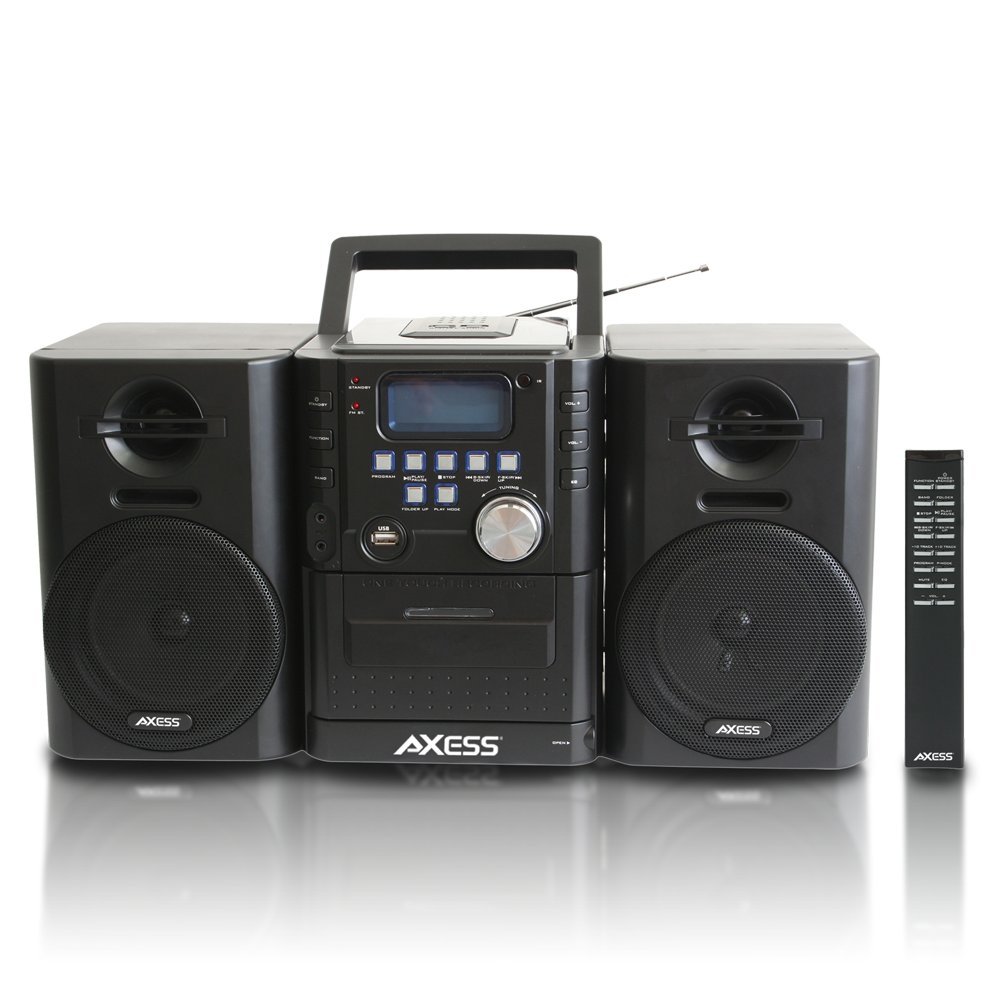
이미지: 앞면 view of the Axess MS3912 Mini Entertainment System, showing the central unit with display, control buttons, USB port, CD tray, cassette deck, and two detachable speakers. A remote control is also visible on the right.
- 대기 버튼: 장치의 전원을 켜거나 끕니다.
- 기능 버튼: Selects between CD, USB, TAPE, AUX, and RADIO modes.
- BAND 버튼 : In Radio mode, switches between AM and FM bands.
- 프로그램 버튼: Used for programming CD/USB tracks.
- 재생/일시정지 버튼: Starts or pauses playback for CD, USB, or Cassette.
- 정지 버튼: 재생을 중지합니다.
- 건너뛰기/검색 버튼(<< / >>): 트랙을 건너뛰거나 빨리 감기/되감기를 합니다.
- FOLDER UP / PLAY MODE Buttons: Navigates folders on USB or changes play mode.
- 볼륨 노브: 오디오 출력 레벨을 조정합니다.
- USB 포트: Connects USB flash drives for MP3 playback.
- PC/AUX IN Jack: 외부 오디오 장치를 연결합니다.
- 헤드폰 잭: 개인 청취를 위해 헤드폰을 연결할 수 있습니다.
- CD 수납공간: 상단 투입식 CD 플레이어.
- 카세트 데크: 전면 로딩 방식의 카세트 플레이어/레코더.
- 표시하다: Shows current function, track number, radio frequency, etc.
후면 패널 연결

이미지: 후면 view of the Axess MS3912 Mini Entertainment System, showing the FM antenna, battery compartment, AC power input, and speaker connection jacks.
- FM 안테나: 최적의 FM 수신을 위해 확장하세요.
- 스피커 잭: 왼쪽과 오른쪽 스피커를 연결합니다.
- AC 전원 입력: AC 전원코드를 연결합니다.
- 배터리 칸: Holds batteries for portable operation.
설정
1. 스피커 연결
Connect the speaker wires from the detachable speakers to the corresponding speaker jacks on the rear of the main unit. Ensure the polarity (+/-) matches for optimal sound quality.
2. 장치에 전원 공급
AC 전원 작동:
Insert the AC power cord into the AC power input jack on the rear of the unit, then plug the other end into a standard wall outlet (AC 120V/60Hz).
직류(배터리) 전원 작동:
Open the battery compartment cover on the rear of the unit. Insert the required number of C-size batteries (not included), ensuring correct polarity. Close the battery compartment cover securely. The unit will automatically switch to battery power when AC power is disconnected.
3. 안테나 설정
For FM radio reception, fully extend the telescopic FM antenna. For AM reception, the unit has a built-in AM antenna, which may require rotating the unit for best reception.
작동 지침
1. 전원 켜기/끄기
를 누르세요 대기 전면 패널이나 리모컨의 버튼을 눌러 장치를 켜거나 끕니다.
2. 기능 선택
를 누르세요 기능 button repeatedly to cycle through the available modes: CD, USB, TAPE, AUX, and RADIO.
3. CD 플레이어 작동
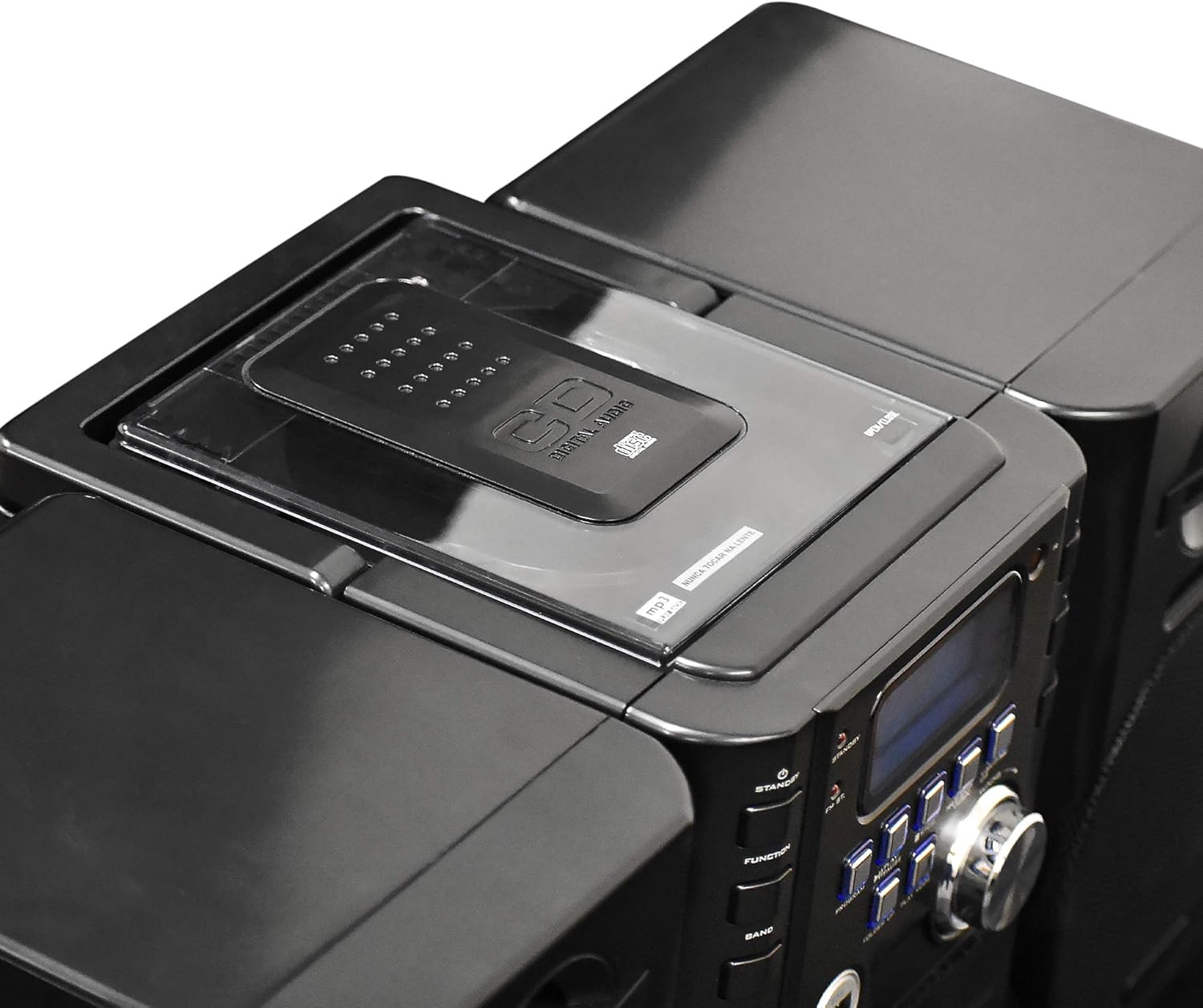
이미지: 상단 view of the Axess MS3912 Mini Entertainment System, showing the transparent lid of the top-loading CD compartment.
- 누르다 기능 CD 모드를 선택하려면.
- CD 수납공간 커버를 엽니다.
- CD의 라벨 면이 위를 향하도록 놓으세요.
- CD 삽입구 덮개를 닫으세요. 기기가 디스크를 읽습니다.
- 누르다 재생/일시정지 재생을 시작하세요.
- 사용하세요 건너뛰기/검색 트랙을 탐색하는 버튼입니다.
- 누르다 멈추다 재생을 종료합니다.
4. USB/MP3 Player Operation

이미지: 측면 view of the Axess MS3912 Mini Entertainment System, highlighting the USB port and PC/AUX IN jack on the central unit.
- USB 포트에 USB 플래시 드라이브를 삽입합니다.
- 누르다 기능 USB 모드를 선택합니다.
- 기기가 자동으로 MP3 재생을 시작합니다. fileUSB 드라이브에서.
- 사용 재생/일시정지, 멈추다, 그리고 건너뛰기/검색 제어를 위한 버튼.
- 사용 접기 to navigate between folders on the USB drive.
5. Cassette Player/Recorder Operation
- 누르다 기능 to select TAPE mode.
- Open the cassette deck door and insert a cassette tape.
- 누르다 재생/일시정지 재생을 시작하세요.
- 사용하세요 빨리 감기 그리고 되감기 buttons (often combined with SKIP/SEARCH buttons) to move through the tape.
- 누르다 멈추다 재생을 종료합니다.
- 녹음: To record from CD, USB, or Radio, select the desired source, then press the 기록 button on the cassette deck (if available, or a combination of PLAY and RECORD). Ensure a blank, recordable cassette is inserted.
6. AM/FM 라디오 작동
- 누르다 기능 RADIO 모드를 선택합니다.
- 누르다 밴드 to select AM or FM.
- 사용하세요 동조 손잡이 또는 건너뛰기/검색 원하는 방송국을 선택하려면 버튼을 누르세요.
- For FM, extend the telescopic antenna. For AM, rotate the unit for best reception.
- 사전 설정 스테이션: Tune to a station, press 프로그램, 그런 다음 사용하세요 건너뛰기/검색 미리 설정된 숫자를 선택하고 누르세요. 프로그램 다시 저장합니다.
7. Auxiliary Input (AUX) Use
외부 오디오 장치(예: 스마트폰, MP3 플레이어)를 연결하세요. PC/AUX IN jack using a 3.5mm audio cable (not included). Press 기능 to select AUX mode. Audio from the external device will play through the MS3912 speakers.
8. 헤드폰 사용
표준 3.5mm 헤드폰을 꽂으세요 헤드폰 jack for private listening. The speakers will automatically mute when headphones are connected.
9. 원격 제어
The included remote control allows for convenient operation of most functions from a distance. Ensure batteries are correctly inserted into the remote control.
유지
장치 청소
Wipe the exterior of the unit with a soft, dry cloth. Do not use abrasive cleaners, waxes, or solvents. For the CD lens, use a specialized CD lens cleaner disc. For the cassette deck, use a head cleaning cassette.
저장
If storing the unit for an extended period, remove all batteries to prevent leakage. Store in a cool, dry place away from direct sunlight and extreme temperatures.
문제 해결
| 문제 | 가능한 원인 | 해결책 |
|---|---|---|
| 전원이 없습니다 | 전원 코드가 연결되어 있지 않거나, 배터리가 방전되었거나 잘못 삽입되었습니다. | AC 코드 연결을 확인하세요. 배터리를 교체하거나 극성이 올바른지 확인하세요. |
| 소리가 나지 않습니다 | Volume too low; Headphones connected; Speakers not connected properly; Incorrect function selected. | Increase volume; Disconnect headphones; Check speaker connections; Select correct function (CD, USB, TAPE, AUX, RADIO). |
| CD가 건너뛰거나 재생되지 않습니다 | CD is dirty or scratched; CD inserted incorrectly; Unit is vibrating. | Clean CD with a soft cloth; Reinsert CD label side up; Place unit on a stable surface. |
| 라디오 수신 불량 | FM antenna not extended; Unit position for AM is poor; Interference. | Fully extend FM antenna; Rotate unit for better AM reception; Move unit away from other electronic devices. |
| USB가 재생되지 않음 | USB 드라이브가 올바르게 포맷되지 않았습니다. 호환되지 않습니다. file types; USB drive not inserted fully. | Ensure USB is FAT32 format; Only MP3 files are supported; Reinsert USB drive. |
| Cassette recording not working | Tape is write-protected; No blank tape inserted; Incorrect source selected. | Check tape's write-protect tab; Insert a blank, recordable tape; Select the desired audio source (CD, USB, Radio, AUX). |
명세서
| 특징 | 사양 |
|---|---|
| 모델 번호 | MS3912 |
| 상표 | 축 |
| 전력 출력 | 12W 스피커 |
| 전원 | AC 120V/60Hz or DC (C-size batteries, not included) |
| 무선 주파수 | 오전/FM |
| 지원되는 미디어 | CD, MP3 (via USB), Cassette Tape |
| 입력 | USB Port, 3.5mm AUX Input |
| 출력 | 3.5mm 헤드폰 잭 |
| 치수(길이 x 너비 x 높이) | 43.82 x 21.59 x 24.13cm (약 17.25 x 8.5 x 9.5인치) |
| 무게 | 3.88kg (약 8.55파운드) |