
1. 서론
구매해주셔서 감사합니다asing the Caliber HPG415BT/B Portable Bluetooth Speaker. This manual provides important information regarding the safe and efficient operation of your device. Please read it thoroughly before use and retain it for future reference.
패키지 내용
- Caliber HPG415BT/B Portable Bluetooth Speaker
- USB to Mini USB Charging Cable
- 3.5mm 오디오 케이블
- 원격 제어
- 사용 설명서
2. 안전 정보
안전한 작동을 보장하고 손상을 방지하려면 다음 안전 지침을 준수하세요.
- 기기를 비, 습기 또는 극한의 온도에 노출시키지 마세요.
- 스피커를 라디에이터, 스토브 또는 기타 열을 발생시키는 기기와 같은 열원 근처에 두지 마십시오.
- 제품을 직접 분해, 수리 또는 개조하지 마십시오. 모든 서비스는 자격을 갖춘 전문가에게 맡기십시오.
- Use only the specified charging cable and power adapter (5V USB) to charge the battery.
- 장치를 강한 자기장에서 멀리 두십시오.
- 기기를 닦을 때는 마른 부드러운 천만 사용하십시오. 액체 세척제를 사용하지 마십시오.
3. 제품 특징
The Caliber HPG415BT/B speaker offers a range of features for versatile audio playback:
- 무선 블루투스 기술: Connect wirelessly to compatible devices within a 10-meter range (Bluetooth version 2.1, supports A2DP and AVRCP profile에스).
- 다중 재생 옵션: Play audio from USB drives and SD cards (up to 32GB).
- FM 라디오 : Enjoy your favorite radio stations with automatic search and storage functions.
- LED 디스플레이: Provides clear information on current mode and status.
- High Power Sound: Equipped with 2x 3W speakers for a total of 6W RMS output.
- 통합 충전식 배터리: Offers up to 5 hours of continuous playback.
- 직관적인 컨트롤: Features buttons for previous/next track, play/pause, mode selection, EQ adjustment, and volume control.
- 3.5mm 오디오 입력: Connect external audio devices via the included audio cable.
- 원격 제어: Conveniently operate the speaker from a distance.
4. 제어 및 연결
스피커의 컨트롤과 연결 포트에 대해 알아보세요.
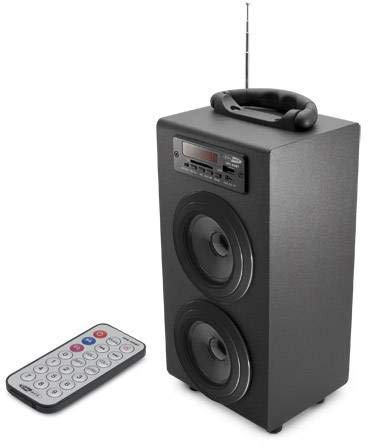
Image 1: Caliber HPG415BT/B Portable Bluetooth Speaker. This image shows the overall design of the speaker, featuring a tubular shape, front-facing speakers, and a control panel on the top or front.
Control Panel (Typical Layout)
- MODE 버튼: Switches between Bluetooth, FM Radio, USB, SD, and AUX modes.
- 재생/일시정지 버튼: 재생을 시작하거나 일시 중지합니다.
- 이전/다음 버튼: Skips tracks in media modes or changes radio stations in FM mode.
- 볼륨 +/- 버튼: 오디오 출력 레벨을 조정합니다.
- EQ 버튼: 이퀄라이저 사전 설정을 순환합니다.
- 전원 켜기/끄기 스위치: Located typically on the rear or side.
Connection Ports (Typical Layout)
- USB 포트: USB 플래시 드라이브 연결용입니다.
- SD 카드 슬롯: SD 메모리 카드를 삽입하기 위한 것입니다.
- AUX 입력(3.5mm): 케이블을 통해 외부 오디오 장치를 연결하는 데 사용합니다.
- 미니 USB 충전 포트: 충전 케이블을 연결합니다.
5. 설정
5.1 초기 충전
- 처음 사용하기 전에 스피커의 내장 배터리를 완전히 충전하십시오.
- Connect the supplied Mini USB cable to the speaker's charging port.
- Connect the other end of the USB cable to a 5V USB power source (e.g., a computer USB port or a USB wall adapter, not included).
- The LED indicator will show charging status. Once fully charged, the indicator may change color or turn off.
5.2 전원 켜기/끄기
- To power on, slide the Power ON/OFF switch to the 'ON' position. The LED display will light up.
- To power off, slide the Power ON/OFF switch to the 'OFF' position.
6. 사용 설명서
6.1 블루투스 모드
- Power on the speaker. It will automatically enter Bluetooth pairing mode, indicated by a flashing Bluetooth icon on the LED display.
- 스마트폰, 태블릿 또는 기타 Bluetooth 지원 기기에서 Bluetooth를 활성화하세요.
- 검색 available Bluetooth devices and select "HPG415BT" from the list.
- 페어링이 완료되면 스피커에서 확인음이 나고 디스플레이의 블루투스 아이콘 깜빡임이 멈춥니다.
- You can now play audio from your connected device through the speaker. Use the PLAY/PAUSE and PREVIOUS/NEXT buttons on the speaker or remote to control playback.
6.2 FM 라디오 모드
- 를 누르세요 방법 button repeatedly until "FM" appears on the LED display.
- To perform an automatic station scan, press and hold the 재생/일시정지 버튼을 누르세요. 스피커가 사용 가능한 FM 방송국을 검색하고 저장합니다.
- 사용하세요 이전 다음 저장된 역들을 탐색하는 버튼입니다.
6.3 USB/SD 카드 재생
- USB 플래시 드라이브를 USB 포트에 삽입하거나 SD 카드를 SD 카드 슬롯에 삽입합니다.
- 스피커는 자동으로 USB 또는 SD 모드로 전환되어 오디오 재생을 시작합니다. files. 그렇지 않은 경우 다음을 누릅니다. 방법 버튼을 눌러 올바른 소스를 선택하세요.
- 사용하세요 재생/일시정지 그리고 이전 다음 재생을 제어하는 버튼.
6.4 AUX 입력 모드
- Connect one end of the supplied 3.5mm audio cable to the speaker's AUX input port.
- 케이블의 다른 쪽 끝을 외부 오디오 장치의 헤드폰 잭이나 오디오 출력에 연결합니다.
- 를 누르세요 방법 LED 디스플레이에 "AUX"가 나타날 때까지 버튼을 반복해서 누르십시오.
- Control playback and volume directly from your external audio device.
7. 배터리 충전
When the battery is low, the speaker may emit an audible warning or the LED indicator will show a low battery status. To charge:
- Connect the Mini USB charging cable to the speaker's charging port.
- Connect the USB end to a 5V USB power source.
- The charging indicator will illuminate. Charging typically takes several hours.
- Once fully charged, the indicator will change or turn off. Disconnect the charging cable.
8. 유지관리
- 청소: 스피커 외부를 닦을 때는 부드럽고 마른 천을 사용하십시오. 연마성 세척제, 왁스 또는 용제를 사용하지 마십시오.
- 저장: 장시간 사용하지 않을 경우, 스피커를 직사광선과 극한의 온도를 피해 시원하고 건조한 곳에 보관하세요.
- 배터리 관리 : 배터리 수명을 연장하려면 배터리를 자주 완전히 방전시키지 마십시오. 사용하지 않을 때에도 정기적으로 충전하십시오.
9. 문제 해결
| 문제 | 가능한 원인 | 해결책 |
|---|---|---|
| 전원이 없습니다 | Battery is discharged; Power switch is OFF. | Charge the battery; Slide the power switch to ON. |
| 소리가 나지 않습니다 | 볼륨이 너무 낮습니다. 잘못된 모드를 선택했습니다. 장치가 제대로 연결되지 않았습니다. | Increase volume; Press MODE to select correct source; Reconnect device. |
| 블루투스가 연결되지 않습니다 | 스피커가 페어링 모드가 아닙니다. 기기 블루투스가 꺼져 있습니다. 스피커와 기기 사이의 거리가 너무 멉니다. | Ensure speaker is in Bluetooth mode and flashing; Enable Bluetooth on your device; Move devices closer (within 10m). |
| FM 라디오 잡음 | 신호 약함; 간섭. | Relocate the speaker for better reception; Perform an auto-scan again. |
10. 사양
- 모델: HPG415BT/B
- 출력 전력: 6W RMS(2x 3W)
- 블루투스 버전: 2.1
- 블루투스 작동 범위: 최대 10미터
- 연결성: 블루투스, USB, SD 카드, 3.5mm AUX 입력
- 지원되는 미디어: USB drives, SD cards (up to 32GB)
- FM 라디오 : Yes, with auto-scan
- 표시하다: 주도의
- 배터리 유형: 일체형 충전식 배터리
- 배터리 수명: 최대 5시간
- 충전 중: 5V USB-A
- 치수(길이 x 너비 x 높이): 140 x 120 x 280mm
- 무게: 약 1.04kg (2.29lbs)
- 제어 유형: 버튼, 리모컨
11. 보증 및 지원
Caliber products are designed and manufactured to the highest quality standards. For warranty information or technical support, please refer to the warranty card included with your product or visit the official Caliber web연락처 정보 사이트.