
1. 서론
The AVerMedia AW330 Wireless Voice Amplifier is a portable audio system designed to enhance vocal clarity and projection in various settings such as classrooms, training sessions, meetings, and public speaking events. Its lightweight design, wireless microphone, and powerful speaker ensure your voice is heard clearly and effortlessly.
주요 특징:
- 휴대성 있는 디자인: Lightweight and compact for easy transport and use.
- 무선 마이크: 2.4 GHz wireless lavalier microphone for stable 360° transmission.
- 강력한 사운드: Built-in 20W speaker delivers loud, clear audio.
- 긴 배터리 수명: Rechargeable lithium polymer battery provides 4 to 5 hours of use, or up to 8 hours of continuous use (depending on volume and usage).
- 멀티미디어 연결성: Audio input port for connecting smartphones, tablets, or laptops.
- Quick Smart Pairing: Automatic microphone-to-speaker pairing for simple setup.
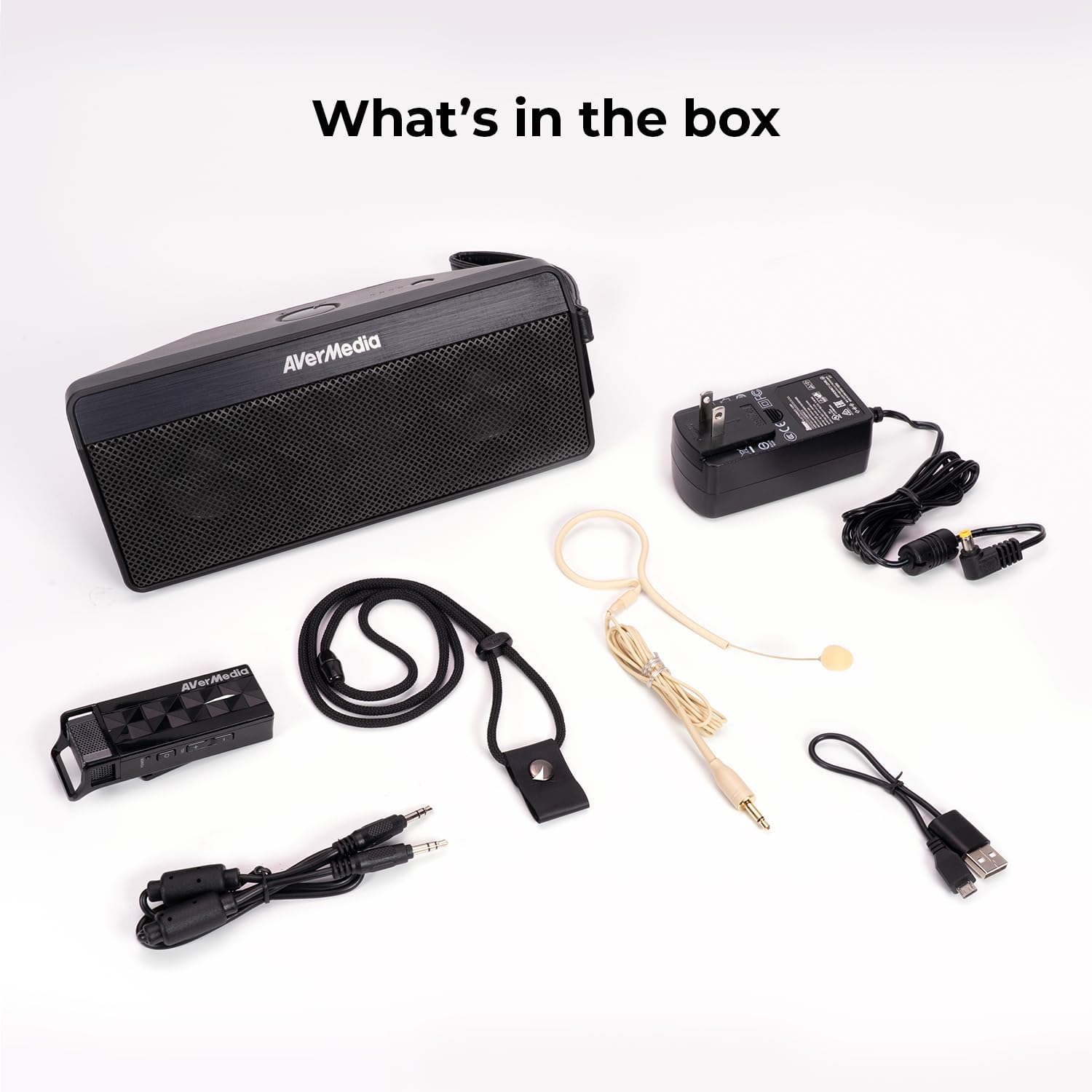
2. 상자 안에 무엇이 들어있나요?
- Microphone & Headset Mic
- 스피커
- AC Power Adapter & USB Power Cable
- 3.5 mm 오디오 케이블
- Lanyard & Buckle
3. 제품 오버view
스피커 유닛

The main speaker unit features a power button, volume controls, and an audio input port for connecting external devices. It also includes a clip for attaching to clothing or a strap.
무선 마이크
The wireless microphone includes a flexible gooseneck boom with a windscreen, volume controls, and a power button. It can be worn as a headset or clipped onto clothing.

4. 설정
- 기기를 충전하세요: Before first use, fully charge both the speaker unit and the wireless microphone using the provided AC power adapter and USB power cable. The microphone uses a USB-C connection.
- 마이크 연결: Plug the headset microphone into the wireless microphone unit.
- 전원 켜기: Turn on the speaker unit by pressing its power button. Turn on the wireless microphone unit by pressing its power button.
- 편성: The speaker microphone system features automatic microphone-to-speaker pairing for hassle-free setup. They should pair automatically upon powering on.
- 볼륨 조절: Adjust the volume on both the speaker and the microphone to your desired level.
5. 사용 설명서
- 목소리 Amp합리화: Once paired, speak into the microphone. Your voice will be amplified through the speaker. Adjust volume as needed.
- 외부 오디오 입력: To play multimedia audio alongside your voice, connect your smartphone, tablet, or laptop to the speaker unit's Audio In port using the 3.5 mm audio cable.
- 착용 옵션: Utilize the clip on the speaker to attach it to your clothing, or use the lanyard and buckle for hands-free operation. The microphone can be worn as a headset or clipped directly.
- 절전: If the microphone is turned off, the speaker will automatically turn off after five minutes to conserve battery.

6. 유지관리
- 청소: Use a soft, dry cloth to clean the surfaces of the speaker and microphone. Do not use liquid cleaners or aerosols.
- 저장: 본 기기는 직사광선과 극한의 온도를 피해 시원하고 건조한 곳에 보관하세요.
- 배터리 관리 : 배터리 수명을 연장하려면 배터리를 자주 완전히 방전하지 마십시오. 장시간 사용하지 않더라도 정기적으로 충전하십시오.
- 물을 피하세요: 이 기기는 방수 기능이 없습니다. 물과 습기로부터 멀리하십시오.
7. 문제 해결
- 소리 없음:
- Ensure both the speaker and microphone are powered on and fully charged.
- Check that the microphone and speaker are successfully paired.
- Increase the volume on both the speaker and the microphone.
- Feedback/Squealing Sound:
- Reduce the volume on the speaker or microphone.
- 마이크와 스피커 사이의 거리를 늘리십시오.
- 마이크가 말하는 사람을 직접 향하지 않도록 하십시오.
- 나쁜 음질:
- Check for obstructions between the microphone and speaker.
- 마이크가 입 가까이에 올바르게 위치하도록 하십시오.
- Verify that the microphone windscreen is properly attached.
- 장치가 충전되지 않음:
- Ensure the charging cables are securely connected to both the device and the power source.
- 다른 전원 콘센트나 USB 포트를 사용해 보세요.
8. 사양
| 특징 | 사양 |
|---|---|
| 상표 | 에이버미디어 |
| 모델 번호 | AW330 |
| 스피커 최대 출력 전력 | 20 와트 |
| 연결 기술 | 블루투스, Wi-Fi |
| 오디오 출력 모드 | 단핵증 |
| 장착 유형 | 탁상 마운트 |
| 추가 기능 | 볼륨 조절 |
| 컨트롤러 유형 | 배터리 구동 |
| 배터리 평균 수명 | 4 Hours (up to 8 hours continuous use) |
| 최대 범위 | 60 피트 |
| 제어 방법 | 만지다 |
| 품목 무게 | 2.6 파운드 |
| 제품의 특정 용도 | Educational/Classroom |
9. 보증 및 지원
The AVerMedia AW330 Wireless Voice Amplifier는 3년 제조사 보증. For technical support, troubleshooting, or warranty claims, please contact AVerMedia customer service.
10. 제품 비디오
AVerMedia AW330 무선 교실 오디오 시스템
Video: An official product video from AVerMedia showcasing the AW330 Wireless Classroom Audio System. It highlights its features and benefits in a classroom environment, demonstrating how teachers can use it to project their voice clearly and effectively to students.


