
F&D A140F
F&D A140F 2.1 Speaker System
사용자 설명서
1. 서론
This manual provides essential information for the proper setup, operation, and maintenance of your F&D A140F 2.1 Speaker System. Please read these instructions carefully before using the product to ensure optimal performance and safety. Keep this manual for future reference.
2. 제품 오버view
The F&D A140F is a 2.1 channel multimedia speaker system designed to deliver enhanced audio. It features a powerful subwoofer and two satellite speakers, offering a balanced sound experience for various media. The system includes multiple connectivity options and user-friendly controls.

Image 1: The F&D A140F 2.1 Speaker System, showing the central subwoofer unit and two compact satellite speakers.
주요 특징:
- 3-inch full-range drivers for satellite speakers.
- 4-inch heavy-duty subwoofer speaker for deep bass.
- Heavy-duty metal grill for satellite speakers.
- Innovative automatic multi-color LED lighting.
- Plug and play USB / CARD (SD / MMC/MS) reader.
- USB reader supporting MP3 / WMA dual formats decoding.
- Advanced PLL Technology for uninterrupted digital FM experience.
- Dedicated buttons for USB reader control (Source, Play/Pause, Next, Previous).
- High-efficient energy-saving design for low power consumption.
- Side panel controls for volume and bass adjustment.
영상 1: 공식 오버view of the F&D 2.1 Speaker System, highlighting its audio performance, specifications, connectivity features, and smart controls.
3. 상자 안에 무엇이 들어있나요?
Upon unpacking your F&D A140F 2.1 Speaker System, please ensure all the following items are present:
- 서브우퍼 유닛 1개
- 위성 스피커 2개
- 1 x 원격 제어
- 1 x 3.5mm to RCA Stereo Audio Cable
- 1 x RCA to RCA Stereo Audio Cable (optional, may vary by region)
- 1 x 보증 카드
- 1 x Battery (for remote control)
- 1 x Operational Manual (this document)
4. 설정 지침
스피커 시스템을 설정하려면 다음 단계를 따르세요.
- 놓기: Place the subwoofer on a stable surface, preferably on the floor for optimal bass. Position the satellite speakers on either side of your listening area, ensuring they are at an equal distance from you for balanced stereo sound.
- 위성 스피커 연결: Connect the cables from the satellite speakers to the corresponding output ports on the rear panel of the subwoofer. Ensure a secure connection.
- 오디오 소스 연결:
- For devices with a 3.5mm audio output (e.g., smartphones, laptops): Use the provided 3.5mm to RCA stereo audio cable. Connect the 3.5mm end to your device and the RCA ends to the 'AUDIO IN' ports on the subwoofer.
- For devices with RCA audio output (e.g., TVs, DVD players): Use an RCA to RCA stereo audio cable (one may be included). Connect one end to your device's audio output and the other to the 'AUDIO IN' ports on the subwoofer.
- 전원 연결: Connect the power cable from the subwoofer to a standard AC 220V-240V ~50/60Hz power outlet.
- 전원 켜기: Turn on the main power switch located on the subwoofer. The LED display should light up.
5. 사용 설명서
기본 작업:
- 전원 켜기/끄기: Use the main power switch on the subwoofer or the power button on the remote control to turn the system on or off.
- 소스 선택: Press the 'SOURCE' button on the subwoofer or remote control to cycle through input modes: AUX, USB, SD/MMC/MS Card, FM Radio.
- 볼륨 조절: Adjust the master volume using the 'Volume+/-' buttons on the side panel of the subwoofer or the remote control.
- 베이스 컨트롤: Adjust the bass level using the dedicated bass control knob on the side panel of the subwoofer.
USB / Card Reader Operation:
Insert a USB drive or SD/MMC/MS card into the respective slot on the subwoofer. The system will automatically switch to USB/Card mode and begin playing compatible audio file(MP3/WMA).
- 재생/일시 중지: '재생/일시정지' 버튼을 눌러 재생을 일시정지하거나 다시 시작하세요.
- 다음/이전: Press the 'Next/CH+' or 'Previous/CH-' buttons to skip to the next or previous track.
FM 라디오 작동:
Switch to FM mode using the 'SOURCE' button.
- 자동 스캔: '스캔' 버튼을 누르면 사용 가능한 FM 라디오 방송국을 자동으로 검색하고 저장합니다.
- 채널 변경: Use the 'CH+' or 'CH-' buttons to navigate through saved stations.
- 수동 조정 : Use the 'TUNE+' or 'TUNE-' buttons for fine-tuning radio frequencies.
6. 컨트롤
The F&D A140F speaker system features both on-unit controls and a remote control for convenient operation.
Subwoofer Side Panel Controls:
- 볼륨 노브: 전체 볼륨 레벨을 조정합니다.
- 베이스 노브: 저음 강도를 조절합니다.
- USB 포트: USB 플래시 드라이브 연결용입니다.
- 카드 슬롯: SD/MMC/MS 메모리 카드를 삽입하기 위한 용도입니다.
- 소스 버튼 : 입력 모드를 순환합니다.
- 재생/일시 정지 버튼: 미디어 재생을 제어합니다.
- 이전/CH 버튼: Skips to previous track/FM channel.
- 다음/채널+ 버튼: Skips to next track/FM channel.
원격 제어:
The included remote control provides full functionality from a distance.
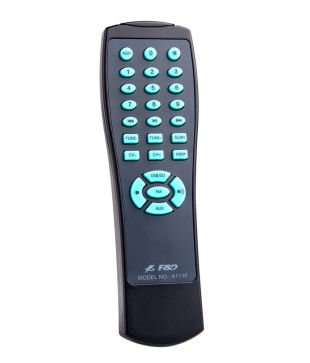
Image 2: The remote control for the F&D A140F speaker system, featuring numerical buttons, source selection, playback controls, and volume adjustment.
The remote control includes buttons for:
- 전원 켜기/끄기
- Source Selection (USB/SD, FM, AUX)
- 볼륨 높이기/낮추기
- 재생/일시정지
- Next/Previous Track/Channel
- Numerical Keypad for direct track/channel selection
- FM Scan, Tune+/-
7. 연결성
The F&D A140F offers versatile connectivity options to link with various audio devices:
- USB 포트: Supports USB flash drives for direct playback of MP3 and WMA audio files.
- 카드 리더: Compatible with SD, MMC, and MS memory cards for audio playback.
- AUX Input (3.5mm to RCA): Connects to devices like smartphones, tablets, laptops, and MP3 players using the provided 3.5mm to RCA cable.
- RCA Input (RCA to RCA): Connects to devices such as televisions, DVD players, and other audio sources with RCA output.
- FM 라디오 : Built-in FM tuner for listening to radio broadcasts.
8. 사양
| 특징 | 사양 |
|---|---|
| 상표 | F&D |
| 모델 번호 | A140F |
| 오디오 출력 모드 | Stereo (2.1 Channels) |
| 출력 전력(RMS) | 37W (Satellites: 12Wx2 + Subwoofer: 13W) |
| 주파수 응답(위성) | 160Hz ~ 20KHz |
| 주파수 응답(서브우퍼) | 45Hz ~ 105Hz |
| 신호 대 잡음비(S/N) | ≥65dB |
| 분리 | ≥35dB |
| Satellite Speaker Driver | 3-inch full range |
| 서브우퍼 스피커 드라이버 | 4-inch heavy duty |
| 연결 기술 | USB, Card Reader (SD/MMC/MS), 3.5mm AUX, RCA |
| 전원 입력 | AC 220V-240V ~50/60Hz 0.5A |
| 제어 방법 | Buttons (on-unit and remote) |
| 재료 | Metal (grill) |
| 서브우퍼 크기(WxHxD) | 210 x 240 x 245mm |
| 위성 크기(가로x세로x깊이) | 153 x 96 x 112mm |
| 품목 무게 | 3.42kg(총량) |
| 호환 장치 | 데스크톱, 노트북, MP3 플레이어, 스마트폰, 태블릿, 텔레비전 |
| 무선 기술 유형 | Bluetooth (as per specifications, primary connectivity is wired/USB/Card) |
9. 문제 해결
If you encounter any issues with your F&D A140F speaker system, please refer to the following common problems and solutions:
- 전원 없음:
- Ensure the power cable is securely plugged into both the subwoofer and a working AC outlet.
- Check if the main power switch on the subwoofer is in the 'ON' position.
- 다른 장치를 연결하여 전원 콘센트가 작동하는지 확인하세요.
- 소리 없음:
- Confirm that the correct audio source is selected (AUX, USB, FM). Press the 'SOURCE' button to cycle through inputs.
- Increase the master volume on the subwoofer or remote control.
- Check all audio cables for secure connections between the source device and the subwoofer.
- Ensure the audio output on your source device is not muted or set to a very low volume.
- Verify satellite speakers are correctly connected to the subwoofer.
- 왜곡된 소리:
- Reduce the volume level on both the speaker system and the source device.
- Check audio cable connections for any loose or damaged cables.
- 오디오 소스의 품질이 좋은지 확인하세요.
- USB/Card Reader Not Working:
- Ensure the USB drive or memory card is inserted correctly and fully.
- 오디오를 확인하세요 files are in a supported format (MP3, WMA).
- Try a different USB drive or memory card to rule out media issues.
- Ensure the system is in USB/Card mode.
- FM 수신 불량:
- Adjust the position of the FM antenna (if external) or the speaker system itself to improve signal reception.
- Perform an auto-scan to find stronger stations.
- Avoid placing the system near other electronic devices that may cause interference.
- 원격 제어가 작동하지 않음:
- Ensure the battery is correctly inserted with the correct polarity.
- 배터리를 새 것으로 교체하세요.
- Point the remote control directly at the infrared receiver on the subwoofer.
- Remove any obstacles between the remote and the subwoofer.
10. 보증 및 지원
The F&D A140F 2.1 Speaker System comes with a 1년 보증 구매일로부터 보증됩니다. 보증 청구를 위해 구매 영수증과 보증 카드를 보관해 주십시오.
For technical support, service, or further inquiries, please refer to the contact information provided on your warranty card or visit the official F&D web대지.
Ask a question about this manual
Ask about setup, troubleshooting, compatibility, parts, safety, or missing instructions. Manuals+ will review the question and use this page’s manual context to help answer it.