
1. 서론
This manual provides detailed instructions for the safe and efficient operation of your Audiocenter MX3200 Multi-channel Amplifier. Please read this manual thoroughly before using the product to ensure proper setup, optimal performance, and to prevent damage.
2. 중요 안전 지침
- 전원: 연결하다 amp지정된 볼륨에만 적용tage and frequency as indicated on the unit.
- 통풍: 주변에 적절한 공기 흐름을 확보하세요. amplifier. Do not block ventilation openings. Maintain at least 10 cm (4 inches) of clear space around the unit.
- 수분: 노출시키지 마십시오 amplifier to rain, moisture, dripping, or splashing liquids. Do not place objects filled with liquids, such as vases, on the apparatus.
- 열: 유지하다 amp라디에이터, 난방기, 스토브 또는 기타 기기(포함)와 같은 열원에서 멀리 떨어진 곳에 발전기를 설치하십시오. amp열을 생성하는 발전기.
- 접지: Ensure the power cord is properly grounded. Do not defeat the safety purpose of the polarized or grounding-type plug.
- 서비스: 모든 정비는 자격을 갖춘 서비스 담당자에게 맡기십시오. 이 제품을 직접 정비하려고 하지 마십시오.
- 청소: 청소하기 전에 전원 콘센트에서 플러그를 뽑으세요. 마른 천만 사용하세요.
3. 패키지 내용
패키지에 모든 품목이 들어 있는지 확인하세요.
- Audiocenter MX3200 Multi-channel Amp리퍼
- 전원 케이블
- 사용 설명서 (본 문서)
4. 제품 오버view
4.1 후면 패널 레이아웃
The rear panel of the MX3200 amplifier features all essential input, output, and control connections. Refer to the image below for a visual guide.
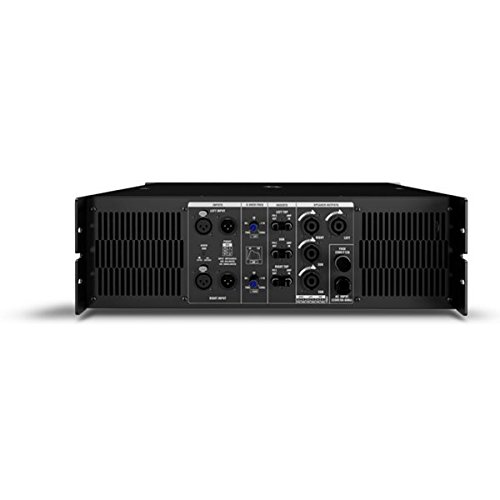
Figure 1: Rear Panel of Audiocenter MX3200 Amplifier. This image displays the various connection points and controls on the back of the amplifier, including XLR inputs, speaker outputs, and configuration switches.
- LEFT INPUT / RIGHT INPUT: XLR input connectors for audio signals.
- 2-WAY / 3-WAY Switch: Selects the crossover mode for the amplifier. Use 2-WAY for two-way speaker systems and 3-WAY for three-way speaker systems.
- MASTER Controls: Adjusts the overall output level for the respective channels.
- SPEAKER OUTPUTS (LEFT / RIGHT): SpeakON connectors for connecting to passive speakers.
- AC 입력: 전원 케이블 연결을 위한 표준 IEC 전원 입력 단자입니다.
- 전원 커넥터: Main power switch for turning the unit on or off.
5. 설정
5.1 배치
배치하다 amplifier on a stable, flat surface or mount it in a standard equipment rack. Ensure there is sufficient space around the unit for proper ventilation to prevent overheating.
5.2 Connecting Audio Inputs
- 오디오 소스(예: 믹서, 프리앰프)를 연결하세요.ampLIFIER)에 왼쪽 입력 그리고 올바른 입력 XLR connectors on the rear panel.
- 모든 연결이 안전한지 확인하세요.
5.3 Connecting Speaker Outputs
- 패시브 스피커를 SPEAKER OUTPUTS (LEFT / RIGHT) using appropriate SpeakON cables.
- Verify that the speaker impedance matches the amplifier's specifications to prevent damage.
5.4 전원 연결
- 확인하십시오 amp앰프의 전원 스위치가 꺼짐 위치에 있습니다.
- 제공된 전원 케이블을 교류 입력 on the rear panel and then to a suitable grounded electrical outlet.
6. 사용 설명서
6.1 전원 켜기/끄기
- To power on, ensure all connections are secure and turn the 전원 커넥터 ON 위치로 전환합니다.
- 전원을 끄려면 스위치를 켜세요. 전원 커넥터 OFF 위치로 전환합니다.
6.2 Adjusting Output Levels
사용하세요 MASTER Controls on the rear panel to adjust the output volume for the left and right channels independently. Start with the controls at a low setting and gradually increase to the desired listening level.
6.3 Crossover Mode Selection
그만큼 2-WAY / 3-WAY Switch allows you to configure the amplifier's internal crossover. Select 2-WAY for systems with two frequency bands (e.g., woofer and tweeter) or 3-WAY for systems with three frequency bands (e.g., woofer, midrange, tweeter). Refer to your speaker system's specifications for the appropriate setting.
7. 유지관리
- 청소: 정기적으로 외부를 닦아주세요 amplifier with a soft, dry cloth. Do not use liquid cleaners or solvents.
- 통풍: Periodically check that the ventilation grilles are free from dust and obstructions. Use a soft brush or vacuum cleaner to remove any buildup.
- 저장: 저장하는 경우 amp앰프를 장기간 사용하지 않을 경우 전원을 차단하고 청소한 후 직사광선과 극한 온도 변화를 피해 서늘하고 건조한 곳에 보관하십시오.
8. 문제 해결
| 문제 | 가능한 원인 | 해결책 |
|---|---|---|
| 전원이 없습니다 | Power cable disconnected; Power outlet faulty; Amp앰프 전원 스위치가 꺼져 있습니다. | Check power cable connection; Test power outlet with another device; Ensure power switch is ON. |
| 사운드 출력이 없습니다 | Input cables disconnected; Speaker cables disconnected; Master controls set too low; Source device not playing. | Verify all input and speaker cable connections; Increase Master controls gradually; Check audio source. |
| 왜곡된 소리 | Input signal too high (clipping); Speaker impedance mismatch; Faulty cables. | Reduce input signal level from source; Verify speaker impedance; Replace suspect cables. |
| 과열 | 환기가 막혔습니다. 과도한 부하. | Ensure clear ventilation paths; Reduce output level or check speaker impedance. |
9. 사양
| 특징 | 세부 사항 |
|---|---|
| 모델 | MX3200 |
| 상표 | Audiocenter |
| 제조업체 | Audiocenter |
| 본체 소재 | 플라스틱 |
| 패키지 크기 | 48.3 x 39 x 13.2cm |
| 품목 무게 | 25kg |
10. 보증 및 지원
For warranty information and technical support, please refer to the documentation provided with your purchase or visit the official Audiocenter web사이트. 직접 장치를 수리하려고 시도하지 마십시오. 보증이 무효화될 수 있습니다.