
1. 서론
The Sitecom MD-065IT All-in-One USB 2.0 ID Card Reader is a versatile device designed for reading and writing various types of memory cards, smart cards, and SIM cards. It facilitates access to online services such as tax filing, home banking, and digital signatures, and allows for the management of phone contacts and messages. This manual provides essential information for the proper setup, operation, and maintenance of your device.
2. 제품 오버view
2.1 주요 특징
- 올인원 기능: Supports reading and writing of 45 types of memory cards.
- 스마트 카드 호환성: Works with various smart cards, including Carta Regionale dei Servizi (CRS) and Carta Nazionale Servizi (CNS).
- SIM 카드 리더기: 가능하게 함 viewing and managing phonebook contacts and messages.
- USB 2.0 연결: Offers data transfer speeds up to 480 Mbps.
- 이전 버전과의 호환성: Compatible with USB 1.1 standard.
2.2 패키지 내용
- Sitecom MD-065IT All-in-One USB 2.0 ID Card Reader
- USB 2.0 Cable (60 cm)
2.3 장치 레이아웃
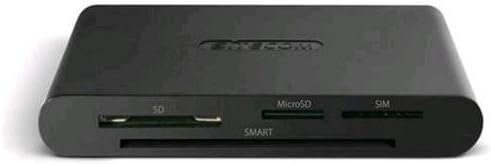
The image displays the front view of the Sitecom MD-065IT card reader. It features slots for SD cards, microSD cards, SIM cards, and a larger slot labeled 'SMART' for smart cards.
3. 설정
- 장치 연결: Plug the included USB 2.0 cable into the card reader and then into an available USB port on your computer.
- 드라이버 설치: The device is typically plug-and-play, and your operating system should automatically install the necessary drivers. If automatic installation fails, please refer to the troubleshooting section or your computer's device manager.
- Additional Software (for Smart Cards): For specific smart card functionalities, such as those for Carta Regionale dei Servizi (CRS) or Carta Nazionale Servizi (CNS), additional software may be required. This software is not included with the card reader and must be downloaded from the official website of the service provider (e.g., your regional government or banking institution).
4. 사용 설명서
4.1 Using Smart Cards
Insert your smart card (e.g., ID card, health card, banking card) into the designated 'SMART' slot on the front of the reader. Ensure the card is inserted correctly with the chip facing upwards and fully seated. Access to services will depend on the specific smart card and any required software installed on your computer.
4.2 Using Memory Cards (SD, MicroSD)
- SD 카드: Insert your SD card into the slot labeled 'SD'.
- MicroSD Cards: Insert your microSD card into the slot labeled 'MicroSD'.
Once inserted, your computer should recognize the memory card as a removable drive, allowing you to transfer files. Note that simultaneous reading of SD and microSD cards may not be supported by all systems or software.
4.3 Using SIM Cards
Insert your SIM card into the slot labeled 'SIM'. This feature allows you to view and manage contacts and messages stored on the SIM card. Specific software may be required for full functionality, which can often be obtained from your mobile network provider or third-party applications.
5. 유지관리
- 청소: Use a soft, dry cloth to clean the exterior of the card reader. Avoid using liquid cleaners or abrasive materials.
- 저장: 본 기기는 직사광선과 극한의 온도를 피해 시원하고 건조한 곳에 보관하세요.
- 손질: Avoid dropping the device or subjecting it to strong impacts. Do not force cards into slots.
6. 문제 해결
6.1 장치가 인식되지 않음
- USB 연결 확인: Ensure the USB cable is securely connected to both the card reader and your computer's USB port. Try a different USB port.
- 컴퓨터를 다시 시작합니다. 때로는 간단한 재부팅만으로 인식 문제가 해결될 수 있습니다.
- 운전자 확인: Open your computer's Device Manager (Windows) or System Information (macOS) to check if the device is listed and if there are any driver errors. If drivers are missing, try searching for 'Sitecom MD-065IT drivers' online.
6.2 Smart Card Not Working
- 올바른 삽입: Ensure the smart card is inserted correctly into the 'SMART' slot with the chip facing upwards.
- 필요한 소프트웨어: Verify that you have installed any necessary software or middleware provided by the smart card issuer (e.g., for CRS/CNS cards). This software is crucial for the card's functionality.
- Card Activation: Confirm that your smart card is activated and functional.
6.3 Memory/SIM Card Not Detected
- Correct Slot: Ensure the card is inserted into the correct slot (SD, MicroSD, SIM).
- 완전 삽입: Make sure the card is fully inserted into its slot.
- 카드 상태: Check if the memory or SIM card itself is damaged or corrupted. Try another card if possible.
7. 사양
| 상표 | 사이트컴 |
| 모델명 | MD-065IT |
| 연결 기술 | USB 2.0 |
| 색상 | 검정/진회색 |
| 호환 장치 | Computers, Tablets, Smartphones (for SIM card management) |
| 품목 무게 | 100그램 |
| 제품 치수 | 14 x 13.2 x 5.2cm |
8. 보증 및 지원
For warranty information and technical support, please refer to the documentation provided with your purchase or visit the official Sitecom website. Support resources may include FAQs, driver downloads, and contact information for customer service.