
1. 서론
구매해주셔서 감사합니다asing the ipega PG-9057 Wireless Game Controller. This manual provides detailed instructions for setting up, operating, and maintaining your device. Please read this manual carefully before use to ensure optimal performance and longevity of your controller.
2. 제품 특징
- 무선 연결 : Enjoy gaming freedom with wireless connection technology.
- 다중 플랫폼 호환성: Supports Android devices (smartphones, tablets, TV boxes) and Windows PCs.
- 내구성이 뛰어난 버튼: Equipped with high-quality, durable buttons for extended gaming sessions.
- 정밀 제어: Features a D-pad with pressure sensitivity and a 360-degree joystick with no dead zone for accurate input.
- 인체공학적 디자인: Designed for comfortable grip and prolonged use.
- 통합형 전화 홀더: Conveniently mount your smartphone for mobile gaming.
3. 패키지 내용
상자를 푼 후 패키지 내용물을 확인하세요.
- ipega PG-9057 무선 게임 컨트롤러
- USB 충전 케이블
- User Manual (Japanese version included)
4. 설정
4.1. 컨트롤러 충전
Before first use, fully charge the controller using the provided USB cable. Connect the small end of the USB cable to the controller's charging port and the other end to a USB power source (e.g., PC, USB wall adapter).
4.2. Device Compatibility Overview
The ipega PG-9057 controller supports various devices and connection methods as shown below:

This image displays the ipega PG-9057 Wireless Game Controller, highlighting its compatibility with various devices including smartphones, tablets, personal computers, and VR headsets.
4.3. Connection Methods and System Environment
The controller offers multiple connection options depending on your device and operating system. Refer to the table below for detailed compatibility.

This table outlines the system requirements and connection methods for the ipega PG-9057 controller, detailing compatibility with Android smartphones, tablets, and TV boxes via Bluetooth 4.0 or USB, and PCs via USB.
4.3.1. Bluetooth Connection (Android Devices)
- 컨트롤러가 충전되어 있는지 확인하세요.
- 를 누르고 계세요 집 버튼과 A button simultaneously until the indicator light flashes rapidly. This puts the controller into pairing mode.
- 안드로이드 기기에서 블루투스 설정으로 이동하여 블루투스를 켜세요.
- 검색 available devices and select "ipega PG-9057" (or similar name) from the list.
- 페어링이 완료되면 컨트롤러의 표시등이 켜집니다.
4.3.2. USB Wired Connection (Windows PC / Android Devices)
- Connect the controller to your Windows PC or Android device using the USB cable.
- The device should automatically recognize the controller. No special drivers are usually required for basic functionality.
5. 사용 설명서
5.1. 기본 제어
The ipega PG-9057 features standard gamepad controls for intuitive gaming.

자세한 view of the ipega PG-9057 controller's D-pad, joystick, and A/B/X/Y buttons, illustrating their high sensitivity and precise input capabilities.
- 방향 패드: For directional input, offering pressure sensitivity.
- 왼쪽/오른쪽 조이스틱: 360-degree movement with no dead zone for precise control.
- A/B/X/Y 버튼: Standard action buttons with zero delay response.
- L1/R1, L2/R2 Triggers: 게임 내 다양한 동작을 위한 어깨 버튼과 트리거.
- 선택/시작 버튼: 게임 내 메뉴 탐색 및 동작에 사용됩니다.
- 홈 버튼: To power on/off the controller or return to the main menu.
5.2. 스마트폰과 함께 사용하기
The controller includes an integrated holder for smartphones, allowing for a portable gaming experience.
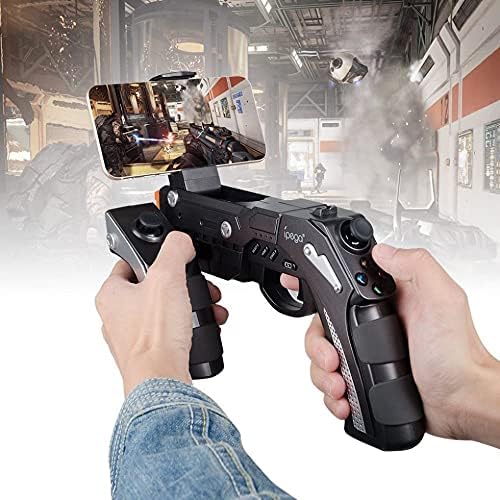
A user is shown holding the ipega PG-9057 Wireless Game Controller with a smartphone securely attached, actively engaged in mobile gaming.
- Extend the phone holder located on the top of the controller.
- 스마트폰을 홀더에 조심스럽게 놓고 단단히 고정되었는지 확인하십시오.
- Connect the controller to your smartphone via Bluetooth as described in Section 4.3.1.
- Launch your desired game and configure controller settings if necessary.
6. 유지관리
To ensure the longevity and optimal performance of your ipega PG-9057 controller, follow these maintenance guidelines:
- 청소: 컨트롤러 표면은 부드럽고 마른 천으로 닦으십시오. 독한 화학 약품이나 연마성 세척제는 사용하지 마십시오.
- 저장: 컨트롤러는 직사광선과 극한의 온도를 피해 서늘하고 건조한 곳에 보관하세요.
- 낙하 방지: 컨트롤러를 떨어뜨리거나 충격을 가하면 내부 부품이 손상될 수 있으므로 주의하십시오.
- 충전 중: 배터리를 과충전하지 마십시오. 컨트롤러가 완전히 충전되면 충전 케이블을 분리하십시오.

The ipega PG-9057 Wireless Game Controller is shown, emphasizing its construction from high-quality, durable ABS material.
7. 문제 해결
컨트롤러에 문제가 발생하면 다음의 일반적인 해결 방법을 참조하세요.
- 컨트롤러가 연결되지 않음:
- 컨트롤러가 완전히 충전되었는지 확인하세요.
- 기기에서 블루투스가 활성화되어 있고 컨트롤러가 페어링 모드인지 확인하십시오.
- 컨트롤러와 장치를 모두 다시 시작해 보세요.
- If using USB, ensure the cable is securely connected and try a different USB port.
- 버튼이나 조이스틱이 응답하지 않음:
- 컨트롤러가 기기에 제대로 연결되어 있는지 확인하십시오.
- 컨트롤러를 재시작하고 다시 연결하세요.
- 플레이하려는 게임이 외부 컨트롤러를 지원하는지 확인하세요.
- 지연 또는 입력 지연:
- Ensure there are no obstructions or excessive distance between the controller and your device.
- 다른 무선 장치의 간섭을 최소화하세요.
- For critical gaming, consider using a wired USB connection if supported by your device.
8. 사양
| 사양 | 값 |
|---|---|
| 상표 | 아이가 |
| 모델 | PG-9057 |
| 호환 장치 | 안드로이드, 윈도우 |
| 컨트롤러 유형 | 게임패드 |
| 연결 기술 | 무선 전화 |
| 특징 | 무선 전화 |
| 호환 가능 품목 | 안드로이드, 윈도우 |
| 연결 방법 | 무선 전화 |
| 특별 기능 | 무선 전화 |
| 하드웨어 플랫폼 | 셋톱박스 |
| 전원 | 배터리 구동 |
| Number of Package Items | 1 |
| 한국어: | 602747571722 |
| ASIN | B018TSBFE4 |
| GTIN | 602747571722 |
9. 보증 및 지원
For warranty information and customer support, please refer to the documentation provided with your purchase or visit the official ipega web사이트. 보증 청구를 위해 구매 증빙 자료를 보관하세요.