
1. 서론
This manual provides essential information for the safe and efficient installation, operation, and maintenance of the IBM 39Y7405 2320W BladeCenter Power Supply. Please read this manual thoroughly before using the product and retain it for future reference. This power supply is designed for use within compatible IBM BladeCenter chassis to provide reliable power to server blades and other components.
2. 안전 정보
WARNING: Risk of Electric Shock. Do not open the power supply unit. Refer all servicing to qualified service personnel.
- Always disconnect the power cord from the electrical outlet before installing, removing, or servicing the power supply.
- Ensure that the BladeCenter chassis is properly grounded.
- 전원 공급 장치를 습하거나 건조한 곳에서 작동하지 마십시오.amp 정황.
- 입력 볼륨을 확인하세요tage and frequency match the specifications listed on the power supply label.
- Avoid blocking ventilation openings on the power supply or chassis.
3. 제품 오버view
The IBM 39Y7405 is a high-efficiency 2320-watt power supply designed for IBM BladeCenter systems. It provides redundant power capabilities to ensure continuous operation and system stability. The unit features hot-swap capability, allowing for replacement without system downtime.
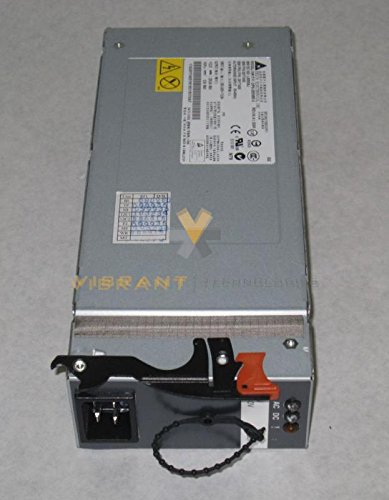
그림 1: 앞쪽 view of the IBM 39Y7405 2320W BladeCenter Power Supply, showing its connectors and ventilation.
4. 설정 및 설치
Follow these steps to install the IBM 39Y7405 power supply into a compatible BladeCenter chassis:
- 준비: Ensure the BladeCenter chassis is powered off and disconnected from the main power source if this is the initial installation or if all power supplies are being replaced. For hot-swap replacement, ensure the system is in a state that supports hot-swapping.
- 베이를 찾으세요: Identify an available power supply bay in the BladeCenter chassis.
- 전원 공급 장치를 연결하십시오. Carefully slide the power supply into the designated bay until it clicks securely into place. Ensure the latch mechanism engages.
- 전원 코드를 연결하십시오: Connect the appropriate power cord to the power supply's input receptacle and then to a grounded electrical outlet.
- 설치 확인: After installation, observe the power supply's status indicator LEDs to confirm proper operation. Refer to the 'Operating Instructions' section for LED status meanings.
5. 사용 설명서
Once installed and connected, the IBM 39Y7405 power supply operates automatically. The primary indicators for its status are the LEDs located on the front panel.
- Green LED (Power OK): A solid green light indicates that the power supply is functioning correctly and providing power to the system.
- Amber LED (Fault): A solid amber light indicates a fault condition. Refer to the 'Troubleshooting' section for potential causes and solutions.
- LED 없음: If no LEDs are illuminated, the power supply may not be receiving input power or may have experienced a critical failure.
For detailed system status, consult the BladeCenter management interface.
6. 유지관리
정기적인 유지관리는 전원 공급 장치의 수명과 최적의 성능을 보장하는 데 도움이 됩니다.
- 청소: Periodically inspect the power supply's ventilation openings for dust accumulation. Use compressed air to gently clear any dust, ensuring the system is powered off and unplugged before cleaning. Do not use liquid cleaners.
- 점검: Visually inspect power cords for any signs of damage (fraying, cuts). Ensure all connections are secure.
- 환경 조건: Ensure the operating environment maintains appropriate temperature and humidity levels as specified for the BladeCenter chassis.
7. 문제 해결
This section provides solutions to common issues you might encounter with the IBM 39Y7405 power supply.
| 문제 | 가능한 원인 | 해결책 |
|---|---|---|
| Power supply LEDs are off. | No input power; power cord disconnected; critical internal failure. | Check power cord connection to both the power supply and the electrical outlet. Verify the outlet has power. If issue persists, replace the power supply. |
| Amber Fault LED is illuminated. | Internal fault; over-temperature; over-current; fan failure. | Check chassis ventilation. Ensure ambient temperature is within operating limits. If the fault persists, replace the power supply. |
| 시스템 불안정 또는 예기치 않은 종료. | Insufficient power capacity; failing power supply. | Ensure enough power supplies are installed for the system load. Check other power supplies for fault indicators. Consider replacing the suspected faulty unit. |
If you are unable to resolve an issue using the troubleshooting steps above, contact IBM support for further assistance.
8. 사양
| 특징 | 사양 |
|---|---|
| 모델 번호 | 39Y7405 |
| 상표 | 아이비엠 |
| 출력 와트tage | 2320 와트 |
| 입력 와트tage | 2320 와트 |
| 품목 무게 | 5파운드(2.27kg) |
| 호환 장치 | Personal Computer (IBM BladeCenter systems) |
| 한국어: | 046655466402 |
| 제조업체 | 아이비엠 |
9. 보증 및 지원
This IBM product is covered by a limited warranty. For specific warranty terms and conditions, please refer to the documentation provided with your original BladeCenter chassis or visit the official IBM support web사이트. 보증 청구를 위해 구매 증빙 자료를 보관하세요.
For technical support, service, or to report issues, please contact IBM support through their official channels. You can typically find contact information on the IBM website or through your authorized IBM reseller.
IBM 지원 Web대지: https://www.ibm.com/support