
Jebao XTP10000
Jebao XTP-10000 Submersible Pond Pump User Manual
Model: XTP10000
1. 서론
This manual provides essential information for the safe and efficient operation, installation, and maintenance of your Jebao XTP-10000 Submersible Pond Pump. Please read these instructions carefully before use and retain them for future reference. This pump is designed for use in ponds and water features, capable of handling dirty water and functioning as both a filter and watercourse pump.
2. 안전 지침
부상이나 손상을 예방하려면 항상 다음 안전 예방 조치를 준수하세요.
- 전원 공급 장치가 펌프의 볼륨과 일치하는지 확인하십시오.tag전자(240V AC).
- Do not operate the pump if the cable or housing is damaged.
- Always disconnect the pump from the power supply before performing any maintenance, cleaning, or installation.
- 전원 케이블을 잡고 펌프를 들어올리거나 운반하지 마십시오.
- The pump is designed for submersible use only. Do not run dry.
- Keep children and animals away from the pond area during pump operation and maintenance.
- Installation should comply with local electrical regulations. A residual current device (RCD) with a tripping current not exceeding 30mA is recommended.
3. 제품 오버view 및 기능
The Jebao XTP-10000 pump is an energy-efficient submersible pump designed for continuous operation in pond environments. Key features include:
- 고효율성: 10,000 liters per hour (L/hr) flow rate with only 68 watts power consumption.
- 다양한 용도: Suitable for filter systems and watercourse applications.
- 최대 헤드 : Capable of pumping water up to 4.5 meters.
- 컴팩트한 디자인: Dimensions of 306mm x 265mm x 127mm.
- 호스 연결: 4-s를 특징으로 합니다tage rotatable stepped outlet for hose sizes 20mm, 25mm, 32mm, and 40mm.
- 모터 보호 : Equipped with a thermal resettable fuse that automatically switches off the pump if it overheats, preventing motor damage.

Figure 1: The Jebao XTP-10000 pump unit, showcasing its compact design and protective casing.
4. 설정 및 설치
올바른 설치를 위해 다음 단계를 따르세요.
- 짐 풀기: 펌프를 포장에서 조심스럽게 꺼내십시오. 손상 흔적이 있는지 확인하십시오.
- 호스 연결:
- Identify the appropriate hose size (20mm, 25mm, 32mm, or 40mm) for your application.
- Trim the stepped outlet connector to the desired diameter.
- Securely attach your pond hose to the trimmed outlet using a hose clamp (not included) to prevent leaks. The outlet can be rotated for optimal hose routing.
- 놓기:
- Place the pump on a stable, level surface at the bottom of your pond or water feature.
- Ensure the pump is fully submerged in water. The pump is designed to handle dirty water, but avoid placing it directly in thick sludge to prevent premature clogging.
- 전기 연결:
- The pump comes with a 10-meter cable but without a plug. A qualified electrician must connect the cable to a suitable outdoor, weather-protected power supply, incorporating an RCD.
- Ensure the cable is routed safely to prevent tripping hazards or damage.

Figure 2: Dimensional drawing of the Jebao XTP-10000 pump, showing its length (306mm), width (265mm), and height (127mm).
5. 사용 설명서
Once installed and connected to the power supply:
- 초기 시작: Plug in the pump or switch on the power supply. The pump should start immediately, circulating water.
- 흐름 조정: The flow rate is fixed at 10,000 L/hr. If reduced flow is desired, it must be achieved through external valves or flow restrictors in your plumbing system. Note that some external controllers may not be compatible and could cause erratic operation.
- 열 보호: The pump is equipped with a thermal resettable fuse. If the pump overheats (e.g., due to low water level, blockage, or prolonged dry running), it will automatically shut off. Allow the pump to cool down and address the cause of overheating before restarting. The pump will automatically reset once cooled.
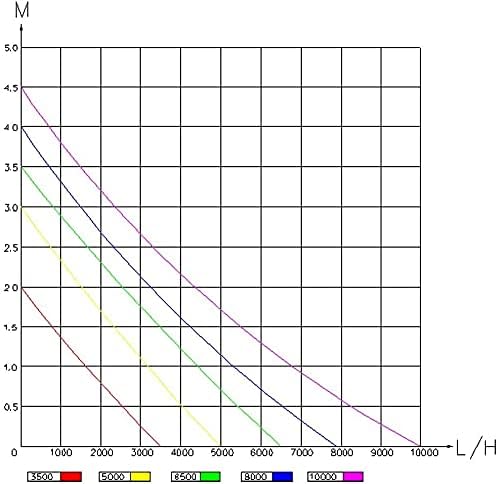
Figure 3: Performance curve graph illustrating the relationship between pump head (M) and flow rate (L/H) for various XTP series models. The XTP-10000 (purple line) shows a maximum head of 4.5m at 0 L/H and a maximum flow of 10,000 L/H at 0m head.
6. 유지관리
정기적인 유지보수는 펌프의 최적 성능과 수명 연장을 보장합니다.
- C 청소asing: Periodically remove the pump from the pond and clean the outer casing to remove accumulated debris, leaves, and algae. This helps maintain efficient water intake.
- 임펠러 세척:
- Disconnect power before attempting to open the pump.
- 펌프 casing can be opened by pressing two small buttons (refer to product diagram if available, or consult manufacturer for specific opening instructions).
- Carefully remove the impeller and clean any debris, calcium buildup, or blanket weed from the impeller and its housing. A soft brush and clean water are usually sufficient.
- Reassemble the pump, ensuring all parts are correctly seated and the casing는 단단히 닫혀 있습니다.
- 겨울 보관: In freezing conditions, remove the pump from the pond, clean it thoroughly, and store it in a frost-free location, fully submerged in water or kept moist to prevent seals from drying out.
7. 문제 해결
| 문제 | 가능한 원인 | 해결책 |
|---|---|---|
| 펌프가 시작되지 않습니다. | 전원 공급이 없습니다. 열 과부하가 활성화되었습니다. 임펠러가 막혔습니다. | 전원 연결 상태와 누전차단기를 확인하십시오. Disconnect power, allow to cool, check for blockages. Disconnect power, clean impeller. |
| 물 흐름 감소. | Clogged intake screen or impeller. 호스가 꼬이거나 막혔습니다. 낮은 수위. | Disconnect power, clean pump. 호스를 점검하고 이물질을 제거하십시오. 펌프가 물에 완전히 잠겼는지 확인하십시오. |
| 펌프가 간헐적으로 멈춥니다. | Thermal overload due to overheating. Erratic power supply. | Check for blockages, ensure adequate water level. Allow to cool. 전기 기술자에게 문의하여 전원 공급 상태를 점검하십시오. |
8. 사양
| 특징 | 세부 사항 |
|---|---|
| 모델 번호 | 엑스티피10000 |
| 유량 | 10,000L / 시간 |
| 전력 소비 | 68와트 |
| 최대 헤드 | 4.5분 |
| 권tage | 240V 교류 |
| 케이블 길이 | 10 m (no plug) |
| 치수(길이 x 너비 x 높이) | 30.6cm x 26.5cm x 12.7cm |
| 무게 | 3.58kg |
| Hose Outlet Sizes | 20mm, 25mm, 32mm, 40mm |
| 재료 | Ceramic (likely referring to impeller shaft) |
9. 보증 및 지원
For warranty information and technical support, please refer to the documentation provided at the point of purchase or contact your retailer. Keep your proof of purchase for any warranty claims. Jebao is committed to providing reliable products and customer assistance.
더 자세한 도움을 받으시려면 제바오 공식 웹사이트를 방문하세요. web사이트 또는 고객 서비스 부서에 문의하십시오.
Ask a question about this manual
Ask about setup, troubleshooting, compatibility, parts, safety, or missing instructions. Manuals+ will review the question and use this page’s manual context to help answer it.