
Centaur 300-188
Centaur 300-188 RDA/DA 300 콜릿 사용 설명서
모델 : 300-188
1. 서론
This manual provides essential information for the proper use, installation, and maintenance of your Centaur 300-188 RDA/DA 300 Collet. Designed for precision applications, this DA300 collet features a 3/16" size and a 1/64 collapse, ensuring secure and accurate tool holding. Please read this manual thoroughly before using the product to ensure safe and efficient operation.
2. 안전 정보
Always observe the following safety precautions when handling and using collets and associated machinery:
- Wear appropriate personal protective equipment (PPE), including safety glasses, when operating machinery that uses collets.
- Ensure the collet is correctly seated and tightened in the spindle or chuck before starting any operation.
- Never attempt to change a collet or tool while the machine is running or powered on.
- Inspect the collet for any signs of wear, damage, or deformation before each use. Do not use damaged collets.
- 회전하는 부품에 손이나 헐렁한 옷을 가까이 두지 마세요.
- Store collets in a clean, dry environment to prevent corrosion and damage.
3. 제품 오버view 및 기능
The Centaur 300-188 RDA/DA 300 Collet is engineered for high precision and durability. Key features include:
- 크기: 3/16" nominal size, suitable for a range of tooling applications.
- 무너지다: Features a 1/64" collapse, providing excellent gripping force and concentricity for the inserted tool.
- 재료: Manufactured from high-grade alloy steel, ensuring long-lasting performance and resistance to wear.
- 정도: Undergoes precision manufacturing processes, including hardening and grinding, with 100% quality inspection to meet stringent accuracy requirements.
- 기원: Proudly manufactured in India, adhering to high quality standards.
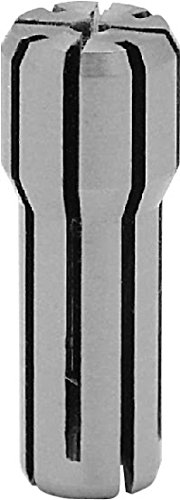
Figure 1: Centaur 300-188 RDA/DA 300 Collet. This image shows the precision-engineered collet, highlighting its slotted design for secure tool gripping.
4. 사양
| 기인하다 | 세부 사항 |
|---|---|
| 모델 번호 | 300-188 |
| 콜렛 유형 | RDA/DA 300 |
| 크기 | 3/16인치 |
| 무너지다 | 1/64인치 |
| 재료 | 합금강 |
| 제조업체 | 센타우르 정밀 툴즈 주식회사 |
| 패키지 크기 | 1.4 x 1 x 1 인치 |
| 품목 무게 | 1 파운드 |
5. 설정 및 설치
Proper installation of the collet is crucial for accuracy and safety. Follow these general steps:
- 준비: Ensure the spindle bore or collet chuck is clean and free of debris, chips, or oil residue. Clean the collet thoroughly as well.
- 콜릿 삽입: Carefully insert the Centaur 300-188 collet into the collet nut or directly into the spindle, depending on your machine's design. Ensure it seats fully and correctly.
- 삽입 도구: Insert the appropriate 3/16" diameter tool (e.g., drill bit, end mill) into the collet. Ensure the tool shank is clean and inserted to the recommended depth, typically past the collet's gripping length.
- 죄다: Hand-tighten the collet nut (if applicable) until the tool is held securely. Then, use a collet wrench to tighten it to the manufacturer's recommended torque specifications. 너무 조이지 마세요, as this can damage the collet or the tool.
- 확인하다: Before operation, manually check that the tool is firmly gripped and does not wobble.
Note: Always refer to your machine's specific instruction manual for detailed collet installation procedures and torque specifications.
6. 사용 설명서
Once the Centaur 300-188 collet and tool are properly installed, you can proceed with your machining operation. Ensure all safety protocols for your specific machine are followed.
- 도구 선택: Use only tools with a shank diameter matching the collet's nominal size (3/16") or within its specified collapse range.
- 기계 설정: Set appropriate spindle speeds and feed rates for the material being machined and the tool being used.
- 모니터링: During operation, monitor the tool and collet for any unusual vibrations, noise, or signs of slippage. Immediately stop the machine if any issues are detected.
- 도구 제거: After operation, power off the machine and allow the spindle to come to a complete stop. Loosen the collet nut with a wrench and carefully remove the tool. Then, remove the collet for cleaning and storage.
7. 유지관리
Regular maintenance extends the life and ensures the performance of your Centaur collet:
- 청소: After each use, thoroughly clean the collet to remove all chips, dust, and coolant residue. Use a soft brush and appropriate cleaning solution if necessary.
- 점검: Periodically inspect the collet for signs of wear, cracks, deformation, or corrosion. Pay close attention to the slots and gripping surfaces.
- 매끄럽게 하기: Apply a thin coat of light machine oil to the collet's surfaces before storage to prevent rust, especially if storing for extended periods.
- 저장: Store collets in a dedicated collet rack or protective case in a clean, dry, and temperature-controlled environment. Avoid storing them loosely where they can be damaged.
- 대사: Replace collets that show significant wear, damage, or loss of gripping force to maintain machining accuracy and safety.
8. 문제 해결
If you encounter issues with your Centaur collet, consider the following common problems and solutions:
- 공구 미끄러짐:
- Ensure the collet nut is tightened to the correct torque.
- Verify the tool shank is clean and free of oil or grease.
- Check if the tool shank diameter matches the collet size.
- Inspect the collet for wear or damage; replace if necessary.
- Poor Runout/Vibration:
- Ensure the collet and spindle bore are clean.
- Check for damage or wear on the collet or collet nut.
- Verify the tool is inserted correctly and fully seated.
- Ensure the collet is the correct type and size for the application.
- Difficulty Inserting/Removing Tool:
- Check for burrs or damage on the tool shank or inside the collet.
- Ensure the collet is fully loosened before attempting removal.
- Verify the tool shank diameter is not oversized for the collet.
9. 보증 및 지원
Centaur Precision Tools, Inc. stands behind the quality of its products. For specific warranty information, technical support, or inquiries regarding your Centaur 300-188 RDA/DA 300 Collet, please refer to the official Centaur Precision Tools web사이트에서 확인하거나 고객 서비스에 직접 문의하세요. 구매 증빙 자료로 구매 영수증을 보관하세요.
추가 지원을 받으려면 다음을 방문하세요. www.centaurtools.com
Ask a question about this manual
Ask about setup, troubleshooting, compatibility, parts, safety, or missing instructions. Manuals+ will review the question and use this page’s manual context to help answer it.