
소개
This manual provides comprehensive instructions for the safe and efficient operation, maintenance, and troubleshooting of your KitchenAid 2.0 cu. ft. Over-the-Range Microwave with Sensor Cooking. Please read all instructions carefully before using the appliance and retain this manual for future reference.

이미지: 앞면 view of the KitchenAid 2.0 cu. ft. Over-the-Range Microwave in Stainless Steel.
중요 안전 지침
전기 제품을 사용할 때는 다음을 포함한 기본적인 안전 예방 조치를 따라야 합니다.
- 기기를 사용하기 전에 모든 지침을 읽으세요.
- 문이나 도어 실이 손상된 경우 오븐을 작동하지 마세요.
- 밀폐된 용기에 액체나 기타 음식을 넣고 가열하지 마십시오. 폭발할 위험이 있습니다.
- 시도하지 마십시오amp오븐의 문, 제어판, 안전 인터록 스위치 또는 기타 부분을 조정하거나 수리하지 마십시오.
- 적절한 지침을 제공하여 아이가 오븐을 안전하게 사용하고 부적절한 사용의 위험을 이해할 수 있도록 한 경우에만, 아이가 감독 없이 오븐을 사용하도록 허용하세요.
- 이 기기에 부식성 화학 물질이나 증기를 사용하지 마십시오.
- Always ensure proper ventilation during operation.
설정
포장 풀기 및 배치
Carefully remove all packaging materials. Ensure the microwave is placed on a flat, stable surface or properly installed over a range. Refer to the separate installation instructions for detailed mounting procedures. Ensure adequate clearance around the appliance for proper ventilation.

Image: KitchenAid microwave installed above a range in a kitchen setting.
턴테이블 설치
Place the turntable support ring in the center of the microwave oven cavity. Position the glass turntable plate securely on the support ring. Ensure the turntable rotates freely.
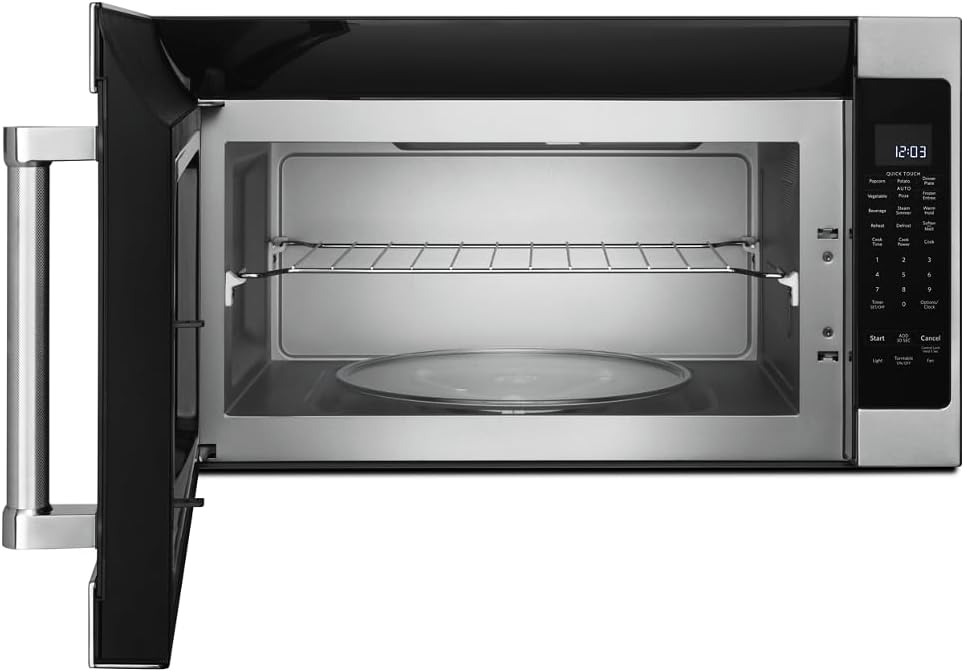
이미지: 내부 view of the microwave showing the glass turntable and support ring.
작동 지침
기본 동작
- 시계 설정: Press 'Options/Clock', then enter the current time using the number pad. Press 'Options/Clock' again to confirm.
- 빠른 시작: Press 'Start' to begin cooking immediately for 30 seconds at 100% power. Press 'Add 30 Sec' to add 30 seconds to the cooking time.
- 요리 시간: Press 'Cook Time', enter the desired cooking time, then press 'Start'.
- Cook Power: After setting 'Cook Time', press 'Cook Power', enter the desired power level (1-10, 10 being 100%), then press 'Start'.
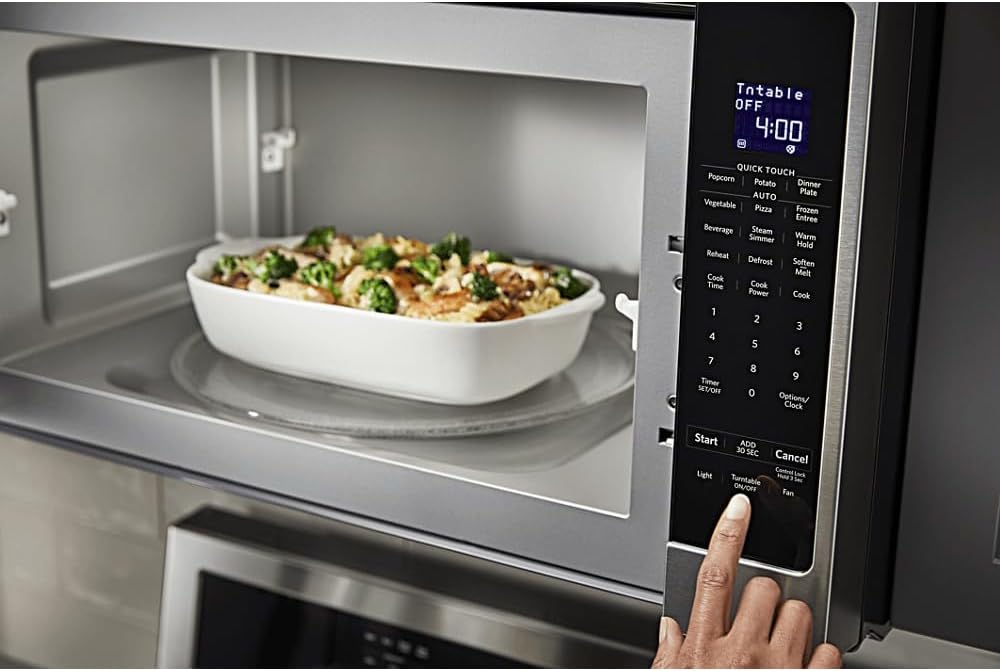
이미지: 상세 view of the microwave's control panel with various cooking options.
Quick Touch Functions
The microwave features several one-touch cooking options:
- 팝콘: For automatic popcorn popping.
- 감자: 감자를 굽는 데 사용.
- 피자: 피자 조각을 다시 데울 때 사용합니다.
- 음료: 음료를 데우는 데 사용.
- 재가열: For reheating various food items.
- 제상 : 무게나 시간에 따라 음식을 해동합니다.
센서 쿠킹
The sensor cooking feature automatically adjusts cooking time and power levels based on the food's moisture content. Select the desired sensor cooking option (e.g., 'Vegetable', 'Frozen Entree', 'Dinner Plate') and press 'Start'. The microwave will detect when the food is cooked.

Image: Interior of the microwave showing food items on the turntable and a removable rack.
특별 기능
- Steam Simmer: For steaming or simmering foods.
- 따뜻한 보류: Keeps cooked food warm for an extended period.
- 연화/용해: For softening butter, melting chocolate, or other similar tasks.
- 빛: Controls the under-cabinet light.
- 턴테이블 켜짐/꺼짐: 큰 접시를 사용할 때 턴테이블 회전을 멈출 수 있습니다.
- 팬 : 배기 팬 속도를 조절합니다.

Image: A person's hand operating the control panel of the KitchenAid microwave.
유지
내부 청소
Clean the interior of the microwave regularly with a mild detergent and a soft cloth. For stubborn food splatters, place a bowl of water with lemon slices inside and microwave for a few minutes to loosen residue, then wipe clean.
외부 청소
Wipe the exterior surfaces, including the control panel and door, with a soft cloth and mild detergent. For stainless steel surfaces, use a stainless steel cleaner and polish in the direction of the grain.
필터 유지 관리
The microwave is equipped with grease filters and may have a charcoal filter. Clean the grease filters monthly by washing them in hot, soapy water or in a dishwasher. Replace the charcoal filter (if present) approximately every 6 to 12 months, depending on usage.
문제 해결
If you experience issues with your microwave, consult the following common problems and solutions:
| 문제 | 가능한 원인 | 해결책 |
|---|---|---|
| 전자레인지가 시작되지 않음 | 문이 제대로 닫히지 않았습니다. 전원 코드가 뽑혀 있습니다. 퓨즈가 끊어졌거나 회로 차단기가 작동했습니다. | Ensure door is securely closed; Check power connection; Reset circuit breaker or replace fuse. |
| 음식이 고르게 가열되지 않음 | 음식이 저어지지 않거나 회전하지 않음; 전원 수준이 올바르지 않음; 턴테이블이 회전하지 않음. | Stir or rotate food during cooking; Adjust power level; Ensure turntable is correctly placed and functioning. |
| 작동 중 이상한 소음이 발생합니다. | 턴테이블이 제대로 장착되지 않았습니다. 내부에 이물질이 들어 있습니다. | Re-seat turntable; Check for and remove any obstructions. |
이러한 해결 방법을 시도한 후에도 문제가 지속되면 고객 지원팀에 문의하세요.
명세서
| 특징 | 세부 사항 |
|---|---|
| 상표 | 키친에이드 |
| 모델 번호 | KMHS120ESS |
| 제품 크기(D x W x H) | 16.13인치 x 30인치 x 17.13인치 |
| 용량 | 2.0입방 피트 |
| 왓tage | 1000 와트 |
| 재료 | 스테인리스 스틸 |
| 설치 유형 | 범위 초과 |
| 특징 | Turntable, Sensor Cooking |
| 컨트롤러 유형 | 단추 |
| 프로그램 수 | 10 |
| 타이머 기능 | 사용 가능 |
| 포함된 구성 요소 | Glass Turntable, Turntable Support Ring, Removable Rack |
보증 및 지원
보증 정보
This KitchenAid appliance comes with a limited warranty. Please refer to the warranty card included with your product for specific terms, conditions, and duration of coverage. Keep your proof of purchase for warranty claims.
고객 지원
For technical assistance, service, or to order replacement parts, please contact KitchenAid Customer Service. Contact details can typically be found on the manufacturer's web웹사이트 또는 제품 등록 카드에서 확인하실 수 있습니다.
온라인 지원: Visit the official KitchenAid website for FAQs, product registration, and service scheduling.
전화 지원: 해당 지역의 고객 서비스 전화번호는 제품 설명서를 참조하세요.