
1. 서론
This manual provides detailed instructions for the installation, operation, and maintenance of your Zmodo ZM-KW1001-O4-1TB HD Camera System. Please read this manual thoroughly before using the product to ensure proper setup and functionality. Keep this manual for future reference.
2. 제품 오버view
2.1 주요 특징
- 720p HD video for clear and sharp images.
- Smartlink wireless configuration for quick setup.
- Motion detection alerts to notify you of activity.
- IP66 rated outdoor cameras for weather resistance.
- Infrared night vision for surveillance in low-light conditions.
- Integrated 1TB hard drive for local video storage.
2.2 시스템 구성 요소
The Zmodo ZM-KW1001-O4-1TB system typically includes the following components:
- Wireless Network Video Recorder (NVR) with 1TB HDD
- HD Wireless Cameras (quantity may vary, typically 4)
- NVR 및 카메라용 전원 어댑터
- 이더넷 케이블
- 장착 나사 및 앵커
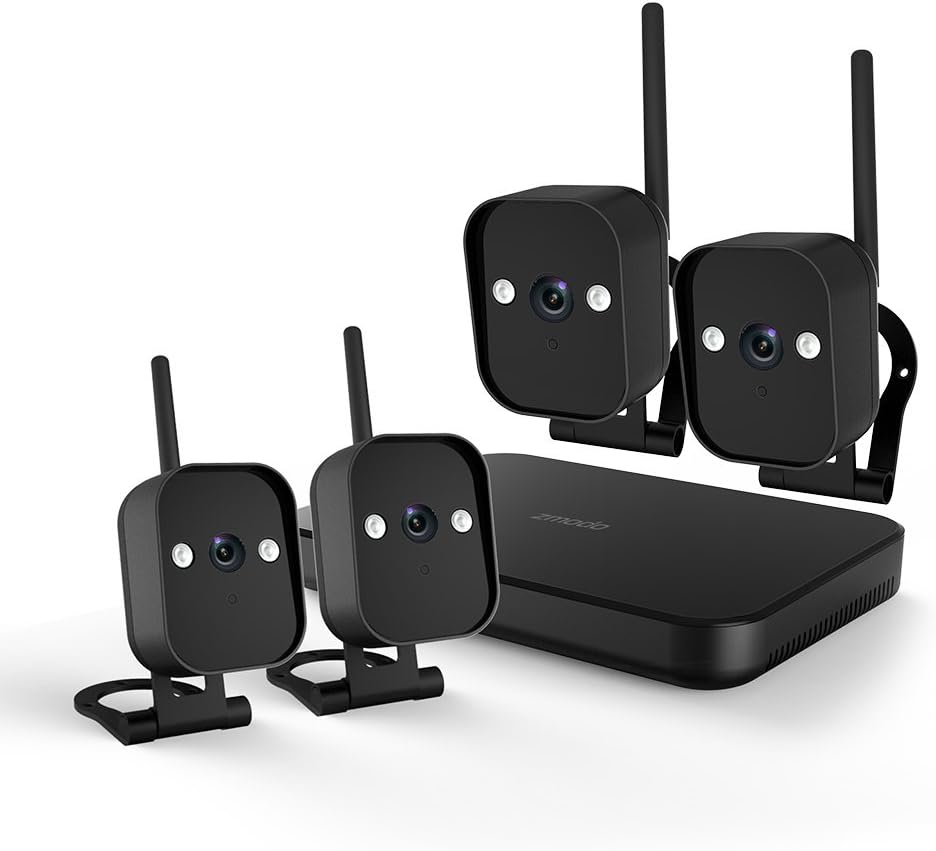
그림 1: 위에view of the Zmodo ZM-KW1001-O4-1TB HD Camera System, showing the NVR unit and four wireless cameras.
3. 설정 지침
3.1 언박싱 및 초기 검사
Carefully unpack all components and verify that all items listed in Section 2.2 are present and undamaged. If any items are missing or damaged, contact customer support.
3.2 NVR 연결
- 제공된 전원 어댑터를 사용하여 NVR을 전원 콘센트에 연결하십시오.
- For initial setup and optimal performance, connect the NVR to your router using the supplied Ethernet cable.
- Connect the NVR to a monitor via HDMI or VGA cable (not included) if local viewing이 바람직합니다.

그림 2: The Zmodo Network Video Recorder (NVR) unit, which stores recordings and manages camera connections.
3.3 카메라 설치 및 페어링
The cameras are designed for both indoor and outdoor use with an IP66 weather-resistant rating. Ensure cameras are placed within range of the NVR's wireless signal.
- 카메라 전원 켜기: 각 카메라를 해당 전원 어댑터에 연결하고 전원 콘센트에 꽂으십시오.
- Smartlink Pairing: The cameras should automatically attempt to pair with the NVR. Follow the on-screen prompts on the connected monitor or use the Zmodo app for Smartlink setup. If pairing fails, refer to the troubleshooting section.
- 설치: Choose suitable locations for your cameras. Use the provided screws and anchors to securely mount the cameras. Ensure a clear line of sight and optimal view잉 각도.

그림 3: A Zmodo wireless camera shown with its wall-mounting bracket, suitable for outdoor installation.

그림 4: A Zmodo wireless camera shown with its stand mount, ideal for indoor placement on flat surfaces.
3.4 모바일 앱 구성
- Download the Zmodo app from the App Store (iOS) or Google Play Store (Android).
- 새 계정을 만들거나 기존 계정에 로그인하세요.
- Follow the in-app instructions to add your Zmodo NVR system. This typically involves scanning a QR code on the NVR or manually entering device details.
- Once added, you should be able to view 카메라에서 전송되는 실시간 영상입니다.
4. 사용 설명서
4.1 라이브 View
Access the Zmodo app or the NVR's local interface to view live video streams from your cameras. You can typically select individual cameras or view 여러 피드를 동시에 표시합니다.
4.2 동작 감지 및 알림
The system is equipped with motion detection capabilities. When motion is detected, the system can record footage and send alerts to your mobile device.
- 구성: In the Zmodo app or NVR settings, navigate to the motion detection section. You can customize detection zones, sensitivity levels, and alert schedules.
- 알림: Ensure push notifications are enabled for the Zmodo app on your mobile device to receive timely alerts.
4.3 녹음 및 재생
The NVR includes a 1TB hard drive for continuous or motion-activated recording.
- 녹음 설정: Configure recording modes (continuous, scheduled, motion-activated) via the NVR's local interface or the Zmodo app.
- 재생: 다시view 기록된 footage, access the playback feature in the Zmodo app or directly on the NVR. Select the desired date and time to view 이벤트.
4.4 야간 투시경
The cameras feature infrared night vision, allowing them to capture clear video in low-light or complete darkness. The system automatically switches to night vision mode when ambient light levels are insufficient.
5. 유지관리
- 카메라 청소: 카메라 렌즈는 부드러운 천으로 주기적으로 청소하세요.amp 깨끗한 이미지 품질을 위해 천을 사용하십시오. 연마성 세척제는 사용하지 마십시오.
- 펌웨어 업데이트: Check the Zmodo app or website regularly for firmware updates. Keeping your system updated ensures optimal performance and security.
- 하드 드라이브 관리: 1TB 하드 드라이브는 가장 오래된 파일을 자동으로 덮어씁니다.tage when full. If you need to preserve specific recordings, back them up to an external device before they are overwritten.
- 전원 공급 장치: 모든 전원 어댑터가 단단히 연결되어 있고 손상되지 않았는지 확인하십시오.
6. 문제 해결
- 영상이 나오지 않습니다:
- Check if the NVR and cameras are powered on.
- Verify network connectivity for the NVR.
- 카메라가 NVR의 무선 범위 내에 있는지 확인하십시오.
- Re-pair cameras if they have lost connection.
- Motion Alerts Not Received:
- Confirm motion detection is enabled in the app settings.
- 동작 감지 구역과 민감도를 확인하세요.
- Ensure push notifications are enabled for the Zmodo app on your mobile device.
- 이미지 품질이 좋지 않음:
- 카메라 렌즈를 청소하세요.
- 카메라 시야에 방해물이 없는지 확인하십시오. view.
- Check for strong interference if using wireless connection.
- Cameras Not Connecting to Wi-Fi:
- Ensure the NVR's Wi-Fi is enabled and functioning.
- Move cameras closer to the NVR to improve signal strength.
- Reset cameras and attempt Smartlink pairing again.
7. 사양
| 특징 | 사양 |
|---|---|
| 모델 번호 | ZM-KW1001-O4-1TB |
| 비디오 해상도 | 720p HD |
| 연결 기술 | 무선 전화 |
| 채널 수 | 4 |
| 저장 용량 | 1TB(테라바이트) |
| 특별 기능 | Wireless, Motion Detection, Night Vision, IP66 Weatherproof |
| 운영 체제 호환성 | 안드로이드, iOS |
| 전원 | Wireless (Power Adapters for components) |
| 색상 | 검은색 |
| 패키지 크기 | 26.8 x 20 x 16cm |
| 품목 무게 | 1.5 킬로그램 |
8. 보증 및 지원
For warranty information and technical support, please refer to the official Zmodo website or contact Zmodo customer service directly. Details regarding warranty periods and service procedures are typically available on the manufacturer's support pages.
온라인 지원: Visit the Zmodo official webFAQ, 문제 해결 가이드 및 연락처 정보를 제공하는 사이트입니다.
지원팀에 문의: If you require further assistance, please have your product model number (ZM-KW1001-O4-1TB) and purchase details ready when contacting support.