
소개
구매해주셔서 감사합니다asing the F&D F3000U 5.1 Home Theatre Speakers. This manual provides essential information for the proper setup, operation, and maintenance of your speaker system. Please read this manual thoroughly before using the product to ensure optimal performance and safety.
제품 끝view
The F&D F3000U is a 5.1 channel home theatre speaker system designed to deliver immersive audio. It features a powerful subwoofer and five satellite speakers, along with convenient connectivity options.
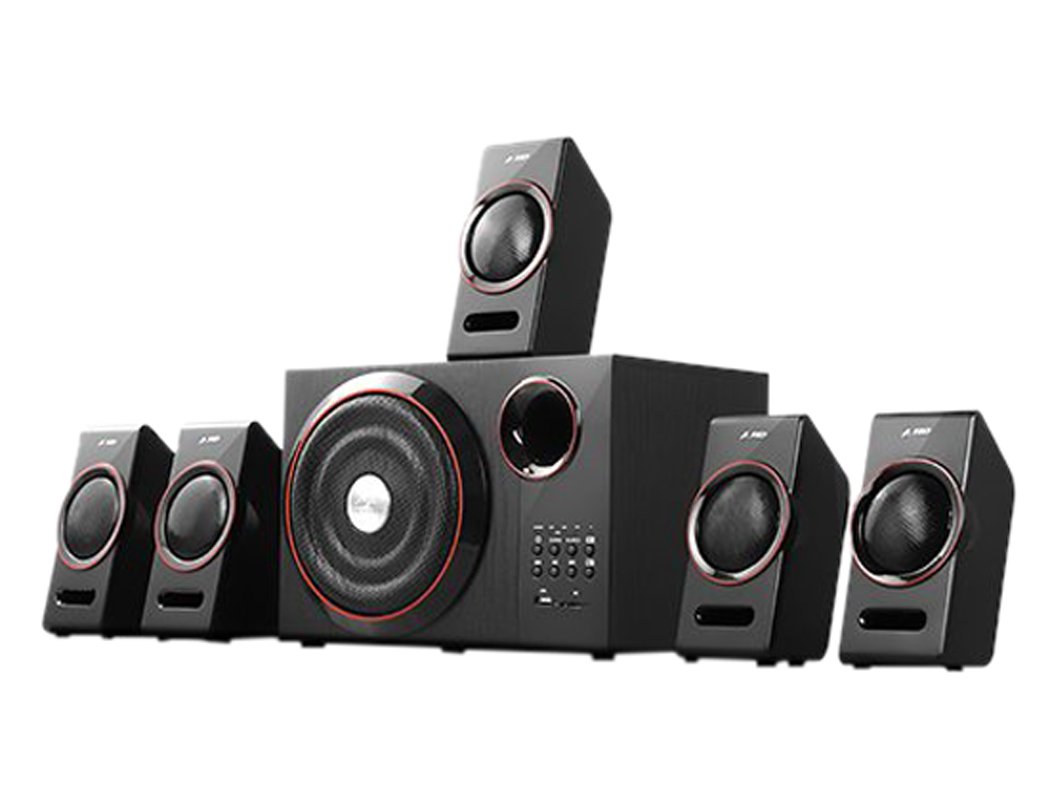
This image displays the main subwoofer unit of the F&D F3000U 5.1 Home Theatre Speakers. The front panel features a large, circular speaker grille with a red accent ring, a bass reflex port, and a control panel on the right. The control panel includes various buttons, indicator lights, a USB port, and an SD card slot.
주요 특징:
- USB reader supporting MP3/WMA dual formats decoding.
- Heavy duty metal grill with red ring decoration.
- 블루투스 무선 연결.
설정
- 짐 풀기: Carefully remove all components from the packaging. Ensure all parts are present: 1 subwoofer unit, 5 satellite speakers, audio cables, and remote control.
- 스피커 배치:
- Place the subwoofer on the floor, preferably near your TV or audio source.
- Position the front left and right satellite speakers equidistant from your listening position, typically on either side of your TV.
- 중앙 스피커를 TV 바로 위나 아래에 설치하세요.
- Position the surround left and right satellite speakers behind or to the sides of your main listening area.
- 위성 스피커 연결하기: Connect each satellite speaker to the corresponding output terminals on the rear of the subwoofer unit. Ensure correct polarity (+ to + and - to -).
- 오디오 소스에 연결: Connect the audio input cable from your TV, DVD player, or other audio source to the appropriate input jacks on the subwoofer unit.
- 전원 연결: Plug the power cord into the subwoofer unit and then into a standard AC power outlet.
- 초기 전원 켜기: Turn on the main power switch on the subwoofer unit. The system should power on, and an indicator light will illuminate.
운영
- 전원 켜기/끄기: Use the power button on the front panel of the subwoofer or the remote control to turn the system on or off.
- 볼륨 조절: Adjust the master volume using the main volume knob on the subwoofer or the volume buttons on the remote control. Individual channel volumes (e.g., center, surround, subwoofer) may also be adjustable via the remote.
- 입력 선택: Press the 'Input' or 'Source' button on the subwoofer or remote to cycle through available audio inputs (e.g., AUX, USB, SD, Bluetooth).
- USB/SD 재생:
- Insert a USB drive or SD card into the respective slot on the front panel.
- Select 'USB' or 'SD' input mode.
- The system will automatically detect and play MP3/WMA audio files. Use the playback controls (Play/Pause, Next, Previous) on the unit or remote.
- 블루투스 연결:
- Select 'Bluetooth' input mode. The system will enter pairing mode.
- On your mobile device, search for Bluetooth devices and select "F&D F3000U" (or similar name).
- 페어링이 완료되면 기기에서 스피커로 오디오를 무선으로 스트리밍할 수 있습니다.
유지
- 청소: Use a soft, dry cloth to clean the surfaces of the speakers. Do not use liquid cleaners or abrasive materials, as they may damage the finish.
- 통풍: Ensure that the subwoofer unit has adequate ventilation. Do not block any ventilation openings.
- 환경: Avoid exposing the speakers to direct sunlight, high temperatures, humidity, or dusty environments.
- 전원 끄기 : Always turn off the speaker system when not in use for extended periods.
문제 해결
| 문제 | 가능한 해결책 |
|---|---|
| 전원이 없습니다 | Check if the power cord is securely plugged into the wall outlet and the subwoofer. Ensure the main power switch is ON. |
| 소리가 나지 않습니다 | Verify the audio input cable is correctly connected. Ensure the correct input source is selected. Increase the volume. Check if speakers are properly connected to the subwoofer. |
| 왜곡된 소리 | Reduce the volume. Check audio source quality. Ensure speaker wires are not damaged or short-circuited. |
| USB/SD 카드가 인식되지 않습니다. | Ensure the USB drive or SD card contains supported MP3/WMA audio files. Reinsert the device. Try a different USB drive or SD card. |
| 블루투스 페어링 실패 | Ensure the speaker system is in Bluetooth mode. Make sure your device's Bluetooth is on and within range. Forget previous pairings on your device and try again. |
명세서
- 모델: F3000U
- 스피커 유형: 5.1 Home Theatre System
- 연결성: USB, 블루투스
- Supported Audio Formats (USB/SD): MP3, WMA
- 특별 기능: USB 충전
- 무선 통신 기술: 블루투스
- 패키지 크기: 49 x 39.7 x 24.1cm
- 품목 무게: 7kg 400g
보증 및 지원
For warranty information, please refer to the documentation provided at the time of purchase or contact your retailer. Keep your purchase receipt as proof of purchase.
법적 고지사항: All matters are subject to Agra Jurisdiction Only.
If you encounter issues not covered in the troubleshooting section, please contact F&D customer support or your authorized service center for assistance.