
1. 서론
The Sony SBH54 is a versatile Stereo Bluetooth Headset designed for wireless communication and audio playback. It offers both handset and headset functionalities, allowing you to take and make calls, view messages, listen to music, and tune into FM radio directly from its display. Crafted from premium metal with a splash-proof design, it combines elegance with durability.
Key features include Bluetooth Wireless 3.0, NFC technology for easy pairing, an OLED display, and built-in noise cancellation for clear audio during calls. The headset supports A2DP profile and can connect to two devices simultaneously.
2. 제품 오버view
The SBH54 features a compact design that fits comfortably in your hand. It includes an OLED display for information at a glance and physical controls for media and call management.
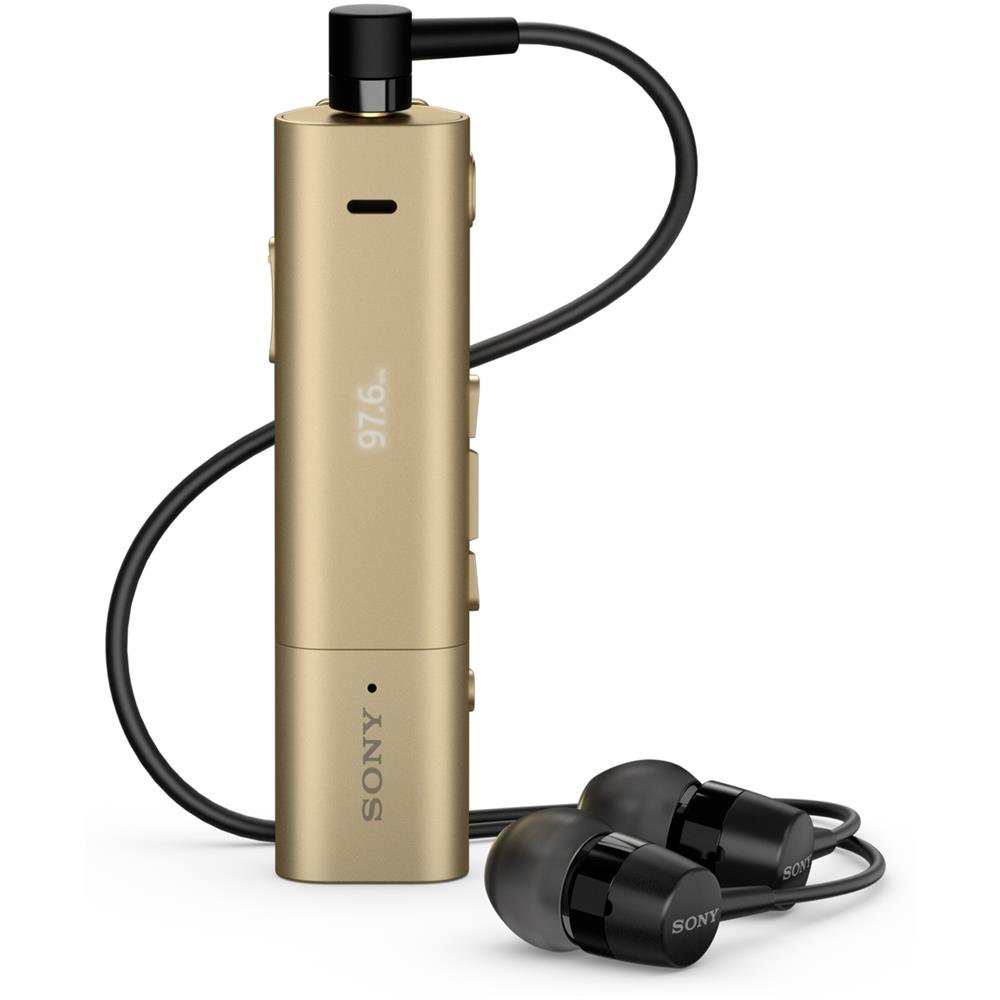
Image: Sony SBH54 Gold Stereo Bluetooth Headset. This image displays the compact, gold-colored headset with its integrated clip and display screen.
제어 및 표시기:
- OLED 디스플레이: Shows caller ID, messages, music track information, and FM radio frequency.
- 다기능 버튼: For call answering/ending, play/pause music.
- 볼륨 버튼: 오디오 볼륨을 조절합니다.
- 탐색 버튼: For menu navigation and track skipping.
- 마이크로폰: 음성 통화 기능이 내장되어 있습니다.
- 헤드폰 잭: 3.5mm port for connecting the included premium headphones.
- 충전 포트: 기기를 충전하기 위한 마이크로 USB 포트.
3. 설정
3.1 헤드셋 충전
- Connect the supplied USB cable to the headset's charging port and to a USB power adapter or a computer's USB port.
- 디스플레이의 배터리 표시등은 충전 상태를 보여줍니다.
- 처음 사용하기 전에 헤드셋을 완전히 충전하십시오.
3.2 기기 페어링 (블루투스)
- 헤드셋이 충전되어 있고 전원이 꺼져 있는지 확인하세요.
- Press and hold the power button until the headset enters pairing mode (indicated by a specific light pattern or message on the display).
- 스마트폰이나 기타 Bluetooth 지원 기기에서 Bluetooth를 활성화하고 사용 가능한 기기를 검색하세요.
- 검색된 장치 목록에서 "SBH54"을 선택하십시오.
- 암호를 묻는 메시지가 나타나면 "0000"(0 네 개)을 입력하십시오.
- 페어링이 완료되면 헤드셋에 연결 성공 표시가 나타납니다.
3.3 Pairing with a Device (NFC)
For devices with NFC (Near Field Communication):
- 스마트폰에서 NFC 기능이 활성화되어 있고 화면 잠금이 해제되어 있는지 확인하세요.
- Touch the NFC detection area of your smartphone to the NFC detection area on the SBH54 headset.
- 화면의 지시에 따라 페어링 과정을 완료하세요.
4. 헤드셋 작동
4.1 전원 켜기/끄기
- 전원을 켜려면: 디스플레이가 켜질 때까지 전원 버튼을 길게 누르세요.
- 전원을 끄려면: 디스플레이가 꺼질 때까지 전원 버튼을 길게 누르세요.
4.2 전화 걸기 및 받기
- 전화 받기 : When a call comes in, press the multi-function button.
- 통화 종료: During a call, press the multi-function button.
- 전화 거부 : Press and hold the multi-function button when a call comes in.
- 전화 걸기: Dial the number on your phone. The call will automatically route to the headset. You can also use voice commands if supported by your phone.
- 핸드셋 기능: The compact SBH54 can be used as an unobtrusive handset for calls.
- 소음 제거 : The headset features echo, wind, and noise cancellation for clear voice transmission.
- HD 음성: Enhances voice clarity for both parties during a call.
4.3 음악 재생
- 재생/일시 중지: 다기능 버튼을 누르세요.
- 다음 트랙: Press the forward navigation button.
- 이전 트랙 : Press the backward navigation button.
- 볼륨 조절: 볼륨 높이기/낮추기 버튼을 사용하세요.
4.4 FM 라디오
- FM 라디오 활성화: Navigate through the headset menu to select the FM Radio function.
- 튜닝 스테이션: Use the navigation buttons to scan or manually tune to FM frequencies.
- 사전 설정 저장: The headset may allow saving favorite stations (refer to on-screen prompts).
5. 유지관리
- 청소: 헤드셋을 부드럽고 마른 천으로 닦으십시오. 강한 화학 약품이나 연마성 재질은 사용하지 마십시오.
- 방수 기능: The SBH54 has a splash-proof design. This means it can withstand light splashes of water but should not be submerged or exposed to heavy rain. Ensure the charging port cover is securely closed.
- 저장: 헤드셋은 직사광선과 극한의 온도를 피해 서늘하고 건조한 곳에 보관하세요.
- 배터리 관리 : 배터리 수명을 연장하려면 배터리를 자주 완전히 방전시키지 마십시오. 정기적으로 충전하십시오.
6. 문제 해결
일반적인 문제 및 해결책:
- 헤드셋 전원이 켜지지 않습니다: 배터리가 충전되어 있는지 확인하세요. 전원에 연결한 후 다시 시도해 보세요.
- 장치와 페어링할 수 없습니다:
- 헤드셋이 페어링 모드인지 확인하세요.
- 기기에서 Bluetooth가 활성화되어 있는지 확인하세요.
- 헤드셋을 장치에 더 가까이 대세요.
- 헤드셋과 기기를 다시 시작하세요.
- 기기의 이전 Bluetooth 연결을 지우고 다시 페어링을 시도하세요.
- 오디오가 나오지 않거나 오디오 품질이 좋지 않음:
- 헤드셋과 연결된 기기의 볼륨 레벨을 확인하세요.
- 헤드셋이 기기의 통신 범위 내에 있는지 확인하십시오.
- Bluetooth 연결을 끊었다가 다시 연결하십시오.
- Ensure the headphones are properly plugged into the 3.5mm jack.
- FM 라디오가 작동하지 않습니다. FM 신호 수신이 양호한 지역에 있는지 확인하십시오.
7. 사양
| 특징 | 세부 사항 |
|---|---|
| 상표 | 소니 |
| 모델 번호 | SBH54GD |
| 색상 | 금 |
| 귀 위치 | 귀에 |
| 폼 팩터 | 귀에 |
| 소음 제어 | 능동 소음 제거 |
| 품목 무게 | 0.1 킬로그램 |
| 오디오 드라이버 유형 | 동적 드라이버 |
| 주파수 범위 | 20Hz - 20,000Hz |
| 인클로저 재료 | 금속 |
| 호환 장치 | 스마트폰, 노트북, 태블릿, 블루투스 지원 기기 |
| 방수 레벨 | Water Resistant (Splash-proof) |
| 연결 기술 | 블루투스, NFC |
| 무선 기술 | 블루투스, NFC |
| 블루투스 버전 | 3.0 |
| 제어 유형 | 미디어 제어 |
| 제어 방법 | 원격 |
8. 보증 및 지원
보증 정보 및 고객 지원은 구매 시 동봉된 설명서를 참조하거나 소니 공식 지원 웹사이트를 방문하십시오. web사이트. 구체적인 보증 조건은 지역 및 소매업체에 따라 다를 수 있습니다.
온라인 지원: www.sony.com/electronics/support