
소개
구매해주셔서 감사합니다asing the SENTRY HPXBT150 Bluetooth Flat Cord Earbuds. This manual provides detailed instructions on how to set up, operate, and maintain your new wireless earbuds. Please read this manual thoroughly before use to ensure optimal performance and longevity of your device.
패키지 내용
- SENTRY HPXBT150 Bluetooth Flat Cord Earbuds
- 보호 케이스
- USB 충전 케이블 (마이크로 USB)
- Removable Ear Hooks
- 사용자 설명서
제품 끝view
The SENTRY HPXBT150 earbuds feature Bluetooth wireless technology, allowing for a cord-free listening experience. They include an in-line microphone for hands-free calls and media control buttons for easy operation. Removable ear hooks provide a secure fit, especially during physical activity.
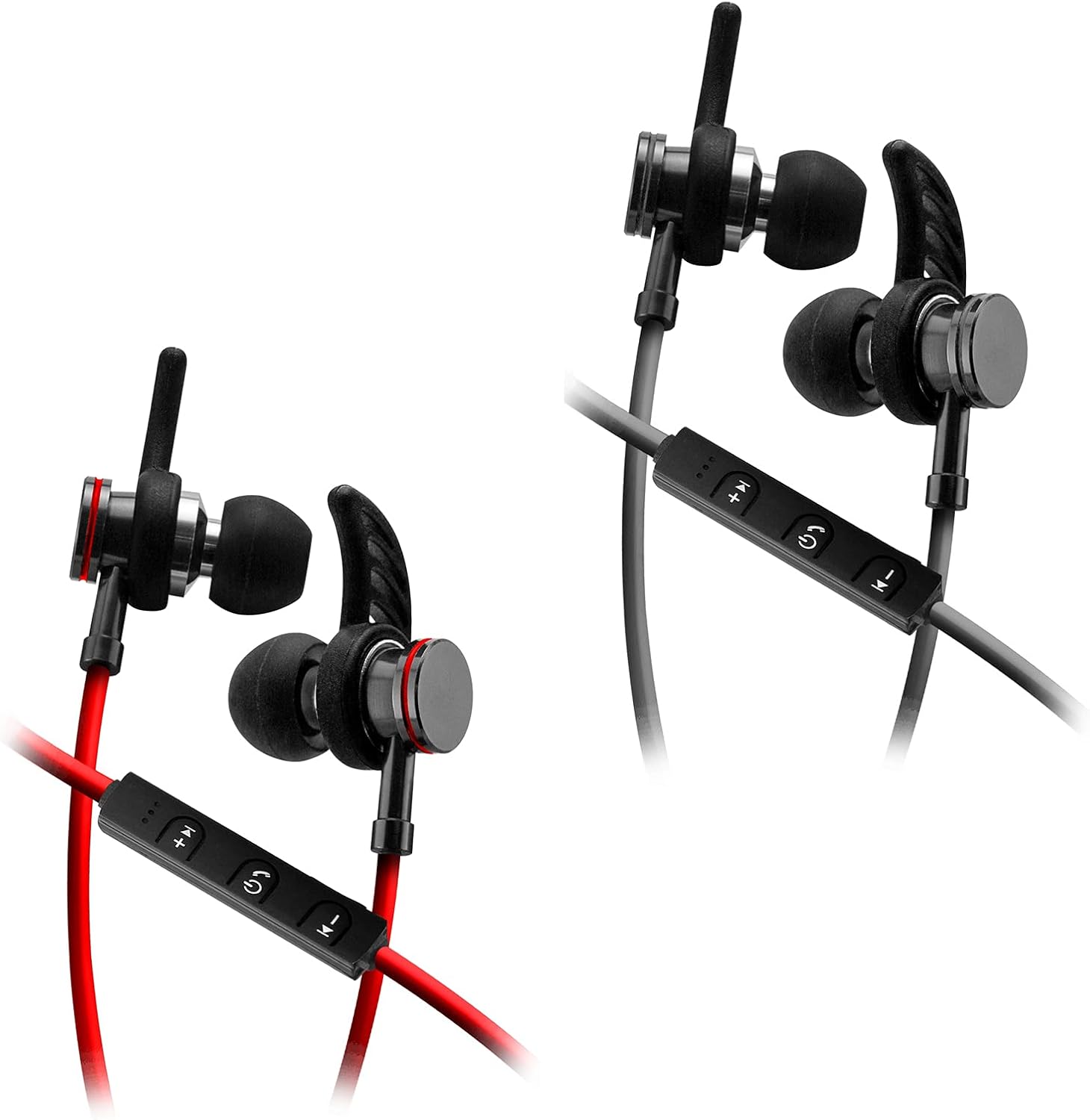
Image: SENTRY HPXBT150 Bluetooth Earbuds showing the in-line control panel and ear hooks. The control panel features volume up/next track, power/multifunction, and volume down/previous track buttons.
설정
1. 이어버드 충전하기
- Locate the Micro-USB charging port on the in-line control unit.
- Connect the provided USB charging cable to the earbuds' charging port.
- USB 케이블의 다른 쪽 끝을 호환되는 USB 전원(예: 컴퓨터 USB 포트, USB 벽면 어댑터)에 꽂으십시오.
- The LED indicator light will illuminate during charging. It will change color or turn off once charging is complete. A full charge typically takes approximately 1-2 hours.
2. 블루투스 페어링
- 처음 페어링하기 전에 이어버드가 완전히 충전되었는지 확인하십시오.
- Press and hold the multi-function button (usually the center button on the in-line control) for approximately 5-7 seconds until the LED indicator light flashes red and blue alternately. This indicates the earbuds are in pairing mode.
- 블루투스 기능이 있는 기기(스마트폰, 태블릿, 컴퓨터)에서 블루투스 설정 메뉴로 이동하세요.
- Bluetooth를 활성화하고 사용 가능한 장치를 검색합니다.
- Select "HPXBT150" or a similar name from the list of found devices.
- Once successfully paired, the LED indicator on the earbuds will typically flash blue slowly or turn off, and you will hear an audible confirmation.
- 비밀번호를 입력하라는 메시지가 나타나면 "0000"을 입력하세요.
작동 지침
전원 켜기/끄기
- 전원 켜기: Press and hold the multi-function button for approximately 3 seconds until the LED indicator flashes blue and you hear a power-on tone.
- 전원 끄기 : Press and hold the multi-function button for approximately 3-5 seconds until the LED indicator flashes red and you hear a power-off tone.
음악 재생
- 재생/일시 중지: 다기능 버튼을 한 번 누릅니다.
- 볼륨 업: '+' 버튼을 누르세요.
- 볼륨 작게 : '-' 버튼을 누르세요.
- 다음 트랙: '+' 버튼을 길게 누르세요.
- 이전 트랙 : '-' 버튼을 길게 누르세요.
통화 관리
- 전화 받기/종료: 다기능 버튼을 한 번 누릅니다.
- 전화 거부: 다기능 버튼을 약 2초간 길게 누르세요.
- 마지막 번호 재다이얼: 다기능 버튼을 두 번 누르세요.
유지
- 청소: Use a soft, dry cloth to clean the earbuds. Do not use harsh chemicals or abrasive materials.
- 저장: 사용하지 않을 때는 이어버드를 제공된 보호 케이스에 보관하여 손상을 방지하십시오.
- 배터리 관리 : 배터리 수명을 유지하려면 이어버드를 자주 완전히 방전시키지 마세요. 장시간 사용하지 않더라도 정기적으로 충전하세요.
- 습기를 피하세요: 이어폰을 물이나 과도한 습기로부터 멀리하십시오.
문제 해결
| 문제 | 가능한 해결책 |
|---|---|
| 이어폰의 전원이 켜지지 않습니다. | Ensure the earbuds are fully charged. Connect to a power source and allow time to charge. |
| 기기와 페어링할 수 없습니다. | Ensure earbuds are in pairing mode (flashing red/blue). Turn off and on Bluetooth on your device. Move earbuds closer to your device. Forget previous pairings on your device and try again. |
| 소리가 나지 않거나 볼륨이 작습니다. | Check volume levels on both the earbuds and your connected device. Ensure earbuds are properly paired. Try re-pairing the earbuds. |
| 연결이 간헐적입니다. | 이어버드와 기기 사이에 장애물이 없는지 확인하십시오. 기기에 더 가까이 이동하십시오. Wi-Fi 또는 기타 무선 간섭이 심한 환경을 피하십시오. |
명세서
- 모델: HPXBT150
- 연결 기술 : 무선(블루투스)
- 드라이버 유닛: 10mm
- 임피던스: 32+/-3 Ohms
- 감광도: 103dB+/-3dB
- 주파수 응답: 20Hz - 20kHz
- 호환 장치: Phones, Tablets, MP3 Players, Computers, Gaming Consoles
- 제어 유형: 미디어 제어
- 특별 기능: Microphone Included, USB Connectivity, Removable Ear Hooks
- 품목 무게: 2.08 온스
안전 정보
- Do not expose the earbuds to extreme temperatures, direct sunlight, or fire.
- Do not disassemble or modify the earbuds. This may void the warranty and cause damage.
- 청력 손상을 방지하려면 장시간 높은 볼륨으로 청취하지 마십시오.
- 어린이와 애완동물의 손이 닿지 않는 곳에 보관하세요.
- 현지 규정에 따라 책임감 있게 제품을 폐기하십시오.
보증 및 지원
For warranty information and technical support, please refer to the documentation included with your purchase or contact SENTRY customer service directly. Keep your proof of purchase for warranty claims.