
소개
The Electro-Harmonix KEY9 Electric Piano Machine Pedal is designed to emulate a variety of classic electric pianos and other keyboard instruments. This pedal allows guitarists to transform their instrument's sound, offering a versatile range of tones from iconic Wurlitzer and Rhodes sounds to mallets and steel drums. Each of the 9 presets provides control over fundamental parameters that define the instrument's sound, often including adjustable modulation effects such as tremolo, phaser, and chorus. The KEY9 is a powerful tool for expanding your sonic palette.

Figure 1: The KEY9 Electric Piano Machine Pedal positioned on a keyboard.
설정
To begin using your KEY9 pedal, follow these steps:
- 전원 연결: Connect the included 9.6VDC 500mA power supply to the 9V power jack on the pedal.
- 입력 연결: 표준 1/4인치 악기 케이블을 사용하여 기타를 페달 오른쪽의 INPUT 잭에 연결하십시오.
- 출력 연결: Connect the KEYS OUTPUT jack on the left side of the pedal to your amplifier or mixer using a standard 1/4-inch instrument cable. An additional DRY OUTPUT jack is available to send your unaffected guitar signal to a separate amp증폭기 또는 입력.
- 초기 설정: Ensure all control knobs (DRY, VOL, KEYS, CTRL 1, CTRL 2) are set to their minimum positions before powering on to avoid sudden volume changes.

그림 2: 상향식 view of the KEY9 pedal showing input and output connections.
작동 지침
The KEY9 pedal features intuitive controls for shaping your sound. Familiarize yourself with the knobs and presets to unlock its full potential.
통제 수단:
- 건조 손잡이: Controls the volume of your unaffected guitar signal at the KEYS OUTPUT.
- 볼륨 노브: Controls the overall volume of the selected KEY9 preset sound.
- KEYS Knob: Controls the volume of the selected KEY9 preset sound at the KEYS OUTPUT.
- CTRL 1 & CTRL 2 Knobs: These controls adjust different parameters depending on the selected preset. They typically modify aspects like modulation speed/depth, tone, or attack characteristics.
- Preset Selector Knob: A 9-position rotary switch to select between the different electric piano and keyboard sounds.
- 바이패스 풋스위치: Toggles the effect on/off. When the effect is active, the LED illuminates red.
출력:
- KEYS OUTPUT: Delivers the processed KEY9 sound, mixed with the dry signal if the DRY knob is raised.
- 건조 출력: Provides a buffered bypass of your guitar signal, allowing you to send your unaffected signal to a separate destination.
사전 설정 :
The KEY9 offers 9 distinct presets, each emulating a unique keyboard or percussive instrument. The CTRL 1 and CTRL 2 knobs will have different functions for each preset.
- Dynamo: Emulates a classic Fender Rhodes electric piano, known for its smooth, ambient tones. CTRL 1 and CTRL 2 adjust overtones and low-end response.
- Wurli: Recreates the distinct sound of a Wurlitzer electric piano, often featuring a built-in tremolo. CTRL 1 and CTRL 2 typically control tremolo speed and depth.
- 가방: A variation of the electric piano sound, often characterized by a phase shifter effect. CTRL 1 and CTRL 2 adjust phaser speed and depth.
- 망치: Produces marimba-like or other mallet percussion sounds. This preset is highly responsive to playing dynamics.
- Eighty Eight: Another Rhodes electric piano emulation, often with a bright, bell-like quality and tremolo. CTRL 1 and CTRL 2 adjust tremolo and tone.
- Tri-Glorious: Emulates a three-voice chorus rack effect, providing lush, swirling textures. CTRL 1 and CTRL 2 control chorus depth and rate.
- Vibes: Recreates the sound of a vibraphone, typically with a distinct tremolo. CTRL 1 and CTRL 2 adjust tremolo speed and depth.
- 오르간: A classic organ sound, offering rich, sustained tones. CTRL 1 and CTRL 2 may adjust attack and decay or modulation.
- Steel Drums: Produces the bright, percussive sound of steel drums. This preset is highly dynamic and responsive.
Video 1: Official demonstration of the Electro-Harmonix KEY9 Electric Piano Machine Pedal, showcasing its various presets and controls.
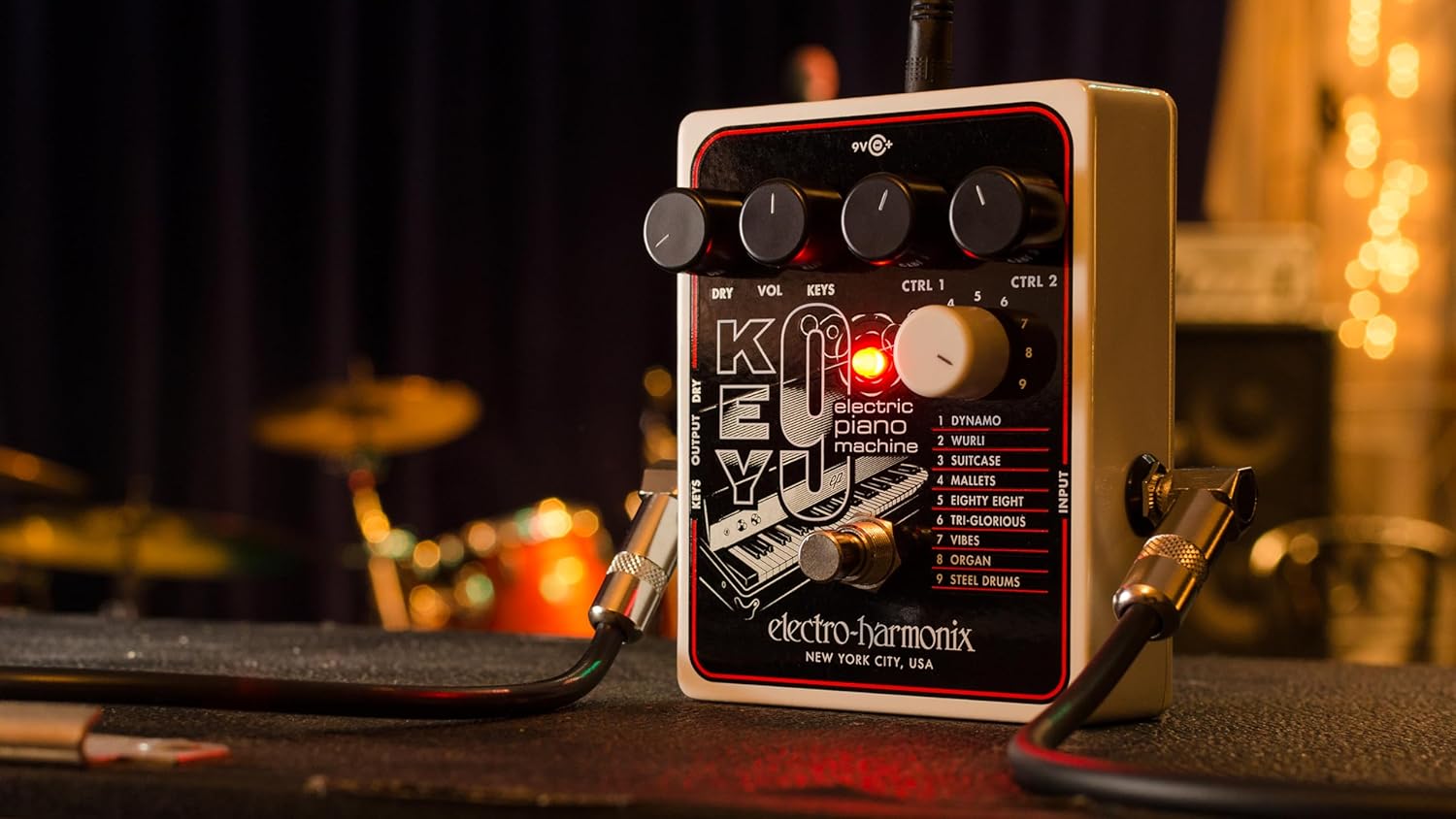
그림 3: 각도 view of the KEY9 pedal, highlighting the control knobs and jacks.
유지
To ensure the longevity and optimal performance of your Electro-Harmonix KEY9 pedal, follow these maintenance guidelines:
- 청소: 페달 외부를 닦을 때는 부드럽고 마른 천을 사용하세요. 연마성 세제나 용제는 사용하지 마세요.
- 저장: 페달을 사용하지 않을 때는 직사광선과 극한의 온도를 피해 시원하고 건조한 곳에 보관하세요.
- 전원 공급 장치: Always use the included 9.6VDC 500mA power supply or a compatible, regulated power supply to prevent damage.
- 사이: 모든 케이블 연결 부위의 마모나 손상을 주기적으로 점검하세요. 잭에 먼지나 이물질이 없는지 확인하세요.
문제 해결
If you encounter issues with your KEY9 pedal, consult the following common troubleshooting steps:
- 소리 없음:
- 모든 케이블 연결 상태(입력, 출력, 전원)를 확인하십시오.
- 전원 공급 장치가 올바르게 연결되어 있고 정상적으로 작동하는지 확인하십시오.
- 귀하의 것을 확인하십시오 amplifier or mixer is powered on and its volume is up.
- Adjust the DRY and KEYS/VOL knobs on the pedal.
- 음질 불량/잡음:
- Ensure you are using a proper, regulated 9.6VDC power supply.
- 결함이 있는 케이블이 있는지 확인하세요.
- Experiment with different guitar pickups or guitar settings.
- Adjust the CTRL 1 and CTRL 2 knobs, as some settings may introduce unwanted artifacts depending on your guitar and playing style.
- 효과가 나타나지 않음:
- Press the footswitch firmly to ensure it engages. The LED should illuminate.
- If the LED does not light up, check the power supply.
명세서
| 품목 무게 | 1.1 파운드 |
| 제품 치수 | 4.75인치 길이 x 4인치 너비 x 2.25인치 높이 |
| 품목 모델 번호 | KEY9 |
| 전원 | Corded Electric (9.6VDC 500mA power supply included) |
| 하드웨어 인터페이스 | 1/4인치 오디오 |
| 신호 형식 | 비슷한 물건 |
| 재료 유형 | Plastic (brushed aluminum finish) |
| 숙련도 수준 | 중급, 고급 |
보증 및 지원
Electro-Harmonix 제품은 뛰어난 신뢰성과 성능을 위해 설계되었습니다. 보증 정보, 기술 지원 또는 서비스 문의는 Electro-Harmonix 공식 웹사이트를 참조하십시오. web사이트를 방문하거나 고객 서비스 부서에 문의하세요. 보증 청구에 대비해 구매 증빙 자료로 구매 영수증을 보관하세요.