
1. 서론
This manual provides detailed instructions for the setup, operation, and maintenance of your Zmodo Mini WiFi 720p HD Wireless Indoor Home Video Security Camera. Please read this manual thoroughly before using the device to ensure proper functionality and safety. This camera is designed for indoor surveillance, offering 720p HD video, two-way audio, and remote access capabilities.
2. 제품 오버view
Familiarize yourself with the components of your Zmodo Mini WiFi Camera.

이미지 2.1: Zmodo Mini WiFi Camera mounted on a wall, showing its compact design and lens. This image illustrates the camera's appearance and typical indoor placement.

이미지 2.2: Zmodo Mini WiFi Camera held in a person's hand, demonstrating its small and portable size. This helps visualize the camera's dimensions.
이미지 2.3: Zmodo Mini WiFi Camera displayed with its power adapter and a quick guide. This shows the main items included in the product package.
2.1 패키지 내용
- Zmodo Mini WiFi Camera
- 전원 어댑터
- 빠른 시작 가이드
3. 설정 지침
3.1 앱 다운로드
제어하고 view your camera, download the MeShare app. 검색 "MeShare" in the Apple App Store (for iOS 6 and up) or Google Play Store (for Android 2.3 and up).
3.2 전원 켜기
- 전원 어댑터를 카메라의 전원 입력 포트에 연결합니다.
- 전원 어댑터를 표준 전기 콘센트에 연결하십시오.
- Wait for the camera's indicator light to show a specific status (refer to the app for light status meanings during setup).
3.3 Network Connection (SmartLink)
The camera uses 2.4GHz Wi-Fi for connectivity. It is not compatible with 5GHz networks.
- Open the MeShare app and create an account or log in.
- 새 장치를 추가하려면 앱 내 지침을 따르세요.
- Select the SmartLink setup option. The app will guide you through connecting the camera to your home Wi-Fi network.
- Ensure your mobile device is connected to the 2.4GHz Wi-Fi network you intend to connect the camera to during setup.
4. 사용 설명서
4.1 라이브 View 및 원격 액세스
Access your camera's live 720p HD video feed from anywhere using the MeShare app on your Android, iPhone, or iPad device. You can also access it via a web 브라우저 user.meshare.com/user/login.

이미지 4.1: A laptop, tablet, and smartphone simultaneously displaying live video feeds from Zmodo cameras. This illustrates the multi-device remote access capability.
4.2 양방향 오디오
The camera features two-way audio, allowing you to listen to the environment around the camera and speak through its built-in speaker using the MeShare app.
4.3 동작 감지
The camera is equipped with a motion sensor that can detect movement. You can configure motion alerts within the MeShare app to receive notifications when motion is detected.

이미지 4.2: A smartphone screen showing a Zmodo alert for motion detected, with video clips available for review. This demonstrates the motion alert feature.
4.4 야간 투시경
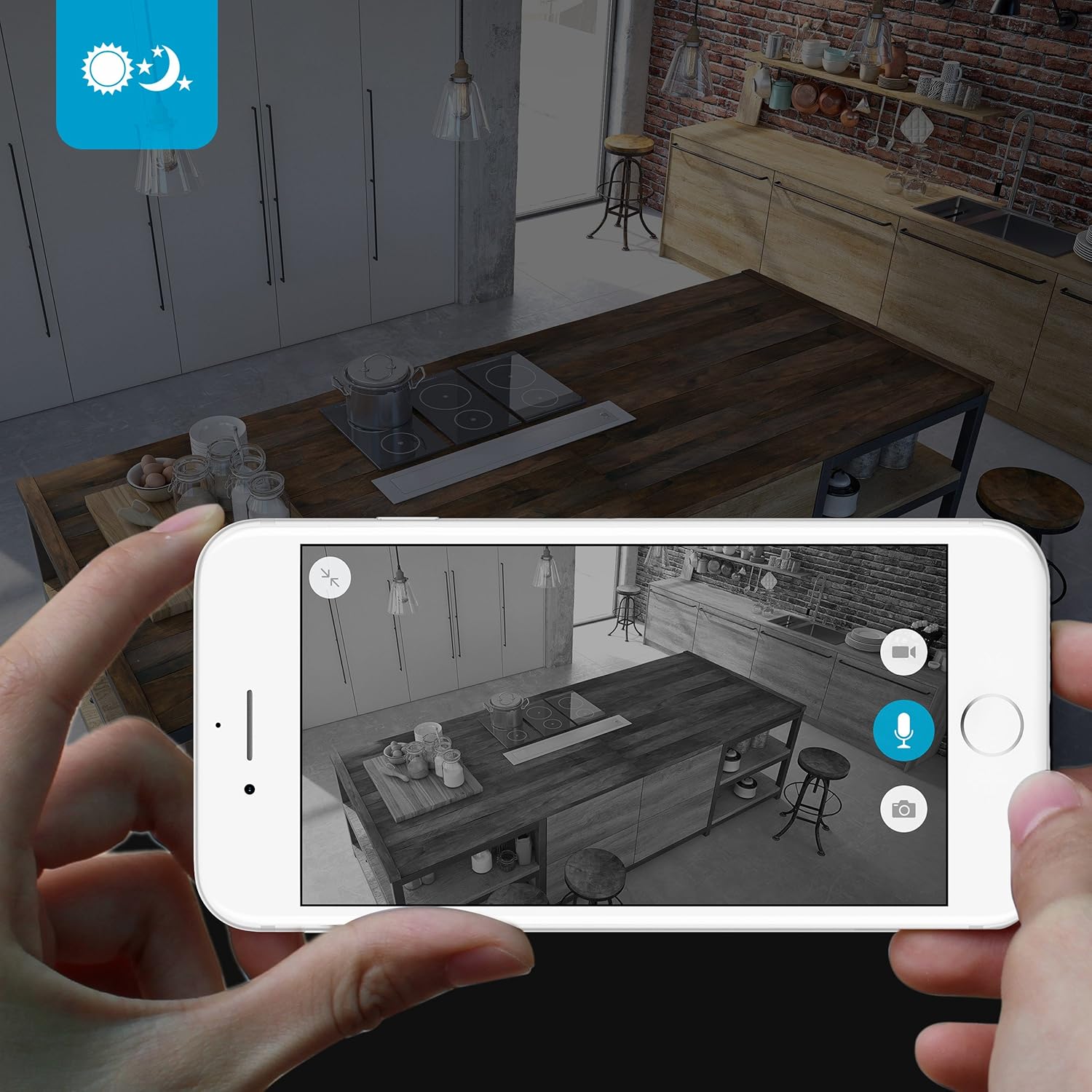
The camera provides clear surveillance even in low-light conditions with its night vision capabilities, offering a range of up to 30 feet. It automatically switches between color day mode and black & white night mode using infrared light.

이미지 4.3: A smartphone screen showing a black and white night vision view from the Zmodo camera in a kitchen setting. This illustrates the camera's low-light performance.
4.5 광각 View
The camera features a 115° wide-angle lens, allowing for a broad view of your indoor space.

이미지 4.4: A smartphone screen showing a wide-angle view from the Zmodo camera in a bedroom, capturing a broad area. This highlights the 115-degree field of view.
5. 유지관리
5.1 카메라 청소
- 청소하기 전에 카메라의 전원이 꺼져 있는지 확인하세요.
- 부드럽고 마른 천으로 카메라 본체를 살살 닦아주세요.
- 렌즈를 닦을 때는 흠집이 생기지 않도록 광학 기기 전용 렌즈 클리닝 천을 사용하십시오.
- 카메라에 액체 세척제나 에어로졸 스프레이를 직접 사용하지 마십시오.
5.2 환경 고려 사항
- 이 카메라는 실내에서만 사용하도록 설계되었습니다.
- 카메라를 직사광선이나 열원 근처에 두지 마십시오.
- Keep the camera away from moisture and extreme temperatures.
6. 문제 해결
6.1 일반적인 문제 및 해결 방법
- 카메라가 Wi-Fi에 연결되지 않음: Ensure your Wi-Fi network is 2.4GHz. Verify your Wi-Fi password. Try restarting your router and the camera.
- 비디오 품질이 좋지 않음: 인터넷 연결 속도를 확인하세요. 카메라 렌즈가 깨끗하고 장애물이 없는지 확인하세요.
- 소리가 안 나거나 소리가 왜곡됨: Verify microphone and speaker settings in the MeShare app. Ensure there are no physical obstructions blocking the microphone or speaker.
- Motion alerts not working: Check motion detection settings in the MeShare app. Ensure notifications are enabled for the app on your mobile device.
- 카메라 오프라인: Check if the camera is powered on. Verify your Wi-Fi network is active and stable. Try restarting the camera.
7. 사양
| 특징 | 설명 |
|---|---|
| 모델 번호 | WAUBMAKGCUVDD |
| 비디오 캡처 해상도 | 720p HD |
| 연결 기술 | 무선(Wi-Fi 2.4GHz) |
| 양방향 오디오 | 예 |
| 와이드 앵글 | 115° |
| 나이트 비전 범위 | 최대 30피트(적외선) |
| 모션 센서 | 예 (움직임 감지 알림 유형) |
| 전원 | AC/DC(5볼트, 5와트) |
| 실내/실외 사용 | 실내 |
| 치수(길이 x 너비 x 높이) | 7 x 2.1 x 4.5 인치 |
| 품목 무게 | 12 온스 |
| 호환 장치 | Video Monitor (Android, iPhone, iPad) |
8. 보증 및 지원
For warranty information or technical support, please refer to the official Zmodo website or contact Zmodo customer service directly. Keep your purchase receipt for warranty claims.
추가 지원을 받으려면 다음을 방문하세요. Zmodo Store on Amazon.