
1. 서론
The Edifier P180 is a stereo earbud headset designed for clear audio and convenient communication. Featuring an inline microphone and control, it offers a comfortable listening experience for various devices.

Figure 1: Edifier P180 Wired Earbud Headset
2. 상자 안에 무엇이 들어있나요?
- Edifier P180 Earbud Headset
- 케이블
3. 주요 특징
- Classic Comfort: Ergonomic design for comfortable wear without irritating the ear canal.
- 뛰어난 음질: Equipped with 16mm neodymium magnetic monomers for high-fidelity audio playback.
- Integrated Microphone and Control: 3.5mm stereo earphones with a built-in microphone and remote button for mobile phone communication.
- 기능: Single button control for picking up/hanging up calls and skipping songs (device dependent for iOS/Android).
- 내구성 있는 디자인: Constructed with quality materials for longevity.

Figure 2: Ergonomic design for comfortable fit.
4. 설정
- 풀다: Carefully remove the Edifier P180 headset from its packaging.
- 검사: Check the earbuds and cable for any visible damage.
- 연결하다: Insert the 3.5mm audio jack into the headphone port of your compatible device (smartphone, tablet, computer, etc.). Ensure the jack is fully inserted for proper audio and microphone function.
- 위치: Place the earbuds comfortably in your ears. The ergonomic design is intended to rest well without causing irritation.
5. 사용 설명서
The Edifier P180 features an inline control button for easy management of calls and music playback.
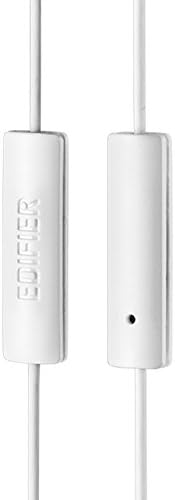
Figure 3: Inline microphone and control button.
- 전화 받기 / 끊기 : 수신 전화를 받으려면 제어 버튼을 한 번 누르십시오. 통화 중인 전화를 종료하려면 다시 누르십시오.
- 음악 재생/일시정지: 제어 버튼을 한 번 누르면 오디오 재생이 시작되거나 일시 정지됩니다.
- 트랙 건너뛰기: Double-press the control button to skip to the next track. Triple-press to go to the previous track (functionality may vary by device and operating system).
- 음성 어시스턴트 : Long-press the control button to activate your device's voice assistant (e.g., Siri, Google Assistant).
영상 1: 공식 제품 출시 완료view of the Edifier P180 Classic Earbud Headsets, demonstrating features and usage.
6. 유지관리
- 청소: 이어버드와 케이블은 부드럽고 마른 천으로 살살 닦아주세요. 강한 화학 약품이나 연마성 재질은 사용하지 마세요.
- 저장: 사용하지 않을 때는 깨끗하고 건조한 곳에 보관하세요. 극한의 온도와 직사광선을 피해 보관하세요. 케이블이 꼬이지 않도록 주의하세요.
- 습기를 피하세요: Do not expose the headset to water or excessive moisture, as this can damage the internal components.
7. 문제 해결
- 소리 없음:
- 3.5mm 잭이 기기의 오디오 포트에 완전히 삽입되었는지 확인하세요.
- 기기의 볼륨 설정을 확인하세요.
- 이어폰을 다른 기기에 연결하여 테스트해 보고 기기 자체의 문제인지 확인해 보세요.
- 마이크가 작동하지 않음:
- 3.5mm 잭이 완전히 삽입되었는지 확인하세요.
- 기기의 마이크 입력 설정을 확인하세요.
- 마이크를 다른 기기나 애플리케이션으로 테스트해 보세요.
- 간헐적인 오디오:
- Check the cable for any kinks or damage.
- 오디오 잭이 깨끗하고 이물질이 없는지 확인하세요.
8. 사양
| 특징 | 사양 |
|---|---|
| 모델 번호 | 피180 |
| 주파수 응답 | 20Hz - 20,000Hz |
| 헤드폰 잭 | 3.5 mm 잭 |
| 연결 기술 | 열광한 |
| 품목 무게 | 1.76온스(50그램) |
| 제품 치수 | 2.01 x 5.59 x 0.91 인치 |
| 재료 | 네오디뮴 |
| 제어 유형 | Inline Control Button |
| 임피던스 | 32옴 |
| 소음 제어 | 소리 차단 |
9. 보증 및 지원
The Edifier P180 headset is backed by a 1년 보증. For any support inquiries or warranty claims, please refer to the contact information provided with your purchase or visit the official Edifier web대지.