
Nextech DFS-N
넥스텍 DFS1000 디지털 힘 측정기 사용자 설명서
Model: DFS-N
브랜드: 넥스텍
소개
This manual provides detailed instructions for the safe and effective operation of your Nextech DFS1000 Digital Force Gauge. Please read this manual thoroughly before using the device to ensure proper functionality and to prevent damage.
주요 특징
- Accuracy 0.2% or better of Full Scale (FS).
- Hold Peak Tension or Compression load reading until reset.
- Peak or Track Mode for versatile measurements.
- Internal memory for storing up to 500 readings.
- Compatible with 'NexGraph' PC Software for plotting Time vs Force.
- M6 Threaded Rod attachment for various load accessories.
- Menu-driven, digital graphic LCD display with white backlight.
- Durable metal enclosures with 2x 10-32"(M5) & 4x M3 mountable threaded holes.
- Re-calibration feature with password protection.
- Load cell condition and overload counter's display page for diagnostics.
- Powered by internal rechargeable NiMH battery pack or directly from wall plug charger.
- Includes plastic case, charger, USB cable, printed manual, and 3 stainless steel accessories.
- Factory's calibration certificate included.
설정
포장 풀기 및 초기 검사
Carefully unpack all components from the carrying case. Verify that all items listed in the 'Included Components' section are present and undamaged. If any items are missing or damaged, contact Nextech customer support immediately.
장치 충전하기
The DFS1000 is powered by an internal rechargeable NiMH battery pack. Before first use, fully charge the device using the provided 100-240 volts US Plug charger. Connect the charger to the device's power input port and plug it into a suitable power outlet.

Image: The DFS1000 Digital Force Gauge, charger, USB cable, and three stainless steel accessories (sharp point, hook, and compression plate) neatly arranged within its black plastic carrying case, alongside the printed manual.
액세서리 부착
The device features an M6 threaded rod attachment point for connecting various load accessories. Select the appropriate stainless steel accessory (sharp point, hook, or compression plate) for your testing application and securely screw it onto the threaded rod.
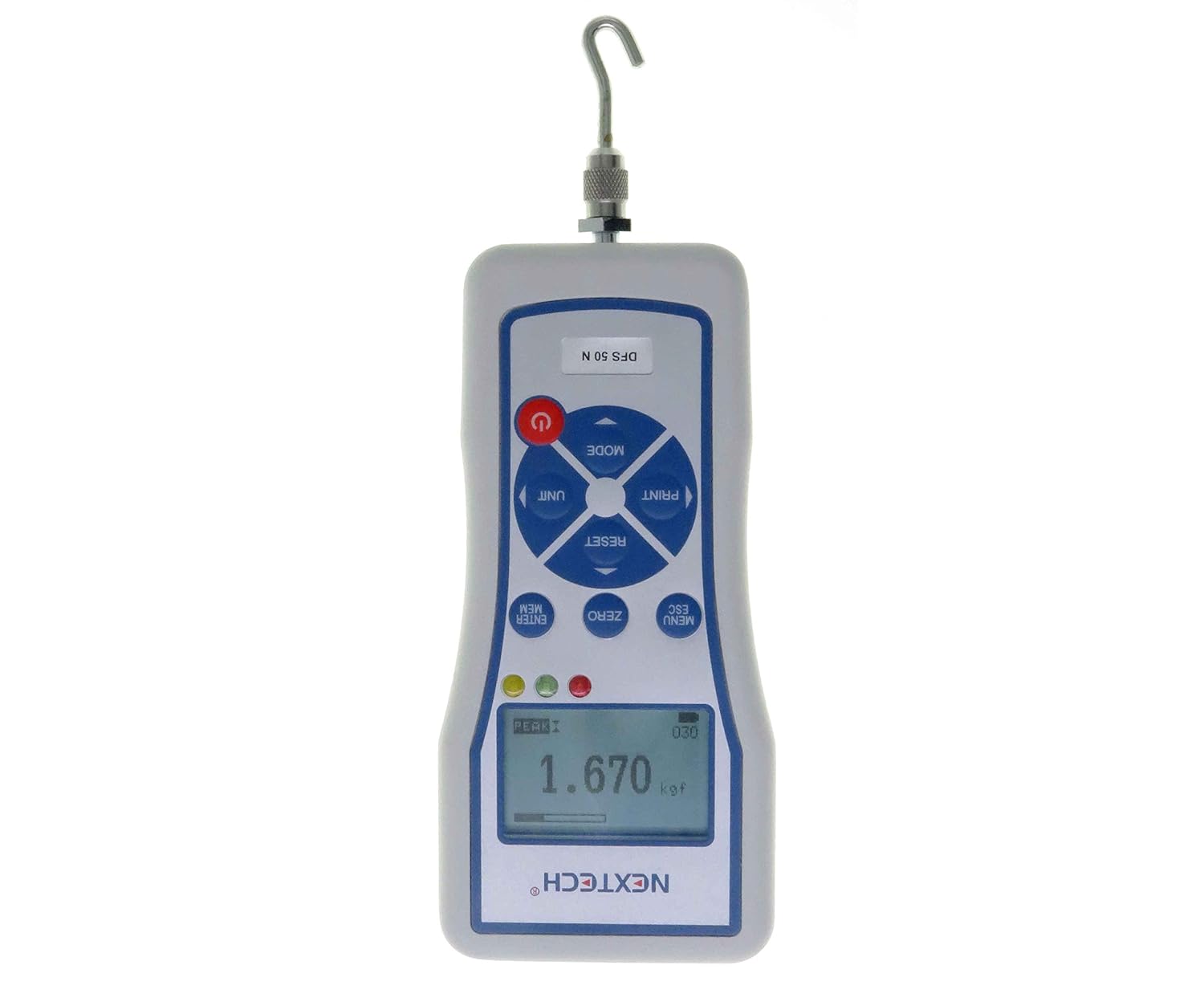
이미지: 앞면 view of the Nextech DFS1000 Digital Force Gauge, showing its digital display and control buttons. A hook attachment is screwed into the bottom of the device, ready for tension testing.
작동 지침
전원 켜기/끄기
Press the red power button to turn the device on or off. The digital graphic LCD display will illuminate.

이미지: 클로즈업, 비스듬한 각도 view of the Nextech DFS1000 Digital Force Gauge, highlighting its large back-lit graphic LCD screen and the arrangement of its control buttons, including the red power button.
측정 모드 선택
The DFS1000 offers three primary measurement modes: Peak Tension, Peak Compression, and Tracking. Use the 'MODE' button to cycle through these options. The selected mode will be indicated on the LCD display. This feature is demonstrated in the video below.
측정 단위 변경
The device supports multiple units of measurement, including kilogram-force (kgf), pound-force (lbf), newton (N), and kilonewtons (kN). Press the 'UNIT' button to switch between these units. The current unit will be displayed on the screen. This feature is demonstrated in the video below.
Zeroing the Display
Before taking a measurement, ensure the display reads zero. Press the 'ZERO' button to reset the reading. This is crucial for accurate measurements.
Pass/Fail Limits
The DFS1000 allows you to set upper and lower pass/fail limits. If a measurement falls outside these predefined limits, the device will indicate a 'Fail' status using LED indicators. Refer to the device's menu for setting these limits. This feature is demonstrated in the video below.
Memory Storage and Data Logging
The device can store up to 500 readings in its internal memory. To save a reading, press the 'ENTER MEM' button. You can review stored results directly from the menu or download them to a Windows-based computer using the provided USB cable and 'NexGraph' PC software. This feature is demonstrated in the video below.

이미지: 후면 view of the Nextech DFS1000 Digital Force Gauge, showing the various ports at the top, including the USB output for data transfer to a computer.

Image: A screenshot of the 'NexGraph' PC software interface, displaying a force versus time plot and a table of recorded data, demonstrating the data logging and analysis capabilities of the DFS1000.
공식 제품 영상: 주요 기능view
Video: This official video from Nextech provides an overview of the DFS Digital Force Gauge's key features, including how to select measurement modes (Peak Tension, Peak Compression, Tracking), change units of measurement (kgf, lbf, N, kN), set and interpret pass/fail limits, store and review memory data, and view diagnostic details like the overload counter.
유지
청소
부드럽고 마른 천으로 기기를 닦으십시오. 연마성 세척제나 용제를 사용하지 마십시오. 기기 내부에 액체가 들어가지 않도록 하십시오.
저장
Store the DFS1000 in its provided plastic case in a cool, dry place when not in use. Avoid extreme temperatures and humidity.
재교정
The device features a recalibration function with password protection. Regular calibration is recommended to maintain accuracy. Refer to the device's menu for calibration procedures or contact Nextech support for professional calibration services.
문제 해결
장치 전원이 켜지지 않음
- 배터리가 충전되어 있는지 확인하세요. 충전기를 연결하고 최소 30분 동안 충전한 후 다시 전원을 켜보세요.
- 전원 버튼이 단단히 눌러져 있는지 확인하세요.
부정확한 판독
- 측정하기 전에 반드시 기기를 영점 조정하십시오.
- Check that the correct unit of measurement is selected.
- Consider recalibrating the device if inaccuracies persist.
데이터 전송 문제
- Verify the USB cable is securely connected to both the device and the computer.
- Ensure the 'NexGraph' PC software is correctly installed and running on your computer.
- Check the device's 'Select Output' menu option to ensure USB output is enabled.
Overload Counter
The device includes an overload counter display page in the diagnostic menu. This can help identify if the device has been subjected to forces exceeding its capacity, which might affect its performance. Access this via the menu. This feature is demonstrated in the official product video.
명세서
| 특징 | 세부 사항 |
|---|---|
| 상표 | 넥스텍 |
| 모델 번호 | DFS-N |
| 제품 크기(L x W x H) | 2.95 x 1.18 x 6.3 인치 |
| 품목 무게 | 1.18킬로그램(2.6파운드) |
| 재료 | 알류미늄 |
| 배터리 | AAA 배터리 4개 (포함) |
| 원산지 | 태국 |
| 제조업체 | Nextech Global Company Limited. |
| 정확성 | 0.2% or better of FS (Full Capacity) |
| 메모리 저장 | 500개의 독서 |
| 디스플레이 유형 | Back-Lit Graphic LCD |
| 전원 어댑터 입력 | 100-240볼트 AC |
Capacity Information (DFS Series)

Image: A table showing the different models in the DFS series (DFS 50, DFS 100, DFS 200, DFS 500, DFS 1000) and their corresponding capacities in Pound (lbf), Kilogram (kgf), and Newton (N).
물리적 차원

Image: A technical drawing illustrating the dimensions of the Nextech DFS Digital Force Gauge from front, side, and rear perspectives, including measurements in millimeters and details on threaded mounting holes (M3, M5, M6).
보증 및 지원
The DFS1000 comes with a factory calibration certificate. For warranty information, technical support, or service inquiries, please contact Nextech Global Co., Ltd. directly. Contact details can typically be found on the manufacturer's website or in the included printed manual.
추가적인 지원 및 자료를 원하시면 공식 웹사이트를 방문하세요. Nextech Store on Amazon.
포함된 구성 요소
전체 세트에는 다음이 포함됩니다.
- DFS1000 Digital Force Gauge
- 플라스틱 운반 케이스
- 100-240 volts US Plug Charger
- USB 케이블
- 인쇄된 매뉴얼
- 3x Stainless Steel Accessories:
- 샤프 포인트
- 훅
- 압축 판
- Factory's Calibration Certificate

Image: A diagram illustrating the components included in the DFS series force gauge kit, such as the plastic case, manual, USB cable, charger, the force gauge itself, and three stainless steel accessories (sharp point, hook, and compression plate).
옵션 액세서리
Additional handles and accessories are available and sold separately to expand the functionality of your DFS1000 Digital Force Gauge.

Image: A display of optional accessories for the DFS series force gauge, featuring a handle assembly and various additional attachments for specialized testing applications.
Ask a question about this manual
Ask about setup, troubleshooting, compatibility, parts, safety, or missing instructions. Manuals+ will review the question and use this page’s manual context to help answer it.