
1. 서론
The ASUS Z170-DELUXE is a high-performance desktop motherboard designed for Intel Z170 chipset and LGA 1151 socket processors. It offers advanced features for enhanced speed, stability, and connectivity, making it suitable for demanding computing tasks and gaming. This manual provides essential information for setting up, operating, and maintaining your motherboard.
주요 특징은 다음과 같습니다.
- 5방향 최적화: Dynamic system tuning for performance, efficiency, digital power, fan control, and networking.
- ASUS PRO Clock Technology: Dedicated base-clock generator for extended overclocking margins.
- 크리스탈 사운드 3: Advanced audio solution for clear and immersive sound.
- 3x3 Dual-Band 802.11ac Wi-Fi + BT4.0: Integrated high-speed wireless connectivity.
- NVME U.2 Device Support and Hyper M.2 x4 Mini Card Support: Next-generation storage options for ultra-fast data transfer.
- USB 3.1 Type-A and Type-C Ports: High-speed USB connectivity with reversible Type-C.
- 5X Protection II: Hardware-level safeguards for long-term durability and reliability.
- Intel Ethernet: Optimized network performance with reduced CPU overhead.
2. 설정 및 설치
This section guides you through the physical installation of the ASUS Z170-DELUXE motherboard and its components.
2.1. 시스템 준비
- 전원 공급 장치가 벽면 콘센트에서 분리되어 있는지 확인하십시오.
- Prepare your computer case and ensure adequate space for installation.
- Gather necessary tools, including a Phillips head screwdriver.
2.2. 마더보드 설치
- Carefully place the motherboard into your computer case, aligning it with the standoffs.
- 나사로 마더보드를 고정합니다.
- Install the CPU (Intel LGA 1151) into the socket, ensuring correct orientation.
- 써멀 페이스트를 바르고 CPU 쿨러를 설치하세요.
- Install DDR4 RAM modules into the designated slots (4 available). For optimal performance, refer to your CPU and RAM manufacturer's guidelines for dual-channel configuration.
- Connect the 24-Pin main power connector and the 8-Pin CPU power connector from your power supply to the motherboard.
- Connect front panel headers (power button, reset button, USB ports, audio jacks) using the provided Q-Connector for easier installation.

Figure 1: ASUS Z170-DELUXE Motherboard layout.
2.3. 저장 장치 및 확장 카드 설치
- SATA 장치: Connect SATA storage drives (HDDs/SSDs) to the available SATA 3 ports (6 total).
- M.2/U.2 Devices: For NVMe M.2 SSDs, insert the module into the M.2 slot and secure it. The motherboard supports NVMe U.2 devices via an adapter (sold separately).
- PCIe Cards: Install graphics cards or other expansion cards into the appropriate PCIe slots (7 total).
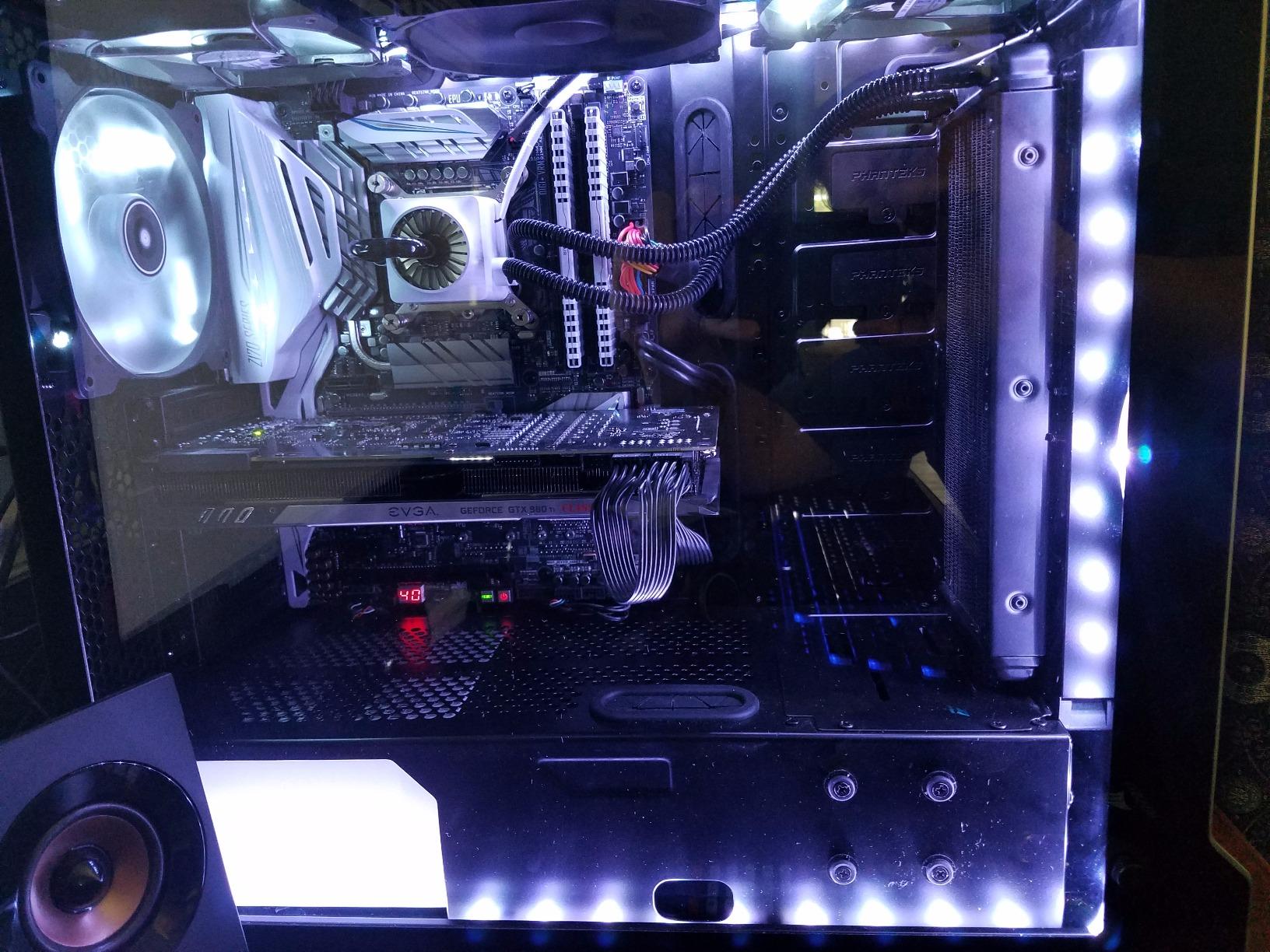
Figure 2: ASUS Z170-DELUXE Motherboard installed in a system, showcasing component layout.
3. 사용 설명서
This section covers the basic operation and key features of your ASUS Z170-DELUXE motherboard.
3.1. 초기 부팅 및 BIOS 설정
- 모든 구성 요소와 주변 장치를 연결한 후 시스템 전원을 켜십시오.
- 를 누르세요 델 or F2 시동 중에 키를 눌러 UEFI BIOS에 진입하십시오.
- In the BIOS, you can configure boot order, enable XMP for RAM, adjust fan speeds, and manage other system settings.
- The ASUS UEFI BIOS provides an intuitive interface for easy navigation and configuration.
3.2. 소프트웨어 및 드라이버 설치
- Install your operating system (e.g., Windows 10).
- Install the latest drivers for the Z170 chipset, audio, LAN, Wi-Fi, and other integrated components from the ASUS support web해당 사이트 또는 제공된 드라이버 디스크를 사용하십시오.
- Utilize ASUS utilities like AI 스위트 3, 여기에는 다음이 포함됩니다. FAN Expert for advanced fan control and 5-Way Optimization for system tuning.
3.3. 연결 기능
- USB 3.1: Utilize the high-speed USB 3.1 Type-A and reversible Type-C ports for fast data transfer with compatible devices.
- Wi-Fi 및 블루투스: Connect to wireless networks using the integrated 3x3 Dual-Band 802.11ac Wi-Fi. Bluetooth 4.0 allows connection to wireless peripherals.
- Intel Ethernet: Benefit from stable and high-throughput wired network connections.
4. 유지관리
적절한 유지관리는 마더보드의 수명과 최적의 성능을 보장합니다.
- 깨끗하게 유지하십시오: Regularly clean dust from the motherboard and case interior using compressed air. Ensure fans are free of obstructions.
- BIOS 업데이트: 정기적으로 ASUS 지원을 확인하세요 website for BIOS updates. Updating the BIOS can improve compatibility, stability, and performance. Use the ASUS EZ Flash utility for safe BIOS updates.
- 드라이버 업데이트 : Keep all drivers (chipset, audio, LAN, etc.) updated to their latest versions for optimal performance and security.
- 전원 공급 장치: Ensure your power supply provides stable and sufficient power to all components. Unstable power can lead to system instability.
5. 문제 해결
This section addresses common issues you might encounter with your ASUS Z170-DELUXE motherboard.
- No POST (Power-On Self-Test) / Error Code 55:
- Error code 55 typically indicates a memory issue.
- RAM 모듈이 슬롯에 완전히 장착되었는지 확인하십시오.
- Try booting with only one RAM stick, testing each slot and module individually to identify a faulty stick or slot.
- Verify RAM compatibility with the motherboard's QVL (Qualified Vendor List) on the ASUS web대지.
- Update the BIOS to the latest version, as this often includes memory compatibility improvements.
- 비디오 출력 없음:
- Ensure your monitor is connected to the correct video output (integrated graphics or dedicated graphics card).
- If using integrated graphics with a 4K display at 60Hz via HDMI, you might experience a blank screen. The integrated HDMI port on the Z170 chipset may be limited to 30Hz at 4K resolution. Consider using a DisplayPort connection or a dedicated graphics card for 4K 60Hz output.
- Reseat your graphics card if applicable.
- 모니터 입력 선택을 확인하십시오.
- 시스템 불안정/충돌:
- 모든 전원 커넥터가 단단히 연결되어 있는지 확인하십시오.
- CPU와 GPU 온도를 확인하세요. 과열은 시스템 불안정을 초래할 수 있습니다.
- 메모리 진단 도구를 사용하여 RAM 안정성을 확인하십시오.
- If using RAID, ensure Intel Rapid Storage Technology (IRST) drivers are compatible. Some IRST driver versions (e.g., 14.8.1.1042 or 15.2.0.1020) have been reported to cause issues with certain configurations. Try using an older stable version (e.g., 14.0.0.1143 or 14.5.0.1081) or uninstall IRST if not using RAID.
- Ensure your power supply is sufficient for your components.
- 주변 장치가 감지되지 않음:
- 물리적 연결을 확인하십시오.
- 관련 드라이버를 설치하거나 업데이트하십시오.
- Test the peripheral on another port or system.
6. 사양
| 특징 | 세부 사항 |
|---|---|
| 상표 | 아수스 |
| 모델명 | Z170-DELUXE |
| CPU 소켓 | LGA 1151 |
| 칩셋 유형 | 인텔 Z170 |
| 호환 프로세서 | Intel Celeron, Core i7 (and other LGA 1151 compatible CPUs) |
| RAM 메모리 기술 | DDR4 |
| 메모리 클럭 속도 | 2133MHz (기본 주파수, XMP를 통해 더 높은 주파수 지원) |
| 사용 가능한 메모리 슬롯 | 4 |
| RAM 메모리 최대 크기 | 64GB (XNUMX기가바이트) |
| 총 SATA 포트 수 | 6 |
| 총 USB 포트 | 15 (including USB 3.1 Type-A and Type-C) |
| 이더넷 포트 수 | 2 (Intel Ethernet) |
| HDMI 포트 총 개수 | 1 |
| Total PCIe Ports | 7 |
| 그래픽 카드 인터페이스 | 통합형, PCI Express |
| 품목 무게 | 0.8 킬로그램 |
7. 보증 및 지원
자세한 보증 정보는 제품과 함께 제공된 보증 카드를 참조하거나 공식 ASUS 지원을 방문하세요. webASUS 웹사이트에서는 제품 관련 문의 사항에 대한 기술 지원 및 자료를 제공합니다.
- ASUS 지원 Web대지: www.asus.com/support/
- 연락처 정보: ASUS를 참조하세요 website for regional contact details and customer service options.
참고: 보증 약관은 지역별로 다를 수 있습니다. 보증 청구를 위해 구매 증빙 자료를 보관해 주세요.