
삼성 SM-T116
삼성 갤럭시 탭 3 라이트 SM-T116 사용 설명서
Your comprehensive guide to operating and maintaining your device.
소개
Welcome to the user manual for your Samsung Galaxy Tab 3 Lite SM-T116. This guide provides detailed instructions on how to set up, operate, maintain, and troubleshoot your tablet. Designed for ease of use, the Galaxy Tab 3 Lite features a 7-inch display, 8GB of internal storage, and supports 3G and Wi-Fi connectivity, allowing you to stay connected and productive on the go.
본 설명서를 주의 깊게 읽어 기기를 올바르게 사용하고 성능 및 수명을 극대화하십시오.
1. 설정
1.1 패키지 내용
Ensure all items are present in the product box:
- Samsung Galaxy Tab 3 Lite SM-T116
- 여행용 어댑터
- USB 케이블
- 빠른 시작 가이드 (본 설명서는 자세한 안내서 역할을 합니다)
1.2 장치 레이아웃

그림 1.1: 전면 view of the Samsung Galaxy Tab 3 Lite SM-T116, showing the 7-inch display, front camera, and physical home button.
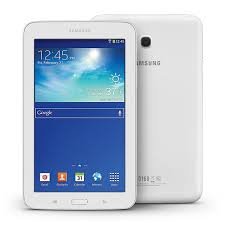
그림 1.2: 앞면과 뒷면 view of the Samsung Galaxy Tab 3 Lite SM-T116, highlighting the rear camera and speaker grille on the back panel.
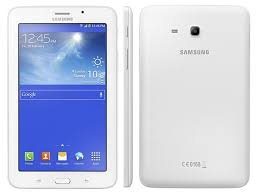
그림 1.3: 측면 view of the Samsung Galaxy Tab 3 Lite SM-T116, illustrating the slim profile and placement of buttons and ports.
Familiarize yourself with the location of buttons, ports, and cameras. Typically, the power button and volume controls are on the side, the charging port at the bottom, and the front/rear cameras on the respective sides.
1.3 배터리 충전
Before first use, fully charge the tablet. Connect the USB cable to the tablet's charging port and the other end to the travel adapter. Plug the travel adapter into a power outlet. The battery indicator will show charging progress. A full charge typically takes approximately 3-4 hours.
1.4 전원 켜기/끄기
- 전원을 켜려면: 삼성 로고가 나타날 때까지 전원 버튼을 길게 누르세요.
- 전원을 끄려면: 전원 옵션 메뉴가 나타날 때까지 전원 버튼을 길게 누른 다음 "전원 끄기"를 탭합니다.
1.5 SIM 및 microSD 카드 삽입
The Galaxy Tab 3 Lite SM-T116 supports a SIM card for 3G connectivity and a microSD card for expandable storage.
- Locate the SIM card slot and microSD card slot on the side or back of the tablet.
- Carefully open the cover(s).
- Insert the SIM card with the gold contacts facing down, ensuring it clicks into place.
- Insert the microSD card into its slot until it is securely seated.
- Close the covers firmly.
메모: Always power off the tablet before inserting or removing SIM or microSD cards to prevent data corruption.
2. 운영
2.1 기본 탐색
Your tablet runs on the Android operating system. Navigation is primarily touch-based:
- 수도꼭지: 앱을 열려면 항목을 선택하거나 버튼을 누르세요.
- 길게 터치: 상황에 맞는 메뉴에 접근하거나 항목을 이동합니다.
- 강타: 화면, 목록 또는 페이지를 스크롤하려면.
- 핀치 투 줌: 이미지를 확대하거나 축소하려면 web 페이지.
- 홈 버튼: 홈 화면으로 돌아갑니다.
- 뒤로가기 버튼: 이전 화면으로 돌아갑니다.
- 최근 앱 버튼: 최근에 사용한 애플리케이션을 표시합니다.
2.2 Wi-Fi에 연결하기
To access the internet via Wi-Fi:
- 이동하다 설정 > 와이파이.
- Wi-Fi 전환 On.
- 목록에서 원하는 Wi-Fi 네트워크를 선택하세요.
- 메시지가 표시되면 네트워크 비밀번호를 입력하고 탭합니다. 연결하다.
2.3 Using 3G Data
If you have a SIM card with a data plan, you can use 3G for internet access:
- 이동하다 설정 > 데이터 사용량 or 모바일 네트워크.
- 보장하다 모바일 데이터 토글됩니다 On.
- Configure APN settings if necessary (refer to your mobile carrier for details).
2.4 카메라 기능
The tablet features a 5MP primary camera.
- 열기 카메라 홈 화면이나 앱 서랍에서 앱을 선택하세요.
- 셔터 버튼을 탭하여 사진을 촬영하세요.
- Switch between photo and video modes as desired.
- Access settings within the camera app to adjust resolution, flash, and other options.
3. 유지관리
3.1 장치 청소
To keep your tablet clean and in good condition:
- 부드럽고 보푸라기가 없는 천을 사용하여 화면과 본체를 닦으세요.
- 완고한 얼룩의 경우 약간 damp천에 물을 묻히거나 전자제품용으로 특별히 고안된 화면 세정제를 묻힙니다.
- 강한 화학 물질, 연마재 또는 과도한 습기를 사용하지 마십시오.
3.2 배터리 관리
- 극한의 온도는 배터리 수명을 단축시킬 수 있으므로 피하세요.
- 태블릿이 완전히 충전된 후에는 장시간 충전기에 꽂아 두지 마십시오.
- If storing the tablet for a long time, charge it to about 50% before turning it off.
3.3 소프트웨어 업데이트
최적의 성능과 보안을 보장하려면 정기적으로 소프트웨어 업데이트를 확인하고 설치하세요.
- 이동하다 설정 > 기기 정보 > 소프트웨어 업데이트.
- 수도꼭지 업데이트 확인.
- Follow on-screen instructions to download and install any available updates.
4. 문제 해결
This section addresses common issues you might encounter with your Samsung Galaxy Tab 3 Lite SM-T116.
4.1 장치가 켜지지 않음
- 배터리가 충분히 충전되었는지 확인하십시오. 충전기를 연결하고 몇 분 정도 기다린 후 전원을 켜십시오.
- Perform a forced restart: Press and hold the Power button and Volume Down button simultaneously for about 7-10 seconds.
4.2 Wi-Fi 연결 문제
- 설정에서 Wi-Fi가 활성화되어 있는지 확인하세요.
- Wi-Fi 라우터와 태블릿을 다시 시작하세요.
- Wi-Fi 설정에서 네트워크를 삭제하고 다시 연결하세요.
- Wi-Fi 신호 범위 내에 있는지 확인하세요.
4.3 느린 성능
- 백그라운드에서 실행 중인 사용하지 않는 애플리케이션을 닫습니다.
- Clear cache data from apps and the system (Settings > Storage > Cached data).
- 불필요한 애플리케이션을 제거하세요.
- 최후의 수단으로 공장 초기화를 고려하세요(먼저 데이터를 백업하세요).
4.4 Apps Crashing or Not Responding
- Force close the app (Settings > Apps > [App Name] > Force Stop).
- 앱의 캐시와 데이터를 지웁니다(설정 > 앱 > [앱 이름] > 저장소 > 캐시 지우기/데이터 지우기).
- Google Play 스토어에서 앱을 업데이트하세요.
- 앱을 다시 설치하세요.
5. 사양
| 특징 | 사양 |
|---|---|
| 모델명 | Samsung Galaxy Tab 3 Lite SM-T116 |
| 표시하다 | 7-inch LCD, 1024 x 600 pixels (WSVGA) |
| 프로세서 | Samsung Processor |
| 숫양 | 1GB (XNUMX기가바이트) |
| 내부 저장소 | 8GB(microSD로 확장 가능) |
| 운영 체제 | 기계적 인조 인간 |
| 후방 카메라 | 5 MP |
| 연결성 | 3G, Wi-Fi (802.11g), Bluetooth, USB |
| 배터리 | (Specific mAh not provided, but it's a standard tablet battery) |
| 치수 | 약 20.4×13×5.1 cm |
| 무게 | 약 350g |
6. 보증 및 지원
6.1 보증 정보
Your Samsung Galaxy Tab 3 Lite SM-T116 comes with a standard manufacturer's warranty, typically covering defects in materials and workmanship for a period of 12 months from the date of purchase. Please refer to the warranty card included in your product packaging for specific terms and conditions, as warranty periods and coverage may vary by region.
보증 청구에 필요하므로 구매 증빙서(영수증 또는 송장)를 보관하세요.
6.2 고객 지원
기술 지원, 서비스 또는 추가 문의 사항이 있으시면 Samsung 고객 지원팀에 문의해 주세요.
- 온라인 지원: 공식 Samsung 지원을 방문하세요 webFAQ, 문제 해결 가이드, 소프트웨어 다운로드 사이트입니다. www.samsung.com/support
- 전화 지원: 지역 Samsung에 문의하세요 website or product packaging for local customer service contact numbers.
- 서비스 센터: Locate authorized Samsung service centers near you through the Samsung support web대지.
When contacting support, please have your tablet's model number (SM-T116) and serial number ready.