
소개
This manual provides essential information for the setup, operation, maintenance, and troubleshooting of your Blackmagic Design URSA Mini 4K Digital Cinema Camera EF-Mount. Please read this manual thoroughly before using the camera to ensure proper functionality and to maximize its capabilities.
The URSA Mini 4K is a compact digital cinema camera featuring a Super-35mm 4K sensor, 12 stops of dynamic range, and an EF-mount for a wide range of compatible lenses. It supports recording in CinemaDNG Raw and ProRes formats to CFast 2.0 memory cards.
안전 정보
카메라 손상을 방지하고 사용자의 안전을 확보하기 위해 다음 안전 수칙을 준수하십시오.
- 카메라를 물이나 과도한 습기에 노출시키지 마세요.
- Avoid extreme temperatures. Operate within specified environmental conditions.
- Use only approved power sources and accessories.
- Do not attempt to disassemble or modify the camera. Refer servicing to qualified personnel.
- Protect the lens and sensor from direct sunlight when not in use.
설정
포장 풀기 및 초기 검사
Carefully remove all components from the packaging. Verify that all items listed in the packing list are present and inspect for any visible damage.
사이드 핸들 부착
The included side handle attaches to the rosette on the side of the camera body. Secure it firmly for comfortable handheld operation and access to start/stop control via LANC connection.
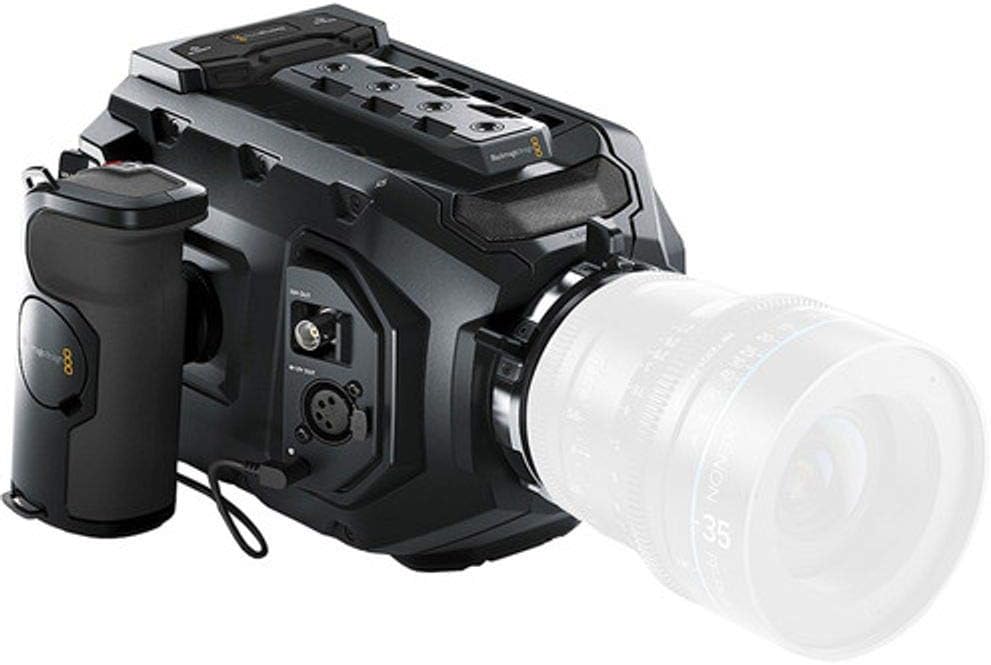
Image: The Blackmagic URSA Mini 4K camera shown with the side handle attached, providing ergonomic grip and control.
렌즈 장착
Align the red dot on your EF-mount lens with the red dot on the camera's lens mount. Gently insert the lens and twist clockwise until it clicks into place. Ensure the lens is securely locked before operation.

Image: The Blackmagic URSA Mini 4K camera with a lens attached, ready for shooting.
카메라에 전원 공급하기
The URSA Mini 4K can be powered via a 4-pin XLR jack at the rear. An optional plate allows for V-Mount or Gold-Mount professional batteries. Ensure the power source provides adequate voltage와 현재.
Inserting CFast 2.0 Cards
Locate the dual CFast 2.0 card slots. Insert the cards with the correct orientation until they click into place. The camera supports continuous recording by switching between cards when one is full.
작동 지침
기본 컨트롤 및 인터페이스
The camera features a 5-inch fold-out touchscreen display for menu navigation and monitoring. Physical buttons provide quick access to essential functions.

Image: The Blackmagic URSA Mini 4K camera with its integrated 5-inch touchscreen monitor extended, displaying a live view.
Recording Formats and Settings
The URSA Mini 4K records in CinemaDNG Raw (uncompressed and 3:1 compressed) and ProRes (444 XQ, 444, 422 HQ, 422, 422 LT, 422 Proxy) formats. Access these settings via the touchscreen menu.
- 해결: Up to 4000 x 2160 (4K) at 60 frames per second.
- 다이나믹 레인지: 12 stops.
- ISO: 200~12800까지 조절 가능.
- 화이트 밸런스: Auto and manual presets available.
오디오 입력
The camera includes XLR audio inputs for professional microphones. Adjust audio levels and monitoring settings through the camera's interface.
유지
카메라 청소
- 부드럽고 마른 천을 사용하여 카메라 본체를 청소하세요.
- For the sensor and lens, use specialized cleaning tools and solutions designed for optical components. Avoid touching the sensor directly.
- 터치스크린은 극세사 천으로 깨끗하게 유지하세요.
펌웨어 업데이트
블랙매직 디자인을 주기적으로 확인하세요 website for firmware updates. Updates can improve performance, add features, and resolve issues. Follow the provided instructions carefully during the update process.
저장
When not in use, store the camera in a dry, dust-free environment, preferably in a protective case. Remove batteries if storing for extended periods.
문제 해결
| 문제 | 가능한 원인 | 해결책 |
|---|---|---|
| 카메라의 전원이 켜지지 않습니다. | Battery depleted or improperly connected; power cable issue. | Ensure battery is charged and correctly inserted. Check power cable connections. |
| 표시되는 이미지가 없습니다. | Lens cap on; display brightness too low; incorrect output settings. | Remove lens cap. Adjust display brightness. Verify video output settings. |
| Recording errors. | CFast card full, slow, or corrupted; incorrect recording format. | Use approved CFast 2.0 cards. Format cards in-camera. Select a compatible recording format. |
| Horizontal lines in footage at high ISO. | Known sensor characteristic at high ISO settings. | Avoid shooting at excessively high ISOs if possible. Check for firmware updates that may address this. |
For further assistance, refer to the official Blackmagic Design support resources or contact customer service.
명세서
| 특징 | 세부 사항 |
|---|---|
| 센서 크기 | Super-35mm CMOS |
| 비디오 해상도 | Up to 4000 x 2160 (4K) at 60p |
| 다이나믹 레인지 | 12 정거장 |
| 렌즈 마운트 | EF-Mount |
| 기록 매체 | Dual CFast 2.0 Card Slots |
| 녹음 형식 | CinemaDNG Raw (Uncompressed/3:1), ProRes (444 XQ, 444, 422 HQ, 422, 422 LT, 422 Proxy) |
| ISO 범위 | 200-12800 |
| 표시하다 | 5-inch Fold-out Touchscreen |
| 오디오 입력 | XLR |
| 연결성 | 12G-SDI Output, Timecode, REF Input, USB 2.0, Wi-Fi |
| 무게 | 5파운드(약 2.27kg) |
보증 정보
Blackmagic Design products typically come with a limited manufacturer's warranty. For specific details regarding the warranty period and terms for your URSA Mini 4K camera, please refer to the warranty card included with your product or visit the official Blackmagic Design web사이트. 보증 청구를 위해 구매 증빙 자료를 보관하세요.
지원 및 연락처
For technical support, product registration, or to download the latest software and manuals, please visit the official Blackmagic Design support page:
www.blackmagicdesign.com/support
You can also find community forums and FAQs on their website which may assist with common queries.