
1. 서론
This manual provides detailed instructions for the safe and efficient operation of your Crenova XPE350 Mini Portable Projector. Please read this manual thoroughly before using the projector and retain it for future reference. The Crenova XPE350 is designed for home and backyard theater use, offering a compact and portable solution for displaying media from various sources.
2. 제품 오버view
The Crenova XPE350 is a mini portable projector featuring a 480x320 resolution and 150 lumens brightness. Its compact design makes it suitable for various environments. Below are key components and features.
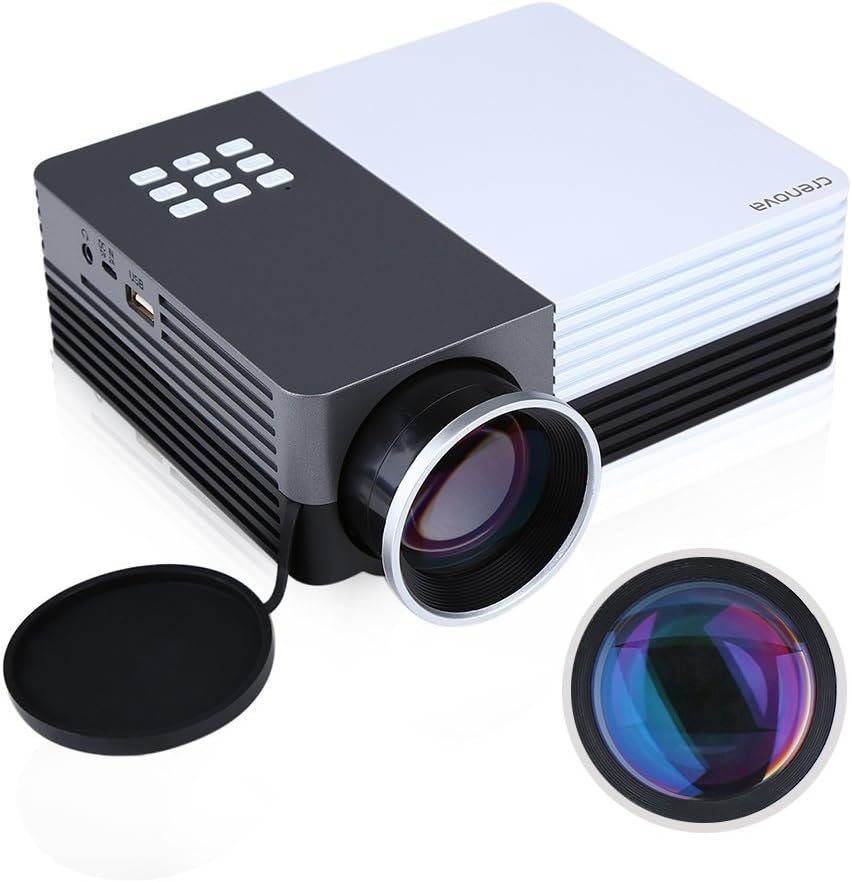
그림 2.1: Crenova XPE350 Mini Portable Projector. This image shows the overall design of the projector, highlighting its compact form factor and front lens.

그림 2.2: The Crenova XPE350 projector held in a hand, demonstrating its compact and portable size. A close-up inset highlights the glass lens, indicating clear image projection.
2.3 패키지 내용
포장을 풀 때 아래 나열된 모든 품목이 들어 있고 상태가 양호한지 확인하세요.
- Crenova XPE350 Mini Portable Projector
- 원격 제어
- AC 전원 어댑터
- AV 케이블
- 사용 설명서 (본 문서)

그림 2.3: Contents of the Crenova XPE350 Projector package. This image displays the projector, remote control, power adapter, AV cable, and the printed user manual.
2.4 프로젝터 구성 요소
Familiarize yourself with the various parts of your projector:
- 렌즈: 화면에 이미지를 투사합니다.
- 기능 버튼: Control basic projector functions.
- 통풍구 : For heat dissipation. Ensure they are not obstructed.
- 입력 포트 : VGA, HDMI, AV, USB, SD Card Slot.
- 오디오 출력: 헤드폰 잭.
- 키스톤 조정: 사다리꼴 이미지 왜곡을 보정합니다.
- 전원 인터페이스: AC 전원 어댑터에 연결합니다.

그림 2.4: 클로즈업 view of the projector's function buttons, lens, and ventilation vents. These are essential for basic control and maintaining optimal operating temperature.

그림 2.5: 상세한 view of the Crenova XPE350 projector's various input and output ports, including VGA, HDMI, AV, USB, headphone jack, mobile power input, SD card slot, and power interface. Also visible is the keystone adjustment dial.
3. 설정
3.1 전원 연결
- Connect the AC power adapter to the "Power Interface" port on the projector.
- 전원 어댑터의 다른 쪽 끝을 적절한 전기 콘센트에 꽂습니다.
- 프로젝터의 전원 표시등이 켜집니다.
3.2 입력 소스 연결
The Crenova XPE350 supports various input sources. Choose the appropriate connection method for your device:

그림 3.1: Diagram illustrating various devices that can be connected to the Crenova XPE350 projector, including laptops, desktop computers, DVD players, game consoles, speakers, mobile hard disks, USB drives, SD cards, digital cameras, tablet PCs, and TV set-top boxes.
- HDMI : For high-definition digital video and audio from devices like laptops, game consoles, or streaming sticks.
- VGA : For connecting to computers with a VGA output.
- 유명인 : For connecting older devices using the included AV cable (e.g., DVD players, some game consoles).
- USB: 미디어 재생을 위해 files USB 플래시 드라이브에서 직접.
- SD 카드: 미디어 재생을 위해 fileSD 메모리 카드에서 직접 가져옵니다.
- MHL (Mobile High-Definition Link): Some smartphones and tablets with MHL-out function can connect via HDMI for screen mirroring. Note: Most Android smartphones do not support MHL function.

그림 3.2: Illustration of the MHL (Mobile High-Definition Link) feature, showing how a tablet and smartphone can mirror their screens to the projector. This feature requires the source device to support MHL-out.
3.3 프로젝터 위치 지정
Place the projector on a stable, flat surface. Ensure there is adequate ventilation around the projector to prevent overheating. The distance from the screen will determine the image size.
4. 사용 설명서
4.1 전원 켜기/끄기
- 전원을 켜려면: Press the power button on the projector or the remote control. The projector lamp 밝아질 것이다.
- 전원을 끄려면: Press the power button again. The projector will shut down.
4.2 이미지 품질 조정
- 초점 조정: Rotate the lens ring (refer to Figure 2.4) until the projected image is clear and sharp.
- 키스톤 보정: Use the keystone adjustment dial (refer to Figure 2.5) to correct trapezoidal distortion if the projector is not perfectly perpendicular to the screen.
4.3 입력 소스 선택
After connecting your desired input device, press the "Source" button on the remote control or the projector's function panel to cycle through available input options (HDMI, VGA, AV, USB, SD Card) and select the correct one.
4.4 Media Playback (USB/SD Card)
Insert a USB flash drive or SD card into the respective port. The projector's interface will typically prompt you to select the media type (e.g., Photo, Music, Movie, Text) for playback. Navigate using the remote control's arrow keys and "OK" button.
5. 유지관리
5.1 렌즈 청소
프로젝터 렌즈는 광학 표면 전용으로 제작된 부드럽고 보풀 없는 천으로 살살 닦아주세요. 연마성 세척제나 과도한 힘을 사용하면 렌즈에 흠집이 생길 수 있으므로 사용하지 마세요.
5.2 환기
Ensure the projector's ventilation vents (refer to Figure 2.4) are clear of obstructions to allow for proper airflow. Blocked vents can lead to overheating and reduced lamp 삶.
5.3리터amp 삶
The Crenova XPE350 projector features a long-life lamp, estimated at 20,000 hours under normal operating conditions, thanks to its SmartEco technology.

그림 5.1: Illustration highlighting the Crenova XPE350 projector's long lamp life of 20,000 hours, supported by SmartEco technology, indicating energy efficiency and durability.
6. 문제 해결
- 전원 없음:
- 전원 어댑터가 프로젝터와 작동하는 콘센트에 제대로 연결되어 있는지 확인하십시오.
- 전원 표시등이 켜져 있는지 확인하십시오.
- 이미지 없음:
- Verify that the correct input source is selected (HDMI, VGA, AV, USB, SD).
- 프로젝터와 소스 장치 간의 모든 케이블 연결을 확인하세요.
- 소스 장치의 전원이 켜져 있고 신호를 출력하고 있는지 확인하세요.
- 흐릿한 이미지:
- 이미지가 선명해질 때까지 렌즈의 초점 링을 조정하십시오.
- Ensure the projection surface is flat and the projector is at an optimal distance.
- 이미지의 형태는 사다리꼴입니다.
- Use the keystone adjustment dial to correct the image shape.
- 프로젝터를 스크린에 최대한 수직으로 위치시키십시오.
- 소리 없음:
- 프로젝터와 소스 기기의 볼륨 설정을 모두 확인하십시오.
- If using external speakers, ensure they are properly connected to the headphone jack and powered on.
- For HDMI connections, ensure the source device is sending audio.
- 원격 제어가 작동하지 않음:
- 리모컨과 프로젝터의 IR 수신기 사이에 장애물이 없는지 확인하세요.
- 리모컨의 배터리를 교체하세요.
7. 사양
| 특징 | 사양 |
|---|---|
| 모델 | XPE350 |
| 상표 | 크레 노바 |
| 해결 | 480x320 |
| 명도 | 150루멘 |
| Lamp 삶 | 20,000 hours (SmartEco) |
| 특징 | 가지고 다닐 수 있는 |
| 폼 팩터 | 가지고 다닐 수 있는 |
| 장착 유형 | 탁상 마운트 |
| 품목 무게 | 2.45파운드 |
| 패키지 크기 | 11.2 x 7.1 x 4.4 인치 |
| 색상 | 150 Lumens-Black |
8. 보증 및 지원
For warranty information or technical support, please refer to the documentation included with your purchase or contact Crenova customer service. Keep your purchase receipt as proof of purchase for warranty claims.
For further assistance, please visit the official Crenova web사이트를 방문하거나 지원 채널에 문의하세요.