
1. 서론
This manual provides detailed instructions for the Sharp EL1750V EL-1750V Two-Color Printing Calculator. This device is designed for efficient financial and general calculations, featuring a two-color printing mechanism for clear record-keeping. It includes functions such as automatic tax keys, a change calculation feature, and a large display for enhanced usability.
주요 특징은 다음과 같습니다.
- Two-color printing (positive numbers in black, negative in red) at 2.2 lines per second.
- 12-digit LCD display for large calculations.
- Built-in antimicrobial protection.
- Change calculation feature.
- Automatic Tax Keys (TAX+, TAX-).
- Rounding and Decimal Switches.
- Grand Total (GT) function.
- 4-key memory.
- Cost, Sell, Margin (CSM) keys.
2. 제품 오버view
Familiarize yourself with the components and key features of your Sharp EL1750V calculator.

그림 1: 전면 view of the Sharp EL1750V calculator, showing the display, keypad, and paper roll.

그림 2: 이상view of key functions including Automatic Tax Keys, Rounding Switch, Decimal Switch, Grand Total Function, 4 Key Memory, Backspace Key, and Percent Key.
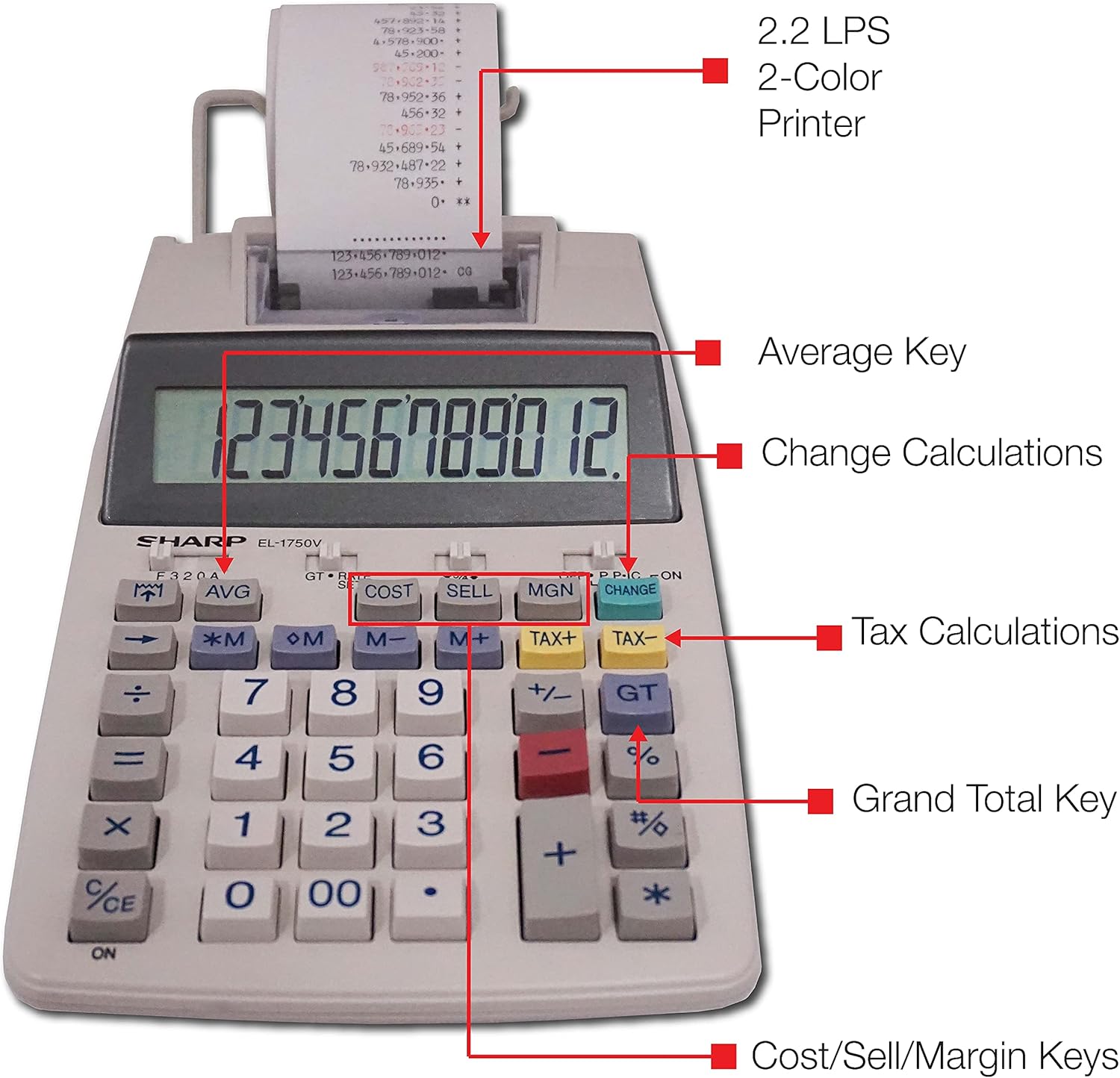
그림 3: 상세 view highlighting the 2.2 LPS 2-Color Printer, Average Key, Change Calculations, Tax Calculations, Grand Total Key, and Cost/Sell/Margin Keys.

Figure 4: Dimensions of the Sharp EL1750V calculator, showing a width of 5.9 inches, depth of 9.1 inches, and height of 2 inches, with a 0.75 inch 12-digit LCD display.
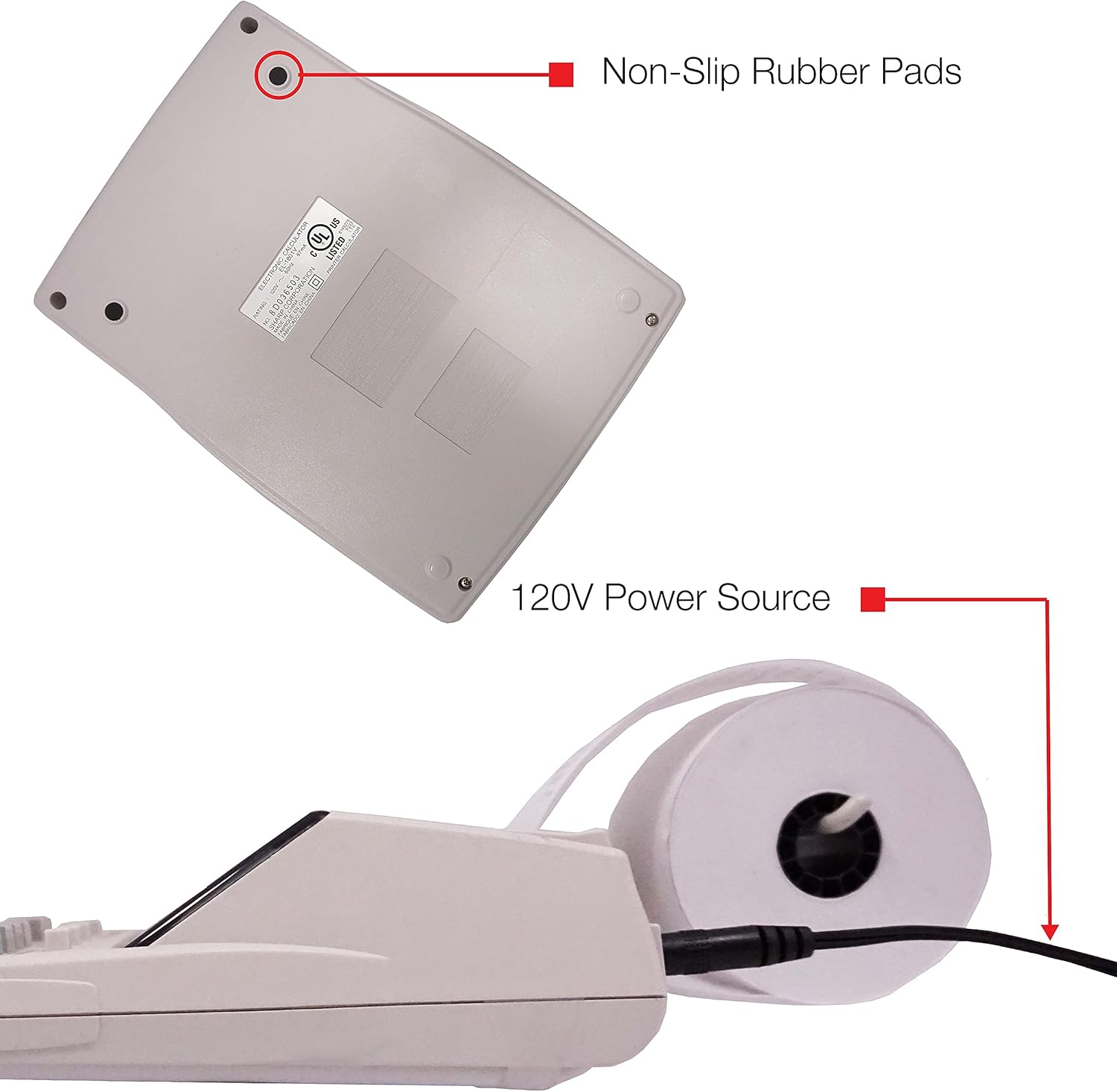
그림 5: 하단 view of the calculator, illustrating the non-slip rubber pads and the 120V power source input.
3. 설정
3.1 전원
The Sharp EL1750V can be powered by an AC adapter (120V) or batteries. Ensure the correct power source is connected before operation.
- AC 어댑터 : Connect the provided AC adapter to the power input port on the side of the calculator (refer to Figure 5) and plug it into a standard 120V electrical outlet.
- 배터리: If using batteries, open the battery compartment (typically on the underside) and insert the required batteries, observing correct polarity.
3.2 용지 롤 설치
- Lift the printer cover to expose the paper roll compartment.
- 새 용지 롤을 용지함에 넣고 용지가 롤의 아래쪽에서 나오도록 하십시오.
- Feed the leading edge of the paper into the printer mechanism slot until it emerges from the top.
- 프린터 덮개를 닫습니다.
- Press the paper feed key (often marked with an arrow pointing up) to advance the paper and ensure it is properly aligned.
4. 사용 설명서
4.1 기본 계산
표준 산술 연산을 수행합니다.
- 추가(+): 첫 번째 숫자를 입력하고 누르세요 +두 번째 숫자를 입력하고 누르세요. =.
- 빼기(-): 첫 번째 숫자를 입력하고 누르세요 -두 번째 숫자를 입력하고 누르세요. =.
- 곱셈(x): 첫 번째 숫자를 입력하고 누르세요 x두 번째 숫자를 입력하고 누르세요. =.
- 나누기(÷): 첫 번째 숫자를 입력하고 누르세요 ÷두 번째 숫자를 입력하고 누르세요. =.
- 출입 허가(CE/C): 마지막으로 입력한 숫자를 지웁니다.
- 모두 클리어(AC): 모든 입력 내용과 계산 결과를 지웁니다.
4.2 특수 기능
- 세금 계산 (세금 포함, 세금 제외):
- Set the tax rate using the appropriate function (refer to the calculator's specific tax rate setting procedure, usually involving a dedicated key or mode).
- Enter the amount, then press 세금+ to add tax or 세- 세금을 공제하기 위해.
- 잔돈 계산 (CHANGE):
- Enter the total amount of the sale.
- 를 누르세요 변화 열쇠.
- 고객으로부터 받은 금액을 입력하세요.
- 누르다 = to display the change due.
- 총계(GT): 누르다 GT to recall the grand total of all previous calculations.
- Memory Functions (M+, M-, RM/CM):
- M+표시된 값을 메모리에 추가합니다.
- M-표시된 값을 메모리에서 뺍니다.
- 링깃/센티미터: Recalls memory content (first press) or clears memory (second press).
- 원가, 판매가, 마진 (COST, SELL, MGN): These keys are used for profit margin calculations.
- Enter two of the three values (Cost, Selling Price, Margin Percentage) and press the key for the unknown value to calculate it.
- Rounding and Decimal Switches: Adjust these switches (typically located above the keypad) to control the number of decimal places and rounding method for calculations.
5. 유지관리
5.1 청소
To maintain the calculator's performance and appearance:
- 부드럽고 마른 천으로 외부를 닦습니다.
- 완고한 먼지에는 약간 damp물이나 순하고 비연마성 세척제를 사용하여 천을 닦으십시오.
- Do not use strong solvents or abrasive cleaners, as these can damage the surface or display.
- 계산기에 액체를 직접 분사하지 마십시오.
5.2 용지 롤 교체
용지 롤이 다 떨어지거나 인쇄가 흐려지면 교체하십시오. 설치 방법은 3.2절을 참조하십시오.
5.3 잉크 롤러 교체
When the print becomes faint or incomplete, the ink roller needs to be replaced. Consult your calculator's specific instructions for ink roller replacement, as the procedure may vary slightly.
6. 문제 해결
| 문제 | 가능한 원인 | 해결책 |
|---|---|---|
| 계산기가 켜지지 않습니다. | No power, AC adapter not connected, or batteries depleted/incorrectly installed. | Ensure AC adapter is securely plugged in. If using batteries, check battery installation and replace if necessary. |
| 인쇄가 안 되거나 희미하게 인쇄되어 있습니다. | Paper roll empty or incorrectly installed; ink roller needs replacement. | Replace paper roll (Section 3.2). Replace ink roller (Section 5.3). |
| Display shows "E" or error message. | Calculation overflow, division by zero, or incorrect operation sequence. | 누르다 AC to clear the error. Re-enter the calculation carefully. |
| 종이 걸림. | Paper roll not installed correctly or paper is creased. | Open printer cover, remove jammed paper, and re-install paper roll correctly (Section 3.2). |
7. 사양
- 모델: Sharp EL1750V
- 표시하다: 12 자리 LCD
- 인쇄 속도: 초당 2.2줄
- 인쇄 색상: 2 (Black for positive, Red for negative)
- 전원: AC Adapter (120V) or Battery Powered
- 치수(대략): 5.9인치(W) x 9.1인치(D) x 2인치(H)
- 무게 (근사치) : 0.16 ounces (Note: This weight seems unusually low for a printing calculator, likely an error in source data. User should refer to product packaging for accurate weight.)
- 재료: 플라스틱
- 특별 기능: Antimicrobial protection, Change calculation, Tax functions, Cost/Sell/Margin functions, Grand Total, 4-key memory.
8. 보증 및 지원
For warranty information and technical support, please refer to the documentation included with your purchase or visit the official Sharp web사이트. 보증 청구를 위해 구매 증빙 자료로 구매 영수증을 보관하세요.
제조업체: 날카로운
Web대지: www.sharpusa.com