
1. 설정
1.1 포장 풀기 및 내용물
TV와 모든 액세서리를 포장에서 조심스럽게 꺼내십시오. 모든 구성품이 있는지 확인하십시오.
- Sharp LC-40LE653U 40-Inch Smart LED TV
- 원격 제어
- 2개의 AA 배터리
1.2 스탠드 설치
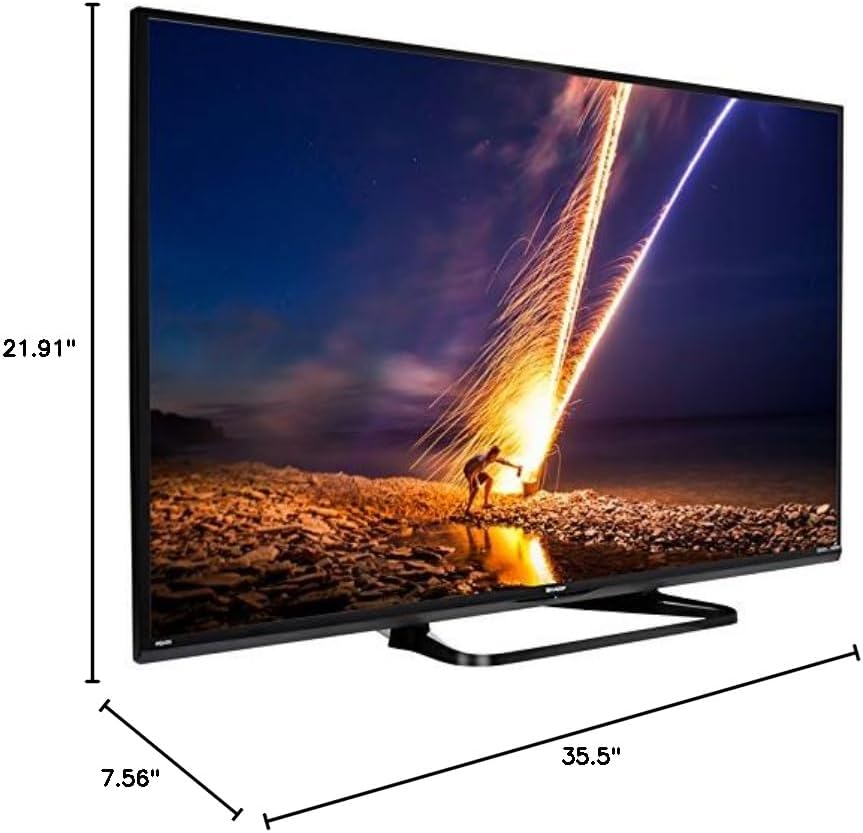
If placing the TV on a table, attach the included stand. Refer to the diagram below for proper assembly. Ensure all screws are securely fastened.
1.3 외부 장치 연결
Connect your external devices such as cable boxes, Blu-ray players, or gaming consoles to the TV's input ports. The TV features multiple connectivity options.


사용 가능한 포트는 다음과 같습니다.
- HDMI : 2 ports for high-definition audio and video. One HDMI port supports MHL (Mobile High-Definition Link).
- USB: 1 port for media playback or connecting a USB device.
- 이더넷: 유선 네트워크 연결용.
- Component/Video: For older video devices.
- DTV/TV(안테나): 안테나나 케이블 TV 피드를 연결하는 데 사용합니다.
- 오디오 출력: Optical for digital audio, and RCA for analog audio.
1.4 전원 연결
After connecting all necessary devices, plug the TV's power cord into a wall outlet.
1.5 초기 설정
Upon first power-on, the TV will guide you through an initial setup process. This includes language selection, time zone, and network configuration. For Wi-Fi setup, select your network and enter the password.
2. 사용 설명서
2.1 리모콘 기능
The remote control allows you to access all TV functions. Insert the two AA batteries into the remote control, ensuring correct polarity.

- 전원(빨간색 버튼): TV를 켜거나 끕니다.
- 입력: Selects the input source (HDMI, TV, USB, etc.).
- 볼륨 +/-: 볼륨 레벨을 조절합니다.
- 채널 +/-: TV 채널을 변경합니다.
- 탐색 버튼(위/아래/좌측/우측/엔터): 메뉴를 탐색하고 옵션을 선택하는 데 사용됩니다.
- 똑똑한: Accesses the Smart Central Apps menu.
- 메뉴: Opens the main TV menu for settings adjustments.
- 넷플릭스: 넷플릭스 애플리케이션 바로가기 버튼입니다.
2.2 Smart TV Features (Smart Central Apps)
The Sharp LC-40LE653U features Smart Central Apps, providing access to various online services and a web browser. Ensure your TV is connected to the internet via Wi-Fi or Ethernet.

- 앱 액세스: Press the 'SMART' button on your remote to open the Smart Central Apps menu.
- 지원되는 서비스: Includes Hulu Plus, Netflix, Pandora, Vudu, and YouTube.
- Web 브라우저: 내장된 기능을 사용하세요 web browser for general internet browsing. Navigation is done via the remote control.
2.3 Wallpaper Mode
When the TV is turned off, Wallpaper Mode can display virtually any image. To use this feature, connect a USB drive containing your desired images to the TV's USB port. Navigate to the Wallpaper Mode settings in the TV menu to select and configure your images.
3. 유지관리
3.1 TV 청소
화면을 청소하려면 부드럽고 마른 보풀 없는 천으로 조심스럽게 닦으세요. 잘 지워지지 않는 얼룩은 가볍게 두드려 닦아주세요.ampen the cloth with water or a specialized screen cleaner. Avoid using harsh chemicals, abrasive cleaners, or direct spraying of liquids onto the screen or cabinet.
Clean the TV cabinet with a soft, dry cloth. Ensure the TV is unplugged before cleaning.
3.2 소프트웨어 업데이트
Periodically check for software updates through the TV's settings menu to ensure optimal performance and access to the latest features. Updates can be performed via the internet connection.
4. 문제 해결
If you encounter issues with your Sharp LC-40LE653U TV, refer to the following common solutions:
- 전원 없음: Ensure the power cord is securely plugged into both the TV and a working wall outlet. Check if the power indicator light on the TV is on.
- 화면/소리 없음: Verify the correct input source is selected using the 'Input' button on the remote. Check all cable connections (HDMI, component, etc.) are secure.
- 화질이 좋지 않음: TV 메뉴에서 화면 설정(밝기, 명암, 선명도)을 조정하십시오. 입력 소스에서 고품질 신호가 나오는지 확인하십시오.
- 인터넷에 연결되지 않음: Check your Wi-Fi router or Ethernet cable connection. Re-enter your Wi-Fi password in the TV's network settings. Restarting your router may resolve connectivity issues.
- 원격 제어가 작동하지 않음: 리모컨의 배터리를 교체하세요. 리모컨과 TV IR 센서 사이에 장애물이 없는지 확인하세요.
For more detailed troubleshooting steps, consult the full online manual or contact customer support.
5. 사양
Key technical specifications for the Sharp LC-40LE653U 40-Inch Smart LED TV:
| 특징 | 사양 |
|---|---|
| 모델 번호 | LC-40LE653U |
| 화면 크기 | 39.5인치(40인치급) |
| 디스플레이 기술 | 액정표시장치 |
| 해결 | 1080p(풀 HD) |
| 새로 고침 빈도 | 60Hz |
| 종횡비 | 16시 9분 |
| 연결 기술 | 와이파이 |
| 하드웨어 인터페이스 | 이더넷, HDMI, USB |
| HDMI 포트 총 개수 | 2 (one with MHL support) |
| 총 USB 포트 | 1 |
| 오디오 입력 | HDMI, 광출력, USB |
| 스피커 최대 출력 전력 | 20 와트 |
| 제품 크기(D x W x H) | 7.56인치 x 35.5인치 x 21.91인치 |
| 품목 무게 | 16.3 파운드 |
| 장착 유형 | 테이블 마운트 |
| 지원되는 인터넷 서비스 | Hulu Plus, Netflix, Pandora, Vudu, YouTube |
| Energy Star 인증 | 예 |
6. 보증 및 지원
6.1 제품 보증
This Sharp LC-40LE653U TV comes with a 1년 한정 보증보증 청구를 위해 구매 증빙 자료를 보관해 주십시오. 보증은 정상적인 사용 조건 하에서의 제조 결함에 적용됩니다.
6.2 고객 지원
For technical assistance, troubleshooting beyond this manual, or warranty service, please contact Sharp customer support. Refer to the official Sharp web최신 연락처 정보는 웹사이트 또는 제품 등록 카드를 참조하십시오.


