
1. 서론
The Argox AS8520 is a high-performance cordless imager designed for efficient barcode scanning. It features advanced wireless communication technology, allowing for a data transmission range of up to 100 meters. Equipped with a long-lasting Li-ion battery and an IP42 sealing level, the AS8520 is built for durability and mobility across various environments, including offices, supermarkets, warehouses, and manufacturing facilities.
2. 제품 오버view
The AS8520 barcode scanner is designed for comfortable handling and robust performance. Key components include the scanning window, trigger button, and ergonomic grip.
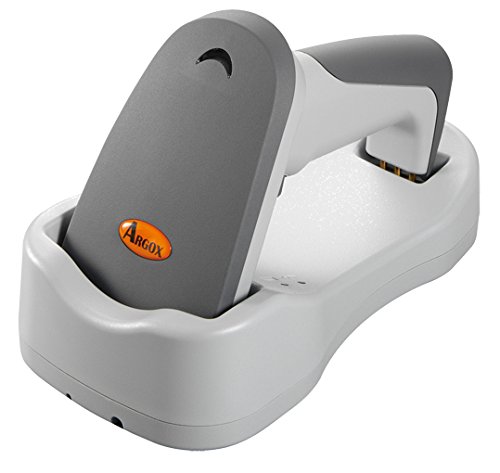
그림 2.1: 옆 view of the Argox AS8520 Barcode Scanner, showing the ergonomic handle and trigger button.
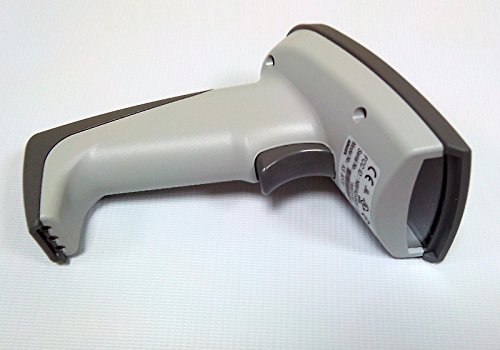
그림 2.2: 앞쪽 view of the Argox AS8520 Barcode Scanner, highlighting the scanning window and product labels.
3. 설정 가이드
3.1. 배터리 설치 및 충전
- Ensure the scanner is powered off before installing or removing the battery.
- Locate the battery compartment on the scanner handle.
- Insert the Li-ion battery pack, ensuring correct polarity.
- 배터리 칸을 단단히 닫으세요.
- Connect the scanner to its charging base or power adapter using the provided cable. Allow the battery to fully charge before first use.
3.2. 호스트 장치에 연결하기
The Argox AS8520 can connect wirelessly to various host devices, including desktops, laptops, and smartphones. Refer to the separate quick start guide for specific pairing instructions for your operating system or device type.
4. 사용 설명서
4.1. 기본 스캐닝
- 스캐너의 전원이 켜져 있고 호스트 장치와 성공적으로 페어링되었는지 확인하십시오.
- Point the scanning window towards the barcode you wish to scan.
- Press and hold the trigger button. A red LED light source (630nm Visible Red LED) will illuminate the barcode.
- Position the scanner at an appropriate distance (the AS8520 offers superior depth of field up to 40 inches on 40-mil codes) until the barcode is successfully read. A successful scan is typically indicated by an audible beep and/or a visual indicator.
- 방아쇠 버튼을 놓으세요.
4.2. 고급 스캔 기능
- Rapid Scan Rate: The AS8520 provides a rapid scan rate of 450 scans/sec for efficient data capture.
- Barcode Symbology Support: Supports GS1 Databar (RSS) and CS (Composite Symbology) barcodes.
- Sunlight Readability: Designed to be readable under direct sunlight conditions.
5. 유지관리
5.1. 스캐너 청소
- 청소하기 전에 스캐너의 전원이 꺼져 있는지 확인하십시오.
- 부드럽고 보풀이 없는 천을 살짝 사용하십시오. damp스캐너 외부를 물이나 순한 세척액으로 닦아주세요.
- For the scanning window, use a lens cleaning cloth to avoid scratches.
- Do not use abrasive cleaners, solvents, or immerse the scanner in liquid. The IP42 sealing level protects against dust and light water splashes, but not full immersion.
5.2. 배터리 관리
- To maximize battery life, avoid fully discharging the Li-ion battery frequently.
- 장시간 사용하지 않을 때는 스캐너를 서늘하고 건조한 곳에 보관하세요.
- If the battery performance degrades significantly, consider replacing it with an authorized Argox replacement battery.
6. 문제 해결
| 문제 | 가능한 원인 | 해결책 |
|---|---|---|
| 스캐너의 전원이 켜지지 않습니다. | 배터리가 방전되었거나 제대로 설치되지 않았습니다. | 배터리를 충전하십시오. 배터리가 제자리에 제대로 장착되었는지 확인하십시오. |
| 스캐너가 바코드를 읽지 못합니다. | Barcode is damaged, scanner is too far/close, or incorrect symbology settings. | Ensure the barcode is clear. Adjust scanning distance. Check scanner programming for supported barcode types. |
| 호스트 장치로 전송된 데이터가 없습니다. | Scanner not paired or out of range. | Re-pair the scanner with the host device. Ensure the scanner is within the 100-meter transmission range. |
| 스캐너가 작동하지 않습니다. | 일시적인 소프트웨어 오류입니다. | Perform a soft reset by powering off and then on the scanner. If issues persist, consult the manufacturer's support. |
7. 기술 사양
| 특징 | 사양 |
|---|---|
| 모델 | AS8520 |
| 스캔 속도 | 450 스캔/초 |
| 광원 | 630nm Visible Red LED |
| 스캐닝 성능 | Starting at 0.1mm (4 mil) |
| 피사계 심도 | Up to 40 inches on 40-mil codes |
| 데이터 전송 범위 | 100 meters (wireless) |
| 호환 장치 | 데스크탑, 노트북, 스마트폰 |
| 전원 | Battery Powered (Li-ion battery pack) |
| 작동 온도 | 0°C ~ 50°C(32°F ~ 122°F) |
| 보관 온도 | -20°C ~ 70°C (-4°F ~ 158°F) |
| 습기 | 상대 습도 10% ~ 90%, 비응축 |
| 조도 레벨 | 최대 70,000럭스 |
| Current - Operating | 225mA @ 4.2VDC |
| Current - Standby | 32mA @ 4.2VDC |
| Power - Operating | 900밀리와트 |
| Power - Standby | 150밀리와트 |
| Reliability (Trigger) | 1,000,000번 |
| Reliability (Cable) | 320,000 times (90° bend) |
| 드롭 사양 | 1.5 미터 |
| 밀봉 레벨 | IP42 |
| 품목 무게 | 1.3kg |
| GTIN/UPC | 702563636336 |
8. 보증 및 지원
For detailed warranty information, please refer to the warranty card included with your product or visit the official Argox website. For technical support, service, or replacement parts, please contact your authorized Argox reseller or Argox customer service directly.