
1. 서론
This manual provides comprehensive instructions for the proper setup, operation, and maintenance of your Albrecht AE Desktop 1300 Scanner Antenna. Please read this manual thoroughly before using the product to ensure optimal performance and longevity.
2. 제품 오버view
The Albrecht AE Desktop 1300 is a compact scanner station antenna designed for wideband reception across the 25 - 1300 MHz frequency range. Its design makes it suitable for indoor use or balcony installations. The antenna features a magnetic base for stable placement and comes with eight radial elements.
주요 특징:
- Frequency Range: 25 - 1300 MHz
- 임피던스: 50옴
- Connector Type: BNC
- Base: Magnetic
- Antenna Length: Approximately 100 cm
- Radials: 8 pieces, each 41 cm long

3. 패키지 내용
아래 나열된 모든 품목이 패키지에 들어 있는지 확인하세요.
- 1x Albrecht AE Desktop 1300 Antenna (main mast with radiating elements)
- 1x Magnetic Base with integrated coaxial cable (approx. 4m length) and BNC connector
- 8x Radial Elements (approx. 41 cm each)
- 1x Hex Key (for assembly)
4. 설정 지침
Follow these steps to assemble and set up your antenna:
4.1. Assembling the Radials
- 모든 구성품을 조심스럽게 풀어보세요.
- Locate the magnetic base and the eight radial elements.
- Insert each of the eight radial elements into the designated slots around the base of the antenna. Ensure they are securely fastened, using the provided hex key if necessary, to prevent loosening.


4.2. 안테나 배치
For optimal reception, place the antenna in an elevated position, clear of obstructions. The magnetic base allows for stable placement on suitable metallic surfaces. It is designed for indoor use or on a balcony.
- Choose a location with minimal interference from electronic devices.
- Ensure the antenna is upright and stable.
4.3. Connecting to Your Receiver
- Locate the coaxial cable attached to the antenna's magnetic base.
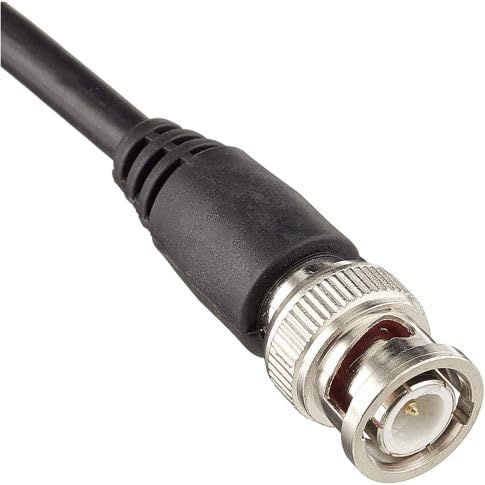
- Connect the BNC connector at the end of the coaxial cable to the antenna input port on your scanner or receiver. Ensure the connection is firm.
5. 사용 설명서
Once the antenna is assembled and connected, your scanner or receiver is ready for operation. The Albrecht AE Desktop 1300 is a passive antenna and does not require external power.
- Turn on your scanner/receiver and tune to the desired frequency within the 25 - 1300 MHz range.
- Adjust the position of the antenna slightly if reception is poor, as local conditions can affect signal strength.
6. 유지관리
The Albrecht AE Desktop 1300 antenna requires minimal maintenance to ensure continued performance.
- 청소: Periodically wipe the antenna elements and base with a soft, dry cloth to remove dust. Do not use abrasive cleaners or solvents.
- 점검: Regularly check the radial elements and cable for any signs of damage or corrosion. Ensure all connections remain secure.
- 환경 보호: While suitable for balcony use, prolonged exposure to extreme weather conditions (heavy rain, snow, direct sunlight) may reduce its lifespan. Consider bringing it indoors during severe weather.
7. 문제 해결
안테나에 문제가 발생하면 다음 사항을 고려하십시오.
- 수신 불량:
- Ensure the antenna is placed in an elevated position, away from large metallic objects or other electronic devices that may cause interference.
- 모든 케이블 연결이 안전한지 확인하십시오.
- Try repositioning the antenna to a different location.
- Verify that your scanner/receiver is functioning correctly and tuned to the correct frequency.
- 신호 없음:
- Confirm the BNC connector is fully inserted into your receiver's antenna input.
- Inspect the coaxial cable for any visible damage (cuts, kinks).
- Ensure all radial elements are properly attached.
8. 사양
| 특징 | 사양 |
|---|---|
| 상표 | 알브레히트 |
| 모델 | AE Desktop 1300 (2040290) |
| 주파수 범위 | 25~1300MHz |
| 임피던스 | 50옴 |
| 커넥터 유형 | 비앤씨 |
| 안테나 유형 | Scanner Station Antenna |
| 기본 유형 | 자성베이스 |
| 안테나 길이 | 100cm |
| Radial Length | 8 x 41cm |
| 전원 | Electrically Wired (Passive) |
| 제품 치수 | 41L x 41W x 100Hcm |
| 무게 | 1.64kg (포장 무게) |
9. 보증 및 지원
Warranty information for the Albrecht AE Desktop 1300 antenna is typically provided by the manufacturer or the point of purchase. Please refer to the documentation included with your product or visit the official Albrecht website for details regarding warranty coverage and customer support. For returns or exchanges, please consult the retailer's policy where the product was purchased.