
소개
구매해주셔서 감사합니다asing the GPX 9-inch Portable DVD Player, Model PD901BDLP. This manual provides essential information for the safe and efficient operation of your device. Please read it thoroughly before use and retain it for future reference.
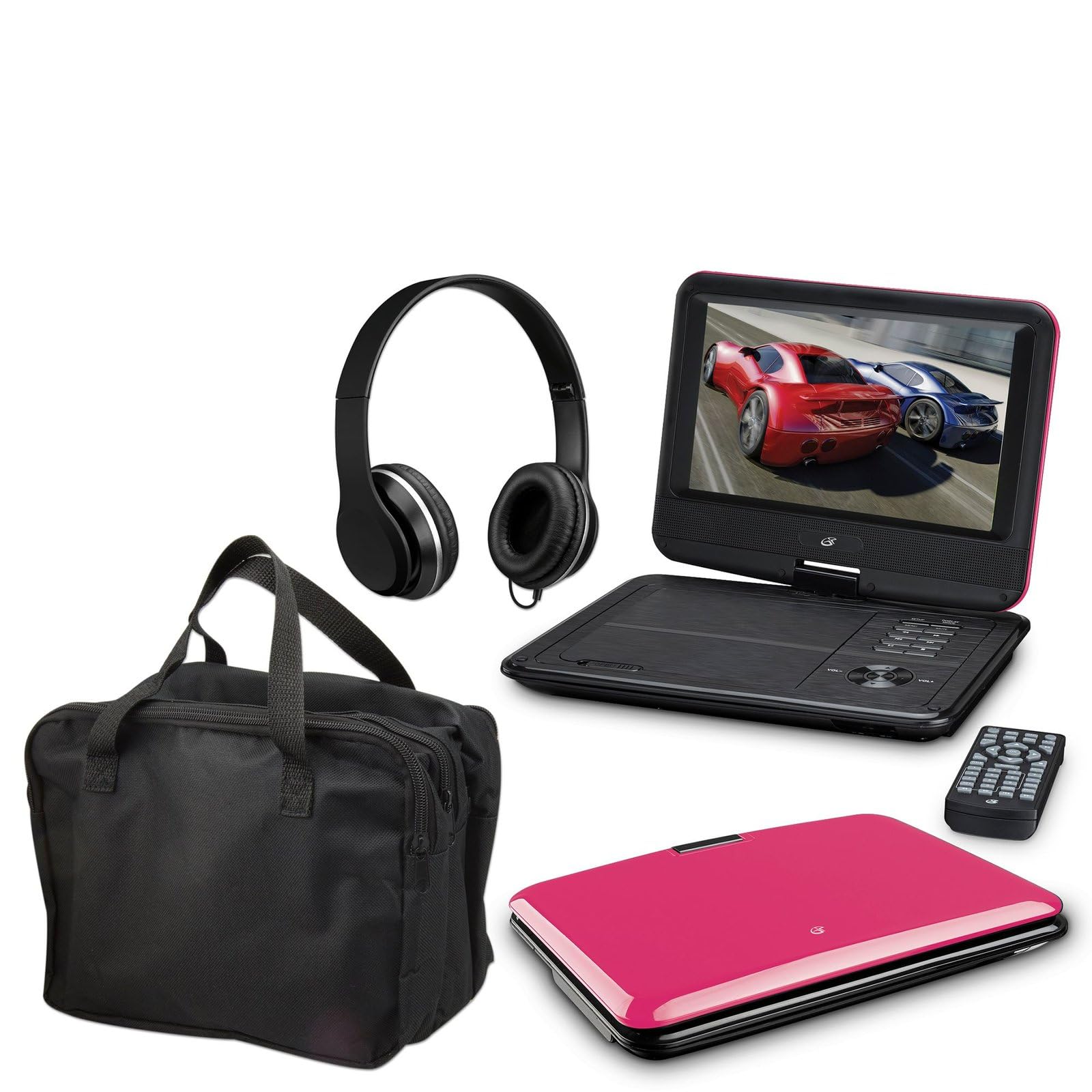
Image: The GPX 9-inch Portable DVD Player in its closed position, showcasing its vibrant pink top casing and sleek design.
패키지 내용
아래 나열된 모든 품목이 패키지에 포함되어 있는지 확인하세요.
- GPX 9-inch Portable DVD Player (Model PD901BDLP)
- 리모콘(AAA 배터리 2개 필요, 포함)
- AC/DC 전원 어댑터
- 12V 차량용 어댑터
- 3.5mm-to-RCA audio/video cable
- 운반 케이스
- 헤드폰
- 사용 설명서(본 문서)
제품 특징
- 9-inch 800x480 LCD screen
- Screen tilts and swivels for versatile view각도를 ing
- Rechargeable lithium polymer battery with up to 2 hours of battery life
- 내장 스테레오 스피커
- 개인적인 청취를위한 헤드폰 잭
- RCA output for connection to external displays
- Supports DVD, DVD-R/RW, DVD+R/RW, CD, CD-R/RW, JPEG, MP3 formats
설정
1. 배터리 충전
Before first use, fully charge the internal lithium polymer battery. Connect the AC/DC power adapter to the DC IN port on the DVD player and plug the other end into a standard wall outlet. The charging indicator light will illuminate. Charging typically takes approximately 3-4 hours for a full charge, providing up to 2 hours of playback.
2. 리모컨 배터리 설치
Open the battery compartment on the back of the remote control. Insert two (2) AAA batteries, ensuring correct polarity (+/-). Close the compartment securely.
3. Connecting to a Television (Optional)
에게 view content on a larger screen, use the included 3.5mm-to-RCA audio/video cable. Connect the 3.5mm end to the AV OUT port on the DVD player. Connect the RCA (red, white, yellow) ends to the corresponding AV INPUT ports on your television. Select the correct AV input source on your TV.
4. Using the Car Adapter (Optional)
For in-car use, connect the 12V car adapter to the DC IN port on the DVD player and plug the other end into your vehicle's cigarette lighter socket.
작동 지침
1. 전원 켜기 / 끄기
를 누르고 계세요 힘 button on the player or remote control to turn the device on or off.
2. DVD 삽입
- Gently open the DVD player lid.
- Place a DVD disc onto the spindle with the label side facing up.
- 디스크 중앙을 딸깍 소리가 나면서 제자리에 고정될 때까지 부드럽게 눌러주세요.
- Close the lid. The player will automatically begin reading the disc.
3. 화면 조정
The LCD screen can be tilted and swiveled to achieve the optimal viewing angle. Carefully adjust the screen to your preferred position.
4. 기본 재생 제어
- 재생/일시정지재생을 시작하거나 일시 정지하려면 누르세요.
- 멈추다: 재생을 중지하려면 누릅니다.
- 건너뛰기(<< / >>): Press to skip to the previous or next chapter/track.
- 급회전/역회전: Press and hold to fast forward or rewind.
- 볼륨(+/-): 오디오 볼륨을 조절합니다.
5. 헤드폰 사용
Plug the included headphones into the 헤드폰 jack for private listening. The built-in speakers will automatically mute when headphones are connected.
유지
- 화면 청소: Use a soft, lint-free cloth to gently wipe the LCD screen. Do not use liquid cleaners or abrasive materials.
- 디스크 트레이 청소: Keep the disc tray free of dust and debris. Use a soft brush or compressed air if necessary.
- 배터리 관리 : To prolong battery life, avoid fully discharging the battery frequently. If storing the player for an extended period, charge it periodically.
- 저장: Store the DVD player in a cool, dry place away from direct sunlight and extreme temperatures. Use the included carrying case for protection during transport.
문제 해결
| 문제 | 해결책 |
|---|---|
| 플레이어가 켜지지 않습니다. | Ensure the battery is charged or the AC/DC adapter is securely connected to a working power outlet. Check the power switch. |
| 디스크가 감지되지 않았습니다. | Verify the disc is inserted correctly with the label side up and seated properly on the spindle. Ensure the disc is clean and free of scratches. Try a different disc. |
| 소리가 나지 않습니다. | Check the volume level. Ensure headphones are not plugged in if you intend to use the built-in speakers. If connected to a TV, check the TV's volume and input settings. |
| 리모컨이 작동하지 않습니다. | Check and replace the AAA batteries in the remote. Ensure there are no obstructions between the remote and the player's IR sensor. |
| Picture is distorted or blurry. | Clean the disc. Adjust the screen angle. If connected to a TV, check the AV cable connections. |
명세서
- 모델: PD901BDLP
- 화면 크기: 9인치
- 디스플레이 유형: 액정표시장치
- 네이티브 해상도: 800 x 480
- 미디어 유형: DVD, DVD-R/RW, DVD+R/RW, CD, CD-R/RW, JPEG, MP3
- 배터리: 충전식 리튬 폴리머
- 배터리 수명: 최대 2시간
- 연결성: 3.5mm AV Out, Headphone Jack, DC In
- 전원 입력: AC/DC Adapter, 12V Car Adapter
- 무게: 약 1.9파운드(0.86kg)
- 색상: 분홍색
- 한국어: 047323179044
보증 및 지원
This GPX Portable DVD Player is covered by a 90일 한정 제조사 보증 최초 구매일로부터 보증합니다. 본 보증은 정상적인 사용 중에 발생하는 재료 및 제조상의 결함을 보장합니다.
For warranty service or technical support, please refer to the contact information provided with your product packaging or visit the official GPX web사이트. 구매 증빙 자료로 구매 영수증을 보관하세요.
자세한 내용은 다음을 방문하세요. GPX Store on Amazon.