
1. 서론
This manual provides comprehensive instructions for the D-Link DWR-910 4G LTE Wireless USB Router. This device is designed to provide high-speed 4G LTE mobile internet access, allowing you to share a cellular data connection via Wi-Fi with multiple devices. It features a compact design, built-in drivers for easy installation, and support for various cellular bands.
2. 패키지 내용
패키지에 다음 품목이 포함되어 있는지 확인하십시오.
- D-Link DWR-910 4G LTE Wireless USB Router
3. 제품 오버view
3.1 장치 기능
- USB 2.0 interface for power and data connection
- Super-fast 4G LTE connectivity with download speeds up to 150 Mbps
- Integrated 6-pin SIM card slot
- MicroSD card slot (supports up to 32 GB, card not included)
- Internal antennas for LTE and Wi-Fi
- Built-in drivers and software for plug-and-play installation (no CD-ROM required)
- Connection Manager with features like phonebook, SMS messaging, and APN management
3.2 물리적 구성 요소
The DWR-910 features a compact design with essential indicators and ports.
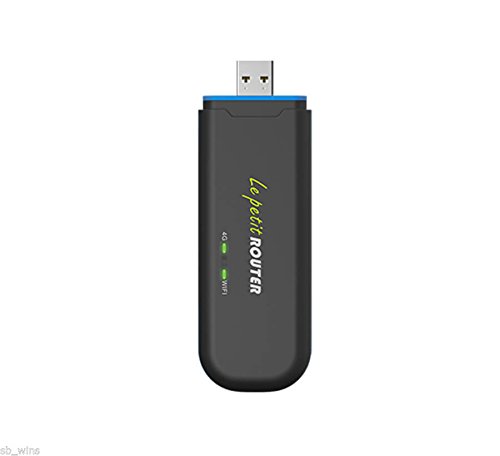
앞쪽 view of the D-Link DWR-910, showing the USB connector and LED indicators.
- USB 커넥터: Used for connecting to a computer or USB power adapter.
- LTE LED Indicator: Displays the status of the cellular network connection (2G/3G/4G).
- Wi-Fi LED 표시기: Shows the status of the Wi-Fi hotspot.
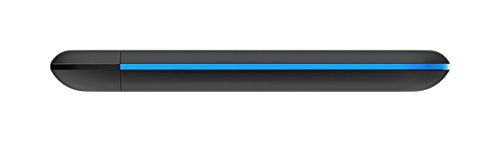
옆 view of the D-Link DWR-910, highlighting the SIM and MicroSD card slots.
- SIM 카드 슬롯: Insert your 6-pin SIM card here.
- MicroSD 카드 슬롯: Insert a MicroSD card for storage (up to 32 GB).
4. 설정
4.1 SIM 카드 삽입
- Locate the SIM card slot on the side of the DWR-910.
- Carefully insert your 6-pin SIM card into the slot. Ensure the correct orientation as indicated on the device. Push until it clicks into place.
4.2 전원 연결
- Plug the DWR-910 into an available USB 2.0 port on a computer or a compatible USB power adapter (a 5V, 1A adapter is recommended for stable operation).
- The device will power on automatically, and the LED indicators will illuminate.
4.3 드라이버 설치 (플러그 앤 플레이)
The DWR-910 features built-in drivers and connection software. Upon first connection to a computer, the necessary drivers and software will install automatically. No external CD-ROM or manual driver installation is typically required.
5. 사용 설명서
5.1 Connecting to the Wi-Fi Hotspot
- Once the DWR-910 is powered on and has established a connection to a cellular network (indicated by the LTE LED), it will broadcast a Wi-Fi network.
- On your Wi-Fi enabled device (e.g., laptop, smartphone, tablet), search for available Wi-Fi networks.
- Select the network name (SSID) corresponding to your DWR-910. The default SSID and Wi-Fi password are typically printed on a label on the device or its packaging.
- 연결할 Wi-Fi 비밀번호를 입력하세요.
5.2 액세스 Web 인터페이스
To manage advanced settings, send SMS messages, view the phonebook, or configure APN settings, access the device's web그래픽 사용자 인터페이스(GUI) 기반.
- Ensure your device is connected to the DWR-910's Wi-Fi network or via USB.
- 열기 web 브라우저를 열고 기본 IP 주소를 입력하세요(예:
192.168.0.1or192.168.1.1). Refer to the device label or documentation for the exact address. - 기본 사용자 이름과 비밀번호를 입력하세요(예:
admin/admin).
5.3 LED 표시등
LED 표시등은 장치의 상태에 대한 시각적 피드백을 제공합니다.
- LTE LED:
- 녹색(깜박임): LTE 네트워크에 연결됨
- 파란색(깜박임): 3G 네트워크에 연결됨
- Purple (blinking): Connected to 2G network
- Red (blinking): No service or device error
- 와이파이 LED:
- Green (solid): Wi-Fi is active and broadcasting
6. 유지관리
To ensure optimal performance and longevity of your DWR-910, follow these maintenance guidelines:
- 기기를 깨끗하고 먼지가 없는 상태로 유지하세요. 청소 시에는 부드럽고 마른 천을 사용하세요.
- 장치를 극한의 온도, 직사광선 또는 높은 습도에 노출시키지 마십시오.
- Do not attempt to open, disassemble, or repair the device yourself. Refer to qualified service personnel for any repairs.
- Ensure proper ventilation when the device is in use to prevent overheating.
- Regularly check for firmware updates on the D-Link support website to enhance performance and security.
7. 문제 해결
This section addresses common issues you might encounter with your DWR-910.
7.1 인터넷 연결 없음
- SIM 카드: SIM 카드가 올바르게 삽입되었고 데이터 요금제로 활성화되었는지 확인하세요.
- LTE LED: Check the LTE LED status. If it is red, there might be no cellular service in your area or a device error.
- APN 설정: Verify that the Access Point Name (APN) settings are correct via the device's web interface. These are usually auto-detected but may require manual configuration for some carriers.
- 다시 시작: Try restarting the device by unplugging it from the USB port and plugging it back in.
7.2 Wi-Fi에 연결할 수 없습니다
- 와이파이 LED: Ensure the Wi-Fi LED is green, indicating the Wi-Fi hotspot is active.
- 비밀번호: Verify that you are entering the correct Wi-Fi password (WPA2-PSK key).
- 범위: Ensure your client device is within the Wi-Fi range of the DWR-910. The Wi-Fi range is typically limited, suitable for a single room (approx. 10-12 feet). Walls and obstructions can significantly reduce range.
- 다시 시작: Restart both the DWR-910 and your Wi-Fi client device.
7.3 기기 과열
- 통풍: Ensure adequate airflow around the device. Avoid placing it in enclosed spaces or covering it.
- 전원: Use a stable 5V, 1A USB power adapter. Using underpowered USB ports can sometimes lead to instability or heat.
- 환경: Avoid prolonged use in direct sunlight or high ambient temperatures.
8. 기술 사양
| 특징 | 세부 사항 |
|---|---|
| 모델 | DWR-910 |
| 인터페이스 | USB 2.0 |
| SIM 슬롯 | 6핀 |
| 마이크로 카드 슬롯 | Up to 32 GB (card not included) |
| 셀룰러 액세스 | LTE-FDD Cat.4 (Downlink: 150 Mbps, Uplink: 50 Mbps) DC-HSPA+ (Downlink: 42 Mbps, Uplink: 11 Mbps) |
| LTE 대역 | B1 / B3 / B5 / B40 (2100/1900/850/2300 MHz) |
| UMTS/HSPA+ 대역 | B1 / B8 (900 / 2100 MHz) |
| GSM/GPRS/EDGE 대역 | 850/900/1800/1900MHz |
| 와이파이 표준 | 802.11n/g/b |
| 와이파이 속도 | 최대 75Mbps(802.11n) |
| 무선 보안 | WPA2-PSK, WPA-PSK, WEP, MAC filter |
| Max Connected Clients | 최대 10개 |
| 치수 (L x W x D) | 113mm x 37mm x 11.5mm(4.45 x 1.46 x 0.45인치) |
| 무게 | 40.5그램(1.43온스) |
| 작동 온도 | 0~45°C(32~113°F) |
| 운영 체제 지원 | Windows 8 / 7 / Vista / XP, Mac OS X 10.5 or higher, Ubuntu Linux 10.04 or higher |
9. 보증 정보
The D-Link DWR-910 4G LTE Wireless USB Router typically comes with a 1-year limited warranty from the date of purchase. This warranty covers manufacturing defects under normal use. Please retain your proof of purchase for any warranty claims. The warranty does not cover damage resulting from misuse, accidents, unauthorized modifications, or external factors such as power surges.
10. 고객 지원
For technical assistance, product registration, or further information regarding your D-Link DWR-910, please visit the official D-Link support website or contact D-Link customer service.
D-Link Official Web대지: www.dlink.com