
D-Link DCS-6501LH/E
D-Link DCS-6501LH/E Compact Full HD Pan & Tilt Wi-Fi Camera User Manual
Model: DCS-6501LH/E
소개
This manual provides comprehensive instructions for the setup, operation, and maintenance of your D-Link DCS-6501LH/E Compact Full HD Pan & Tilt Wi-Fi Camera. This camera is designed to monitor large areas of your home or small office with its Full HD resolution and versatile pan and tilt functionality. It features integrated night vision for monitoring in low light, two-way audio for communication, and motion/sound detection for security alerts. The camera supports local recording to an SD card and cloud storage, and can be controlled via the mydlink app or voice commands with Amazon Alexa and Google Assistant.
패키지 내용
- D-Link DCS-6501LH/E Compact Full HD Pan & Tilt Wi-Fi Camera
- 빠른 시작 가이드
- 장착 나사
- 마이크로 USB 전원 어댑터
- Tripod/Mounting Base
설정
1. 카메라 오버view

앞쪽 view of the D-Link DCS-6501LH/E camera, showing the lens, status LED, and D-Link logo.

뒤쪽에 view of the D-Link DCS-6501LH/E camera, showing the speaker grille, micro USB power port, and reset button.
2. 카메라 전원 켜기
Connect the micro USB power adapter to the camera's power port and plug it into a wall outlet. The camera's status LED will illuminate, indicating it is powering on.
3. Installing the mydlink App
Download the official mydlink app from the Apple App Store or Google Play Store on your smartphone or tablet. Create a mydlink account or log in if you already have one.
4. Adding the Camera to mydlink
- Open the mydlink app and tap the "Add a Device" icon.
- 카메라나 패키지에 있는 QR 코드를 스캔하세요.
- Follow the on-screen instructions to connect the camera to your Wi-Fi network. Ensure your Wi-Fi network is 2.4 GHz for optimal compatibility.
- Once connected, the camera's status LED will turn solid green.
5. 카메라 장착
The camera can be placed on a flat surface using its integrated base or mounted to a wall or ceiling using the provided mounting screws and tripod/mounting base. Ensure the camera is positioned to cover the desired monitoring area.
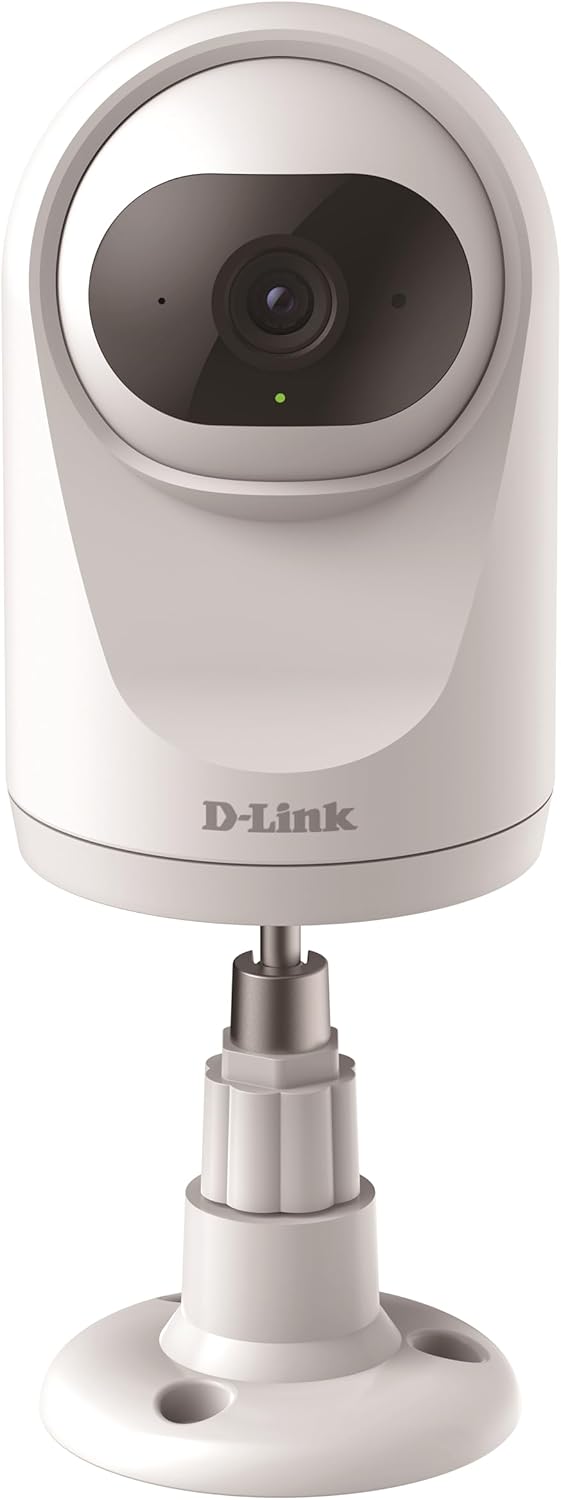
The camera can be placed on a flat surface using its included stand, providing stability and a clear view.

The camera can also be securely mounted to a wall or ceiling using the provided hardware for a fixed installation.
카메라 작동
팬 및 틸트 기능
The DCS-6501LH/E features motorized pan (340°) and tilt (90°) capabilities, allowing you to remotely adjust the camera's viewing angle through the mydlink app. This enables comprehensive coverage of large areas.

The camera offers a wide 340-degree horizontal pan and 90-degree vertical tilt range for extensive area coverage.
Automatic Motion Tracking
When enabled, the camera can automatically detect and track moving objects within its field of view, ensuring that important events are captured. This feature utilizes the pan and tilt motors to follow the subject.

The camera's automatic motion tracking feature follows moving subjects, keeping them in frame.
나이트 비전
The integrated night vision allows the camera to capture clear video footage even in complete darkness, up to a range of 5 meters. This ensures 24/7 monitoring capabilities.
동작 및 소리 감지
The camera is equipped with advanced motion and sound detection. When motion or sound is detected, the camera can automatically send push notifications to your mydlink app and begin recording video.
양방향 오디오
Utilize the built-in microphone and speaker for two-way communication. You can listen to what's happening in the camera's vicinity and speak through the camera from your smartphone.

The camera supports two-way audio, allowing users to listen and speak through the device.
비디오 녹화 및 저장
The camera supports recording video locally to a microSD card (not included) or to the mydlink cloud. A 1-year free mydlink cloud subscription is included, allowing remote storage, playback, and download of recorded videos.
개인정보 보호 모드
For enhanced privacy, the camera features a physical privacy mode that rotates the lens to completely cover it, ensuring no video is captured when privacy is desired.

The camera's privacy mode physically covers the lens, ensuring complete privacy when needed.
유지
- 청소: 카메라 렌즈와 본체를 부드럽고 마른 천으로 살살 닦아주세요. 액체 세척제나 연마제를 사용하지 마세요.
- 펌웨어 업데이트: Regularly check for and install firmware updates through the mydlink app to ensure optimal performance, security, and access to new features.
- MicroSD 카드: If using a microSD card, periodically check its status and format it if necessary to maintain recording performance.
문제 해결
카메라가 Wi-Fi에 연결되지 않습니다
- Wi-Fi 네트워크가 2.4GHz인지 확인하십시오. 카메라는 5GHz 네트워크를 지원하지 않습니다.
- Wi-Fi 비밀번호가 정확한지 확인하세요.
- 신호 강도를 개선하려면 카메라를 Wi-Fi 라우터에 더 가까이 옮기세요.
- 카메라와 Wi-Fi 공유기를 모두 재시작하세요.
- Perform a factory reset on the camera (refer to the Quick Start Guide for instructions) and try the setup process again.
비디오 품질이 좋지 않음
- 인터넷 연결 속도를 확인하세요. 최적의 스트리밍을 위해서는 안정적이고 빠른 연결이 필요합니다.
- 카메라 렌즈가 깨끗하고 먼지나 얼룩이 없는지 확인하세요.
- 직사광선이나 강한 역광을 피하도록 카메라 위치를 조정하세요.
Motion/Sound Detection Not Working
- Verify that motion and sound detection settings are enabled in the mydlink app.
- Adjust the sensitivity levels for detection in the app.
- 카메라를 가리는 장애물이 없는지 확인하십시오. view.
명세서
| 특징 | 세부 사항 |
|---|---|
| 모델 번호 | DCS-6501LH/E |
| 해결 | 1080p 풀 HD |
| 팬 범위 | 340도 |
| 기울기 범위 | 90도 |
| 나이트 비전 범위 | 5 미터 |
| 연결성 | Wi-Fi (2.4GHz) |
| 전력 소비 | 4 와트 |
| 치수(길이 x 너비 x 높이) | 7.7 x 7.7 x 12.1cm |
| 무게 | 190그램 |
| 특별 기능 | Two-Way Audio, Motion Detection, Sound Detection, Automatic Motion Tracking, Privacy Mode, SD Card/Cloud Recording |
| 실내/실외 사용 | 실내 |
보증 및 지원
For warranty information and technical support, please refer to the D-Link official website or contact D-Link customer service. Keep your purchase receipt for warranty claims.
D-Link Official Web대지: www.dlink.com
Ask a question about this manual
Ask about setup, troubleshooting, compatibility, parts, safety, or missing instructions. Manuals+ will review the question and use this page’s manual context to help answer it.