
D-Link DWA-185 AC1300 MU-MIMO Dual-Band USB 3.0 Wi-Fi Adapter User Manual
Model: DWA-185
1. 서론
The D-Link DWA-185 AC1300 MU-MIMO Dual-Band USB 3.0 Wi-Fi Adapter provides high-speed wireless connectivity for your desktop or laptop computer. This adapter supports the 802.11ac Wave 2 standard, offering speeds up to 867 Mbps on the 5 GHz band and 400 Mbps on the 2.4 GHz band. Featuring MU-MIMO technology and a detachable high-gain antenna, it ensures an extended range and a more reliable connection. This manual will guide you through the installation, configuration, and troubleshooting of your DWA-185 adapter.
2. 패키지 내용
패키지에 다음 품목이 모두 들어 있는지 확인해 주십시오.
- D-Link DWA-185 AC1300 MU-MIMO Dual-Band USB 3.0 Wi-Fi Adapter
- Detachable High-Gain Antenna
- 빠른 설치 가이드(이 문서)
- 드라이버 CD (또는 온라인 드라이버 링크)
누락되거나 손상된 품목이 있는 경우 판매점에 문의하여 도움을 받으십시오.
3. 시스템 요구 사항
Before installing the DWA-185 adapter, ensure your computer meets the following minimum requirements:
- Available USB 3.0 port (compatible with USB 2.0, but performance may be reduced)
- Operating System: Windows 7/8/10, Mac OS, or Linux
- CD-ROM drive (for driver installation, if not downloading online)
- An existing 802.11ac, 802.11n, 802.11g, or 802.11b wireless network
4. 제품 오버view
The DWA-185 adapter is designed for enhanced wireless performance and flexibility. It features a compact USB form factor with a powerful external antenna.
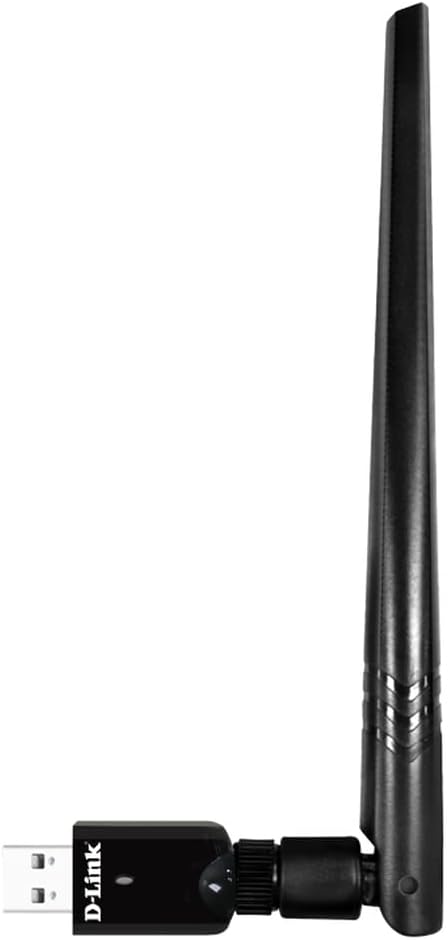
Figure 1: D-Link DWA-185 AC1300 MU-MIMO Dual-Band USB 3.0 Wi-Fi Adapter with antenna attached, side view.

Figure 2: D-Link DWA-185 AC1300 MU-MIMO Dual-Band USB 3.0 Wi-Fi Adapter with antenna attached, angled view showing USB connector.
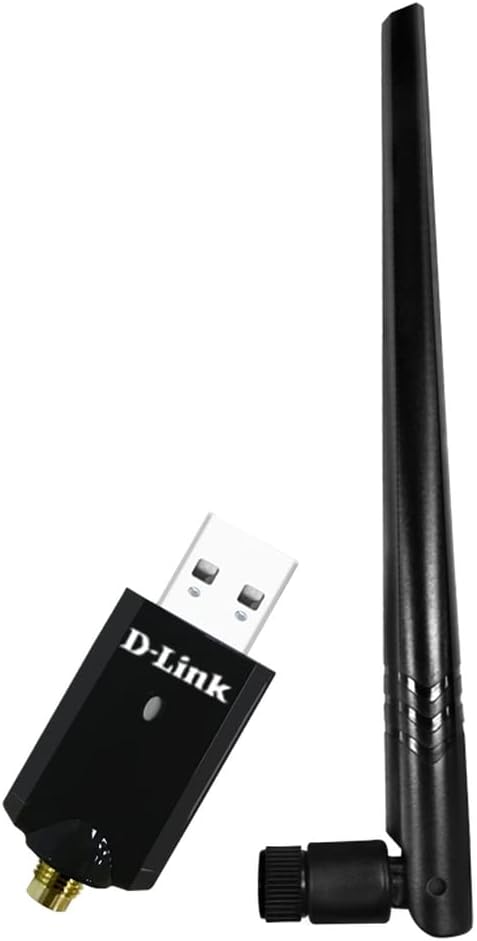
Figure 3: D-Link DWA-185 AC1300 MU-MIMO Dual-Band USB 3.0 Wi-Fi Adapter with antenna detached, showing the antenna connector.
주요 특징:
- 듀얼 밴드 연결: Operates on both 2.4 GHz (up to 400 Mbps) and 5 GHz (up to 867 Mbps) frequencies for versatile and high-speed connections.
- MU-MIMO 기술: Enhances efficiency and performance when used with a Wireless AC Wave 2 router by allowing simultaneous data streams to multiple devices.
- USB 3.0 인터페이스: Provides maximum throughput to your computer, ensuring fast data transfer rates.
- Detachable High-Gain Antenna: Improves wireless signal reception and extends coverage range.
- WPA3 보안: Supports the latest Wi-Fi security protocol for enhanced authentication and encryption.
5. 설정 및 설치
Follow these steps to install your D-Link DWA-185 Wi-Fi Adapter:
- 드라이버 설치:
- Insert the provided driver CD into your computer's CD-ROM drive. If you do not have a CD-ROM drive, download the latest drivers from the official D-Link support web대지.
- 화면의 지시에 따라 드라이버 설치를 완료하십시오. 필요한 경우 컴퓨터를 다시 시작하십시오.
- 안테나를 연결하십시오:
- Carefully screw the detachable high-gain antenna onto the adapter's connector. Ensure it is securely fastened but do not overtighten.
- 어댑터를 연결하십시오:
- Insert the DWA-185 adapter into an available USB 3.0 port on your computer. The adapter is also compatible with USB 2.0 ports, but for optimal performance, a USB 3.0 port is recommended.
- 설치 확인:
- After plugging in the adapter, your operating system should detect the new hardware. A small LED indicator on the adapter may light up or blink, indicating activity.
- Check your computer's Device Manager (Windows) or System Information (Mac/Linux) to confirm that the DWA-185 adapter is recognized and drivers are installed correctly.
6. 사용 설명서
Once the adapter is installed, you can connect to a wireless network.
- 무선 네트워크에 연결하세요:
- 윈도우: Click the Wi-Fi icon in the system tray. Select your desired wireless network (SSID) from the list and click 'Connect'. Enter the network security key (password) if prompted.
- 맥 OS: Click the Wi-Fi icon in the menu bar. Select your desired wireless network (SSID) and enter the password.
- 리눅스: Use your distribution's network manager to scan for and connect to wireless networks.
- Selecting a Frequency Band (2.4 GHz or 5 GHz):
- If your router broadcasts separate SSIDs for 2.4 GHz and 5 GHz bands (e.g., 'MyNetwork_2.4GHz' and 'MyNetwork_5GHz'), you can choose which band to connect to.
- The 5 GHz band offers higher speeds and less interference but has a shorter range. The 2.4 GHz band offers better range but lower speeds and more interference. Choose the band that best suits your needs.
- 보안:
- The DWA-185 supports WPA3, WPA2, and WPA encryption protocols. Always connect to networks using the strongest available security (WPA3 or WPA2) to protect your data.
7. 유지관리
To ensure optimal performance and longevity of your DWA-185 adapter:
- 드라이버 업데이트 유지: Periodically check the D-Link support website for the latest driver updates. Updated drivers can improve performance, add features, and fix bugs.
- 신체 관리: 어댑터를 깨끗하게 유지하고 먼지가 쌓이지 않도록 하십시오. 극한의 온도나 습기에 노출시키지 마십시오.
- 안테나 위치: Adjust the antenna position for the best signal reception. Experiment with different angles to find the optimal orientation.
8. 문제 해결
If you encounter issues with your DWA-185 adapter, refer to the following troubleshooting tips:
- 무선 연결 없음:
- 어댑터가 USB 포트에 안전하게 꽂혀 있는지 확인하세요.
- 드라이버가 올바르게 설치되었는지 확인하십시오. 필요한 경우 다시 설치하십시오.
- Check if your wireless network (SSID) is visible in the list of available networks.
- Confirm that your router is powered on and broadcasting a Wi-Fi signal.
- 다른 USB 포트에 연결해 보십시오.
- 느린 연결 속도:
- Ensure you are connected to the 5 GHz band if your router supports it, as it generally offers higher speeds.
- 다른 장치(예: 전자레인지, 무선전화기)의 간섭이 있는지 확인하세요.
- Move closer to your wireless router or adjust the antenna position for better signal strength.
- 라우터의 펌웨어가 최신인지 확인하세요.
- 어댑터가 인식되지 않음:
- 컴퓨터를 다시 시작해 보세요.
- 드라이버를 제거한 후 다시 설치하십시오.
- Ensure your USB port is functioning correctly by testing it with another device.
- macOS Compatibility Note:
- Please be aware that this adapter may not function correctly with macOS 11 (Big Sur) and later versions. Apple has discontinued support for many third-party USB Wi-Fi dongles beyond macOS Catalina. Check D-Link's support website for specific driver availability and compatibility for newer macOS versions.
9. 사양
| 특징 | 설명 |
|---|---|
| 상표 | 디링크 |
| 모델 번호 | DWA-185 |
| 인터페이스 하드웨어 | USB 3.0, 802.11 ac/b/g/n |
| 데이터 전송 속도 | 최대 867Mbps(5GHz), 최대 400Mbps(2.4GHz) |
| 데이터 링크 프로토콜 | USB |
| 운영 체제 호환성 | Windows 7/8/10, Mac OS, Linux |
| 치수(길이 x 너비 x 높이) | 12 x 2.5 x 19.5 cm (approximate, with antenna) |
| 무게 | 50그램 |
| 특별 기능 | MU-MIMO, Dual-Band, Detachable High-Gain Antenna, WPA3 Security |
10. 보증 정보
The D-Link DWA-185 Wi-Fi Adapter comes with a three-year warranty against manufacturing defects. Please retain your proof of purchase for warranty claims. For detailed warranty terms and conditions, refer to the D-Link official website or contact D-Link support.
11. 지원
For further assistance, technical support, or to download the latest drivers and firmware, please visit the official D-Link support web대지:
You may also find helpful FAQs and community forums on the support portal.