
Rii Mini i7
Rii Mini i7 Wireless Gyro Mouse Remote Control User Manual
Model: Mini i7 (RT-MWK07)
1. 서론
Thank you for choosing the Rii Mini i7 Wireless Gyro Mouse Remote Control. This device combines the functionality of a traditional remote control with a precise gyro mouse, offering versatile control for a wide range of devices. It is designed for use with Smart TVs, game consoles (Xbox 360, Xbox ONE), PCs (Windows, Mac, Linux), Mini PCs, and Android Tablets, providing an intuitive and efficient user experience.

Figure 1: Rii Mini i7 Wireless Gyro Mouse Remote Control, front view.
2. 패키지 내용
- 1 x Rii Mini i7 Wireless Gyro Mouse Remote Control
- 1 x USB 수신기
- 사용 설명서 (본 문서)
참고: AAA 배터리 2개가 필요하며, 제품 구성품에는 포함되어 있지 않습니다.
3. 제품 오버view
Familiarize yourself with the layout and functions of your Rii Mini i7 remote control.
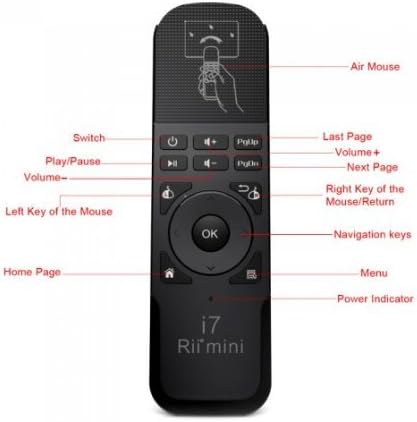
그림 2: 전면 view of the Rii Mini i7 remote control with labeled buttons.
- 전원 버튼: Turns the connected device on/off or puts it into standby.
- 볼륨 +/- : 볼륨을 조절합니다.
- 재생/일시 중지: 미디어 재생을 제어합니다.
- PgUp/PgDn: Page Up/Page Down functionality.
- Left Mouse Key: 왼쪽 클릭과 같은 기능을 합니다.
- Right Mouse Key/Return: Functions as a right-click or back/return button.
- 확인 버튼: 선택 사항을 확인합니다.
- 탐색 키: 메뉴 탐색을 위해 위, 아래, 왼쪽, 오른쪽 버튼을 사용하세요.
- Home Page Button: 홈 화면으로 돌아갑니다.
- 메뉴 버튼: 상황에 맞는 메뉴를 엽니다.
- 전원 표시기: 전원 상태를 나타내는 LED 표시등.
- 에어 마우스: Activates/deactivates the gyro mouse function.

그림 3: 뒤로 view of the Rii Mini i7 remote control, showing the battery compartment and USB receiver storage.
4. 설정 지침
4.1. 배터리 설치
- 리모콘 뒷면에서 배터리함을 찾으세요.
- 배터리 덮개를 밀어서 엽니다.
- 2개(2)의 AAA 알카라인 배터리를 올바른 극성(+/-)에 맞춰 삽입합니다.
- 배터리 덮개를 단단히 닫으세요.

Figure 4: Open battery compartment showing placement for AAA batteries and the USB receiver.
4.2. USB 수신기 연결
- USB 수신기는 편의를 위해 배터리 칸 내부에 보관되어 있습니다. 조심스럽게 꺼내십시오.
- Plug the USB receiver into an available USB port on your Smart TV, PC, game console, Mini PC, or Android Tablet.
- 기기가 필요한 드라이버를 자동으로 감지하고 설치합니다. 이 과정은 다소 시간이 걸릴 수 있습니다.
- Once the drivers are installed, the remote control is ready for use.
5. 사용 설명서
5.1. Basic Remote Functions
Most buttons on the Rii Mini i7 function similarly to a standard remote control. Press the corresponding button for power, volume adjustment, media playback (play/pause), and navigation within menus.
5.2. Using the Gyro Mouse (Air Mouse)
- To activate the gyro mouse function, press the dedicated 에어마우스 button (often indicated by a hand icon or mouse cursor icon).
- Once activated, move the remote control in the air to control the on-screen cursor. The cursor will follow your hand movements.
- 를 누르세요 Left Mouse Key to click on items.
- 를 누르세요 Right Mouse Key for right-click functionality or to go back in some applications.
- To deactivate the gyro mouse and return to standard button navigation, press the 에어마우스 버튼을 다시 누르세요.
5.3. 호환성
The Rii Mini i7 is compatible with various operating systems and devices. For optimal performance, ensure your device's software is up to date. While generally plug-and-play, some advanced functions may vary depending on the specific device and application.
6. 유지관리
6.1. 배터리 교체
When the remote control's performance degrades or the power indicator light does not illuminate, it is time to replace the batteries. Follow the steps in Section 4.1 to replace the two AAA batteries.
6.2. 청소
리모컨을 청소할 때는 부드럽고 마른 천을 사용하세요. 잘 지워지지 않는 얼룩은 약간 거친 천으로 닦아내세요.amp 천을 사용할 수 있지만, 기기 내부로 습기가 들어가지 않도록 주의하세요. 강한 화학 물질이나 연마성 세척제는 사용하지 마세요.
7. 문제 해결
- 리모컨이 응답하지 않음:
- 배터리가 제대로 삽입되었고 충전량이 충분한지 확인하세요. 필요하면 교체하세요.
- Ensure the USB receiver is securely plugged into the device's USB port.
- Verify that the remote control is within the operating range (up to 10 meters) and there are no significant obstructions between the remote and the receiver.
- USB 수신기를 장치의 다른 USB 포트에 꽂아보세요.
- Gyro mouse cursor is erratic or not moving smoothly:
- Ensure the remote is held steady when activating the gyro mouse.
- Try recalibrating the gyro mouse by placing the remote on a flat surface for a few seconds, then picking it up and moving it.
- 다른 무선 장치로 인한 잠재적인 간섭이 있는지 확인하세요.
- 작동하지 않는 특정 버튼:
- Some buttons may have different functionalities or may not be supported by all applications or operating systems. Refer to your device's software settings.
- Ensure the remote is not in a significant distance from the receiver.
8. 사양
| 특징 | 세부 사항 |
|---|---|
| 모델명 | Mini i7 |
| 모델 번호 | RT-MWK07 |
| 상표 | Rii (Riitek) |
| 연결 기술 | Radiofrequency (Wireless) |
| 작동 범위 | 최대 10미터 |
| 호환 장치 | Smart TV, Game Consoles (Xbox 360, Xbox ONE), PC (Windows, Mac, Linux), Mini PC, Android Tablet |
| 버튼의 수 | 10 |
| 컨트롤러 유형 | Button Control, Gyro Mouse |
| 필요한 배터리 | AAA 알카라인 배터리 2개 |
| 제품 치수 | 13.2 x 2.2 x 4cm |
| 무게 | 65그램 |
9. 보증 및 지원
For warranty information and technical support, please refer to the documentation provided with your purchase or contact your retailer. You may also visit the official Riitek web추가 지원은 사이트를 참조하세요.
Ask a question about this manual
Ask about setup, troubleshooting, compatibility, parts, safety, or missing instructions. Manuals+ will review the question and use this page’s manual context to help answer it.