
1. 서론
구매해주셔서 감사합니다asing the F&D F690 Multimedia Speaker System. This system is designed to provide high-quality audio playback from various sources, including USB drives, SD cards, FM radio, and auxiliary input. Please read this manual carefully before operating the device to ensure proper use and to maximize its performance.
2. 안전 정보
- 전원: 전원 공급 장치 볼륨을 확인하십시오.tage matches the requirements specified on the speaker unit. Use only the provided power cable.
- 통풍: 환기구를 막지 마십시오. 공기가 원활하게 흐르도록 장치 주변에 충분한 공간을 확보하십시오.
- 물과 습기: 본 제품을 비, 습기 또는 액체가 떨어지거나 튀는 곳에 노출시키지 마십시오. 꽃병 등 액체가 담긴 물건을 제품 위에 올려놓지 마십시오.
- 열: 라디에이터, 난방 장치, 스토브 또는 기타 장치(예: 열원)에서 장치를 멀리 두십시오. amp열을 생성하는 발전기.
- 청소: 청소하기 전에 전원 콘센트에서 제품의 플러그를 뽑으십시오. 마른 천으로 닦으십시오. 액체 세척제나 스프레이형 세척제는 사용하지 마십시오.
- 서비스: 이 제품을 직접 수리하려고 하지 마십시오. 모든 서비스는 자격을 갖춘 서비스 담당자에게 문의하십시오.
- 놓기: 떨어지지 않도록 장치를 안정적이고 평평한 표면에 놓으세요.
3. 패키지 내용
다음 항목에 대한 상자를 체크해 주세요.
- Subwoofer unit (1 pc)
- Satellite speakers (2 pcs)
- 리모컨(1개)
- Audio input cable (RCA vs. 3.5mm stereo cable) (1 pc)
- Quick installation guide (1 pc)
- Warranty card (1 pc)
4. 제품 오버view
The F&D F690 system consists of a subwoofer and two satellite speakers, designed for a balanced audio experience. The subwoofer features a 6.5-inch bass driver, while each satellite speaker includes a 3-inch full-range driver and a 1-inch tweeter.
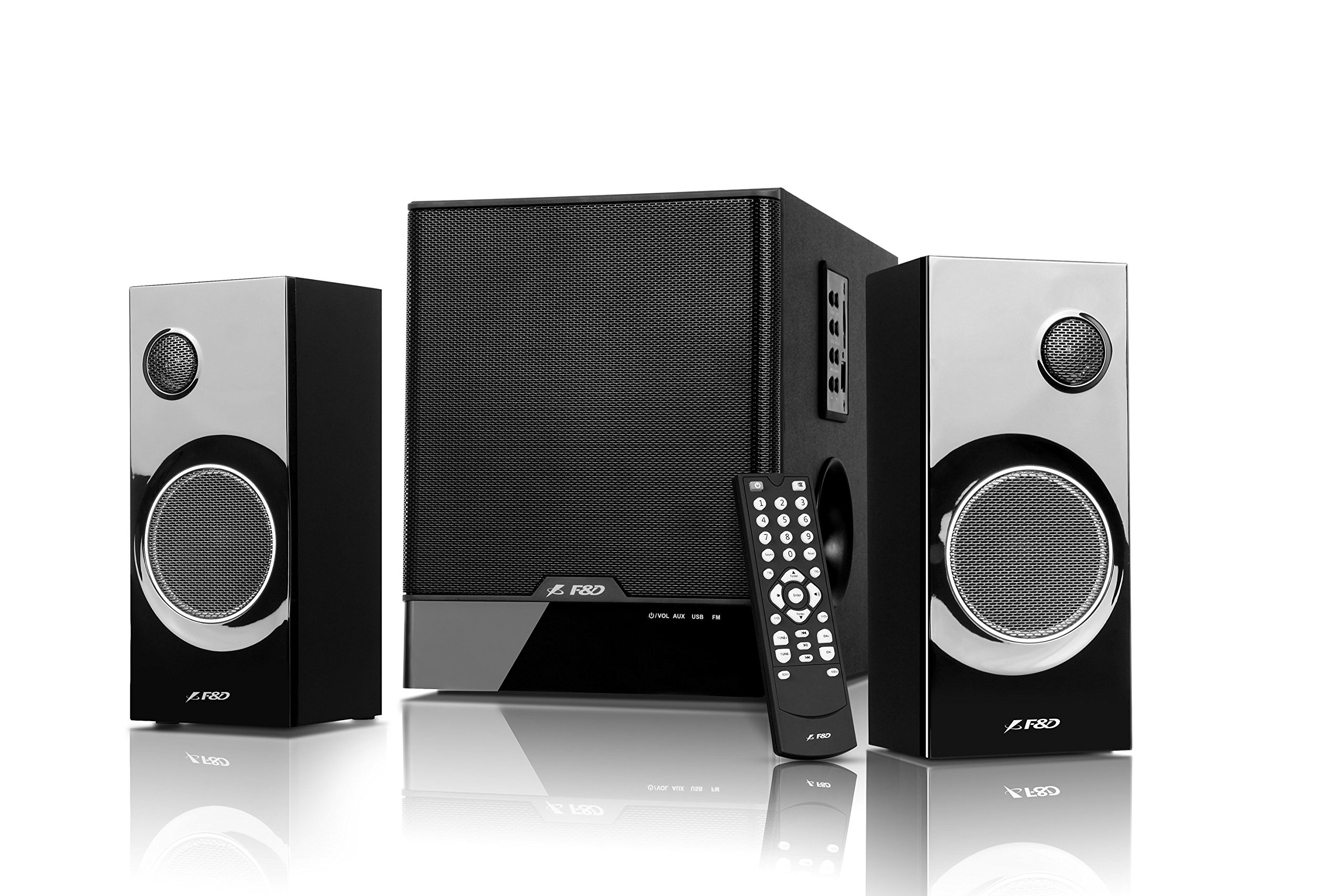
Image: The F&D F690 Multimedia Speaker System, showing the central subwoofer unit and two satellite speakers. The subwoofer has a large speaker grille, and the satellites feature smaller grilles.
4.1. Front Panel Controls (Subwoofer)
The subwoofer unit includes the following controls:
- 대기 버튼 : 장치의 전원을 켜거나 끕니다.
- 소스 버튼 : Cycles through input sources (USB, SD, FM, AUX).
- 사운드 버튼: Adjusts sound modes or settings.
- 볼륨 +/- 버튼: 마스터 볼륨을 높이거나 낮춥니다.
- 재생/일시 정지 버튼: Controls playback for USB/SD modes.
- 이전/다음 버튼: Navigates tracks in USB/SD modes or stations in FM mode.
4.2. 원격 제어
The full-function remote control allows for convenient operation of all features from a distance, including direct numeric key input for track selection or FM station tuning.
5. 설정
5.1. Connecting Satellite Speakers
- Locate the speaker output ports on the rear of the subwoofer unit.
- Connect the cables from the satellite speakers to the corresponding output ports. Ensure a secure connection.
5.2. 오디오 소스 연결
- 보조 입력: Use the provided RCA to 3.5mm stereo cable to connect external devices (e.g., TV, PC, MP3 player) to the AUX input ports on the subwoofer.
- USB 드라이브: Insert a USB flash drive into the USB port on the subwoofer.
- SD 카드: Insert an SD card into the SD card slot on the subwoofer.
5.3. 전원 연결
- Connect the power cable to the AC input on the rear of the subwoofer.
- Plug the other end of the power cable into a standard AC 220-240V~50/60Hz wall outlet.
- Press the Standby button on the subwoofer or remote control to power on the unit.
6. 사용 설명서
6.1. 소스 선택
를 누르세요 원천 button on the subwoofer or remote control repeatedly to cycle through the available input modes: AUX, USB, SD, and FM.
6.2. USB/SD 재생
- MP3/WMA 오디오 파일이 들어 있는 USB 드라이브 또는 SD 카드를 삽입하세요. files. The system will automatically switch to USB/SD mode and begin playback.
- 사용하세요 재생/일시정지 버튼을 눌러 재생을 일시 중지하거나 다시 시작합니다.
- 사용하세요 이전/다음 버튼을 눌러 이전 또는 다음 트랙으로 건너뜁니다.
- For direct track selection, use the numeric keys on the remote control.
6.3. FM 라디오 작동
- FM 모드로 전환하려면 다음을 사용하세요. 원천 단추.
- The system features PLL technology for stable FM reception.
- 자동 스캔: 를 누르고 계세요 재생/일시정지 button (or a dedicated scan button on the remote, if available) to automatically scan and store available FM stations. The system can store up to 100 stations.
- 수동 조정 : 사용하세요 이전/다음 저장된 방송국을 탐색하는 버튼입니다.
- 직접 주파수 입력: Use the numeric keys on the remote control to directly enter an FM frequency.
6.4. 볼륨 조절
마스터 볼륨을 조정하려면 다음을 사용하세요. 볼륨 +/- buttons on the subwoofer or the remote control.
7. 유지관리
- 청소: Wipe the surfaces of the speakers and subwoofer with a soft, dry cloth. Do not use abrasive cleaners, waxes, or solvents.
- 먼지: 스피커 그릴에 먼지가 쌓여 음질에 영향을 미치는 것을 방지하기 위해 정기적으로 먼지를 제거하십시오.
- 저장: 장기간 보관할 경우, 전원 콘센트에서 플러그를 뽑고 서늘하고 건조한 곳에 보관하세요.
8. 문제 해결
| 문제 | 가능한 원인 | 해결책 |
|---|---|---|
| 전원이 없습니다 | 전원 케이블이 연결되지 않았습니다. 전원 콘센트가 활성화되지 않았습니다. | Ensure power cable is securely connected; Check power outlet with another device. |
| 소리가 나지 않습니다 | Incorrect source selected; Volume too low; Audio cables not connected properly | Press Source button to select correct input; Increase volume; Check all audio cable connections. |
| USB/SD 카드가 재생되지 않습니다 | 잘못된 file format; USB drive/SD card corrupted; Device not inserted correctly | 보장하다 files are MP3/WMA format; Try another USB drive/SD card; Reinsert the device. |
| FM 수신 불량 | 약한 신호; 간섭 | Adjust the position of the unit; Try auto-scanning again; Avoid placing near other electronic devices. |
| 리모컨이 작동하지 않습니다 | 배터리가 소진되었습니다. 리모컨과 장치 사이에 방해물이 있습니다. | Replace remote control batteries; Ensure clear line of sight to the unit's sensor. |
9. 사양
| 특징 | 세부 사항 |
|---|---|
| 출력 전력(RMS) | 60 W (Subwoofer: 30W, Satellites: 15W x 2) |
| 서브우퍼 드라이버 | 6.5-inch bass driver |
| 위성 드라이버 | 3-inch full range driver & 1-inch tweeter |
| 주파수 응답(서브우퍼) | 30Hz ~ 120Hz |
| Frequency Response (Satellite) | 200Hz ~ 20kHz |
| 연결성 | USB, SD Card, AUX (RCA to 3.5mm stereo) |
| 지원되는 오디오 형식 | MP3, WMA (USB/SD 카드 이용) |
| FM 라디오 | Digital FM with PLL technology, 100 station storage |
| 전원 공급 장치 | AC 220-240V ~ 50/60Hz |
| Subwoofer Dimensions (W×D×H) | 206 x 302 x 260mm |
| Satellite Speaker Dimensions (W×D×H) | 93 x 91 x 213mm |
| 순중량 | 7.6kg |
| 재료 | 플라스틱, 목재 |
| 제어 방법 | Remote, Unit Buttons |
10. 보증 및 지원
This product comes with a limited warranty. Please refer to the warranty card included in your package for detailed terms and conditions. For technical support, service, or inquiries, please contact your local F&D customer service center or authorized dealer. Keep your purchase receipt as proof of purchase for warranty claims.