
1. 안전 정보
Please read this manual carefully before operating the GAIN EXPRESS Digital Car Window Tint Meter WTM-1100. Retain this manual for future reference.
- 기기를 분해하거나 개조하지 마십시오. 이는 보증을 무효화하고 기기 손상을 초래할 수 있습니다.
- 기기를 물과 과도한 습기로부터 멀리하세요.
- 장치를 극한의 온도나 직사광선에 장기간 노출시키지 마십시오.
- Use only the specified battery type (AAA alkaline batteries) for power.
- Handle the measuring probes with care to prevent damage to the optical components.
- Ensure proper alignment of the probes during measurement to obtain accurate readings.
2. 제품 오버view
The GAIN EXPRESS WTM-1100 is a portable digital window tint meter designed for accurately measuring the Visible Light Transmission (VLT) through various transparent or translucent materials, including automotive windows, filmed glass, and other samples. While the product title mentions capabilities for UV IR Rejection and Spectrum Testing, the primary measurement detailed in the specifications is Visible Light Transmission at 550 nanometers. It features a clear LCD display, one-key calibration, and a compact design for ease of use.
주요 특징:
- 정확한 측정: Precisely measures Visible Light Transmission (VLT) from 0% to 100%.
- 다양한 응용 분야: Suitable for automotive, aerospace, glass products, plastic sheets, and more.
- 디지털 디스플레이: Features a 10mm LCD display for clear reading results.
- 고해상도: Provides accurate and reliable readings with high resolution.
- 휴대성 있는 디자인: Solid structure, small size, and lightweight for easy carrying and use.
- 연속 측정 모드: Allows for ongoing measurements.
- 내부 광원: Enables use in various lighting conditions, day or night.
- One-Key Calibration: Simplifies the calibration process for user convenience.
- Optional PC Connectivity: Can be connected to a PC via an optional RS232C cable and software (not included) for expanded functionality.

Figure 2.1: GAIN EXPRESS Digital Car Window Tint Meter WTM-1100. This image shows the main unit of the tint meter, highlighting its compact design and digital display.

Figure 2.2: Labeled components of the WTM-1100 Tint Meter. This image identifies the RS-232 port, display, calibration key, power key, and measuring probes.
3. 설정
3.1 배터리 설치
The WTM-1100 meter is powered by four AAA alkaline batteries. To install or replace batteries:
- 장치 뒷면에서 배터리 덮개를 찾으세요.
- 덮개를 밀어 엽니다.
- Insert four AAA alkaline batteries, ensuring correct polarity (+/-).
- 배터리 덮개를 단단히 닫으세요.

Figure 3.1: Battery compartment. This image shows the open battery compartment on the back of the device, ready for battery insertion.
3.2 Power On and Self-Calibration
After battery installation, the device will perform a self-calibration upon power-on. This ensures accuracy without manual adjustment.
- 를 누르세요 힘 기기를 켜는 버튼입니다.
- The instrument will automatically self-calibrate. During this process, the display will show initial values and then settle to 100% VLT (or similar initial values depending on the model variant).
- Once self-calibration is complete, the device is ready for use.
Video 3.1: LS162 Transmission Meter Instruction Guide. This video demonstrates the battery installation, power-on sequence, and automatic self-calibration of a similar transmission meter, showing the display settling to initial values.
4. 사용 설명서
4.1 측정하기
To measure the light transmission of a samp르 :
- Ensure the device is powered on and has completed its self-calibration.
- Carefully insert the material (e.g., window, film) into the test slot between the transmitter and receiver probes.
- Ensure the two markings on the probe are properly aligned for accurate results.
- The measured Visible Light Transmission (VLT) percentage will be displayed instantly on the LCD.
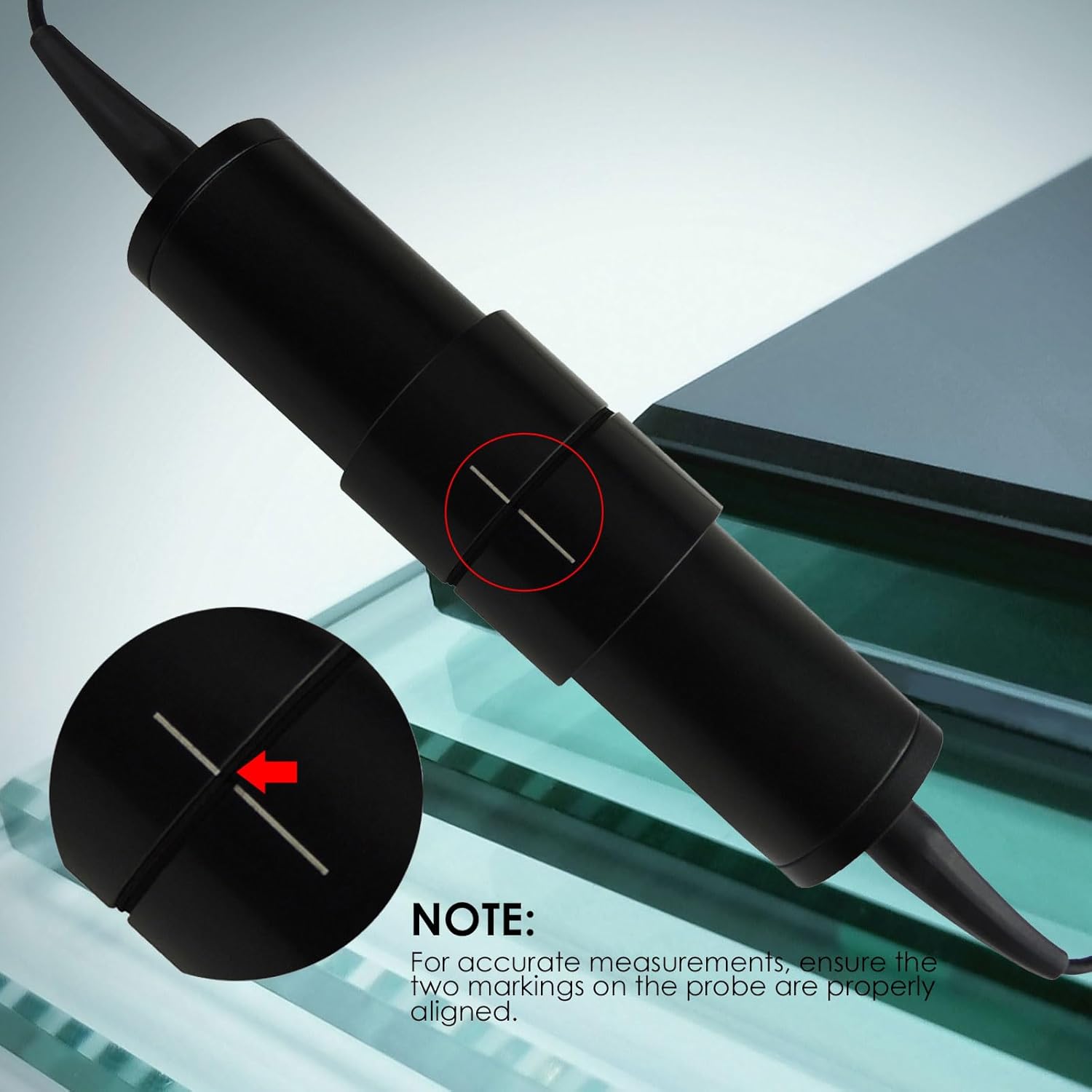
Figure 4.1: Proper probe alignment. This image illustrates how to align the two markings on the measuring probe to ensure accurate readings.
Video 4.1: Window Tint Meter Operation. This video demonstrates the process of placing a window between the transmitter and receiver to obtain a tint measurement.
4.2 Checking Calibration
To quickly verify the accuracy of the device's calibration:
- Use the included reference sample (test sheet) if available.
- Place the receiver probe on top of the test sheet.
- Compare the value shown on the LCD with the specified value on the test sheet. They should match closely.
Video 4.2: Calibration Check. This video shows how to verify the meter's accuracy by comparing its reading with a reference samp르.
4.3 데이터 홀드 기능
The device features a data hold function to freeze the current reading on the display.
- After taking a measurement, short press the DATA TRANS button (or equivalent data hold button) to lock the displayed value.
- The "HOLD" indicator may appear on the screen.
- To release the hold and return to live measurement, short press the button again.

Figure 4.2: One-key calibration. This image highlights the 'CAL' button, which is used for calibration or data hold depending on the model variant.
Video 4.3: Data Hold Function. This video demonstrates how to use the data hold function to lock a measurement on the display.
4.4 RS232C Connectivity (Optional)
The WTM-1100 can be connected to a PC for data transfer and analysis using an optional RS232C cable and software (not included).
- Locate the RS-232 port on the device.
- Connect the RS232C cable (purchased separately) from the device to your PC.
- Install the appropriate software on your PC to enable data communication.

Figure 4.3: RS232C port. This image shows the RS232C port located on the side of the device for optional PC connectivity.
5. 유지관리
5.1 청소
- 기기 외부를 부드럽고 마른 천으로 닦아주세요.
- 연마성 세척제나 용제를 사용하지 마십시오. 이러한 제품은 표면을 손상시킬 수 있습니다.asing 또는 디스플레이.
- Keep the optical components of the probes clean and free from dust or smudges. Use a soft, lint-free cloth specifically designed for optics if necessary.
5.2 배터리 교체
When the low battery indicator appears on the display, replace the batteries as described in Section 3.1. Always replace all four batteries at once with new AAA alkaline batteries.
5.3 보관
Store the device in a dry, cool place, away from direct sunlight and extreme temperatures. The recommended storage environment is -70 to 50 degrees Celsius with less than 80% relative humidity (non-condensing).
6. 문제 해결
| 문제 | 가능한 원인 | 해결책 |
|---|---|---|
| 장치의 전원이 켜지지 않습니다. | 배터리가 방전되었거나 잘못 설치되었습니다. | 배터리 극성을 확인하세요. 새 AAA 알카라인 배터리로 교체하세요. |
| 부정확하거나 일관성이 없는 판독값. |
|
|
| Display shows "Low Battery" or similar. | 배터리가 부족합니다. | Replace all four AAA alkaline batteries. |
7. 사양
| 매개변수 | 값 |
|---|---|
| 모델 번호 | WTM-1100 |
| 측정 유형 | 전송 미터 |
| 해결 | 0.1 |
| 정확성 | ≤ 2% |
| 파장 | 550 Nanometers (Visible Light) |
| 측정 범위 | 0~100% Light Transmission |
| Samp르 두께 | Less than 18mm / 0.4 inch |
| 전원 | Battery Powered (4 x AAA alkaline batteries) |
| 최소 작동 볼륨tage | 1.5 볼트 |
| 상한 온도 등급 | 섭씨 50도 |
| 운영 환경 | 0-50°C, <80% RH (No condensation) |
| 저장 환경 | -70-50°C, <80% RH |
| 품목 무게 | 100그램 |
| 제품 크기(L x W x H) | 25.4 x 5.1 x 20.3 센티미터 |
| 인터페이스 | RS-232C (optional, not included) |

Figure 7.1: Specifications. This image provides a visual summary of the key technical specifications for the WTM-1100.

Figure 7.2: Dimensions. This image shows the physical dimensions of the main unit and the probe.
8. 보증 및 지원
GAIN EXPRESS products are manufactured to high-quality standards. For warranty information and technical support, please refer to the warranty card included with your product or contact your retailer. Keep your purchase receipt as proof of purchase.
For further assistance, please visit the GAIN EXPRESS store on Amazon or contact their customer service directly.
제조업체: Gain Express Holdings Ltd
사업장 위치: To Kwa Wan, Kowloon, 000, HK