
1. 서론
The Audioengine B1 is a premium Bluetooth receiver designed to integrate high-quality wireless audio streaming into your existing home stereo system. Featuring Bluetooth 5.3 with aptX Adaptive technology, it delivers superior sound quality and extended wireless range. This manual provides detailed instructions for setting up, operating, and maintaining your B1 receiver.
2. 상자 안에 무엇이 들어있나요?
- Audioengine B1 Bluetooth Receiver
- RCA Audio Cable (3ft/1m)
- Power Adapter with Detachable Cable
- 마이크로파이버 백
- 설정 가이드(본 설명서)

Image: All items included with the Audioengine B1 Premium Bluetooth Receiver.
3. 제품 오버view
The Audioengine B1 features a compact design with essential connections for seamless integration into your audio setup.
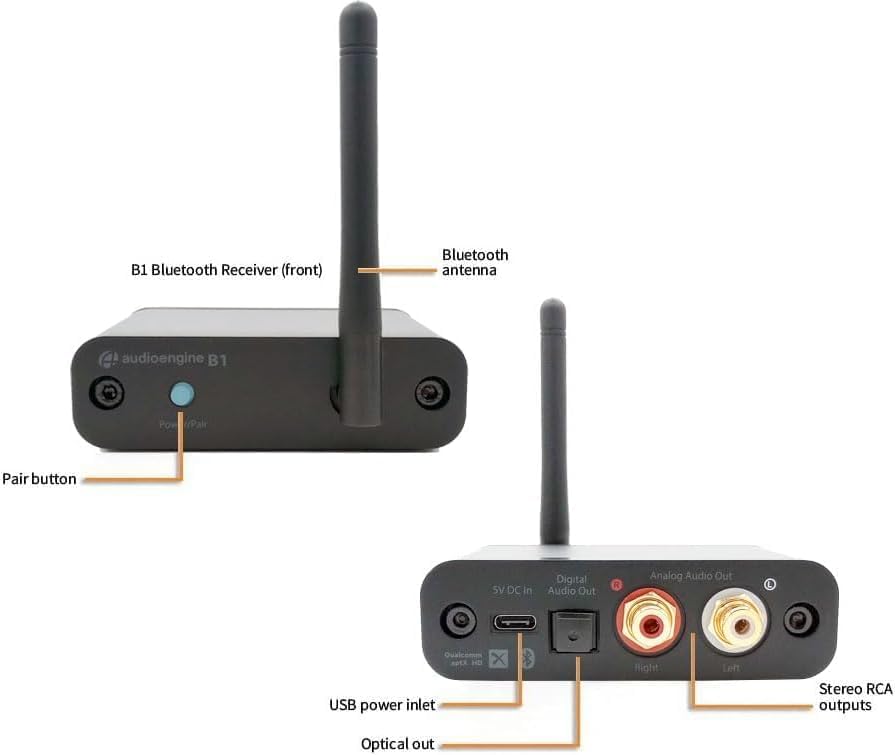
Image: Front and rear panels of the B1 receiver, highlighting the Power/Pair button, Bluetooth antenna, USB power input, Optical output, and Analog RCA outputs.
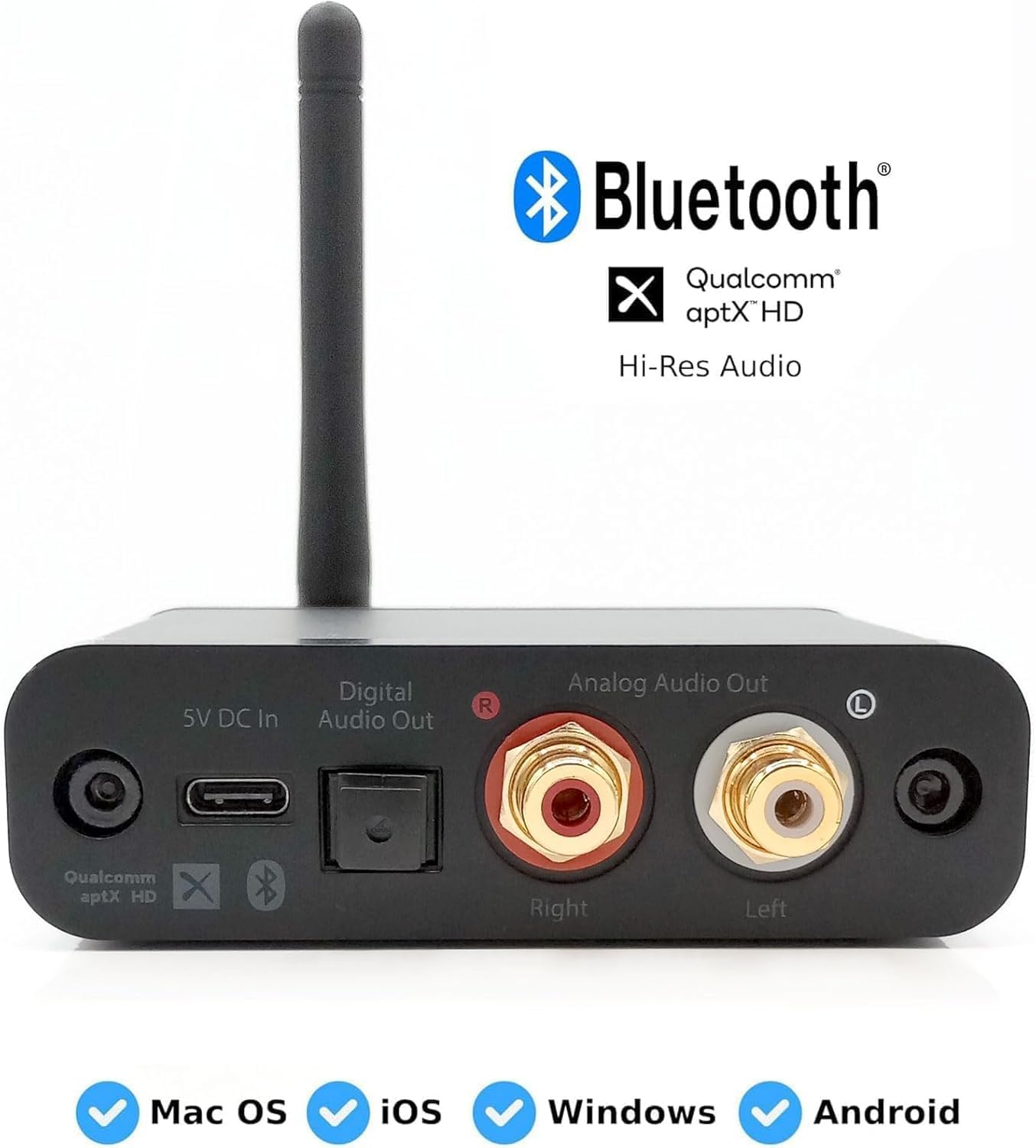
이미지: 상세 view of the B1's rear connections, including digital optical and analog RCA outputs, and power input. Also shows compatibility with various operating systems.
- Power/Pair Button: Used to power on/off the device and initiate Bluetooth pairing.
- 블루투스 안테나: Ensures stable and extended wireless range.
- 5V DC In (USB Power Inlet): Connects to the included power adapter for power.
- 디지털 오디오 출력(광): For connecting to a digital audio input on your stereo system or DAC.
- Analog Audio Out (RCA): For connecting to analog RCA inputs on your stereo system or powered speakers.
4. 설정 지침
Follow these steps to connect your Audioengine B1 to your home stereo system and start streaming music wirelessly.
- 오디오 케이블을 연결하세요: Connect the included RCA audio cables from the B1's Analog Audio Out (or an optical cable from Digital Audio Out) to an available input on your music system (e.g., AUX, CD, Tape input). Ensure left and right channels are matched (red for right, white for left).

Image: The B1 receiver connected to a vintage Marantz stereo receiver via RCA cables.
- 전원 연결: Connect the included power adapter to the B1's 5V DC In port and plug it into an AC outlet. The B1 will automatically power on and enter pairing mode, indicated by a blinking light on the Power/Pair button.

Image: The B1 receiver powered on and ready for pairing, positioned on a stereo receiver.
- 장치를 페어링하십시오: On your smartphone, tablet, or computer, go to your Bluetooth settings. Select "Audioengine B1" from the list of available devices to pair and connect. The light on the B1's Power/Pair button will turn solid once connected.

Image: A smartphone displaying the Bluetooth pairing menu, showing the Audioengine B1 as a discoverable device.
- 음악을 재생하세요: Select the corresponding input on your stereo system (e.g., AUX) and start playing music from your paired device. Enjoy high-fidelity wireless audio!
설정 비디오 가이드
Video: Official quick start guide for the Audioengine B1 receiver, demonstrating the connection process to an audio system.
Video: A step-by-step demonstration of how to set up the Audioengine B1 Wireless Bluetooth Receiver quickly.
5. 사용 설명서
Once connected, the B1 operates seamlessly. It will automatically reconnect to the last paired device when powered on and within range. To pair a new device, press and hold the Power/Pair button until the light blinks, then select "Audioengine B1" from your device's Bluetooth settings.
The B1 features an extended wireless range of up to 100 feet (30 meters), allowing you to stream music from a distance without interruption. Its 32-bit DAC ensures high-resolution audio playback, enhancing your listening experience.
6. 유지관리
To ensure the longevity and optimal performance of your Audioengine B1, follow these simple maintenance guidelines:
- 청소: Use a soft, dry cloth to clean the exterior of the B1. Avoid using harsh chemicals or abrasive materials.
- 놓기: Place the B1 in a well-ventilated area, away from direct sunlight, heat sources, and moisture. Ensure the Bluetooth antenna is not obstructed for optimal signal reception.
- 케이블 관리 : 손상을 방지하고 안정적인 연결을 보장하려면 케이블을 깔끔하게 정리하세요.
7. 문제 해결
If you encounter any issues with your Audioengine B1, refer to the following common solutions:
- 소리가 나지 않거나 간헐적으로 오디오가 끊김:
- Ensure the B1 is properly powered on and the indicator light is solid.
- Verify that your audio system is set to the correct input source (e.g., AUX, CD).
- 모든 오디오 케이블이 안전하게 연결되었는지 확인하세요.
- Confirm your device is successfully paired and connected to "Audioengine B1" via Bluetooth.
- Move the B1 further away from other electronic devices or power supplies that might cause interference.
- 기기를 페어링할 수 없습니다:
- Ensure the B1 is in pairing mode (blinking indicator light). If not, press and hold the Power/Pair button until it blinks.
- Turn off Bluetooth on other nearby devices that might be trying to connect to the B1.
- Try restarting both the B1 (unplug and replug power) and your source device.
- Analog Output Issues (e.g., after power failure):
- If the B1's analog output stops working and only digital output is available, reboot the device by unplugging it, waiting a few seconds, and then plugging it back in.
- Bright Power Light:
- The power light will blink when awaiting pairing and then turn off after approximately three minutes if no connection is made, entering standby. If the light remains too bright for your environment, consider repositioning the unit or using a small, non-obstructive cover.
8. 사양
| 특징 | 사양 |
|---|---|
| 상표 | 오디오엔진 |
| 모델 번호 | B1 |
| 연결 기술 | 블루투스 5.3 |
| 특징 | Bluetooth 5.3 aptX-HD, Optical, iOS, Android, Windows, MacOS |
| 호환 장치 | 스테레오 수신기 |
| 커넥터 유형 | 광학, RCA |
| 오디오 인코딩 | 스테레오 재생 |
| 오디오 출력 모드 | 스테레오, 서라운드 |
| 서라운드 사운드 채널 구성 | 2.0 |
| 채널 수 | 2 |
| 지원되는 인터넷 서비스 | 조수 |
| 제어 방법 | 앱 |
| 오디오 출력 유형 | 스피커 |
| 체재 | WAV, WMA |
| 무선 기술 | 블루투스 |
| 품목 치수 D x W x H | 9.52인치 깊이 x 8.89인치 너비 x 2.54인치 높이 |
| 품목 무게 | 5 온스 |
9. 보증 및 지원
The Audioengine B1 Bluetooth Receiver comes with a 3년 제조사 보증. 본 보증은 정상적인 사용 중에 발생하는 재료 및 제조상의 결함을 보장합니다.
For technical support, troubleshooting assistance, or warranty claims, please visit the official Audioengine web사이트를 방문하거나 고객 서비스에 직접 문의하세요. 보증 확인을 위해 구매 증빙 자료를 보관하세요.