
ASUS THUNDERBOLTEX II/DUAL
ASUS ThunderboltEX II/DUAL 어댑터 사용 설명서
Model: THUNDERBOLTEX II/DUAL
1. 서론
The ASUS ThunderboltEX II/DUAL is an add-on card designed to bring Thunderbolt 2 technology to compatible ASUS motherboards. This card provides two Thunderbolt 2 ports, enabling high-speed data transfer and versatile connectivity for various devices. With bi-directional transfer speeds of up to 20 Gbps, it offers significantly faster performance compared to USB 3.0. It supports daisy-chaining of up to six Thunderbolt devices and can connect multiple 1080p displays via DisplayPort.
This manual provides essential information for the proper installation, operation, and maintenance of your ThunderboltEX II/DUAL adapter.
2. 안전 정보
Please read the following safety guidelines carefully before installing or operating the device:
- 설치하기 전에 컴퓨터의 전원이 꺼져 있고 벽면 콘센트에서 플러그가 뽑혀 있는지 확인하세요.
- 카드를 만지기 전에 접지된 금속 물체(예: 컴퓨터 본체)를 만져 몸의 정전기를 방전시키십시오.
- 민감한 부품에 손이 닿지 않도록 카드 가장자리를 잡고 다루십시오.
- 과열을 방지하기 위해 통풍이 잘 되는 컴퓨터 케이스에 그래픽 카드를 설치하십시오.
- Refer to your motherboard's manual for specific PCIe slot compatibility and Thunderbolt header location.
3. 패키지 내용
패키지에 모든 품목이 들어 있는지 확인하세요.
- ASUS ThunderboltEX II/DUAL Adapter Card
- Thunderbolt Header Cable
- Support CD/DVD (containing drivers and utilities)
- User Manual (this document, or a quick start guide)
4. 시스템 요구 사항
시스템이 정상적으로 작동하려면 다음 요구 사항을 충족해야 합니다.
- 마더보드: Compatible ASUS motherboard with a dedicated Thunderbolt header. Refer to your motherboard's specifications for compatibility.
- PCIe 슬롯: An available PCI Express 2.0 x4 slot.
- 운영 체제: Microsoft Windows (Windows 7, 8, 8.1, 10, 64-bit recommended).
- 그래픽 카드: A graphics card with a DisplayPort output is required for video passthrough functionality.
5. 설정 및 설치
5.1 물리적 설치
- 시스템을 준비하세요: 컴퓨터 전원을 끄고 전원 코드를 뽑으세요. 컴퓨터 케이스를 여세요.
- PCIe 슬롯을 찾으세요: Find an available PCI Express 2.0 x4 slot on your motherboard.
- Install the card: Carefully insert the ThunderboltEX II/DUAL card into the chosen PCIe slot until it is firmly seated. Secure the card with a screw to the chassis.
- Connect the Thunderbolt Header Cable: Connect one end of the provided Thunderbolt header cable to the Thunderbolt header on the ThunderboltEX II/DUAL card and the other end to the dedicated Thunderbolt header on your ASUS motherboard. Refer to your motherboard manual for the exact location of this header.
- Connect DisplayPort Cable (Optional): If you plan to use the DisplayPort passthrough feature for video output through the Thunderbolt ports, connect a DisplayPort cable from the DisplayPort output of your graphics card to the DisplayPort input on the ThunderboltEX II/DUAL card.
- 케이스 종료: Once all connections are secure, close your computer case and reconnect the power cord.
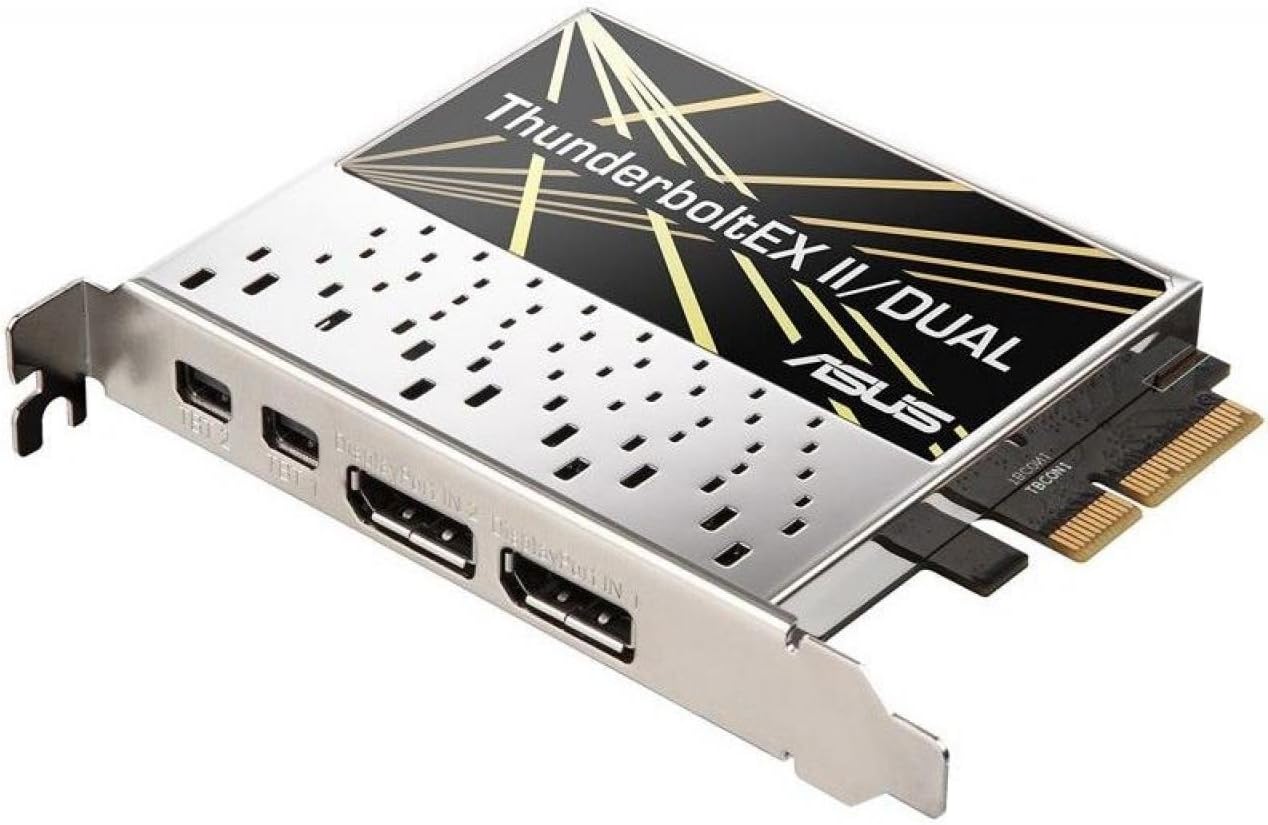
그림 1: 상향식 view of the ASUS ThunderboltEX II/DUAL Adapter card, showing the PCIe connector and the two Thunderbolt 2 ports.
그림 2: 측면 view of the ASUS ThunderboltEX II/DUAL Adapter card, highlighting the two Thunderbolt 2 ports and the DisplayPort input.
5.2 BIOS 구성
After physical installation, you may need to configure your motherboard's BIOS/UEFI settings to enable Thunderbolt functionality. The exact steps may vary depending on your motherboard model:
- Power on your computer and press the designated key (usually 델 or F2BIOS/UEFI 설정으로 들어가려면 다음 단계를 따르세요.
- 로 이동합니다 고급의 설정.
- Look for a section related to 벼락 or Intel Thunderbolt Technology.
- Enable the Thunderbolt controller and configure any related options, such as security levels (e.g., "Security Level: User Authorization" or "No Security").
- Save changes and exit the BIOS/UEFI. Your system will restart.
5.3 드라이버 설치
Once your operating system loads, install the necessary drivers:
- Insert the provided support CD/DVD into your optical drive, or download the latest drivers from the official ASUS support website for your motherboard model and the ThunderboltEX II/DUAL card.
- Run the driver setup program and follow the on-screen instructions.
- 드라이버 설치가 완료되면 컴퓨터를 다시 시작하십시오.
- Verify the installation in Device Manager (Windows) to ensure the Thunderbolt controller is recognized and functioning correctly.
6. Operating the ThunderboltEX II/DUAL
6.1 Connecting Thunderbolt Devices
The ThunderboltEX II/DUAL card features two Thunderbolt 2 ports. You can connect various Thunderbolt-enabled devices, such as external storage drives, audio interfaces, and docking stations. Thunderbolt 2 supports bi-directional data transfer at up to 20 Gbps.
- Use certified Thunderbolt cables for optimal performance and compatibility.
- You can daisy-chain up to six Thunderbolt devices from a single Thunderbolt port. Connect the first device to the card, then connect the second device to the first, and so on.
- Ensure all devices in the daisy chain are powered on before connecting them to the Thunderbolt port.
6.2 디스플레이 지원
The Thunderbolt 2 ports also support DisplayPort functionality. This allows you to connect displays directly to the Thunderbolt ports, or as part of a daisy-chain with other Thunderbolt devices.
- The card supports up to three 1080p displays.
- For video output, ensure your graphics card is connected to the ThunderboltEX II/DUAL card via a DisplayPort cable as described in the installation section.
- Some Thunderbolt displays may also provide USB and Ethernet connectivity through the Thunderbolt cable.
7. 유지관리
The ThunderboltEX II/DUAL adapter requires minimal maintenance. To ensure its longevity and optimal performance:
- Keep your computer's interior clean and free of dust to ensure proper airflow and prevent overheating.
- 모든 케이블이 단단히 연결되어 있는지 확인하십시오.
- 정기적으로 ASUS 지원을 확인하세요 website for updated drivers and firmware for both the ThunderboltEX II/DUAL card and your motherboard.
8. 문제 해결
If you encounter issues with your ThunderboltEX II/DUAL adapter, refer to the following common troubleshooting steps:
| 문제 | 가능한 원인 | 해결책 |
|---|---|---|
| Card not detected by the system. |
|
|
| 썬더볼트 장치가 인식되지 않습니다. |
|
|
| No video output from Thunderbolt display. |
|
|
9. 사양
| 특징 | 세부 사항 |
|---|---|
| 모델명 | THUNDERBOLTEX II/DUAL |
| 폼 팩터 | 플러그인 카드 |
| Interface (Bus) Type | PCI 익스프레스 2.0 x4 |
| 포트 | 2 x 썬더볼트 2 |
| 데이터 전송 속도 | Up to 20 Gbps (bi-directional) |
| 디스플레이 지원 | Supports up to three 1080p displays |
| 데이지 체인 지원 | Up to 6 Thunderbolt devices |
| 치수(길이x너비x높이) | 3.94 x 3.54 x 0.79인치(대략) |
| 무게 | 1.4파운드(대략) |
| 호환 장치 | Personal Computer (with compatible ASUS motherboard) |
10. 보증 및 지원
For information regarding the product warranty, please refer to the warranty card included with your purchase or visit the official ASUS support website. The warranty terms and conditions may vary by region.
For technical support, driver downloads, and frequently asked questions, please visit the ASUS support web대지:
When contacting support, please have your product model name (THUNDERBOLTEX II/DUAL) and serial number ready.
Ask a question about this manual
Ask about setup, troubleshooting, compatibility, parts, safety, or missing instructions. Manuals+ will review the question and use this page’s manual context to help answer it.