
1. 서론
This manual provides essential information for the proper installation, operation, and maintenance of the Furuno FAP7011C Control Unit. The FAP7011C is designed to serve as the primary interface for the Furuno NavPilot 711C autopilot system, enabling precise control and navigation for marine vessels. Please read this manual thoroughly before using the unit to ensure safe and efficient operation.
2. 안전 정보
Observe the following safety precautions to prevent injury, damage to the equipment, or other property. Always prioritize safety when operating marine electronics.
- 전원 공급 장치: 전원 공급 장치 볼륨을 확인하십시오.tage matches the unit's requirements. Incorrect voltag손상을 초래할 수 있습니다.
- 설치: Installation should be performed by qualified personnel to ensure correct wiring and mounting.
- 물 노출: While designed for marine environments, avoid direct high-pressure water spray on the unit.
- 항해: The autopilot is an aid to navigation. Always maintain a proper lookout and be prepared to take manual control of the vessel.
- 유지: 유지관리나 청소를 하기 전에 전원을 분리하세요.
3. 패키지 내용
설치를 진행하기 전에 패키지에 모든 품목이 들어 있는지 확인하세요.
- Furuno FAP7011C Control Unit
- 장착 브래킷 및 하드웨어
- 전원 케이블
- Data Cable (NMEA2000 or NMEA0183, depending on configuration)
- 사용 설명서(이 문서)
4. 제품 오버view
The Furuno FAP7011C is a dedicated control unit for the NavPilot 711C autopilot system. It features a clear display and intuitive controls for setting course, engaging autopilot modes, and accessing navigation functions. Its robust design is suitable for demanding marine conditions.
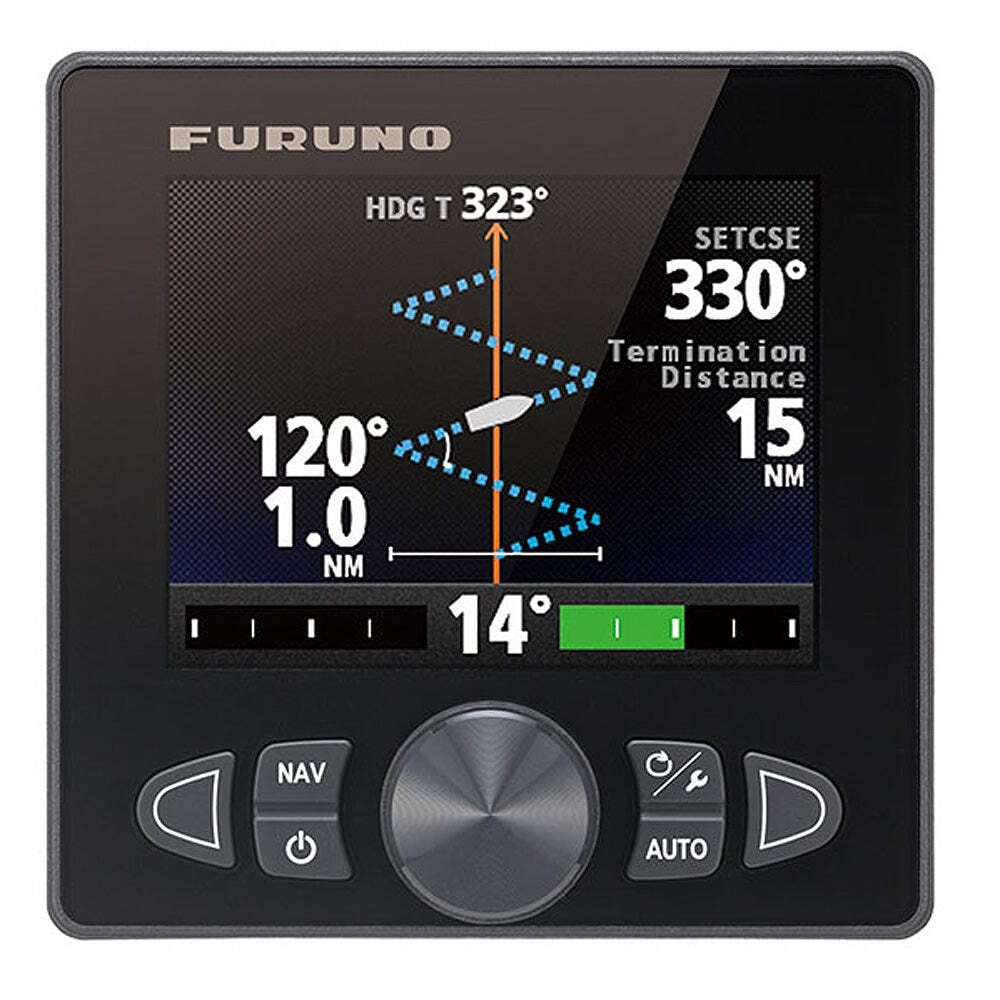
그림 1: 앞쪽 view of the Furuno FAP7011C Control Unit. This image displays the unit's screen, rotary knob, and various control buttons, designed for easy interaction with the NavPilot 711C autopilot system.
5. 설치 및 설정
Proper installation is crucial for the performance of your FAP7011C control unit. It is recommended that installation be performed by a certified marine electronics technician.
5.1 장착
- 위치 선택: Choose a location on the helm that is easily accessible, visible, and protected from direct impact or excessive vibration. Ensure adequate space for wiring connections at the rear.
- 템플릿 사용: Use the provided mounting template to mark drilling locations for the mounting bracket.
- 안전한 장착: Secure the mounting bracket using the supplied hardware. Ensure a watertight seal if flush mounting.
5.2 배선 연결
- 전원 연결: Connect the power cable to a suitable 12V or 24V DC power source, ensuring proper polarity. Install an appropriate fuse or circuit breaker as specified in the full NavPilot 711C system manual.
- 데이터 연결: Connect the data cable to the NavPilot 711C processor unit. This typically involves a NMEA2000 or NMEA0183 connection, depending on your system configuration. Refer to the NavPilot 711C installation manual for specific wiring diagrams.
- 접지: Ensure the unit is properly grounded to the vessel's common ground system to prevent electrical interference.
6. 사용 설명서
The FAP7011C control unit provides intuitive control over your NavPilot 711C autopilot system.
6.1 전원 켜기/끄기
- 전원을 켜려면: 를 누르고 계세요 힘 디스플레이가 켜질 때까지 버튼을 누르세요.
- 전원을 끄려면: 를 누르고 계세요 힘 장치가 종료될 때까지 버튼을 누르십시오.
6.2 Engaging Autopilot
- Ensure the vessel is on a stable course.
- 를 누르세요 자동차 button. The autopilot will engage and maintain the current heading.
6.3 Course Adjustment
- 미세 조정: Rotate the large rotary knob to adjust the course in 1-degree increments.
- Coarse Adjustment: 사용하세요 포트 (left arrow) and 우현 (right arrow) buttons for larger course changes, typically 10-degree increments, or to quickly avoid an obstruction and return to the previous course.
6.4 Navigation Modes
The FAP7011C supports various navigation modes when connected to compatible chartplotters or navigation systems:
- NAV Mode: Engages the autopilot to follow a pre-programmed route or steer to a waypoint. The unit will typically alarm upon approaching waypoints.
- 자동 모드: Maintains a set magnetic or true heading.
- TRK Mode: Maintains a track over ground, compensating for set and drift.
Refer to the comprehensive NavPilot 711C operation manual for detailed instructions on advanced navigation features, including auto route following and specific menu functions.
7. 유지관리
Regular maintenance ensures the longevity and optimal performance of your FAP7011C control unit.
- 청소: 디스플레이를 닦고 casing는 부드러운 d로 발음합니다.amp cloth. Do not use abrasive cleaners, solvents, or chemical sprays, as these can damage the screen and plastic components.
- 점검: 주기적으로 모든 케이블과 연결부를 점검하여 마모, 부식 또는 손상 여부를 확인하십시오. 연결부가 단단히 고정되어 있는지 확인하십시오.
- 저장: If the vessel is stored for an extended period, ensure the unit is powered off and, if possible, protected from extreme temperatures and humidity.
8. 문제 해결
This section addresses common issues you might encounter with the FAP7011C control unit.
| 문제 | 가능한 원인 | 해결책 |
|---|---|---|
| 장치의 전원이 켜지지 않습니다. | 전원 공급 안 됨; 퓨즈 단선됨; 연결 불량. | 전원 케이블 연결 상태를 확인하십시오. 퓨즈/차단기를 점검하십시오. 배터리 전압을 확인하십시오.tage. |
| 디스플레이가 비어 있거나 어둡습니다. | Brightness setting too low; Power issue. | Adjust display brightness (refer to NavPilot 711C manual for menu options); Check power supply. |
| Autopilot does not engage. | No valid heading data; System error; NavPilot processor not powered. | Check compass/heading sensor connection; Verify NavPilot 711C processor is powered and functioning; Consult NavPilot 711C manual for error codes. |
| 컨트롤이 반응하지 않습니다. | Unit frozen; Loose data connection. | Power cycle the unit; Check data cable connection to the NavPilot processor. |
For more complex issues or if troubleshooting steps do not resolve the problem, contact Furuno customer support or a certified service technician.
9. 사양
Key technical specifications for the Furuno FAP7011C Control Unit:
- 모델 이름: FAP7011C
- 부품 번호: FAP7011C
- 상표: 후루노
- 재료: 플라스틱
- 품목 크기(LxWxH): 12 x 8 x 7 인치
- 품목 무게: 4 파운드
- 패키지 치수(LxWxH): 11.46 x 8.27 x 6.97 인치
- 패키지 무게: 1.87 킬로그램
- 첫 번째 가능한 날짜: 27년 2014월 XNUMX일
10. 보증 정보
The Furuno FAP7011C Control Unit is covered by a manufacturer's warranty. Specific warranty terms and conditions, including duration and coverage details, are provided with the product documentation or can be found on the official Furuno web사이트. 보증 청구를 위해 구매 증빙 자료를 보관하세요.
11. 지원 정보
For technical assistance, service, or further inquiries regarding your Furuno FAP7011C Control Unit or NavPilot 711C system, please contact Furuno customer support. You can find contact details, FAQs, and additional resources on the official Furuno web대지.
Web대지: www.후루노우사.com