
1. 제품 오버view
The Soundstream VR-930B is a single DIN car DVD player featuring a 9.3-inch motorized LCD touchscreen display and Bluetooth connectivity. This unit supports playback of various media types including CD, CD-R/RW, DVD, DVD-R/RW, MP3, WMA, and AAC. It includes a front USB input and a front SD card slot for expanded media options. The device also offers AM/FM radio tuning and MP3 ID3 Tag Display for track information.
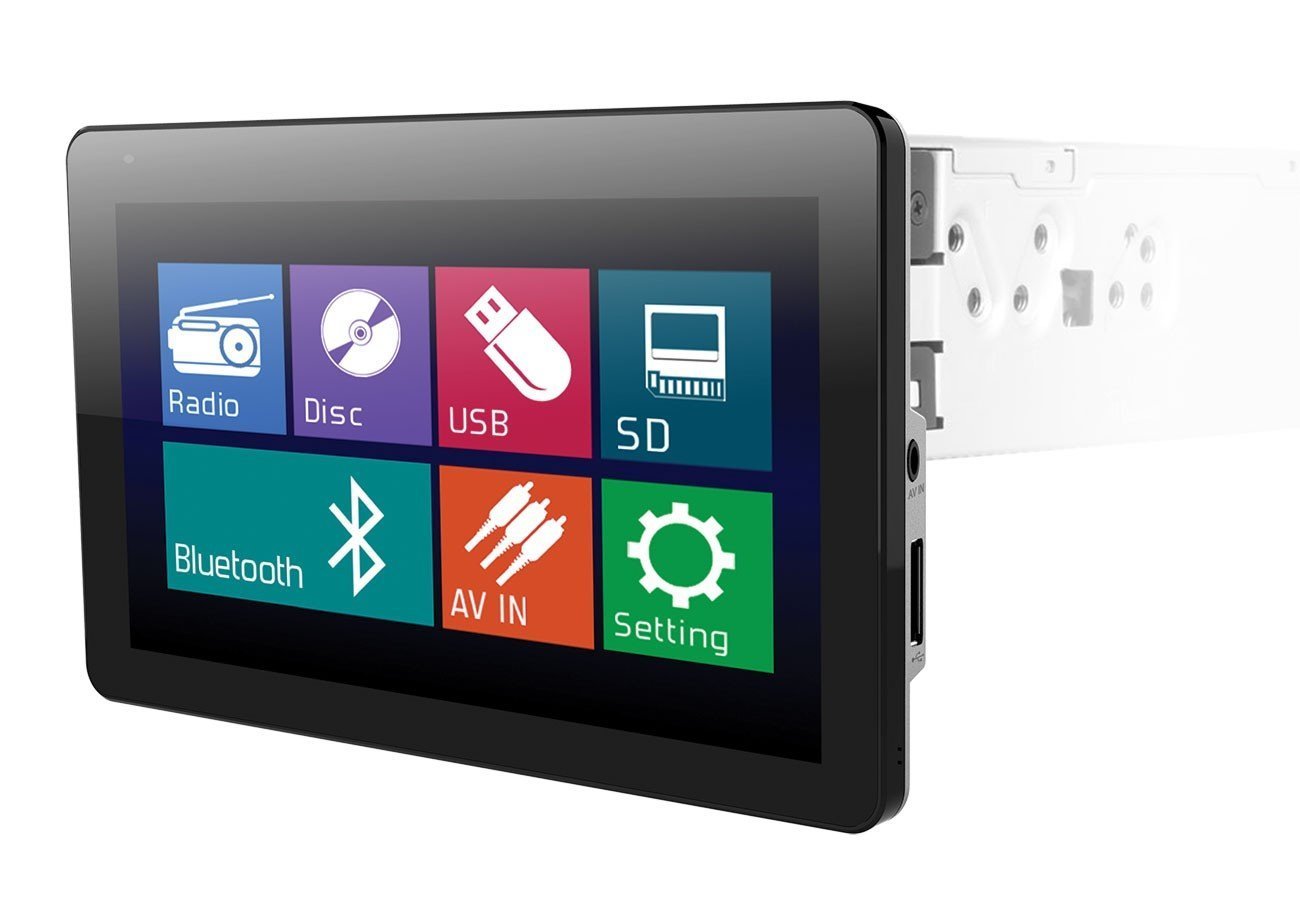
Image: The Soundstream VR-930B car DVD player, showcasing its large 9.3-inch motorized LCD touchscreen display in a vehicle dashboard.
주요 특징:
- Single DIN chassis with a 9.3-inch motorized LCD touchscreen display.
- Bluetooth for audio streaming and hands-free calling.
- Media playback from CD, DVD, USB, and SD cards.
- AM/FM tuner with MP3 ID3 Tag 표시하다.
- Maximum power output of 52 watts x 4 channels.
- Removable faceplate for security.
- Includes a wireless remote control.
2. 안전 정보
Read all instructions carefully before installation and operation. Failure to follow these instructions may result in damage to the unit, vehicle, or personal injury. Always ensure the vehicle is parked and the parking brake is engaged when operating features that require visual attention, such as DVD playback or extensive menu navigation. Do not operate the unit in a manner that distracts you from driving safely. Consult a professional for installation if you are unsure about any wiring or mounting procedures.
3. 패키지 내용
Verify that all items are present in the package before beginning installation. The typical package includes:
- Soundstream VR-930B Head Unit
- 배선 마구
- 무선 원격 제어
- 장착 하드웨어
- 사용 설명서 (본 문서)
4. 설정
4.1 설치
The VR-930B is designed for single DIN dashboard openings. Professional installation is highly recommended to ensure proper wiring and functionality. Incorrect installation can lead to damage to the unit or vehicle electrical system. Ensure the vehicle's battery is disconnected before starting any installation work.
4.2 배선도
Refer to the detailed wiring diagram provided in the separate installation guide or on the unit's chassis for specific connections. Key connections include power (constant 12V, accessory 12V, ground), speaker outputs, antenna, parking brake sensor, and reverse gear input.
4.3 초기 전원 켜기
After installation, reconnect the vehicle battery. Press the power button on the unit or remote control. The unit should power on and display the Soundstream logo. Follow any on-screen prompts for initial setup, such as language selection or clock setting.
5. 사용 설명서
5.1 기본 컨트롤
- 전원 버튼: 기기를 켜거나 끕니다.
- Volume Knob/Buttons: 오디오 출력 레벨을 조정합니다.
- 모드 버튼: Cycle through available audio sources (Radio, DVD, USB, SD, Bluetooth, AUX).
- 메뉴 버튼: Access the main system settings and options.
5.2 DVD/CD 재생
Insert a DVD or CD into the disc slot. The unit will automatically detect the disc and begin playback. Use the on-screen controls or remote control for functions such as Play, Pause, Stop, Skip Track/Chapter, and Fast Forward/Rewind. Ensure the parking brake is engaged for video playback.
5.3 블루투스 연결
Bluetooth 장치를 페어링하려면:
- 모바일 기기에서 Bluetooth를 활성화하세요.
- On the VR-930B, select the Bluetooth source.
- 검색 available devices on your mobile phone. The unit's name will typically appear as "Soundstream VR-930B" or similar.
- Select the unit and enter the default PIN (usually "0000") if prompted.
Once paired, you can stream audio from your device or make/receive hands-free calls through the unit.
5.4 USB/SD 미디어 재생
Insert a USB drive into the front USB port or an SD card into the front SD card slot. The unit will automatically switch to the respective source and display the media files. Navigate through folders and select files using the touchscreen or remote control. Supported formats include MP3, WMA, and AAC.
5.5 라디오 작동 (AM/FM)
Select the Radio source. Use the 'Seek' or 'Tune' functions to find radio stations. You can save your favorite stations as presets for quick access. Press the 'Band' button to switch between AM and FM bands.
5.6 터치스크린 조작
The 9.3-inch LCD is a resistive touchscreen. Use light pressure with your fingertip or a stylus to interact with on-screen icons and menus. The motorized screen allows for angle adjustment to optimize view주고받음.
6. 유지관리
6.1 장치 청소
Wipe the unit's surface and touchscreen with a soft, dry cloth. For stubborn dirt, use a slightly damp cloth with a mild, non-abrasive cleaner. Avoid using harsh chemicals or solvents, as they can damage the finish or screen. Ensure the unit is powered off before cleaning.
6.2 디스크 관리
Handle discs by their edges to avoid fingerprints and scratches. Store discs in their cases when not in use. Clean dirty discs with a soft, lint-free cloth, wiping from the center outwards. Do not use abrasive cleaners or solvents on discs.
7. 문제 해결
If you encounter issues with your VR-930B, refer to the table below for common problems and solutions.
| 문제 | 가능한 원인 | 해결책 |
|---|---|---|
| 장치의 전원이 켜지지 않습니다. | 배선 오류; 퓨즈 단선; 차량 배터리 방전. | 전원 및 접지 연결 상태를 확인하십시오. 차량 퓨즈를 점검하십시오. 배터리가 충전되어 있는지 확인하십시오. |
| 소리가 나지 않습니다. | 볼륨이 너무 낮습니다. 음소거가 활성화되었습니다. 스피커 선이 분리되었습니다. | Increase volume. Deactivate mute. Check speaker wiring connections. |
| Disc error. | Dirty or scratched disc; Unsupported disc format. | Clean the disc. Try a different disc. Ensure disc format is supported. |
| 블루투스가 연결되지 않습니다. | 기기에서 블루투스가 활성화되어 있지 않습니다. 기기가 페어링 모드가 아닙니다. 간섭이 발생하고 있습니다. | Ensure Bluetooth is on and visible. Put unit in pairing mode. Move closer to the unit. |
| Video not playing. | Parking brake not engaged; Incorrect video format. | Ensure parking brake is fully engaged. Check video file 형식 호환성. |
8. 사양
Below are the technical specifications for the Soundstream VR-930B:
| 특징 | 사양 |
|---|---|
| 모델 번호 | VR-930B |
| 디스플레이 크기 | 9.3 인치 |
| 디스플레이 유형 | Motorized LCD Touchscreen |
| 디스플레이 해상도 | 800 x 480 |
| 최대 전력 출력 | 52와트 x 4채널 |
| 지원되는 미디어 유형 | CD+RW, CD-R, MP3, DVD, DVD-R/RW, WMA, AAC |
| 연결 기술 | 블루투스, USB |
| 전원 | 12V |
| 제품 무게 | 2.8 파운드 |
| GTIN / UPC | 709483047792 |
9. 보증 정보
Soundstream products are designed and manufactured to the highest quality standards. This product is covered by a limited warranty against defects in materials and workmanship. The duration and terms of the warranty may vary by region and retailer. Please retain your proof of purchase for warranty claims. For specific warranty details, refer to the warranty card included with your product or contact Soundstream customer support.
10. 고객 지원
For technical assistance, troubleshooting beyond this manual, or warranty inquiries, please contact Soundstream customer support. Visit the official Soundstream website for contact information, FAQs, and additional resources. When contacting support, please have your product model number (VR-930B) and proof of purchase readily available.