
1. 서론
This manual provides instructions for the installation, configuration, and operation of the D-Link DGS-1210-28P Web Smart 24-Port Gigabit PoE Switch. This device is designed to provide a high-performance, cost-effective solution for small to medium-sized businesses, offering advanced management features and Power over Ethernet (PoE) capabilities.
2. 안전 정보
- 과열을 방지하려면 스위치 주변의 환기가 제대로 되는지 확인하세요.
- Do not place the switch in areas with high humidity or extreme temperatures.
- 장치와 함께 제공된 전원 어댑터만 사용하십시오.
- 청소나 유지관리를 하기 전에 전원을 분리하세요.
- This device should be installed by qualified personnel in accordance with all local and national electrical codes.
3. 패키지 내용
패키지에 다음 품목이 포함되어 있는지 확인하십시오.
- DGS-1210-28P Web Smart 24-Port Gigabit PoE Switch
- 전원 코드
- 랙 마운트 키트(브래킷 및 나사)
- 고무발(탁상 설치용)
- 콘솔 케이블(RJ-45 - DB-9)
- 빠른 설치 가이드
- CD-ROM (containing product documentation)
If any items are missing or damaged, please contact your local D-Link reseller for assistance.
4. 물리적 설명 및 하드웨어view
The DGS-1210-28P switch features 24 Gigabit Ethernet ports with PoE support and 4 SFP slots for fiber optic connections. Below are diagrams illustrating the front and rear panels of the device.
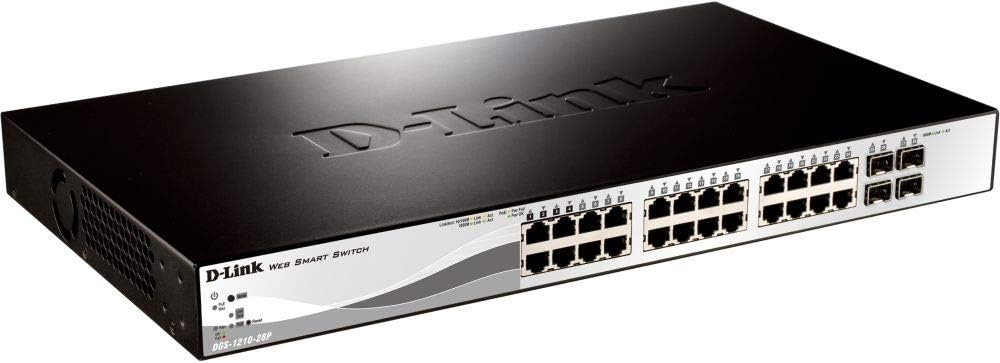
그림 4.1: 전면 패널 View
This image displays the front panel of the DGS-1210-28P switch, showing 24 RJ-45 Gigabit Ethernet ports, each with LED indicators for link/activity and PoE status. To the right, there are 4 SFP (Small Form-Factor Pluggable) slots for fiber optic transceivers. The D-Link logo and model number are visible on the left side of the panel.

그림 4.2 : 후면 패널 View
This image shows the rear panel of the DGS-1210-28P switch. The primary feature visible is the AC power input connector on the right side, labeled "AC LINE" with voltage and current specifications (100-240VAC, 50/60Hz, 0.5 A MAX). The D-Link brand name is embossed on the top surface of the switch casing.
4.1 전면 패널 표시등
- 전원 LED: 스위치의 전원 상태를 나타냅니다.
- 시스템 LED: 시스템 상태를 나타냅니다.
- 링크/동작 LED(포트당): Green for Gigabit link/activity, Amber for 10/100 Mbps link/activity.
- PoE 상태 LED(PoE 포트당): PoE 전원 공급 상태를 나타냅니다.
4.2 후면 패널 커넥터
- AC 전원 입력: 제공된 전원 코드에 연결합니다.
5. 설정
5.1 데스크탑 설치
- 포함된 고무발을 스위치 바닥에 부착합니다.
- Place the switch on a flat, stable surface with adequate ventilation.
5.2 랙 설치
- Attach the two rack-mounting brackets to the side grooves of the switch using the provided screws.
- 스위치를 적절한 랙 나사(별도 구매)를 사용하여 표준 19인치 장비 랙에 고정하십시오.
5.3 스위치 연결
- Connect your network devices (computers, servers, access points, IP cameras) to the RJ-45 ports on the front panel using standard Ethernet cables.
- 광섬유 연결의 경우, 호환되는 SFP 트랜시버를 SFP 슬롯에 삽입하고 광섬유 케이블을 연결하십시오.
- Connect the power cord to the AC power input on the rear panel of the switch and then to a suitable power outlet.
- 전면 패널의 전원 LED가 켜지는지 확인하십시오.
6. 스위치 작동
6.1 초기 접근 Web기반 관리
The DGS-1210-28P is a Web Smart switch, meaning it can be configured and managed via a web 브라우저.
- 컴퓨터가 스위치의 이더넷 포트 중 하나에 연결되어 있는지 확인하세요.
- By default, the switch has a pre-configured IP address (e.g., 192.168.0.1). Refer to the Quick Installation Guide or product documentation for the exact default IP address.
- Configure your computer's IP address to be in the same subnet as the switch (e.g., if the switch is 192.168.0.1, set your computer to 192.168.0.10 with subnet mask 255.255.255.0).
- 열기 web browser (e.g., Chrome, Firefox, Edge) and enter the switch's default IP address in the address bar.
- You will be prompted for a username and password. The default credentials are typically "admin" for both username and password. Refer to the documentation for specific defaults.
- Upon successful login, you will access the switch's web management interface, where you can configure various network settings, VLANs, QoS, PoE settings, and more.
중요한: For security reasons, it is highly recommended to change the default password immediately after initial login.
6.2 PoE(Power over Ethernet) 기능
The DGS-1210-28P supports PoE, allowing it to deliver power to compatible devices (e.g., IP phones, wireless access points, IP cameras) over the Ethernet cable. This eliminates the need for separate power outlets for these devices.
- Connect PoE-compatible devices to any of the 24 Gigabit Ethernet ports.
- The switch will automatically detect and provide power to compliant devices.
- Monitor PoE status via the port LEDs or the web 관리 인터페이스.
- The total power budget for the switch is 193 Watts. Ensure the total power consumption of connected PoE devices does not exceed this limit.
7. 유지관리
- 청소: 부드럽고 마른 천으로 스위치 외부를 닦으세요. 액체나 에어로졸 세척제는 사용하지 마세요.
- 펌웨어 업데이트: Periodically check the D-Link support website for firmware updates to ensure optimal performance and security. Follow the instructions provided with the firmware update package.
- 통풍: Ensure that the ventilation openings on the switch are not blocked to prevent overheating.
- 백업 구성: Regularly back up your switch configuration settings through the web management interface to facilitate quick recovery in case of a reset or failure.
8. 문제 해결
| 문제 | 가능한 원인 | 해결책 |
|---|---|---|
| 전원 LED 표시 없음 | 전원 코드가 연결되지 않았거나 전원 콘센트에 문제가 있습니다. | Verify power cord connection to the switch and power outlet. Test the outlet with another device. |
| No Link/Act LED on a connected port | Faulty cable, incorrect cable type, or device not powered on. | Check the Ethernet cable for damage. Ensure the connected device is powered on and functioning correctly. Try a different port or cable. |
| 접근할 수 없습니다 web 관리 인터페이스 | Incorrect IP address, subnet mismatch, or browser issue. | Verify the switch's IP address and your computer's IP settings. Ensure they are in the same subnet. Clear browser cache or try a different browser. Reset the switch to factory defaults if necessary (refer to documentation for procedure). |
| PoE 장치가 전원을 공급받지 못하고 있습니다. | Device not PoE compliant, cable issue, or power budget exceeded. | Ensure the device is PoE compliant. Check the Ethernet cable. Verify the total PoE power consumption in the web interface and ensure it does not exceed 193 Watts. |
9. 사양
| 모델 | DGS-1210-28P |
| 포트 | 24 x 10/100/1000BASE-T PoE Ports, 4 x Gigabit SFP Ports |
| PoE 표준 | IEEE 802.3af / at |
| 총 PoE 전력 예산 | 193 와트 |
| 스위칭 용량 | 56Gbps |
| 전달 속도 | 41.67메가피에스 |
| MAC 주소 테이블 크기 | 16K 항목 |
| 점보 프레임 | 10,000바이트 |
| 치수(폭 x 깊이 x 높이) | 440 x 210 x 44mm(17.32 x 8.27 x 1.73인치) |
| 무게 | 3.63kg(8파운드) |
| 전원 입력 | 100-240 VAC, 50/60 Hz Internal Universal Power Supply |
| 작동 온도 | 0°C ~ 50°C(32°F ~ 122°F) |
| 보관 온도 | -20°C ~ 70°C (-4°F ~ 158°F) |
| 작동 습도 | 0% ~ 95% 비응축 |
10. 보증 및 지원
D-Link provides a limited warranty for this product. For detailed warranty information, please refer to the warranty card included with your product or visit the official D-Link web대지.
For technical support, product documentation, and firmware updates, please visit the D-Link support portal:
You can also find additional resources and community forums on the D-Link web대지.