
1. 서론
This user manual provides essential information for the proper setup, operation, maintenance, and troubleshooting of your Ozone OES-BAS-22 Electronic Safe-Core. Please read this manual thoroughly before using the safe to ensure optimal performance and security. This electronic safe is designed to provide secure storage for your valuables.
2. 제품 오버view
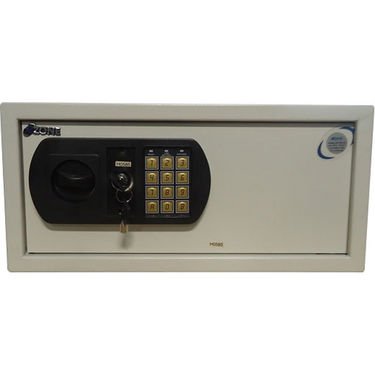
This image displays the front panel of the Ozone OES-BAS-22 Electronic Safe-Core, highlighting the electronic keypad, key override lock, and the overall compact design. The keypad allows for digital code entry, while the key provides an alternative access method.
3. 설정
3.1. 배터리 설치
- 금고 문 안쪽에 있는 배터리함을 찾으세요.
- 배터리 덮개를 엽니다.
- Insert the required number of batteries (usually AA or AAA, refer to the compartment label) ensuring correct polarity (+/-).
- 배터리 덮개를 단단히 닫으세요.
3.2. 초기 코드 설정
- With the safe door open, locate the reset button (often a small red or green button) on the inside of the door or near the battery compartment.
- Press the reset button. You should hear a beep or see an indicator light.
- On the keypad, enter your desired new code (typically 3-8 digits).
- Confirm the code by pressing the 'E' or '#' button.
- 금고를 닫기 전에 문을 열어둔 상태에서 새 비밀번호가 제대로 작동하는지 테스트하십시오.
4. 사용 설명서
4.1. Opening the Safe with Electronic Code
- 키패드에 개인 코드를 입력하세요.
- Press the 'E' or '#' button.
- Within 5 seconds of a successful code entry, turn the handle clockwise (or counter-clockwise, depending on model) to open the door.
4.2. Opening the Safe with Override Key
- 키패드 패널의 작은 덮개 뒤에 숨겨져 있는 키 구멍을 찾으십시오.
- Insert the override key and turn it.
- 열쇠를 돌린 상태에서 손잡이를 돌려 금고 문을 여세요.
4.3. 금고 닫기 및 잠금
- 금고 문을 단단히 닫으세요.
- Turn the handle counter-clockwise (or clockwise) until the bolts are fully extended and the door is securely locked.
4.4. Changing Your Personal Code
- 금고 문이 열린 상태에서 리셋 버튼을 누르세요.
- Enter your new desired code (3-8 digits) on the keypad.
- Press the 'E' or '#' button to confirm.
- Verify the new code by entering it with the door open before closing.
5. 유지관리
- 배터리 교체: Replace batteries annually or when the low battery indicator (if present) illuminates. Always use new, high-quality batteries of the specified type.
- 청소: 금고 외부를 부드러운 천으로 닦으세요.amp 천을 사용하십시오. 마감재나 키패드를 손상시킬 수 있는 연마성 세척제나 용제는 사용하지 마십시오.
- 키 저장소: Store override keys in a secure location away from the safe itself. Do not store them inside the safe.
- 메커니즘 점검: Periodically check the locking bolts and door hinges for smooth operation. Do not lubricate the electronic lock mechanism.
6. 문제 해결
| 문제 | 해결책 |
|---|---|
| 금고는 코드로 열리지 않습니다. | Ensure batteries are fresh and correctly installed. Re-enter code carefully. Try the override key. |
| 키패드가 작동하지 않습니다. | Check battery power. Replace batteries if necessary. Ensure no foreign objects are obstructing buttons. |
| 예상치 못하게 경보가 울립니다. | This safe features a visual alarm. Ensure the safe is not being tampered with. If persistent, contact customer support. |
| 문이 제대로 닫히거나 잠기지 않습니다. | Check for any obstructions inside the safe or around the door frame. Ensure the handle is fully turned to engage bolts. |
7. 사양
| 특징 | 세부 사항 |
|---|---|
| 상표 | 오존 |
| 모델 | OES-BAS-22 |
| 잠금 유형 | 전자 |
| 특징 | 가지고 다닐 수 있는 |
| 품목 무게 | 12.2kg(26.9파운드) |
| 경보 | 시각적 |
| 방수 레벨 | 방수가 되지 않음 |
| 한국어: | 783942612165 |
| 패키지 크기 | 42.9 x 38 x 20cm |