
1. 서론
This manual provides comprehensive instructions for the Supereyes Y002 7mm 200X Waterproof Handheld Digital Microscope. This device utilizes optoelectronic technology to inspect hard-to-reach areas, offering a magnification range of 1X to 200X. Its compact design and waterproof capabilities make it suitable for various inspection tasks.
주요 특징은 다음과 같습니다.
- Unique IP67 waterproof rating.
- Powered via USB 2.0.
- 2 Megapixel CMOS sensor for clear imaging.
- Automatic white balance and brightness adjustment.
- Continuous zoom capability (combined optical and digital).
- Snapshot and video recording functions.
- Compact 7mm camera diameter and durable aluminum alloy body.
2. 안전 정보
기기를 사용하기 전에 모든 안전 지침을 읽고 이해해 주십시오.
- 방수 기능: The device is IP67 waterproof, allowing for use in wet environments and underwater. It can be rinsed with water or wiped with damp clothes for cleaning. Ensure the USB connection port is dry before connecting to a computer.
- 온도: The LED light may generate heat during prolonged use. Avoid direct contact with sensitive skin for extended periods.
- 전원: Use only standard USB 2.0 ports for power. Do not attempt to power the device with non-standard or damaged power sources.
- 손질: 기기를 조심스럽게 다루십시오. 떨어뜨리거나 강한 충격을 주지 마십시오.
3. 패키지 내용
패키지에 모든 품목이 들어 있는지 확인하세요.
- Supereyes Y002 USB Microscope (x1)
- Software CD (x1)
- Ruler for calibration (x1)
Note: If your computer lacks a CD-ROM drive, please visit the official Supereyes website to download the necessary software.
4. 제품 오버view
Familiarize yourself with the components of your Supereyes Y002 microscope:

이미지 4.1: Structure Diagram of the Supereyes Y002 Digital Microscope. This image illustrates the main components including the focus knob, LED light waterproof camera, tripod attachment point, light adjustable button, camera button, and optional 60-degree and 45-degree side mirrors.
- 초점 손잡이: 선명한 이미지를 얻기 위해 초점을 조절하는 데 사용됩니다.
- LED Light Waterproof Camera: The main camera unit with integrated LED illumination.
- 삼각대: A small stand for stable positioning (may be an optional accessory or included depending on package).
- Light Adjustable Button: LED 조명의 밝기를 조절합니다.
- 카메라 버튼: Triggers snapshot capture or video recording.
- Side Mirrors (60° and 45°): Optional attachments for viewing at an angle.
5. 설정
5.1 소프트웨어 설치
Windows 사용자의 경우:
- 제공된 소프트웨어 CD를 컴퓨터의 CD-ROM 드라이브에 넣으십시오.
- Follow the on-screen instructions to install the Supereyes software.
- For full compatibility with Windows 8 (32/64 bit) and newer operating systems, it is recommended to download the latest Supereyes V3.5 software from the official Supereyes web대지.
For Mac OS Users:
- No specific driver or additional software is required.
- Simply connect the device, and use built-in applications like Photo Booth or FaceTime to access the microscope's camera feed.
Linux 사용자의 경우:
- The device is compatible with Linux. Specific software or drivers may vary depending on your distribution.
5.2 장치 연결
- Ensure the software is installed (for Windows) or your Mac/Linux system is ready to recognize a USB camera.
- Connect the USB cable of the Supereyes Y002 microscope to an available USB 2.0 port on your computer.
- The system should automatically detect the device.
6. 사용 설명서
6.1 기본 작업
- Launch the Supereyes software (Windows) or Photo Booth/FaceTime (Mac).
- Position the microscope over the object you wish to inspect.
- 조정하다 초점 노브 on the microscope body until the image on your screen is clear.
- 사용하세요 Light Adjustable Button on the cable to control the brightness of the LED illumination for optimal view주고받음.
6.2 확대
The Supereyes Y002 offers a continuous magnification range from 1X to 200X. This is achieved through a combination of optical and digital zoom. The 200X magnification is calculated based on a 21-inch display.
6.3 이미지 및 비디오 캡처
- 스냅 사진: 를 누르세요 카메라 버튼 on the cable to take a still image. Alternatively, use the snapshot function within the software. Photo format is JPEG. Photo Capture Resolution: 640 x 480, 320 x 240.
- 비디오 녹화: Use the software's video recording function. Video format is WMV for Windows systems and AVI for Mac OS. Video Capture Resolution: 320 x 240. Maximum display speed is 30 frames per second (f/s).
6.4 Software Functions (Windows Only)
The Supereyes software provides advanced functionalities:
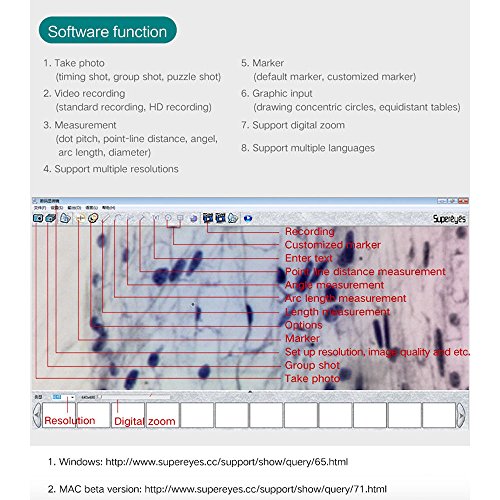
이미지 6.1: Screenshot of the Supereyes software interface, showing various functions such as recording, customized markers, measurement tools (point-line distance, angle, arc length, length), options, resolution settings, and digital zoom.
- 사진 찍기: Includes timing shot, group shot, and puzzle shot options.
- 비디오 녹화: Standard and HD recording capabilities.
- 측정: Perform measurements such as dot pitch, point-line distance, angle, arc length, and diameter. This function is exclusive to Windows systems.
- Support Multiple Resolutions: Adjust the display and capture resolution.
- 채점자: Utilize default or customized markers on the image.
- Graphic Input: Tools for drawing concentric circles, equidistant tables, etc.
- Support Digital Zoom: Further magnify the image digitally.
- 여러 언어 지원 : Change the software interface language.
6.5 일반적인 애플리케이션
The Y002 microscope is versatile and can be used for inspecting various areas:

이미지 6.2: Examples of actual photos taken by the Y002 endoscope, demonstrating its capability to capture detailed images of an ear canal, oral cavity, and skin surface.
- Ear Inspection: The 7mm diameter allows for inspection of ear canals.
- Oral Inspection: Suitable for examining the inner mouth, tongue, and teeth.
- Skin Observation: Useful for observing various skin conditions.
- 산업 검사: Ideal for quality control, PCB inspection, and examining hard-to-reach areas in machinery.
7. 유지관리
적절한 유지관리는 기기의 수명과 최적의 성능을 보장합니다.
- 청소: Due to its waterproof design, the camera head can be rinsed under water or wiped with a damp cloth. Ensure the lens is clean and free of debris for clear images. Do not use harsh chemicals or abrasive materials.
- 저장: Store the microscope in a dry, cool place away from direct sunlight and extreme temperatures.
- 케이블 관리: Avoid bending or kinking the USB cable excessively, as this can damage internal wires.
8. 문제 해결
- 화면에 이미지가 없습니다:
- USB 케이블이 현미경과 컴퓨터에 제대로 연결되어 있는지 확인하십시오.
- Verify that the correct software or application (e.g., Photo Booth) is open and selected the microscope as the input device.
- Restart the software or computer.
- 불분명한 이미지:
- 조정하다 초점 노브 on the microscope body.
- 렌즈에 먼지나 얼룩이 없는지 확인하십시오.
- Adjust the LED light brightness using the Light Adjustable Button.
- Software Compatibility Issues (Windows):
- If experiencing issues with the provided CD software, download the latest Supereyes V3.5 software from the official Supereyes website for improved compatibility with Windows 8/10.
- Measurement Function Not Working (Mac/Linux):
- The measurement function is only available on Windows operating systems with the Supereyes software.
9. 사양
| 특징 | 사양 |
|---|---|
| 모델명 | Y002 |
| 배율 최대 | 200X |
| 광원 유형 | 주도의 |
| 방수 등급 | IP67 |
| 카메라 직경 | 7mm (XNUMXmm) |
| 제품 치수 | 6.89인치 길이 x 0.28인치 너비 x 6.89인치 높이 |
| 재료 | 알루미늄 합금 |
| 권tage | 5 Volts (USB Powered) |
| 사진 캡처 해상도 | 640 x 480, 320 x 240 |
| 비디오 캡처 해상도 | 320 x 240 |
| Maximum Display Speed | 30 F / S의 |
| 운영 체제 호환성 | Windows 10/8/7/Vista/XP SP2/2000 (32/64 bit), Mac OS X 10.5 or above, Linux |
10. 보증 및 지원
This product is manufactured by Supereyes. For specific warranty information, technical support, or to download the latest software and drivers, please visit the official Supereyes web고객 서비스 연락처 정보는 일반적으로 제조업체 웹사이트에서 찾을 수 있습니다. web사이트 또는 제품 포장.