
1. 제품 오버view
The HP ProDisplay P17A is a 17-inch LED-backlit LCD monitor designed for general computing tasks. It features a 5:4 aspect ratio with a maximum resolution of 1280 x 1024 pixels, providing clear and consistent visuals. This monitor is equipped with both VGA and HDMI connectivity options, offering versatility for various system configurations. Its compact design and energy-efficient LED backlighting make it suitable for a range of environments.

그림 1: 전면 view of the HP ProDisplay P17A monitor, showcasin디스플레이와 스탠드를 갖추고 있습니다.
2. 설정 지침
2.1 모니터 풀기
모든 구성품을 포장에서 조심스럽게 꺼내세요. 다음 품목이 모두 있는지 확인하세요.
- HP ProDisplay P17A Monitor
- Monitor Stand (base and neck)
- 전원 케이블
- VGA 케이블 (지역/패키지에 따라 다를 수 있음)
- HDMI 케이블(지역/패키지에 따라 다를 수 있음)
2.2 스탠드 조립
- 긁힘을 방지하려면 모니터를 부드럽고 깨끗한 표면에 뒤집어서 놓으세요.
- Attach the stand neck to the back of the monitor, aligning the tabs and pushing until it clicks into place.
- Attach the stand base to the bottom of the stand neck, securing it with the captive screw if present.
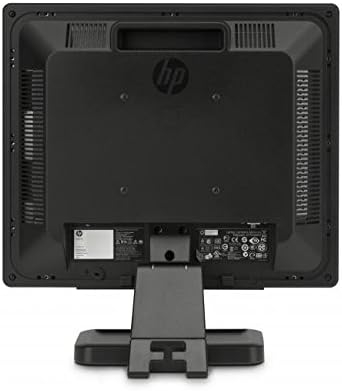
그림 2: 후면 view of the monitor, illustrating the stand attachment point and various connectivity ports.
2.3 연결 케이블
- 전원 연결: 전원 케이블을 모니터의 전원 입력 단자에 연결한 다음 접지된 전기 콘센트에 연결합니다.
- 비디오 연결:
- For VGA: Connect one end of the VGA cable to the VGA port on the monitor and the other end to the VGA port on your computer. Tighten the screws on the VGA connector.
- For HDMI: Connect one end of the HDMI cable to the HDMI port on the monitor and the other end to the HDMI port on your computer.
- 모든 연결이 안전한지 확인하세요.
3. 사용 설명서
3.1 전원 켜기/끄기
모니터 전면 베젤에 있는 전원 버튼을 눌러 모니터를 켜거나 끕니다. 모니터가 켜지면 전원 표시등이 켜집니다.
3.2 Adjusting Display Settings (OSD Menu)
The On-Screen Display (OSD) menu allows you to adjust various monitor settings. Use the buttons on the front bezel to navigate and select options.
- 메뉴 버튼: OSD 메뉴를 엽니다.
- 탐색 버튼(+ / - or Up/Down): Move through menu options and adjust values.
- 선택/확인 버튼: 선택을 확인하거나 하위 메뉴로 들어갑니다.
- 종료 버튼 : 현재 메뉴나 OSD를 종료합니다.
일반적으로 조정 가능한 설정은 다음과 같습니다.
- 밝기/대비: 전체적인 밝기와 밝은 부분과 어두운 부분의 차이를 조절합니다.
- 색상 제어: Allows adjustment of color temperature, RGB levels, or preset color modes.
- 입력 선택: Manually switches between VGA and HDMI input sources.
- 이미지 제어: Adjusts sharpness, aspect ratio, and auto-adjustment for analog signals.
- 관리: 절전 옵션, OSD 타임아웃, 언어 선택.
4. 유지관리
4.1 모니터 청소
- 청소하기 전에는 항상 모니터를 끄고 전원 코드를 뽑으십시오.
- 부드럽고 보풀이 없는 천을 살짝 사용하십시오. damp물이나 비연마성 화면 세척제로 세척하세요.
- 세척제를 화면이나 모니터에 직접 분사하지 마십시오.asing.
- 벤젠, 신나, 암모니아계 세척제 또는 연마재는 표면을 손상시킬 수 있으므로 사용을 피하십시오.
4.2 일반 관리
- 직사광선이 닿는 곳이나 열원 근처에 모니터를 두지 마십시오.
- 모니터 주변에 적절한 환기가 이루어지도록 하세요.
- 환기구를 막지 마십시오.
- 날카로운 물체나 과도한 압력으로부터 화면을 보호하십시오.
5. 문제 해결
지원팀에 문의하기 전에 다음의 기본 문제 해결 단계를 시도해 보세요.
5.1 화면에 이미지가 없습니다
- 모니터 전원 케이블이 모니터와 작동하는 콘센트에 제대로 연결되어 있는지 확인하십시오.
- Verify the power indicator light on the monitor is on. If not, press the power button.
- Check that the video cable (VGA or HDMI) is securely connected to both the monitor and the computer.
- Ensure the correct input source is selected on the monitor (use the OSD menu to switch inputs).
- 컴퓨터를 다시 시작하세요.
5.2 이미지 품질이 좋지 않음
- 흐릿하거나 뿌옇게 보이는 이미지: 컴퓨터의 디스플레이 해상도가 모니터의 기본 해상도(1280 x 1024)로 설정되어 있는지 확인하십시오.
- 잘못된 색상: Adjust color settings through the OSD menu or your computer's display settings.
- Image Off-Center/Incorrect Size (VGA only): Use the "Auto Adjust" function in the OSD menu.
- 꺼질 것 같은: Check the refresh rate setting on your computer; ensure it is set to 60 Hz.
5.3 Monitor Not Responding to Buttons
- Unplug the monitor's power cable, wait 10 seconds, then plug it back in and try again.
- 단추가 끼어 있지 않은지 확인하세요.
6. 기술 사양
| 특징 | 사양 |
|---|---|
| 상표 | 휴렛팩커드 |
| 모델명 | HP P17A |
| 모델 번호 | F4M97AAABA |
| 화면 크기 | 17 인치 |
| 디스플레이 유형 | LED 백라이트 LCD |
| 네이티브 해상도 | 1280 x 1024(SXGA) |
| 종횡비 | 5시 4분 |
| 대비율 | 1000시 1분 |
| 새로 고침 빈도 | 60Hz |
| 응답 시간 | 5밀리초 |
| View잉 각도 | 170도 |
| 연결성 | 1x VGA, 1x HDMI |
| 전력 소비 | 25와트(최대) |
| 품목 치수(D x W x H) | 8.12인치 깊이 x 14.85인치 너비 x 15.24인치 높이 |
| 품목 무게 | 8.2 파운드 |
| 장착 유형 | 벽걸이형(VESA 호환) |
| 추가 기능 | 눈부심 방지 스크린 |

Figure 3: Dimensions of the HP ProDisplay P17A monitor.
7. 보증 및 지원
7.1 보증 정보
This product is often sold as a refurbished item. Refurbished products typically come with a limited warranty provided by the refurbisher or seller. Please refer to your purchase documentation for specific warranty terms and conditions, including duration and coverage details.
7.2 기술 지원
For technical assistance, troubleshooting beyond this manual, or warranty claims, please contact the vendor or HP customer support. Have your monitor's model number (F4M97AAABA) and serial number ready when contacting support.
You can find additional support resources, drivers, and documentation on the official HP support web대지.


