
마블 816733002217
마블 스파이더맨 핸드 3D 데코 LED 벽등 사용 설명서
모델: 816733002217
소개
The Marvel Spiderman Hand 3D Deco LED Wall Light is designed to provide a unique and engaging lighting solution for any room. This cordless, battery-operated nightlight features energy-efficient LED bulbs and includes a graphic wall sticker to create a dynamic visual effect, making it appear as if Spider-Man has broken through your wall.
This product is officially licensed by 3D Light FX and meets high quality and safety standards, including CPSIA & PTPA approvals.
안전 정보
- 배터리가 올바른 극성(+/-)으로 삽입되었는지 확인하세요.
- 오래된 건전지와 새 건전지, 다른 종류의 건전지를 혼용하지 마세요.
- 장시간 조명을 사용하지 않을 경우에는 배터리를 제거하세요.
- Keep out of reach of small children when installing or replacing batteries.
- 본 제품은 실내에서만 사용하도록 설계되었습니다.
- The LED bulbs are energy-efficient and designed not to get hot to the touch.
상자 안에 무엇이 들어있나요?
패키지를 열면 모든 구성품이 들어 있는지 확인하세요.
- 1 x Marvel Spiderman Hand 3D Deco LED Wall Light unit
- 1 x 3D Crack Decal Sticker
- 장착 나사
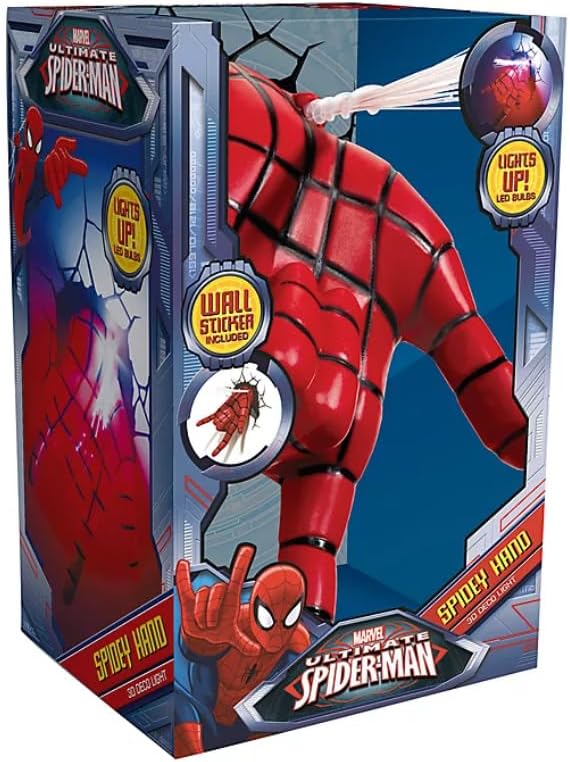
Figure 1: Product packaging showing the light unit and wall sticker.
설정 및 설치
올바른 설치를 위해 다음 단계를 따르세요.
- 배터리 설치: Locate the battery compartment on the back of the light unit. Insert 3 x AAA batteries (not included), ensuring correct polarity. Close the compartment securely.
- Prepare Wall Surface: Choose a clean, dry, and smooth wall surface for installation.
- Apply Crack Decal: Carefully peel the 3D crack decal sticker from its backing. Position it on the wall where you intend to mount the light. The decal serves as a template for screw placement and enhances the visual effect. Smooth out any air bubbles.
- 라이트 장착: Align the mounting holes on the back of the light unit with the designated spots on the crack decal. Use the provided screws to securely attach the light to the wall. Ensure the light is firmly mounted and does not wobble.

Figure 2: Spiderman Hand light mounted on a wall with the crack decal.

그림 3: 또 다른 view of the Spiderman Hand light installed with the crack decal.
작동 지침
The Spiderman Hand 3D Deco LED Wall Light is designed for simple operation:
- 켜기/끄기: Locate the simple switch on the light unit. Toggle the switch to turn the light ON or OFF.
- 자동 차단 : The light features an automatic timer that will turn the unit off after approximately 60 minutes to conserve battery life.

Figure 4: The Spiderman Hand light illuminated, creating a nightlight effect.
유지
- 배터리 교체: When the light dims or stops working, replace all 3 AAA batteries with new ones. Always use fresh batteries of the same type.
- 청소: Wipe the light unit and decal with a soft, dry cloth. Do not use abrasive cleaners or solvents.
- 전구 교체: The LED bulbs are designed for long-lasting use and do not require replacement.
문제 해결
| 문제 | 가능한 원인 | 해결책 |
|---|---|---|
| 조명이 켜지지 않습니다. | 배터리가 소진되었거나 올바르게 설치되지 않았습니다. | 배터리를 새 배터리로 교체하고 극성이 올바른지 확인하세요. |
| 빛이 어둡습니다. | 배터리가 부족합니다. | 배터리를 새것으로 교체하세요. |
| 불이 너무 빨리 꺼져요. | Automatic timer activated. | This is a normal function of the product to conserve battery life. The light will turn off after approximately 60 minutes. |
명세서
| 특징 | 세부 사항 |
|---|---|
| 모델 번호 | 816733002217 |
| 치수(D x W x H) | 4인치 깊이 x 4.5인치 너비 x 7인치 높이 |
| 무게 | 9.9 온스 |
| 재료 | 플라스틱 |
| 광원 유형 | 주도의 |
| 전원 | Battery Powered (3 x AAA batteries, not included) |
| 제어 방법 | Touch / Simple Switch |
| 장착 유형 | 벽걸이형 |
| 특별 기능 | Cordless, Energy-efficient LED, Automatic 60-minute timer, Includes 3D crack decal |
보증 및 지원
This product is manufactured to high quality standards and carries CPSIA & PTPA approvals, ensuring its safety and compliance. For any inquiries or support, please refer to the contact information provided on the product packaging or the official Marvel web대지.
Ask a question about this manual
Ask about setup, troubleshooting, compatibility, parts, safety, or missing instructions. Manuals+ will review the question and use this page’s manual context to help answer it.