
1. 서론
This manual provides essential instructions for the installation, operation, and maintenance of the BFT Elba BU Control Unit, model D113717 00002. This unit is designed for controlling gate automation systems, ensuring reliable and safe operation. Please read this manual carefully before proceeding with any installation or operation. Keep this manual for future reference.
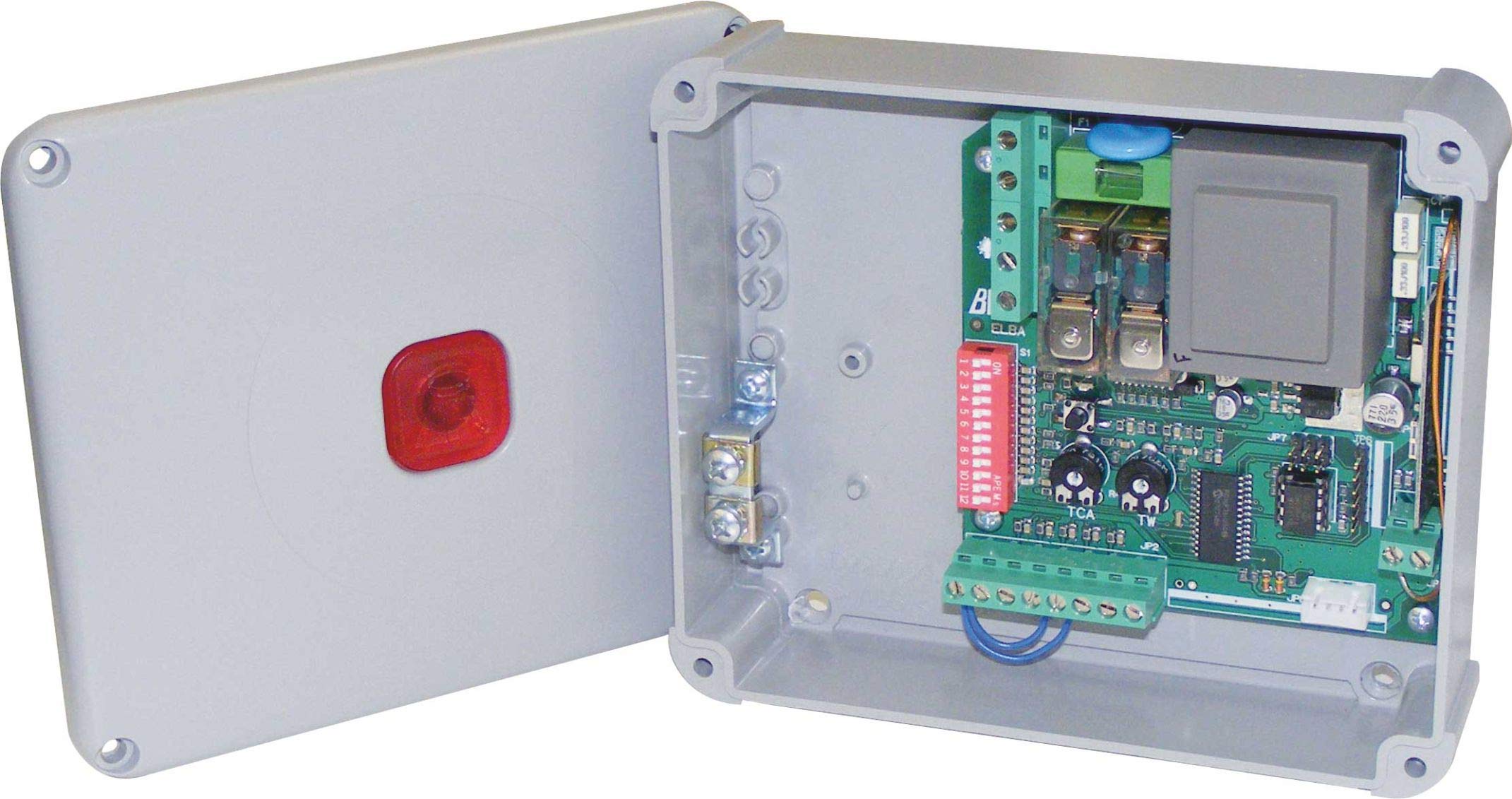
그림 1: BFT Elba BU Control Unit D113717 00002. This image shows the main control board with various terminals and components.
2. 안전 정보
경고: Incorrect installation or improper use can cause serious injury or damage.
- All installation and maintenance work must be performed by qualified personnel only.
- Disconnect power before performing any work on the control unit.
- 모든 전기 연결은 지역 및 국가 전기 규정을 준수해야 합니다.
- 제품을 습기, 비 또는 극한 온도에 노출시키지 마십시오.
- Use only original BFT spare parts and accessories.
- 작동 중에는 어린이와 허가받지 않은 사람이 출입문 자동화 시스템에 접근하지 못하도록 하십시오.
3. 패키지 내용
포장을 풀 때 모든 구성 요소가 들어 있고 손상되지 않았는지 확인하세요.
- BFT Elba BU Control Unit (Model D113717 00002)
- 사용 설명서(본 문서)
- 설치용 하드웨어(나사, 앵커 - 구성품은 다를 수 있음)
- Wiring terminals (pre-installed or separate - may vary)
4. 설정 및 설치
This section outlines the general steps for installing the control unit. Refer to detailed wiring diagrams provided with the product for specific connections.
- 설치: Securely mount the control unit in a protective enclosure, away from direct weather exposure and vibrations. Ensure adequate ventilation.
- 전원 연결: Connect the main power supply (230V AC, 50 Hz) to the designated terminals. Ensure proper grounding.
- 모터 연결: Connect the gate motor(s) to the appropriate output terminals on the control unit.
- 액세서리 연결: Connect safety devices (e.g., photocells, safety edges), command devices (e.g., push buttons, key switches), and other accessories (e.g., flashing lights) to their respective terminals.
- 안테나 연결: If using a radio receiver, connect the antenna to improve signal reception.
- 초기 전원 켜기: After all connections are verified, apply power to the unit. Observe any indicator lights for initial status.
5. 사용 설명서
The BFT Elba BU Control Unit offers various functionalities for gate automation.
- 프로그램 작성: The unit typically features a programming interface (e.g., dip switches, push buttons, or a display) to set operating parameters such as opening/closing times, force, pause times, and safety logic. Refer to the detailed programming guide for your specific gate system.
- 수동 조작: In case of power failure or emergency, the gate can usually be disengaged for manual operation. Consult your gate motor's manual for instructions on manual release.
- 원격 제어: If a radio receiver is connected, remote controls can be programmed to operate the gate. Follow the instructions for pairing remote controls with the receiver.
6. 유지관리
Regular maintenance ensures the longevity and safe operation of your BFT Elba BU Control Unit and the entire gate automation system.
- 연례 검사: Have a qualified technician inspect the control unit and all associated components annually.
- 청결: Keep the control unit enclosure clean and free from dust, insects, and debris.
- 배선 점검: 정기적으로 모든 배선 연결부의 조임 상태와 마모 또는 부식 여부를 점검하십시오.
- 안전 장치 : Regularly test all safety devices (photocells, safety edges) to ensure they are functioning correctly.
- 전원 차단: Always disconnect the main power supply before performing any cleaning or inspection inside the control unit.
7. 문제 해결
기술 지원팀에 문의하기 전에 다음을 다시 확인하세요.view 다음은 흔히 발생하는 문제점과 그에 대한 잠재적인 해결책입니다.
| 문제 | 가능한 원인 | 해결책 |
|---|---|---|
| 문이 명령에 반응하지 않습니다. | No power, remote control battery flat, safety device activated, faulty wiring. | Check power supply, replace remote battery, check safety devices for obstructions, inspect wiring connections. |
| 문은 열리지만 닫히지 않습니다. | Safety device (e.g., photocell) obstructed or misaligned, programming error. | Clear obstruction from safety devices, clean photocell lenses, realign photocells, check programming parameters. |
| Gate operates intermittently. | Loose wiring connection, interference with remote signal, motor issue. | Check all wiring connections, ensure antenna is properly connected, consult a technician for motor diagnosis. |
If the problem persists after attempting these solutions, contact a qualified BFT service technician.
8. 사양
| 특징 | 세부 사항 |
|---|---|
| 모델 번호 | 디113717 00002 |
| 상표 | 비피에이치피(BFT) |
| 입력 Voltage | 230V 교류 |
| 빈도 | 50Hz |
| 제조업체 | B.F.T. SRL |
| 호환 장치 | Gate automation systems (e.g., gate motors, safety sensors) |
9. 보증 및 지원
For detailed warranty information, please refer to the official warranty documentation provided with your product or visit the official BFT web대지.
For technical support, spare parts, or service, please contact your authorized BFT dealer or a qualified service technician. Ensure you have your product model number (D113717 00002) and purchase details available when seeking support.
중요한: Any unauthorized repairs or modifications will void the product warranty.


