
1. 서론
The D-Link DIR-808L Wireless AC600 Dual-Band Cloud Router provides high-speed Wi-Fi connectivity with dual-band technology and Fast Ethernet ports. This device is designed to deliver a reliable networking experience for home use, supporting activities such as HD media streaming, online gaming, and web browsing. It includes security features and mydlink Cloud Services for remote network management.
The DIR-808L is backward compatible with existing Wi-Fi devices (802.11a/b/g/n) for seamless integration into your current network setup.
2. 패키지 내용
패키지에 다음 품목이 포함되어 있는지 확인하십시오.
- Wireless AC600 Dual Band Cloud Router (DIR-808L)
- 전원 어댑터
- 이더넷 케이블
- 빠른 설치 가이드
If any of the above items are missing or damaged, please contact your local D-Link reseller.
3. 최소 시스템 요구 사항
To set up and use the D-Link DIR-808L router, ensure your computer meets the following minimum requirements:
- 운영 체제: Windows® 8, Windows® 7, Windows Vista®, Windows® XP SP3, or Mac OS® X (v10.4 or higher)
- Web 브라우저: Internet Explorer® v6, Mozilla® Firefox®, Google Chrome, or Safari 4 or higher
- 하드웨어: 네트워크 인터페이스 카드(NIC)
For Internet access, you will also need:
- 케이블 또는 DSL 모뎀
- 인터넷 서비스 공급자(ISP) 구독
4. 하드웨어 오버view
Familiarize yourself with the physical components and ports of your DIR-808L router.

그림 4.1: 앞쪽 view of the DIR-808L router with power and internet status indicators.

그림 4.2: Rear panel of the DIR-808L router, detailing port layout.
후면 패널 설명:
- LAN 포트(1-4): Four Fast Ethernet ports for connecting wired devices such as computers, gaming consoles, or network storage.
- 인터넷 포트: 인터넷 접속을 위해 모뎀에 연결합니다.
- 재설정 버튼: Press and hold for 10 seconds to restore the router to factory default settings.
- 전원 입력: 여기에 포함된 전원 어댑터를 연결합니다.
- WPS 버튼: Use for easy, secure wireless connection to WPS-compatible devices.
5. 설정 및 설치
Follow these steps to set up your D-Link DIR-808L router.
5.1 물리적 연결
- 전원 끄기 : 모뎀과 라우터의 전원을 분리합니다(해당되는 경우).
- 모뎀 연결: Connect an Ethernet cable from your modem's Ethernet port to the 인터넷 port on the back of your DIR-808L router.
- 컴퓨터 연결 (선택 사항): For initial setup, connect an Ethernet cable from your computer's Ethernet port to any of the 랜 ports (1-4) on the back of your DIR-808L router. You can also connect wirelessly using the default Wi-Fi name and password found on the device label.
- 모뎀 전원 켜기: Connect the power adapter to your modem and power it on. Wait for the modem's indicator lights to stabilize, indicating an active internet connection.
- 라우터 전원 켜기: 포함된 전원 어댑터를 연결하세요. 전원 입력 on the back of your DIR-808L router and plug it into a power outlet. The power LED on the front of the router should illuminate.
5.2 초기 구성 (Web 브라우저)
After physical connections are made, configure your router using a web 브라우저.
- 열기 web 라우터에 연결된 컴퓨터에서 웹 브라우저(예: Chrome, Firefox, Edge)를 사용하십시오.
- 주소창에 다음을 입력하세요.
http://dlinkrouter.localor192.168.0.1Enter를 누르세요. - The D-Link Setup Wizard should appear. Follow the on-screen instructions to configure your Internet connection, wireless network name (SSID), and password.
- Create a unique password for your router's administration interface for security.
5.3 Quick Router Setup Mobile App
Alternatively, you can use the D-Link Quick Router Setup mobile app for convenient setup from your smartphone or tablet.
- Download the "D-Link QRS Mobile" app from the Apple App Store or Google Play Store.
- Connect your mobile device to the router's default Wi-Fi network (SSID and password are on the router's label).
- Launch the QRS Mobile app and follow the instructions to complete the setup.
6. 운영
This section covers the basic operation of your DIR-808L router.
6.1 Dual-Band Wireless Performance
The DIR-808L operates on two frequency bands: 2.4 GHz and 5 GHz.
- 2.4GHz 대역: 더 넓은 커버리지와 벽 투과율 향상을 제공하여 일반적인 인터넷 사용 및 구형 기기에 적합합니다.
- 5GHz 대역: Offers faster speeds and less interference, ideal for high-bandwidth activities like HD video streaming and online gaming, but with a shorter range.
You can configure separate SSIDs (network names) for each band or use a single SSID for both, allowing the router to intelligently assign devices to the optimal band.
6.2 유선 연결
The four Fast Ethernet LAN ports allow you to connect up to four wired devices directly to the router for stable and fast connections.
6.3 mydlink Cloud Management
mydlink Cloud Services enable you to monitor and manage your network remotely from anywhere using the mydlink Lite app or the mydlink web 문.
- 원격 접속: View connected devices, block unwanted users, and receive notifications.
- 보호자 관리: Manage internet access schedules and block specific web사이트.
To use mydlink services, you will need to register your router with a mydlink account during or after the initial setup process.
6.4 무선 보안
The DIR-808L supports WPA/WPA2 encryption to secure your wireless network. It is recommended to use WPA2-PSK (AES) for the strongest security.
- WPS(Wi-Fi 보호 설정): Provides a simple way to connect WPS-compatible devices to your wireless network by pressing the WPS button on the router and the device.
7. 유지관리
적절한 유지 관리는 라우터의 최적 성능과 수명 연장을 보장합니다.
- 펌웨어 업데이트: Periodically check the D-Link support website for firmware updates. Updating firmware can improve performance, add new features, and fix security vulnerabilities. Instructions for updating firmware are typically provided with the update package.
- 청소: Keep the router in a clean, dust-free environment. Use a soft, dry cloth to clean the exterior. Do not use liquid cleaners or aerosols.
- 놓기: Place the router in a central location, away from obstructions and devices that may cause interference (e.g., cordless phones, microwaves).
8. 문제 해결
This section addresses common issues you might encounter with your DIR-808L router.
8.1 인터넷 연결 없음
- 케이블 확인: 모든 이더넷 케이블이 라우터와 모뎀의 올바른 포트에 제대로 연결되어 있는지 확인하십시오.
- 전원 주기: Power off your modem, then your router. Wait 30 seconds, then power on your modem first. Once the modem is fully online (indicator lights stable), power on your router.
- 모뎀 상태: Verify that your modem has an active internet connection. Check its indicator lights or consult your modem's manual.
- ISP 설정: Confirm your Internet Service Provider (ISP) settings are correctly entered in the router's web 인터페이스.
8.2 Slow Wireless Speed or Poor Range
- 라우터 배치: Position the router in a central location, elevated, and away from large metal objects, concrete walls, and other electronic devices that may cause interference.
- 간섭: Other wireless devices (cordless phones, microwaves, Bluetooth devices) can interfere with Wi-Fi signals. Try changing the wireless channel in the router's settings.
- 듀얼 밴드 사용: Connect devices that require high bandwidth (e.g., streaming devices) to the 5 GHz band, and other devices to the 2.4 GHz band.
- 펌웨어: 라우터의 펌웨어가 최신인지 확인하세요.
8.3 라우터에 접근할 수 없습니다 Web 인터페이스
- IP 주소: 컴퓨터가 IP 주소를 자동으로 받도록(DHCP) 설정되어 있는지 확인하세요.
- 정확한 주소: 주소를 정확하게 입력했는지 다시 한번 확인하세요.
http://dlinkrouter.localor192.168.0.1. - Temporary Disable Firewall/Antivirus: 컴퓨터의 액세스를 차단할 수 있는 방화벽이나 바이러스 백신 소프트웨어를 일시적으로 비활성화하세요.
- 라우터 재설정: If all else fails, perform a factory reset by pressing and holding the Reset button on the back of the router for 10 seconds. 메모: 이렇게 하면 사용자 지정 설정이 모두 삭제됩니다.
9. 기술 사양
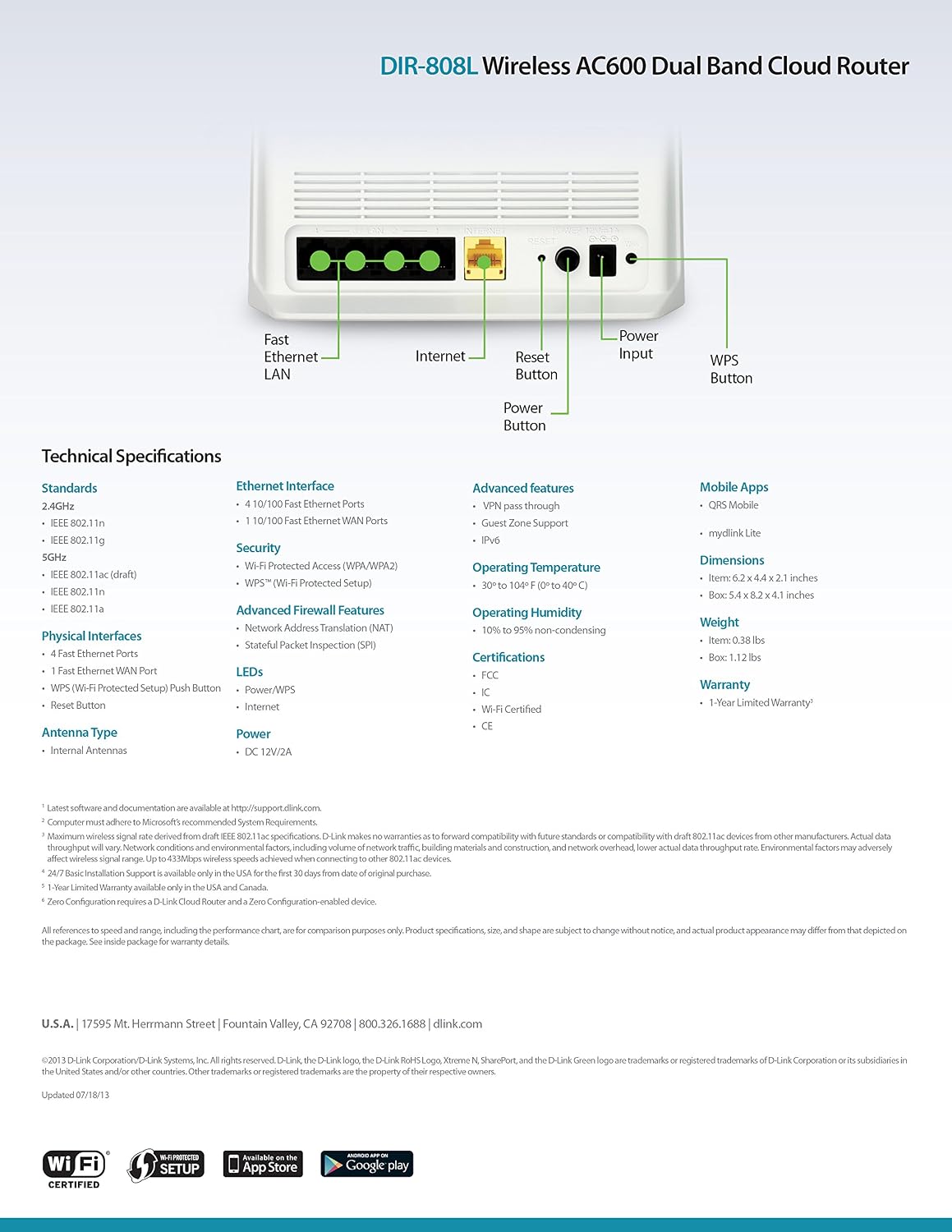
그림 9.1: Technical specifications and rear panel diagram of the DIR-808L router.
| 특징 | 설명 |
|---|---|
| 모델명 | 디알-808L |
| 무선형 | 802.11ac (AC600), 802.11a/b/g/n |
| 주파수 대역 클래스 | 듀얼 밴드(2.4GHz 및 5GHz) |
| 유선 연결 | 4 x Fast Ethernet LAN Ports, 1 x Fast Ethernet WAN Port |
| 보안 | WPA/WPA2, WPS (Wi-Fi Protected Setup) |
| 운영 체제 호환성 | 윈도우, 맥, 안드로이드 |
| 치수(길이x너비x높이) | 2.1 x 6.1 x 4.4 인치 |
| 품목 무게 | 7.2 온스(0.45 파운드) |
| 전원 입력 | 12V DC, 1A |
| 작동 온도 | 0~40°C(32~104°F) |
| 작동 습도 | 10% ~ 95% 비응축 |
| 인증 | FCC, Wi-Fi Certified, CE |
10. 보증 정보
The D-Link DIR-808L Wireless AC600 Dual-Band Cloud Router comes with a 1년 한정 보증 구매일로부터. 이 보증은 정상적인 사용 하에서 재료 및 제조상의 결함을 포함합니다.
For full warranty terms and conditions, please refer to the warranty card included with your product or visit the official D-Link web대지.
Legal Disclaimer: D-Link is not responsible for honoring warranty claims from unauthorized resellers. Please contact the manufacturer directly for official warranty service.
11. 기술 지원
If you encounter problems that are not addressed in this manual, or require further assistance, please contact D-Link Technical Support.
- D-링크 지원 Web대지: 방문하다 support.dlink.com for FAQs, documentation, and firmware downloads.
- Phone Support (U.S.): You may contact D-Link customer support at 1-877-453-5465. Please have your product model number (DIR-808L) and serial number ready when calling.