
1. 서론
This manual provides detailed instructions for the safe and efficient operation of your VOLTCRAFT 8210 Function Generator. The 8210 is a versatile instrument combining a sweep function, function generator, pulse generator, and frequency counter into a single unit. It is designed for professional use, generating various waveforms with precision.
2. 안전 지침
Please read these safety instructions carefully before operating the device to prevent injury and damage. Keep this manual for future reference.
- 항상 접지된 전원 콘센트에 장치를 연결하십시오.
- 물기가 있거나 습기가 있는 곳에서 장치를 작동하지 마십시오.amp 정황.
- 과열을 방지하려면 적절한 환기를 유지하세요.
- 장치를 열지 마십시오.asing; 내부에는 사용자가 수리할 수 있는 부품이 없습니다. 수리는 자격을 갖춘 기술자에게 맡기십시오.
- 제품을 청소하거나 이동하기 전에 전원을 차단하십시오.
- 볼륨을 적용하지 마십시오tages exceeding the specified maximum input ratings.
3. 제품 오버view
The VOLTCRAFT 8210 is a versatile 4-in-1 instrument designed for various electronic testing and development applications. It integrates the functionalities of a sweep function generator, a standard function generator, a pulse generator, and a frequency counter.
주요 특징:
- Four-in-one functionality: Sweep function, function generator, pulse generator, and frequency counter.
- 주파수 범위: Generates signals from 0.1 Hz to 10 MHz.
- 주파수 카운터: Measures frequencies from 2 Hz to 100 MHz.
- 파형 생성: Produces professional-grade rectangular, triangular, and sawtooth signals.
- 산출 Amp고독 : 최고 amplitude of 20 Vpp (10 Vpp into 50 ohms).
제품 이미지:
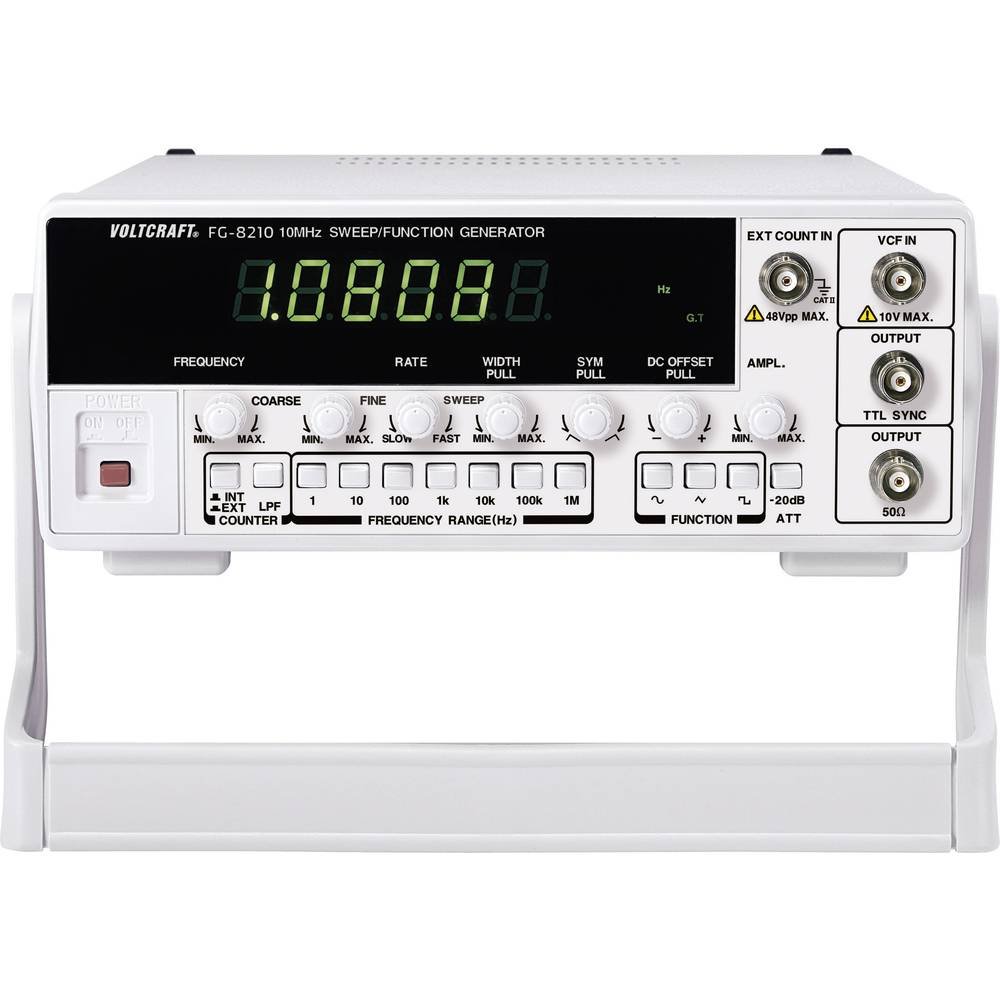


공식 제품 영상:
현재 판매자가 제공하는 공식 제품 영상은 내장할 수 없습니다.
4. 설정
- 짐 풀기: Carefully remove the function generator from its packaging. Inspect the unit for any signs of damage during transit. Retain the packaging for future storage or transport.
- 놓기: Place the unit on a stable, flat surface with adequate ventilation around it. Avoid placing it near heat sources or in direct sunlight.
- 전원 연결: Connect the provided power cord to the power input on the rear panel of the 8210 and then to a suitable grounded AC power outlet. Ensure the power switch is in the OFF position before connecting.
- 초기 전원 켜기: Flip the power switch to the ON position. The display should illuminate, indicating the unit is receiving power.
- 출력 연결 : Connect your test leads or cables to the appropriate output terminals (e.g., BNC connectors for main output, TTL output) on the front panel, depending on your application.
5. 사용 설명서
This section details the basic operation of the VOLTCRAFT 8210 for its primary functions.
5.1. Function Generator Mode
- 파형을 선택하세요: Use the dedicated buttons (e.g., Sine, Square, Triangle) on the front panel to select the desired output waveform.
- 빈도 설정: Adjust the frequency using the frequency control knob and range buttons. The display will show the current frequency.
- 조정하다 Amp고독 : 사용하세요 amplitude knob to set the desired output voltage peak-to-peak (Vpp). Monitor the output with an oscilloscope for precise adjustment.
- DC 오프셋: If available, use the DC offset control to add a DC bias to the output signal.
- 연결 출력: Connect the main output (e.g., BNC) to your circuit or device under test.
5.2. Sweep Function Mode
The sweep function allows the output frequency to vary automatically over a specified range.
- Activate Sweep: Press the "Sweep" button to enable this mode.
- Set Start/Stop Frequencies: Use the frequency controls to define the lower and upper limits of the sweep range.
- Adjust Sweep Rate: Set the sweep duration or rate using the dedicated control.
- 모니터 출력 : Observe the sweeping signal on an oscilloscope to verify the settings.
5.3. Frequency Counter Mode
The built-in frequency counter measures external signals.
- Select Counter Input: Connect the external signal to the designated frequency counter input terminal.
- Activate Counter: Press the "Counter" or "Freq. Meas." button to switch to frequency measurement mode.
- Read Frequency: The display will show the frequency of the input signal.
6. 유지관리
Proper maintenance ensures the longevity and accuracy of your VOLTCRAFT 8210.
- 청소: 부드럽고 마른 천을 사용하여 장치 외부를 청소하십시오. 잘 지워지지 않는 먼지의 경우, 약간amp 순한 세제를 묻힌 천을 사용하여 액체가 기기에 들어가지 않도록 주의하세요. 연마성 세제나 용제는 사용하지 마세요.
- 저장: When not in use for extended periods, store the unit in a dry, dust-free environment, preferably in its original packaging.
- 구경 측정: Periodic calibration by qualified service personnel is recommended to maintain measurement accuracy, especially for critical applications.
7. 문제 해결
If you encounter issues with your VOLTCRAFT 8210, refer to the following common problems and solutions:
| 문제 | 가능한 원인 | 해결책 |
|---|---|---|
| 전원이 꺼져요/디스플레이가 꺼져요 | Power cord disconnected, power switch off, faulty outlet. | Check power cord connection, ensure power switch is ON, test outlet with another device. |
| 출력 신호 없음 | Output cable disconnected, amplitude set to zero, incorrect function selected. | Verify output cable connection, increase amplitude, ensure correct waveform/function is selected. |
| Incorrect frequency reading (counter) | Signal too weak, incorrect input range, noisy signal. | Ensure signal amplitude is sufficient, check input range settings, use shielded cables. |
위 해결 방법을 시도해 본 후에도 문제가 지속되면 고객 지원팀에 문의하십시오.
8. 사양
The following are the technical specifications for the VOLTCRAFT 8210 Function Generator:
- 제조업체: 볼트크래프트
- 모델 번호: 8210
- 품목 무게: 3킬로그램
- Number of items in package: 1
- 배터리 포함: 아니요
- 필요한 배터리: 아니요
- ASIN: B00EPLFP46
- Amazon.fr 최초 판매일: 15년 2014월 XNUMX일
- 예비 부품 가용성: 예비 부품에 대한 정보가 없습니다.
9. 보증 및 지원
Information regarding specific warranty terms and conditions for the VOLTCRAFT 8210 Function Generator is not available in the provided product data. Please refer to the documentation included with your purchase or contact VOLTCRAFT customer support directly for warranty details and technical assistance.
For further support, visit the official VOLTCRAFT web사이트를 방문하거나 공인 서비스 센터에 문의하세요.