
1. 소개 및 이상view
This manual provides essential information for the proper use and care of your Amazon Basics 11.6-inch Laptop Carrying Case. This bag is designed for safely transporting laptops and tablets, making it suitable for both professional and casual environments. It features multiple compartments for organizing essentials and offers versatile carrying options for convenience.

그림 1: 전면 view of the Amazon Basics 11.6-inch Laptop Carrying Case.
2. 제품 특징
- Compact Compatibility: Designed to fit laptops and tablets up to 11.6 inches, providing protection for various devices.
- Amp파일 저장: A high-volume front compartment offers space for power cords, business cards, USB devices, and other essentials. A handy front pocket provides quick access to smaller items like airline tickets or passports.
- Versatile Carrying Options: Features both an adjustable, removable shoulder strap and sturdy grab handles for comfortable and convenient transport.
- 여행 친화적인 디자인: Includes a luggage pass-through on the back panel, allowing for easy attachment to rolling luggage.

Figure 2: Key features of the carrying case.
3. 설정
3.1 어깨끈 부착하기
- Locate the two D-rings on either side of the main compartment zipper.
- Attach the swivel hooks of the adjustable shoulder strap to these D-rings. Ensure both hooks are securely fastened.
- Adjust the strap length using the buckle to achieve a comfortable carrying position, whether over the shoulder or across the body.
3.2 콘텐츠 구성
- Utilize the padded main compartment for your laptop or tablet.
- Store power cords, chargers, and larger accessories in the high-volume front compartment. This compartment also includes smaller pockets for business cards or USB drives.
- The handy front pocket is ideal for quick-access items such as airline tickets, passports, or a smartphone.

Figure 3: Organized front compartment.
4. 사용 설명서
4.1 케이스 운반
- Grab Handles: For short distances or when quick handling is needed, use the sturdy top grab handles.
- 어깨 끈: For hands-free carrying or longer commutes, use the adjustable and padded shoulder strap. Ensure the strap is adjusted to a comfortable length to distribute weight evenly.
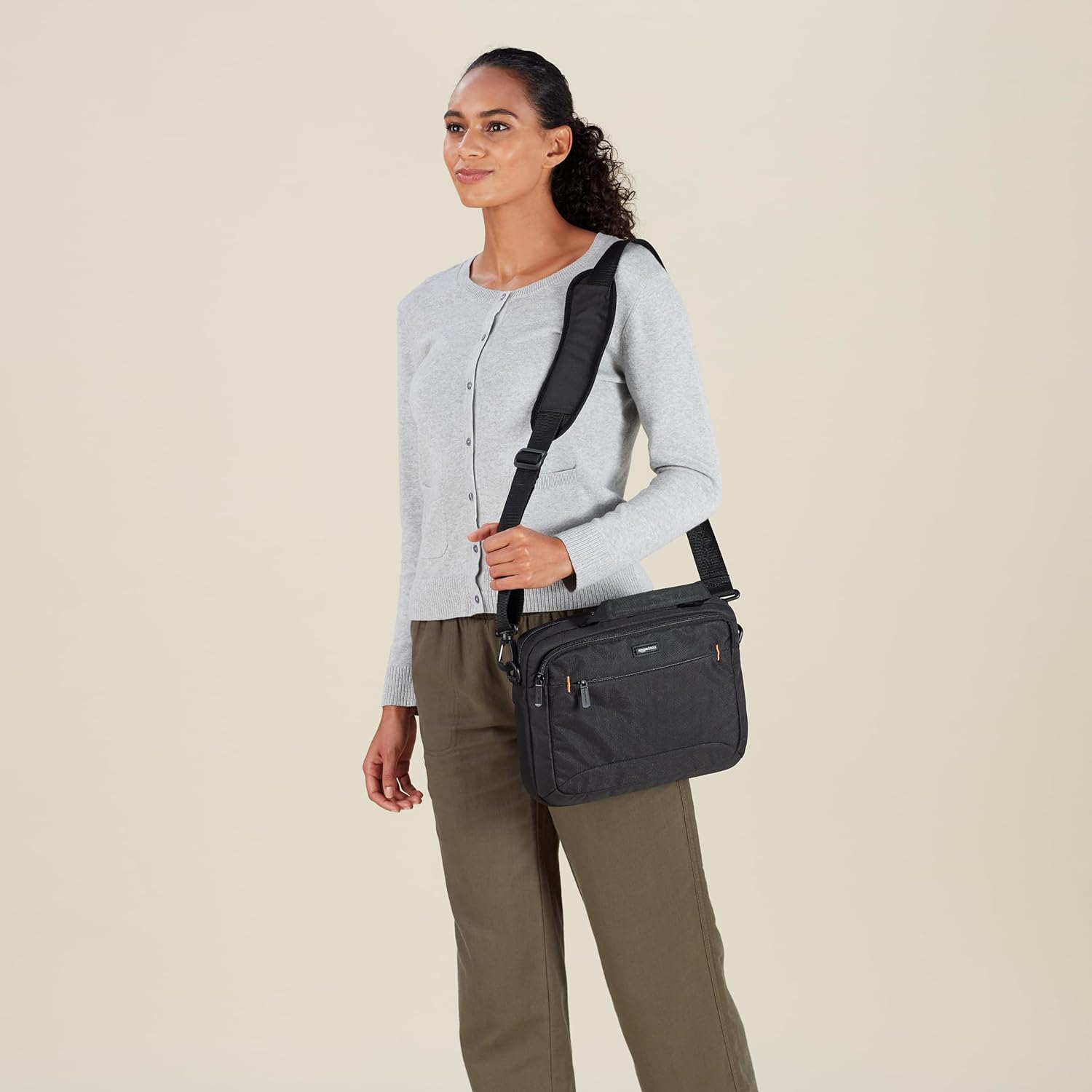
Figure 4: Carrying the case with the shoulder strap.
4.2 Using the Luggage Pass-Through
- On the back panel of the carrying case, locate the wide fabric strap.
- Slide this strap over the extended handle of your rolling luggage. This secures the laptop case to your luggage, allowing for easier transport through airports or busy areas.

Figure 5: Luggage pass-through in use.
5. 유지관리
5.1 청소 지침
- The bag is machine washable. For best results, use a gentle cycle with cold water and a mild detergent.
- 표백제나 독한 화학물질을 사용하지 마세요.
- Air dry the bag completely. Do not tumble dry, as this may damage the fabric or padding.
- For minor spots, wipe with a damp 천과 순한 비누.
6. 문제 해결
6.1 지퍼 문제
- If a zipper becomes stiff, apply a small amount of zipper lubricant or a graphite pencil lead along the teeth.
- Avoid forcing stuck zippers to prevent damage.
6.2 스트랩 조정
- If the shoulder strap slips, ensure the buckle is threaded correctly and tightened securely.
- For optimal comfort, adjust the strap so the bag rests at your hip level.
6.3 오버로딩
- Avoid overloading the bag beyond its intended capacity to prevent strain on zippers, seams, and straps.
- Distribute weight evenly across compartments to maintain balance and comfort.
7. 사양
| 특징 | 세부 사항 |
|---|---|
| 스탠딩 스크린 디스플레이 크기 | 29.5센티미터(11.6인치) |
| 상표 | 아마존 기본 정보 |
| 시리즈 | 가방 |
| 품목 모델 번호 | NC1305222R1 |
| 품목 무게 | 12.3 온스 |
| 제품 치수 | 13.19 x 10.24 x 2.95 인치 |
| 색상 | 검은색 |
| 제조업체 | 아마존 |
| ASIN | B00DUGZFA6 |
| 첫 번째 이용 가능 날짜 | 1년 2013월 XNUMX일 |
8. 보증 및 지원
보증 정보 및 고객 지원에 대해서는 아마존 베이직스 공식 웹사이트를 참조하십시오. website or contact Amazon customer service directly. Details regarding product returns, exchanges, and troubleshooting assistance can be found through these channels.

