
1. 서론
This manual provides comprehensive instructions for the installation, configuration, operation, and maintenance of your D-Link DGS-1210-08P Smart Switch. The DGS-1210 series represents the third generation of D-Link Web Smart Switches, designed to integrate advanced security and management functions for optimal application performance and modularity. Its innovative fanless design ensures silent operation and extended durability, making the DGS-1210 an efficient and cost-effective solution for small and medium-sized businesses (SMBs).
2. 제품 오버view
2.1 주요 특징
- Features 8 Power over Ethernet (PoE) ports.
- These PoE ports provide up to 15.4 W per port.
- Offers the flexibility to connect 802.3af compatible devices, such as network cameras and IP phones.
- Includes 2 Gigabit SFP ports for fiber optic connections.
- Web-managed interface for advanced configuration.
2.2 패키지 내용
- D-Link DGS-1210-08P Smart Switch Unit
- 전원 어댑터
- 랙마운트 키트(해당되는 경우)
2.3 제품 Views
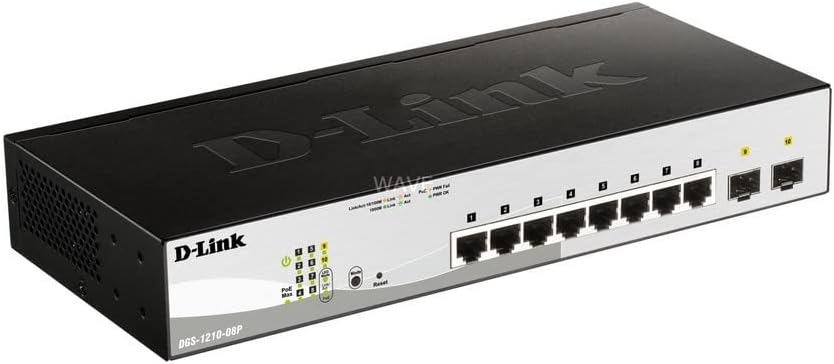
그림 1: 각도 view of the D-Link DGS-1210-08P Smart Switch, showcasin컴팩트한 디자인과 포트 배치가 특징입니다.

그림 2: 전면 view of the D-Link DGS-1210-08P Smart Switch, highlighting the 8 Gigabit Ethernet ports and 2 SFP ports, along with LED indicators.

그림 3: 후면 view of the D-Link DGS-1210-08P Smart Switch, showing the power input and grounding screw.

Figure 4: D-Link DGS-1210-08P Smart Switch with key dimensions indicated: 28 cm length, 12.6 cm width, and 4.4 cm height.
3. 설정
3.1 물리적 설치
- 놓기: Position the switch on a flat, stable surface or mount it in a standard 19-inch equipment rack using the provided rackmount kit. Ensure adequate ventilation around the unit.
- 환경: 스위치를 직사광선이 비치는 곳, 열원 근처, 습도가 높거나 먼지가 많은 곳에 두지 마십시오.
3.2 전원 연결
- Connect the power adapter to the power input port on the rear panel of the switch.
- 전원 어댑터의 다른 쪽 끝을 적절한 전원 콘센트에 꽂습니다.
- 전면 패널의 전원 LED가 켜지는지 확인하여 스위치에 전원이 공급되고 있는지 확인하십시오.
3.3 네트워크 연결
- Connect your network devices (computers, servers, network cameras, IP phones) to the RJ45 Ethernet ports (1-8) on the front panel using standard Ethernet cables.
- For fiber optic connections, insert SFP transceivers into the SFP ports (9-10) and connect fiber optic cables.
- For PoE-powered devices, connect them to any of the 8 PoE-enabled ports. The switch will automatically detect and provide power to compatible devices.
3.4 초기 구성
The DGS-1210-08P is a managed switch, allowing for advanced configuration via a web-based graphical user interface (GUI). Refer to the detailed D-Link documentation for specific instructions on accessing and configuring the web interface, including default IP addresses and login credentials.
4. 사용 설명서
4.1 PoE(Power over Ethernet) 기능
The switch's 8 PoE ports automatically detect and supply power to IEEE 802.3af compliant devices. This eliminates the need for separate power cables for devices like IP cameras or VoIP phones, simplifying deployment and reducing cable clutter.
4.2 데이터 전송
The Gigabit Ethernet ports support high-speed data transfer up to 1000 Mbps, while the SFP ports provide flexible uplink options. The switch operates automatically to forward data packets between connected devices.
5. 유지관리
5.1 청소
스위치 외부를 부드럽고 마른 천으로 정기적으로 닦아주십시오. 액체 또는 에어로졸 세척제를 사용하지 마십시오. 통풍구에 먼지나 이물질이 끼지 않도록 하십시오.
5.2 펌웨어 업데이트
Periodically check the D-Link support website for firmware updates. Keeping the switch's firmware up-to-date ensures optimal performance, security, and access to new features.
6. 문제 해결
6.1 전원 문제
- If the Power LED is off, ensure the power adapter is securely connected to both the switch and a working power outlet.
- 다른 기기를 사용하여 전원 콘센트가 정상적으로 작동하는지 확인하십시오.
6.2 연결 문제
- Check that Ethernet cables are securely connected to both the switch and the network device.
- Verify that the Link/Act LED for the connected port is illuminated or blinking, indicating a valid connection and activity.
- 연결된 장치가 켜져 있고 올바르게 구성되어 있는지 확인하십시오.
6.3 PoE 관련 문제
- Confirm that the connected device is IEEE 802.3af compliant.
- Check the PoE status LEDs on the switch for any error indications.
- Ensure the total power budget (65W) is not exceeded by all connected PoE devices.
7. 사양
| 제품 치수 | 28L x 12.6W x 4.4Hcm |
| 품목 무게 | 1.23 킬로그램 |
| 권tage | 240볼트 |
| Housing Material Type | 플라스틱 |
| 최대 전력(PoE 예산) | 65와트 |
| 인터페이스 유형 | SFP, RJ45 |
| 데이터 전송 속도 | 초당 2000 메가비트 |
| 정격 전류 | 2 Amp오히려 |
| 제조업체 | D-Link Mediterraneo S.r.l. |
| 상표 | 디링크 |
| 시리즈 | DGS-1210-08P |
| 색상 | 검은색 |
| 품목 모델 번호 | DGS-1210-08P |
| 이더넷 포트 수 | 8 |
| 총 와트tage | 97 와트 |
| 전원 공급 유형 | Type F Connector (EU) |
| 포함된 구성 요소 | 스위치 유닛 |
8. 보증 및 지원
8.1 보증 정보
This product originates from and is shipped within the European Economic Area (EEA). It is an original product from manufacturer-authorized distributors. For specific warranty terms and conditions, please refer to the warranty card included with your product or visit the official D-Link web대지.
8.2 기술 지원
For further assistance, technical support, or to download the latest drivers and firmware, please visit the official D-Link support web대지: www.dlink.com/support.