
소개
The Bogen TAMB2PS Telephone Access Module is designed to serve as an interface between a telephone system and a paging system. This module facilitates dual-purpose voice paging, allowing for seamless communication. It is compatible with various analog telephone port types and supports both station port and trunk port operations. A 24V power supply is included and is essential for all operational modes.
중요한 안전 정보
경고: 본 제품에는 캘리포니아 주에서 암, 선천적 기형 또는 기타 생식 기능 장애를 유발하는 것으로 알려진 화학 물질이 포함되어 있습니다. 취급에 주의하시고 폐기 시에는 해당 지역의 규정을 준수하십시오.
제품 끝view 및 주요 특징
The TAMB2PS module integrates telephone and paging functionalities. Its key features include:
- 600-ohm output: Ensures compatibility with various audio systems.
- Adjustable tone volume: Allows customization of alert tones.
- Background music input with volume control: Enables integration of background music, which can be muted during paging.
- Dual-purpose voice paging: Supports both telephone and paging system integration.
- Analog telephone port compatibility: Works with a full range of analog telephone port types.
- Station port or trunk port operation: 유연한 배포 옵션.
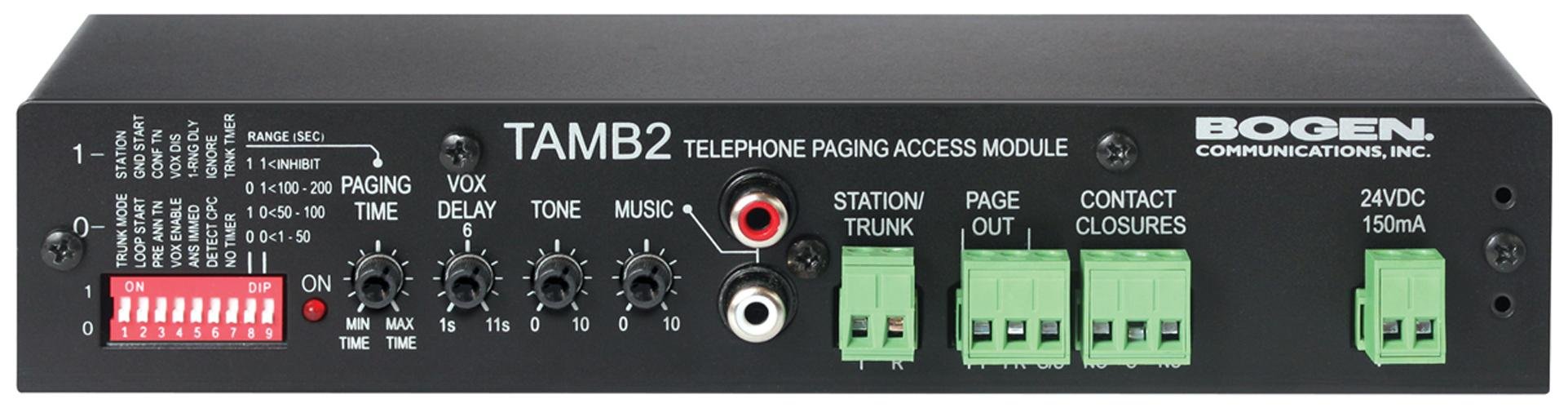
Figure 1: Bogen TAMB2PS Telephone Access Module with included power supply. This image shows the front and side view of the compact black unit, highlighting its various ports and indicators.
설정 및 설치
Follow these steps to properly set up your Bogen TAMB2PS module:
- 모듈 압축 해제: Carefully remove the TAMB2PS module and its 24V power supply from the packaging.
- Connect to Telephone System: Connect the module to your analog telephone system. The TAMB2PS supports both station port and trunk port configurations. Refer to your telephone system's documentation for the appropriate connection method.
- Connect to Paging System: Connect the 600-ohm output of the TAMB2PS to the input of your paging amplifier. Ensure proper impedance matching for optimal audio quality.
- Background Music Input (Optional): If using background music, connect your audio source (e.g., CD player, radio) to the line-level input RCA jacks on the module. Adjust the background music volume control as needed.
- 전원 공급 장치 연결: Plug the included 24V power supply into the designated power input on the TAMB2PS module, then connect the power supply to a standard electrical outlet. The module requires continuous power for operation.
- 초기 테스트: After all connections are made, perform a test page through the telephone system to verify proper functionality and audio output.
작업
Once installed, the Bogen TAMB2PS operates as follows:
- Voice Paging: To initiate a page, access the telephone line connected to the TAMB2PS module. Speak into the telephone handset to broadcast your message through the connected paging system.
- Background Music Muting: When a page is initiated, the TAMB2PS automatically mutes the background music playing through its input, allowing the page to be heard clearly. Music resumes once the page is complete.
- 톤 볼륨 조정: Use the adjustable tone volume control on the module to set the desired level for any alert tones generated by the system.
유지
The Bogen TAMB2PS module requires minimal maintenance to ensure long-term performance:
- 청소: 주기적으로 부드럽고 마른 천으로 제품 외부를 닦아주십시오. 액체 세척제나 용제를 사용하지 마십시오.
- 환경: Ensure the module is installed in a dry, well-ventilated area, away from direct sunlight, extreme temperatures, and excessive dust.
- 케이블 연결: 모든 케이블 연결 부분을 정기적으로 점검하여 안전하고 손상이 없는지 확인하세요.
문제 해결
If you encounter issues with your TAMB2PS module, refer to the following common problems and solutions:
- 오디오 출력 없음:
- Verify the 24V power supply is correctly connected and receiving power.
- Check all audio connections between the TAMB2PS and the paging amp리퍼.
- Ensure the telephone line connected to the module is active and functioning.
- Confirm the paging amplifier is powered on and its volume is adjusted appropriately.
- Low Paging Volume:
- Adjust the output level control on the TAMB2PS module.
- Increase the input sensitivity or volume on your paging amp리퍼.
- Ensure the telephone system's output level to the TAMB2PS is sufficient.
- Humming or Static Noise:
- Check for ground loops. Try connecting the TAMB2PS and paging amplifier to the same power outlet or using a ground loop isolator.
- Ensure all cables are properly shielded and not running parallel to power lines.
- 케이블에 손상이나 느슨한 연결 부분이 있는지 점검하십시오.
- Background Music Not Muting:
- Verify the background music source is connected to the correct input on the TAMB2PS.
- Ensure the telephone system is properly signaling the TAMB2PS when a page is initiated.
If problems persist, contact Bogen customer support or a qualified technician.
기술 사양
| 특징 | 사양 |
|---|---|
| 상표 | 보겐 |
| 모델명 | TAMB2PS |
| 품목 모델 번호 | TAMB2PS |
| 제품 크기(LxWxH) | 8.5 x 3 x 1.75 인치 |
| 품목 무게 | 2파운드 |
| 커넥터 유형 | RCA (for background music input) |
| 최대 볼륨tage | 24 Volts DC (from included power supply) |
| 출력 임피던스 | 600옴 |
| 실내/실외 사용 | 실내 |
| 한국어: | 643749567672, 765368482058 |
| ASIN | B00D61HS2I |
참고 : 사양은 예고없이 변경 될 수 있습니다.
보증 정보
Specific warranty details for the Bogen TAMB2PS Telephone Access Module are typically provided with the product packaging or can be found on the official Bogen Communications website. Please retain your proof of purchase for warranty claims. For the most current and detailed warranty information, please visit the manufacturer's official support page or contact your authorized dealer.
고객 지원
For technical assistance, product inquiries, or further support regarding your Bogen TAMB2PS module, please contact Bogen Communications directly:
- 제조업체 Web대지: Visit the official Bogen Communications web제품 설명서, 자주 묻는 질문(FAQ) 및 연락처 정보를 제공하는 사이트입니다.
- 고객 서비스: Refer to the contact details provided in your product packaging or on the manufacturer's web전화 또는 이메일 지원을 위한 사이트입니다.
When contacting support, please have your product model number (TAMB2PS) and purchase information readily available.