
1. 서론
The VOLTCRAFT DSO-2020 USB is a PC-based digital storage oscilloscope designed for precise signal measurement and analysis. This device connects to your computer via USB, utilizing software to display and process waveforms. It features a 20 MHz bandwidth, two independent channels, and a real-time sampling rate of 48 MSa/s, making it suitable for various electronic testing and development applications. This manual provides essential information for the safe and effective use of your oscilloscope.
2. 안전 정보
기기를 작동하기 전에 모든 안전 지침을 읽고 이해하십시오. 지침을 따르지 않을 경우 부상이나 기기 손상이 발생할 수 있습니다.
- Always connect the oscilloscope to a computer using a certified USB cable.
- Ensure proper grounding of the PC and the measurement setup to prevent electrical shock.
- 최대 입력량을 초과하지 마십시오.tage ratings for each channel (e.g., MAX 45V for CH1/CH2).
- 습기가 많거나 건조한 환경에서 기기를 작동하지 마십시오.amp 정황.
- 장치를 열지 마십시오.asing; 내부에 사용자가 수리할 수 있는 부품이 없습니다.
- Use only probes and accessories specified for this oscilloscope.
3. 제품 오버view
The VOLTCRAFT DSO-2020 USB is a compact unit designed for portability and ease of use with a personal computer. Below are images illustrating the device and its key connection points.
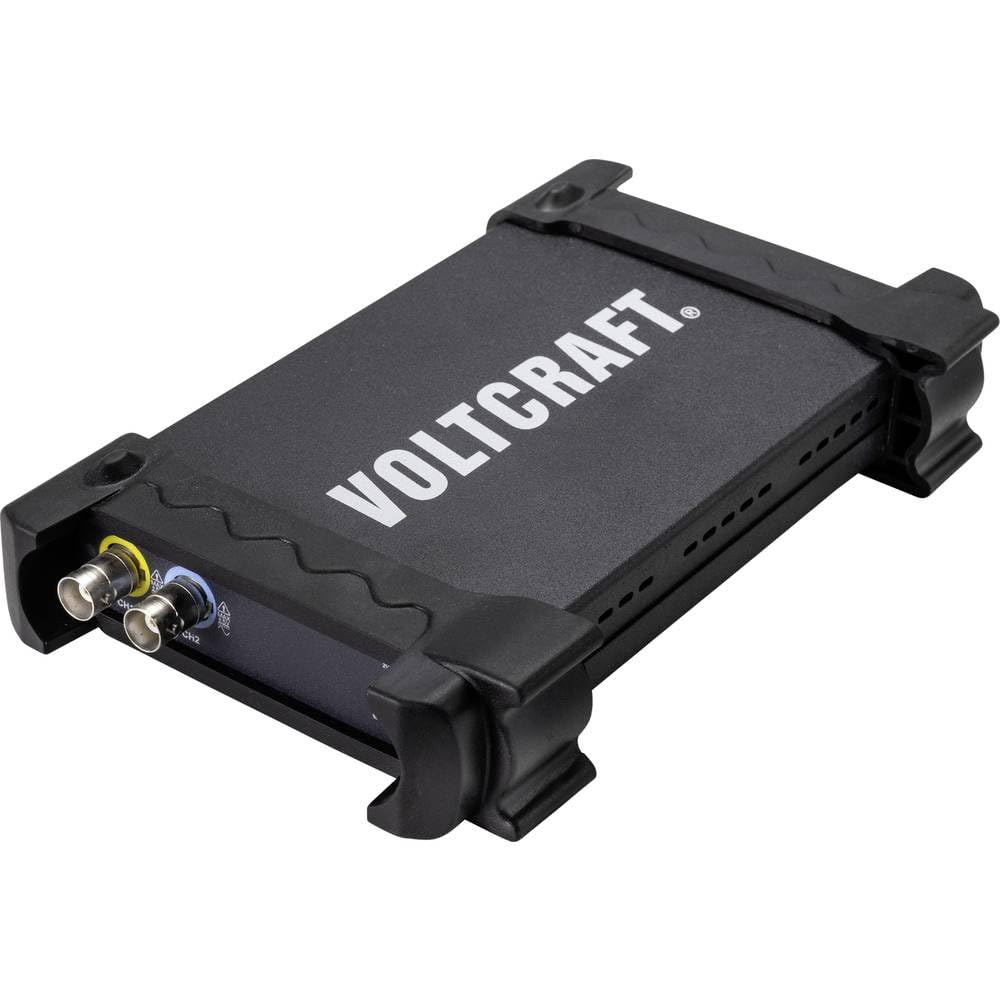
그림 3.1: 전면 view of the VOLTCRAFT DSO-2020 USB PC Oscilloscope, showing its compact design and protective casing.

그림 3.2: 각도 view of the oscilloscope, highlighting the USB-B port for PC connection and the USBXI port.
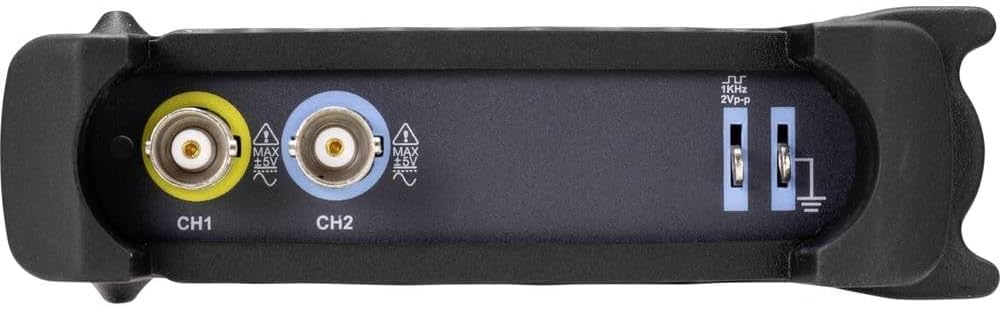
그림 3.3: 후면 view showing the BNC input connectors for Channel 1 (CH1) and Channel 2 (CH2), along with the 1KHz 2Vp-p calibration output and ground terminals.
4. 설정
4.1 소프트웨어 설치
Before connecting the DSO-2020 USB, install the necessary software and drivers on your computer. Refer to the included software CD or the manufacturer's website for the latest version and installation instructions. Typically, this involves running an installer and following on-screen prompts.
4.2 하드웨어 연결
- Connect the USB cable from the DSO-2020 USB device to an available USB port on your computer.
- Once connected, your operating system should detect the device. If drivers were installed correctly, the device should be recognized by the oscilloscope software.
- Connect your oscilloscope probes to the CH1 and/or CH2 BNC input connectors as required for your measurement. Ensure probes are securely attached.
- For accurate measurements, perform probe compensation if using passive probes. Refer to your probe's manual for specific instructions.
5. 사용 설명서
This section outlines the basic steps for operating your VOLTCRAFT DSO-2020 USB oscilloscope.
5.1 소프트웨어 실행
After successful installation and connection, launch the VOLTCRAFT oscilloscope application from your computer's desktop or start menu. The software interface will display a virtual oscilloscope screen, similar to a traditional benchtop unit.
5.2 Basic Signal Acquisition
- 연결 신호: 측정하려는 회로 지점에 프로브를 부착합니다.
- 채널 선택: In the software, enable the desired channel (CH1 or CH2).
- 세로축 눈금(볼트/분할): Adjust the vertical scale to fit the signal amplitude on the screen.
- 수평 스케일(시간/분할): 가로축을 조정하세요 view the signal's period or frequency.
- 트리거 설정: Configure the trigger source, type (edge, pulse), and level to stabilize the waveform. The software provides controls similar to a physical oscilloscope.
- 자동 설정: Utilize the automatic setup function within the software. This feature automatically adjusts the vertical and horizontal settings to display the input signal optimally.
5.3 Data Processing and Export
The DSO-2020 USB allows for advanced data processing and storage:
- 파형 저장: Captured waveforms can be saved directly to your computer for later analysis.
- 측정 기능: The software includes various automatic measurement functions (e.g., Vpp, Vrms, Frequency, Period).
- 데이터 내보내기: Measurement data can be exported to formats such as Excel for further analysis and reporting.
- 랩VIEW 호환성: The device is compatible with LabVIEW, allowing for integration into custom measurement and automation systems.
6. 유지관리
적절한 유지 관리는 오실로스코프의 수명과 정확성을 보장합니다.
- 청소: 부드럽고 마른 천을 사용하여 기기 외부를 닦으세요. 연마성 세제나 용제는 사용하지 마세요.
- 저장: Store the oscilloscope in a dry, dust-free environment when not in use. Avoid extreme temperatures.
- 프로브 관리: 프로브를 조심스럽게 다루십시오. 케이블이 구부러지거나 눌리지 않도록 주의하십시오. 손상되지 않도록 올바르게 보관하십시오.
- 소프트웨어 업데이트: Regularly check the VOLTCRAFT web최적의 성능과 호환성을 보장하기 위한 소프트웨어 및 드라이버 업데이트 사이트입니다.
7. 문제 해결
이 섹션에서는 일반적으로 발생할 수 있는 문제에 대해 설명합니다.
- 인식되지 않는 장치:
- Ensure the USB cable is securely connected to both the oscilloscope and the PC.
- 드라이버가 올바르게 설치되었는지 확인하십시오. 필요한 경우 다시 설치하십시오.
- 컴퓨터의 다른 USB 포트를 사용해 보십시오.
- 신호가 표시되지 않음:
- Check that the probe is properly connected to the input channel and the circuit under test.
- Ensure the correct channel is enabled in the software.
- Adjust the vertical (Volts/Div) and horizontal (Time/Div) scales.
- Check trigger settings; an incorrect trigger level can prevent a stable display.
- Verify the signal source is active and within the oscilloscope's measurement range.
- 불안정한 파형:
- Adjust the trigger level and trigger type (e.g., edge trigger).
- Ensure the trigger source is set to the channel with the signal.
- Check for noise in the measurement environment.
8. 사양
The following table details the technical specifications of the VOLTCRAFT DSO-2020 USB PC Oscilloscope.
| 특징 | 사양 |
|---|---|
| 제조업체 | 볼트크래프트 |
| 모델 번호 | DSO-2020 USB |
| 대역폭 | 20MHz |
| 채널 | 2 |
| Sampling Rate (Real-time) | 48MSa/초 |
| 기억의 깊이 | 1 Mpts |
| 해결 | 8비트 |
| 치수(길이 x 너비 x 높이) | 20.5 x 3.8 x 12.5cm |
| 무게 | 430g |
| 전원 유형 | Hand-operated (USB powered) |
| 특별 기능 | Two independent channels, display similar to standard oscilloscope, automatic setup function, data export to Excel, LabVIEW 호환 가능. |
| 포함된 구성 요소 | 1 unit (oscilloscope) |
| 필요한 배터리 | 아니요 |
9. 보증 및 지원
For warranty information, technical support, or service inquiries, please refer to the documentation provided with your purchase or visit the official VOLTCRAFT website. Contact details for customer support can typically be found on the manufacturer's product page or in the included warranty card.
10. 공식 제품 영상
No official product videos from the seller were found in the provided data for this specific model. Please refer to the manufacturer's website or official channels for any available video resources.